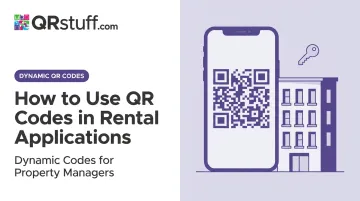
QR codes are one practical bridge between physical marketing materials and digital application systems. But there's a catch: many property managers generate a code, link it to a static PDF or an unoptimised form, and wonder why applicants don't convert. The code isn't the problem — the setup behind it is.
This guide covers the full workflow, from choosing the right form and QR code type to deployment, testing, and ongoing management.
Key Takeaways
- QR codes work best when linked to dynamic, mobile-friendly forms — not static files or PDFs.
- You need a finalised form, a dynamic QR code, and a placement strategy before going live.
- Use separate tracked codes for each placement channel to see which placements drive scans.
- Dynamic codes let you update the linked destination without reprinting — essential as forms evolve.
- Scan analytics show where applicants engage most — cut placements that aren't pulling their weight.
When Should You Use QR Codes in Rental Applications?
QR codes earn their place when they solve a real operational problem — not when they're added as a modern-looking afterthought.
They add genuine value when you're:
- Managing multiple properties simultaneously and need to reduce manual data handling
- Running open inspections with high foot traffic where paper sign-ins slow things down
- Targeting mobile-first renters who expect to start an application from their phone on the spot
- Linking directly to a live application form, inspection check-in, or document portal
They're commonly misused when linked to:
- Static PDFs that can't be submitted digitally
- Generic listing pages with no clear next step
- Forms that require a desktop browser or platform login to access
When the destination works, the technology is no longer the bottleneck. Pew Research data from 2025 shows 91% of U.S. adults own a smartphone. A U.S. Census Bureau usability study found that 100% of participants rated scanning a QR code as "extremely easy", with an average time of just 12.4 seconds to open a digital link.
The technology barrier is gone. The real barrier is the form or destination on the other end — and that's entirely within your control.
What You Need Before Getting Started
Don't generate a QR code until these three things are in place:
1. A mobile-responsive digital rental application form Hosted on Google Forms, Typeform, or a property management platform. Test it on a phone before generating any code — if fields are hard to tap or the form requires sideways scrolling, fix that first.
2. A dynamic QR code generator with scan analytics Static codes are permanently fixed at creation. If your form URL ever changes — because you switch platforms or migrate to a new system — a static code becomes a dead link. Dynamic codes let you update the destination from a dashboard without reprinting anything.
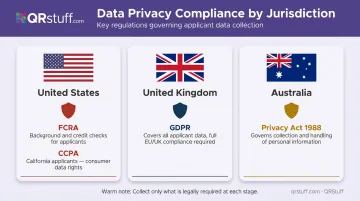
3. A documented data privacy approach Rental applications collect sensitive personal and financial information. Your form platform must comply with applicable regulations:
- US: FCRA compliance for background or credit checks; CCPA obligations for California applicants
- UK: GDPR applies to all applicant data collection
- Australia: Privacy Act 1988 governs how personal information is handled
Collect only what's legally necessary at each stage. A 2026 ruling by the Australian Privacy Commissioner found that rental platform 2Apply had collected excessive data — including gender and student status — and was ordered to stop.
How to Use QR Codes in Rental Applications (Step-by-Step)
The two most common errors: generating the QR code before the form is ready, and deploying without testing on an actual smartphone. Follow this sequence.
Setup and Preparation
Build and finalise your rental application form first. Include all required fields — personal information, income details, rental history, and references — and confirm it loads correctly on a smartphone screen before doing anything else.
Decide upfront how many codes this property needs:
- One for the main application form
- A separate one for document uploads (ID, pay slips, references)
- A separate one for open inspection check-in
Planning this now prevents code sprawl : multiple untracked codes with no clear ownership and no way to measure performance.
Creating Your QR Code
Use a dynamic QR code platform to generate a URL-type code pointing to your hosted application form. QRStuff supports 40+ QR code data types, including URL, file upload, PDF, and SMS types, each suited to different stages of the rental process.
Dynamic codes allow you to swap the destination URL at any time without reprinting materials, and built-in scan tracking shows you exactly where applicants are engaging.
Customise the code before downloading:
- Add your agency logo inside the code
- Apply brand colours to the foreground
- Add a call-to-action frame label such as "Apply Now" or "Start Your Application" — this alone increases scan rates by removing ambiguity about what the code does
QRStuff's platform allows all of this within the code builder, with a live preview before you export.
Deploying and Distributing the Code
Place the QR code across all relevant touchpoints:
| Placement | Code Purpose |
|---|---|
| For-rent signage at the property | Main application form |
| Property listing flyers | Application form + virtual tour |
| Open inspection handouts | Check-in + draft application |
| Email footers and social posts | Application form |
| Agency website listing page | Application form |
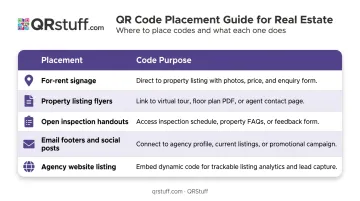
Create a separate tracked code for each channel. This is the only way to know whether your signage or your email campaigns are actually driving completed applications.
Print QR codes at a minimum of 2 × 2 cm and apply the 10:1 rule for scan distance: a code scanned from 3 metres away should be at least 30 cm wide. Test scanning from the intended distance before committing to a print run.
Testing Before Going Live
Test on at least two devices — one iOS, one Android — and two different browsers before placing the code anywhere public.
Check for these common pre-launch failures:
- Broken redirect URL (especially if you copied a form link before it was published)
- Form requires a platform login to access
- Fields auto-fill incorrectly or overlap on small screens
- Submission confirmation message doesn't appear after completing the form
No special app is needed to scan — modern iOS and Android cameras handle this natively. Confirming that the full applicant journey works end-to-end on both platforms before deployment is non-negotiable.
Monitoring and Updating
After deployment, use your QR code platform's analytics dashboard to track performance. QRStuff's dynamic code analytics report:
- Total and unique scans — distinguishes new audience reach from repeat engagement
- Scan time and date — identifies peak engagement windows
- Device type and operating system — iOS vs Android, mobile vs desktop
- Geographic data — country and city level
Review this data by channel placement to identify which locations are generating the most completed applications, and deactivate or relocate codes that aren't performing.
If your form URL ever changes — platform migration, property status update, or form rebuild — update the dynamic code's destination URL from the dashboard. No reprinting required. Property managers running multiple listings can maintain accurate, live application links across all printed materials without touching a single sign.
Key Use Cases Across the Rental Application Process
QR codes aren't limited to the initial application. They can serve five distinct functions across the applicant journey.
Property Listings and Marketing
Use URL or video QR codes on for-rent signs, flyers, and print ads to give prospects instant access to property photos, virtual tours, and the application form. Apartments.com data shows listings with 3D tours generate up to 42% more leads than those without. A QR code on a yard sign connects that physical touchpoint directly to your listing — no manual URL entry required.
Open House and Inspection Check-In
Place a check-in QR code at the property entrance during open inspections. Prospects scan to register their attendance and can immediately access a draft application form — eliminating paper sign-in sheets and creating an automatic applicant record tied to that inspection date.
Application Form Submission
A dedicated QR code linking directly to your digital rental application form handles submissions from any location. Applicants complete personal details, employment information, rental history, and references on mobile, then submit documents digitally. This cuts the transcription errors that come with retyping handwritten forms into your system.
Tenant Communication and Follow-Up
SMS or Business Page QR codes in welcome packets and email footers give applicants a scannable, direct line to the property manager. One scan beats hoping they copied the number down correctly.
Rent Payments and Ongoing Tenancy
Payment QR codes on monthly rent statements direct tenants to the online payment portal. According to Zego's 2024 Rent Payment Trends Report, 84.2% of renters found the ability to pay rent online without a service fee to be a useful technology feature — yet 4 out of 10 rent payments were still made by check or money order. A payment QR code on the statement gives tenants a one-scan path to online payment — no login hunting, no manual URL.

Best Practices for Getting Results
- Label every code with a clear call-to-action. A code that says "Apply Now" outperforms one that says "Scan Here" — clarity of intent drives the tap.
- Use one code per purpose. A single code trying to serve as both inspection check-in and application submission creates confusion. Keep them separate and labelled.
- Verify your platform's compliance credentials. Only use QR code platforms with documented certifications. QRStuff is SOC2 and GDPR compliant, with data stored on European servers — relevant for managers collecting applicant data at volume.
- Audit active codes quarterly. Deactivate codes for properties that are no longer available. Leaving stale codes active damages applicant trust more than having no code at all.
- Consider password-protecting sensitive stages. QRStuff supports password-protected QR codes, which can restrict access to document upload portals so only invited applicants can access document upload portals.
For property management companies running large portfolios, that last point scales quickly. QRStuff's Full Suite and Enterprise tiers support bulk generation of up to 500 tracked codes at once — so you can create individual tracked codes for dozens of properties in a single operation rather than building them one by one.
Frequently Asked Questions
Can I use a QR code to replace the entire paper rental application?
Yes, if the linked form is mobile-optimised, captures all required fields, and supports document uploads. A QR code linking to a static PDF does not qualify — applicants can't submit a PDF digitally, so it just replicates the paper problem in a different format.
What type of QR code should I use for a rental application form?
Use a dynamic URL QR code. It links directly to your hosted form, can be updated if the URL changes, and includes scan tracking. Static codes are locked at creation with no tracking or editing — not a good fit for an ongoing application process.
How do I protect tenant data collected through a QR code rental application?
The QR code itself stores no personal data — security depends entirely on the form platform used. Choose platforms with encryption, comply with applicable regulations (FCRA, CCPA, or GDPR depending on your jurisdiction), and collect only what's legally required at each stage.
Do tenants need a special app to scan a rental application QR code?
No. iPhones running iOS 11 or later and Android devices running Android 8.0 or later scan QR codes natively through the built-in camera app — no download required.
Can I update the rental application form without reprinting the QR code?
Yes, but only with a dynamic QR code. The linked URL can be changed at any time from your platform dashboard, so the printed code keeps working even after you update or switch your form.
Where should I place QR codes to attract the most rental applications?
The highest-converting placements are for-rent signage at the property, open inspection handouts, and digital channels including email and listing sites. Use separate tracked codes per channel — that data reveals which placements are actually driving completed applications, not just scans.