Introduction
Getting customers to actively engage — not just glance and move on — is one of the harder problems in marketing. Print ads get ignored. Banner ads get blocked. And most promotions ask customers to do something inconvenient before they can participate.
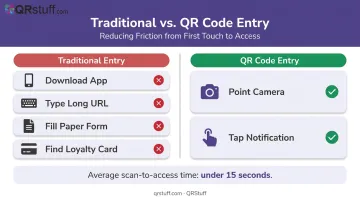
QR code contests flip that dynamic. Point a phone camera at a code, tap the notification, and the customer is already inside the experience. No app download, no URL to manually type, no loyalty card to dig out.
That ease matters at scale. Research from the US Census Bureau found that 89 million US smartphone users scanned a QR code in 2022 — up 26% from 2020 — and in a separate usability study, every one of 20 test participants successfully scanned a QR code in an average of 12.4 seconds with zero reported difficulty. That means your contest entry barrier is effectively zero.
This post covers six creative contest formats, industry-specific applications for retail, restaurants, and events, and a practical five-step launch guide that takes you from idea to live campaign.
Key Takeaways
- QR code contests remove entry friction — customers scan and participate in seconds, no app required.
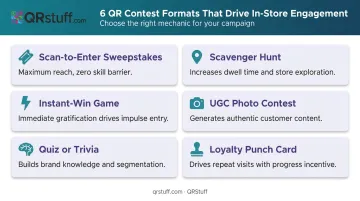
- Six formats covered: sweepstakes, scavenger hunts, instant-win, UGC, quiz, and loyalty punch cards.
- Dynamic QR codes let you swap the destination (entry form → winner announcement) mid-campaign without reprinting.
- Real-time analytics track scan count, location, device type, and peak times — giving you a clear picture of what's working.
- Match the prize to your audience — relevant rewards attract genuine customers, not just bargain hunters.
Why QR Code Contests Are a Customer Experience Win
The Effort Equation
Every extra step in an entry process costs you participants. Long URLs, paper forms, and mandatory app downloads all create friction — and friction kills conversion.
Google and Deloitte's mobile speed research puts numbers on this: a 0.1-second improvement in mobile load time lifts retail conversion by 8.4% and lead-generation form progression by 21.6%. Bounce probability rises 32% when load time goes from one second to three. The same sensitivity applies to perceived entry effort — if scanning feels fast and the landing page loads instantly, participation follows.
QR codes are a near-zero-effort entry point. Research on QR scan behavior consistently shows average scan-to-access times under 15 seconds — fast enough that users rarely abandon before the contest page loads.
Two Benefits, One Campaign
QR code contests deliver on both sides of the value exchange:
- Customers get entertainment, the chance to win, and a sense of being rewarded for engaging.
- Businesses capture first-party data (emails, preferences, purchase behavior), opt-ins, and real-time participation metrics — all without relying on third-party platforms.
Run one campaign, and you're building goodwill and a data asset at the same time.
Brand Presence at the Point of Scan
A plain black-and-white code on generic signage works, but it misses an opportunity. With QRStuff, you can embed your logo directly in the code, apply brand colors, and match the module shapes to your existing design system. When the contest code on a shelf display or event banner looks like it belongs to your brand, the scan moment reinforces recognition instead of interrupting it.
Top QR Code Contest Ideas to Engage Customers
Scan-to-Enter Sweepstakes
The simplest format: place a QR code on packaging, signage, receipts, or displays. Customers scan, land on a short entry form, and a winner is drawn at random.
Why it works: zero skill barrier means maximum participation breadth. It's the right format when the goal is email list growth or broad reach, because anyone can enter in under a minute.
Best placements: product packaging inserts, checkout-area signage, receipts, shopping bags.
QR Code Scavenger Hunts
Scatter multiple QR codes across a store, event venue, or neighborhood. Each scan reveals a clue or unlocks a piece of the prize. Customers who find and scan all codes claim the final reward.
Two things happen at once: dwell time increases (customers stay longer) and store exploration expands (customers visit sections they'd otherwise skip). For multi-location businesses, scavenger hunts can span locations and incentivize repeat visits.
Instant-Win Games
Customers scan and find out immediately whether they've won — via a digital scratch card, a spin-to-win wheel, or a simple reveal page. No waiting for a draw date.
Instant gratification removes the delayed-reward barrier that causes people to skip traditional sweepstakes. This format is especially effective at high-traffic moments like checkout or event registration, where impulse participation rates are naturally higher.
Photo or UGC Contests
A QR code directs customers to a submission form or social media hashtag page where they upload a photo or video — showing product use, a branded theme, or an event moment.
According to Stackla's 2021 research, nearly 8 in 10 people say user-generated content highly influences their purchase decisions. Running a UGC contest through a QR code lowers the submission barrier — one scan takes customers directly to the upload page rather than asking them to search for a hashtag manually.
The bonus: you leave the campaign with a library of real customer content.
Quiz or Trivia Contests
A QR code links to a branded quiz about the product, campaign theme, or industry topic. Customers who answer correctly or score highest win prizes.
This format earns more than entries — it earns attention. Specifically:
- Time-on-page increases as customers work through each question
- Brand knowledge improves with every correct answer
- Quiz responses create natural segmentation (new customers vs. loyal ones)
Tying the prize to the quiz theme matters too. A coffee brand running a coffee-origin quiz that awards an espresso machine feels cohesive — not like a generic giveaway.
Loyalty Punch-Card Contests
QR codes on receipts, loyalty cards, or packaging work like digital punch cards. Scan enough times across multiple visits and customers unlock a contest entry or a guaranteed reward.
Research on the endowed progress effect backs this up. Customers given a 10-stamp card with 2 pre-stamped slots showed 34% completion, versus 19% for a blank 8-stamp card — both requiring the same 8 actions. A visible head start increases follow-through. Pre-load the first scan as a "Welcome" bonus and watch completion rates climb.
QR Code Contest Ideas by Industry
Retail and E-Commerce
| Placement | Contest Format | Goal |
|---|---|---|
| Shelf displays | Instant-win reveal | Drive trial of promoted product |
| Packaging inserts | Scan-to-enter sweepstakes | Post-purchase email capture |
| Receipts | Loyalty punch card | Repeat visit incentive |
| Shopping bags | UGC photo contest | Social proof and organic content |
IKEA, one of QRStuff's documented customers, already uses in-store QR codes to offer guided product tours and room setups — the same infrastructure adapts naturally to a scavenger hunt or instant-win overlay on existing signage.
Restaurants and Hospitality
Table tents and menus are already QR-code territory. Extending them to include a seasonal trivia game about the menu or a "review-to-win" prompt requires minimal additional setup.
For hotels, in-room QR codes linking to a guest satisfaction contest with a prize incentive serve two purposes: they generate genuine feedback and they prompt loyalty program sign-ups, all from a single scan.
Events and Live Experiences
Live events concentrate more willing participants in one place than almost any other channel. Lanyards, seat backs, sponsor screens, and entry signage all become contest touchpoints. Formats that work well here:
- Live audience polls with prize draws for participants
- Bracket challenge contests tied to event content
- Scan-to-enter sweepstakes tied to specific session or booth visits
Scan-to-enter formats work especially well here because the barrier to entry is low — one scan, and they're in.
OOH and Print Campaigns
Embedding a QR code in a print ad, billboard, or direct mail piece turns a one-way impression into a measurable two-way interaction. A campaign-specific sweepstakes attached to a billboard QR code tells you exactly which outdoor placement drove real engagement — something a standard impression count can't do.
This is where QRStuff's UTM parameter support becomes particularly useful. Scan data paired with campaign-tagged URLs flows directly into Google Analytics, so you can compare offline channel performance against the same metrics you use for digital.
How to Launch Your QR Code Contest Step by Step
Step 1: Match Your Goal to a Contest Format
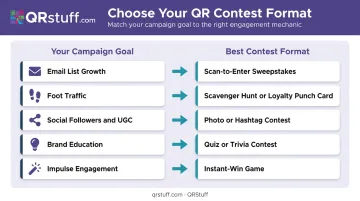
The format should follow the objective, not the other way around.
| Goal | Best Format |
|---|---|
| Email list growth | Scan-to-enter sweepstakes |
| Foot traffic increase | Scavenger hunt or loyalty punch card |
| Social followers / UGC | Photo or hashtag contest |
| Brand education | Quiz or trivia contest |
| Impulse engagement | Instant-win game |
Step 2: Build the Contest Landing Experience
The page customers land on after scanning determines whether that scan converts. A slow or cluttered landing page undoes the frictionless scan experience.
Keep it focused:
- Clear headline stating the prize and how to enter
- Minimal form fields (name and email is often enough)
- Prize details visible without scrolling
- Single, prominent CTA
Aim for a Largest Contentful Paint under 2.5 seconds. Google's Core Web Vitals benchmark for a "good" LCP is 2.5 seconds or less for 75% of page visits. On mobile, every half-second matters.
Step 3: Generate and Customize Your QR Code
QRStuff's dynamic QR codes are the right choice for contest campaigns. The key reason: you can change the destination URL at any point — switching from the entry form to a winner announcement page without reprinting a single piece of signage or packaging.
Dynamic codes are available from the Lite Suite plan (50 dynamic codes, no expiration, starting from $8/month). For large-scale contest deployments requiring unique per-unit codes on packaging, the Full Suite supports batch generation of up to 500 codes, and Enterprise offers unlimited bulk generation.
For customization, QRStuff supports:
- Logo or text embedding in the code centre
- Custom module and eye shapes
- Brand-matched colors via exact hex input or the color picker
- Gradient effects for visual depth
- Custom background image uploads
Print at a minimum of 2cm × 2cm for simple URLs, use 300 DPI for raster files, and always preserve the quiet zone border around the code.
Step 4: Place QR Codes Strategically
High-traffic and high-dwell placements outperform everything else. Prioritize:
- Near checkout counters (high dwell, purchase intent is active)
- On product packaging (post-purchase is a high-satisfaction moment)
- Event screens and lanyards
- Welcome emails and social media posts (viewed on a second screen, scannable from a laptop)
For displays on large screens, OAAA's UX research found that codes placed at the middle or bottom of 55-inch screens outperformed top placement. At arm's length, a code between 3 and 3.75 inches across works reliably.
Always include a short prompt next to the code: "Scan to win" or "Scan for your chance to enter" removes ambiguity and improves activation rates.
Step 5: Track, Analyse, and Follow Up
QRStuff's real-time analytics dashboard gives you:
- Total and unique scan counts — differentiating new participants from repeat scanners
- Hourly scan velocity — identifying peak engagement windows
- Geographic data at country and city level
- Device type breakdowns — iOS vs. Android, mobile vs. desktop
- Referring source data for digitally-shared codes
- CSV export for integration with your CRM or business intelligence tools
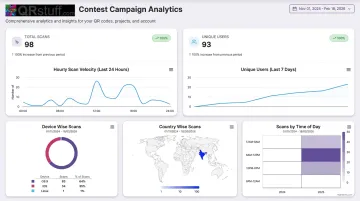
Use those insights to identify your peak windows, top locations, and device mix before the contest even closes — then act on them for future campaigns.
Once the contest closes, follow up quickly. Announce the winner on the same landing page the code pointed to (no reprint needed with dynamic codes). Send a "thank you for entering" email to non-winners with a consolation offer: a discount, a free resource, or early access to the next campaign.
That follow-up email extends engagement beyond the contest period and turns one-time participants into ongoing customers.
Best Practices for QR Code Contest Success
Running a successful QR code contest takes more than a clever prize. These four fundamentals keep your campaign legally sound, technically reliable, and genuinely useful for your brand.
- Nail the legal requirements. In the US, sweepstakes generally require a no-purchase-necessary entry route and clear official rules covering eligibility, prize descriptions, and sponsor details. Post full contest terms on the landing page and run the structure past legal counsel before launch.
- Test on multiple devices before printing. Scan the QR code on both iOS and Android, confirm the landing page renders correctly on mobile, and submit a test entry. A broken form wastes every physical touchpoint the code appears on.
- Match the prize to your audience. A restaurant gift card from a restaurant contest attracts actual customers. A generic cash prize maximizes entry volume but pulls in prize-hunters with no interest in your brand — which matters more than raw entry numbers when you're building first-party data.
- Restrict high-value redemptions. For prize-claim pages or exclusive winner experiences, QRStuff's password protection feature restricts access to authorized participants only, giving you full control over redemption.
Frequently Asked Questions
How does a dynamic QR code work for a contest?
A dynamic QR code encodes a short redirect URL rather than the final destination directly. Because the destination lives in a dashboard — not in the code's visual pattern — you can swap it at any time without reprinting. QRStuff uses this terminology (dynamic, not "live") and requires an active subscription to keep the redirect service running.
How do you scan a QR code to enter a competition?
Most smartphones scan QR codes natively through the built-in camera app — just open the camera, point it at the code, and tap the notification that appears. No separate scanning app is needed on current iOS or Android devices.
Can a QR code be used to claim a prize or process a payment?
QR codes don't transfer money themselves, but they can link to payment platforms like PayPal or digital gift card portals. For prize claims, QRStuff codes can also link to password-protected pages that restrict access to verified winners.
What is a location-based QR code in a scavenger hunt?
A QR code can encode a GPS coordinate or Google Maps link so that scanning it opens a map to a specific physical location. In a scavenger hunt, each code can direct participants to the next clue location, with the final code unlocking the prize.
Can I run a QR code contest on social media?
QR codes can be shared as images in social posts, Stories, or email campaigns. They work best when followers view on a second screen and scan with their phone — so for mobile-first placements like Instagram Stories, pair the QR code with a swipe-up or link-in-bio option to cover both scenarios.
Do I need separate QR codes for each contest placement?
Not necessarily, but separate codes per placement let you see exactly which touchpoint — shelf display, receipt, or email — drives the most scans. QRStuff's campaign tagging and UTM support make it straightforward to attribute scan data by source without managing dozens of separate URLs.