Most brands print a QR code, point it at their homepage, and call it done. No call-to-action, no mobile-optimised destination, no way to measure whether anyone scanned at all. The code becomes decoration — printed on an item that 48.7% of consumers will keep for more than five years, and completely wasted.
This guide covers how to do it right: choosing the right QR code type, designing for real-world scannability, matching your destination to your campaign, and tracking what actually happens after the product ships.
Key Takeaways
- Use dynamic QR codes — they let you update the destination URL and track scans without reprinting
- Match the destination to the product and goalMatch the destination to the product and goal: a fundraiser tote should link to a donation page, not your homepage
- Size and contrast determine scannability — get either wrong and the code fails before anyone reaches your content
- Include a short call-to-action near the code so people know why they should scan
- Track scan volume, location, and device type to measure ROI and improve future campaigns
When Does a QR Code Belong on a Promotional Product?
A QR code earns its place when there's a specific, valuable action for the recipient to take. Without that, it's just visual noise.
Products That Work Well
Items that people handle repeatedly give the code multiple chances to be scanned. Strong candidates include:
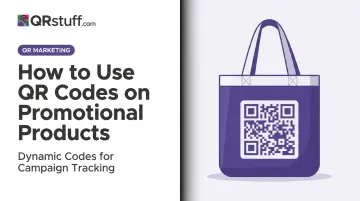
- Tote bags and drinkware — carried regularly, scanned at leisure
- Notebooks and journals get referenced over months, making every reopen another scan opportunity
- Lanyards and badge holders — worn throughout events where scanning is natural
- Apparel — high lifetime impressions; ASI's 2023 data shows T-shirts generate over 5,000 lifetime impressions on average
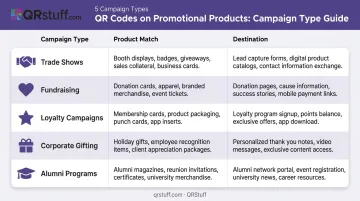
Situations Where QR Codes on Promo Products Deliver
| Campaign Type | Product Match | Destination |
|---|---|---|
| Trade shows | Lanyards, notebooks | Contact card, product demo, event schedule |
| Fundraising | Tote bags, water bottles | Donation page |
| Loyalty campaigns | Post-purchase inserts | Sign-up form, referral page |
| Corporate gifting | Branded mugs, kits | How-to video, onboarding resource |
| Alumni programs | Apparel, drinkware | Annual giving page |
When QR Codes Are Misused
Not every product is a good fit, and poor execution wastes budget fast. Watch out for these common mistakes:
- Placed on items too small to scan clearly — pens, keychains, small patches
- Linking to a non-mobile-optimized page (the only device used to scan is a smartphone)
- Using a static code that can't be updated when the campaign changes
What You Need Before Printing
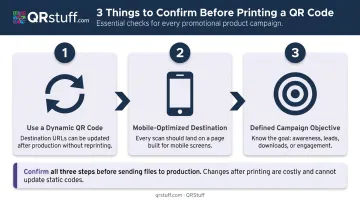
Get these three things locked in before a design file is created. Fixing them after products are printed is expensive and, in most cases, avoidable.
1. A dynamic QR code, not a static one Static codes permanently encode a destination. If the URL changes or breaks, the code is useless and you're reprinting. Dynamic codes use a redirect URL that can be updated at any time. They also enable scan tracking — which is the only way to measure whether the campaign worked.
2. A mobile-optimized destination Every scan happens on a smartphone. If the landing page doesn't render properly on a 6-inch screen, or takes more than a few seconds to load, people leave. Google's mobile speed research found that 53% of mobile visits are abandoned if a page takes longer than 3 seconds to load.
3. A defined campaign objective tied to a specific destination Without a clear goal, you can't write an effective call-to-action or interpret your scan data. A vague brief like "link to the website" gives you nothing to measure. Something like "drive event registrations from conference attendees" does.
How to Add a QR Code to a Promotional Product
Most promotional QR code campaigns fail at the same two points: poor scannability and skipped testing. Follow this sequence to avoid both.
Generate Your QR Code
Use a dedicated platform to generate a dynamic QR code and select the right content type for your objective. QRStuff supports 40+ QR code types including URL, vCard, video, PDF, coupon, event registration, and Google Form — so the destination type can match the campaign precisely rather than defaulting to a generic URL redirect.
Branded color QR codes are fine, but test them before sending to print
Quiet zone:
- Every QR code requires a clear margin of at least 4 modules wide on all four sides
- Cropping or printing over this border causes scanning failures
Test Before Production
Test the final design file on both iOS and Android devices, in different lighting conditions, before approving production. Specifically check:
- Does the code scan cleanly from the expected scanning distance?
- Does the destination load correctly on mobile within 2–3 seconds?
- If using branded colors, does contrast hold up in the actual print color profile?
A failed test at this stage costs nothing — catching it after 2,000 units are printed does.
Add a Call-to-Action
A QR code with no surrounding text rarely gets scanned. People don't scan unexplained squares. A short line placed near the code removes the hesitation:
- "Scan for your exclusive discount"
- "Scan to register for the event"
- "Scan to watch the demo"
The CTA should tell people specifically what they'll get — not just "scan here."
What to Link Your QR Code to
The destination should match both the product context and the campaign objective. A code on a conference lanyard serves a completely different purpose than one on a retail product insert.
High-performing destination types by use case:
- Link retail and consumer campaigns to a specific offer or sign-up form — not the homepage
- Product demos, how-to guides, and brand story videos perform well on corporate gifts and packaging where recipients want to learn more
- Digital business card (vCard) — ideal for conference giveaways or branded notebooks; QRStuff's vCard type saves contact details directly to a smartphone's address book
- Nonprofit items (tote bags, water bottles, lanyards) work best with a donation page or event registration form for immediate conversion; Eventbrite and Google Form QR code types are available natively
- Post-purchase inserts and packaging benefit from a loyalty program sign-up or review request, where the goal is extending the customer relationship
Dynamic codes add a layer of flexibility that static codes can't match: the destination can be swapped after products are already distributed. An alumni program, for example, can update their annual giving page each year without reprinting the mugs.
Design and Printing Requirements
Surface Compatibility
Flat and gently curved surfaces work reliably for QR codes. Highly curved or textured surfaces distort the code pattern and require extra care:
Safe surfaces: tote bags, notebooks, mugs, T-shirts, water bottles, coasters
- Avoid: heavily ridged textures, sharp curves, wrinkled or embossed surfaces
- Test carefully: cylindrical drinkware (print on the flattest possible area), stretch fabrics
Error Correction
QRStuff automatically selects the appropriate error correction level based on data type and design. The four levels defined by ISO/IEC 18004 are:
| Level | Recovery Capacity | Use Case |
|---|---|---|
| L | 7% | Clean, controlled environments |
| M | 15% | General print |
| Q | 25% | Physical products subject to wear |
| H | 30% | High-risk of damage, logo overlay |
For promotional products (drinkware, bags, outdoor event materials), higher error correction means the code still scans even with minor scratches or print imperfections.
Finish and Print Method
Your choice of finish and print method directly affects whether that carefully configured error correction level does its job in the field.
Matte finishes are preferable for scanning reliability — gloss can create glare under certain lighting that interferes with a phone camera
If gloss is required (certain packaging), test extensively before production
Inkjet and digital printing reliably reproduce QR codes at high resolution
Foil stamping and embossing are not recommended for QR codes — the surface variation introduces errors that prevent scanning
Best Practices and Measuring Performance
Practical Rules for Consistent Results
- Assign a unique QR code to each campaign or product batch — this is the only way to attribute scan data correctly across different initiatives. QRStuff's Full Suite supports up to 250 dynamic codes; Enterprise handles up to 1,000
- Review link destinations quarterly for long-lived products like corporate gifts or alumni merchandise — a broken destination on a mug someone keeps for years is a permanent missed opportunity
- Confirm the destination URL is live before products ship, every time
Tracking Performance
Dynamic QR codes expose what promotional products traditionally can't measure. QRStuff's analytics dashboard provides:
- Total and unique scan counts
- Scan date and time (identifying peak engagement periods)
- Device type and operating system (iOS vs. Android)
- Geographic data at country and city level
- CSV and Excel export for deeper analysis
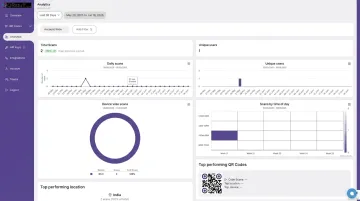
This data identifies which products, events, or distribution channels drove the most engagement — verified by actual scan records.
Applying the Data
Once you have scan data, use it to refine future campaigns rather than just report on past ones:
- High scan rates on specific products or placements signal where to concentrate future promo budgets
- Low scan rates are diagnostic — check whether the CTA was unclear, the product type was wrong, or the destination didn't load correctly on mobile
- Geographic data can reveal where distributed products are actually being used, which is especially useful for field campaigns, direct mail, and regional events
That shift — from gut feel to verified engagement data — is what separates promotional products that earn their budget from those that don't.
Frequently Asked Questions
Can I put a QR code on any promotional product?
Most products with a flat or gently curved printable surface work well — tote bags, mugs, notebooks, T-shirts, and water bottles are reliable choices. Very small items (pens, small keychains) or highly textured surfaces can make scanning unreliable and are best avoided.
What is the difference between a static and dynamic QR code for promotional products?
A static code permanently encodes the destination and cannot be changed after printing. A dynamic code points to a redirect URL that can be updated at any time and also enables scan tracking, making dynamic codes the far more practical choice for promo campaigns where reprinting is expensive.
How large does a QR code need to be on a printed product?
At least 1.5″ × 1.5″ for hand-held items scanned up close, and 2″ or larger for wearables or bags where scanning happens at arm's length. Never scale a QR code smaller than a coin; most phone cameras can't resolve the pattern reliably at that size.
What should my QR code link to?
The destination should match the product and campaign goal. Strong options include dedicated landing pages with specific offers, product demo videos, digital contact cards, or event registration forms. A generic homepage is rarely the right choice.
How do I know if people are actually scanning my QR code?
Dynamic QR codes provide real-time analytics including total scans, unique scans, device type, geographic location, and time of scan. This data is accessible through your QR code platform dashboard on any paid plan.
Can I update the QR code destination after the products are already printed?
Yes, and this is exactly what dynamic QR codes are designed for. The printed code never changes, but the destination URL can be updated at any time through the platform dashboard — no reprinting required.