Introduction
Shipping creates anxiety on both ends. Customers refresh tracking pages obsessively — McKinsey's 2025 e-commerce delivery survey found roughly 50% of consumers actively track orders to confirm on-time delivery. Meanwhile, businesses field a steady stream of "Where is my package?" tickets, each costing $5–$15 in agent time according to Salesforce.
The frustration compounds when multiple carriers are involved, tracking numbers get mistyped, or customers land on a carrier's website with no idea which portal to use.
QR codes on shipping labels solve a real problem, but only when implemented correctly. The gap between a code that works and one that creates new headaches comes down to a handful of decisions: dynamic vs. static, print quality, code size, error correction, and how the destination URL is managed over time. Get any of these wrong, and you've traded one customer complaint for another.
This guide walks through when QR code tracking genuinely makes sense, how to set it up right, and which mistakes to catch before your first label runs.
Key Takeaways
- QR codes on shipping labels replace manual tracking number entry with a single scan that opens a live tracking page.
- Dynamic QR codes are the only type worth using for shipments — they let you update the destination URL without reprinting and capture real-time scan data.
- Setup covers four steps: define the destination URL, generate a unique dynamic code per shipment, print it correctly, then monitor scan analytics.
- Scan reliability comes down to print quality, code size, quiet zone margins, and error correction level — not just the generator you choose.
- QR codes work alongside printed tracking numbers and 1D barcodes — they add a faster scan path without removing existing label data.
Why QR Codes Outperform Traditional Package Tracking
The Data Capacity Gap
Traditional 1D barcodes like GS1-128 carry up to 48 characters — enough for a tracking number and little else. A QR code holds up to 4,296 alphanumeric characters, which is enough to encode a full URL linking to a live tracking page, delivery instructions, customs documents, or a returns portal — all from one printed code.
That gap means a single QR label can do the work of an entire printed insert.
Eliminating the Manual Lookup Problem
Currently, most customers track packages by copying a tracking number into a carrier's website — a process that breaks down when:
- The number is mistyped or partially obscured
- Multiple carriers are involved and the customer doesn't know which website to use
- The package has moved between a regional courier and a national carrier, creating a handoff gap in status updates
A QR code scan bypasses all of this. One tap opens a unified tracking URL that can pull status updates from every carrier involved in the delivery.
Operational Benefits for Warehouse and Delivery Teams
1D barcodes require precise alignment to scan. QR codes read from any angle and at variable distances, which speeds up sorting and reduces scan failures that slow sorting lines.
A case study on warehouse QR labelling published via ResearchGate reported retrieval time reduced by 58% and stock movement error rates dropping from 15% to 4% after implementation — though results will vary by operation size and existing processes.
The Returns Angle
Those efficiency gains matter on the outbound side — but the reverse logistics burden is just as pressing. U.S. retail returns hit $890 billion in 2024, with an average return rate of 16.9% of annual sales. A QR code on the shipping label can redirect to a returns portal post-delivery, cutting the cost of including a prepaid return label in every outbound box.
How to Set Up Package Tracking With QR Codes
Step 1: Define What Your QR Code Should Link To
Every QR code on a shipping label must serve one clear purpose. Common destinations include:
- Live tracking page: links to real-time shipment status and ETA — the most common use case
- Delivery instructions: useful for freight or white-glove deliveries where access details matter
- Customs document repository: for international shipments requiring documentation at clearance
- Returns portal: activated after delivery to streamline reverse logistics
"Improve tracking" is too vague to act on. A working goal sounds like: "Allow recipients to scan and view real-time shipment status and estimated delivery date from any device." That specificity determines the URL you'll link to and what success looks like.
Step 2: Generate a Dynamic QR Code for Each Shipment
A label is printed once, but a shipment's status changes throughout transit. Static codes hard-code a fixed URL — if that URL changes, or you want to redirect to a returns page post-delivery, you'd need to reprint every label.
Dynamic codes use a short redirect URL that can be updated at any time without touching the physical label. That's why they're the only practical option for shipping.
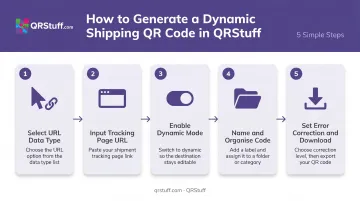
Within QRStuff, the generation workflow runs as follows:
- Log in and select URL as the data type for a tracking page link
- Input your tracking page URL (must include
https://) - Enable the Dynamic option to activate redirect and analytics features
- Name the code and assign it to a project folder for organised management
- Set error correction level and download as SVG or high-resolution PNG for print use
For high-volume operations, QRStuff supports bulk generation of up to 500 dynamic codes on the Full Suite plan, with unlimited batch processing on Enterprise. Businesses integrating with a warehouse management system (WMS) or transportation management system (TMS) can use QRStuff's API to generate a unique dynamic code per shipment programmatically — no manual steps required.
After generation, the destination URL can be updated unlimited times — so the same label works across the full shipment lifecycle.
Step 3: Design and Print the QR Code on the Shipping Label
Design Requirements
- High contrast: black modules on white background
- No decorative frames or complex backgrounds that reduce scan reliability
- Branded QR codes with logos can work — but must be tested on the actual label stock before rollout
- Add a short action prompt like "Scan to track your package" so recipients know what to do
Size Requirements
| Scanning Context | Minimum Size |
|---|---|
| Close-range warehouse scanner | 1.5 cm × 1.5 cm (0.6 in) |
| Customer scanning at arm's length | 2 cm × 2 cm (0.8 in) |
The quiet zone — the white margin surrounding the code — must be at least 4× the X-dimension on every side, per GS1's 2D Barcode Verification guidelines. Skimping on this is a common source of failed reads.
File format: Export as SVG (vector) or high-resolution PNG for print. Never use a low-resolution raster screenshot — pixelation at print scale causes scan failures that won't show up until labels are already printed.
Critical step before mass production: Print a physical test label and scan it with both a smartphone camera and any handheld scanner used in your warehouse. A code that looks fine on screen can fail on glossy label stock under fluorescent lighting.
Placement: Position the QR code in a consistent location — upper-right corner works well — away from fold lines, tape application zones, and label edges that sustain the most handling damage.
Step 4: Monitor Scan Performance and Adjust
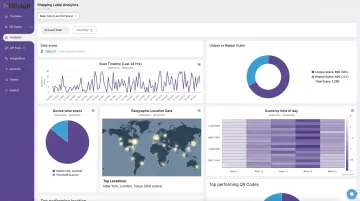
Dynamic QR codes capture every scan as a data event. QRStuff's analytics dashboard records:
- Timestamp: exact date and time of each scan
- Device type: iOS, Android, and desktop breakdowns
- Location: country and city level
- Unique vs. repeat scans: separates new interactions from follow-up checks
This data has direct operational uses. If scans cluster at warehouse intake but disappear mid-transit, that's a carrier handoff gap worth investigating. If customer scans spike in the 48 hours after delivery, adding a returns page redirect at that stage would reduce inbound support contacts.
Scan data can be exported as CSV for integration into a TMS or operations dashboard. Enterprise users can pull analytics programmatically via the API for automated reporting.
Key Factors That Affect QR Code Tracking Performance
Two operations can follow the same setup process and get very different results. These are the variables that explain the gap.
QR Code Type: Dynamic vs. Static
QR code type is the most important decision you'll make here. Static codes lock in a URL at generation — they cannot be updated or tracked after printing. Print a thousand static-coded labels and discover the tracking URL has changed, and you're reprinting everything.
Dynamic codes stay editable indefinitely and capture every scan for analysis. For any shipping operation at scale, static codes are simply the wrong tool.
Print Quality and Label Material
QR codes printed at low resolution, on glossy or textured surfaces, or with faded ink fail to scan — particularly under warehouse fluorescent lighting or outdoors. A single unscannable label creates a manual exception. Across a high-volume operation, poor print quality compounds into systemic tracking gaps and increased support volume.
Minimum print resolution: Use a thermal or laser printer capable of producing clean, sharp module edges. Test on the exact label material before committing to a print run.
QR Code Size and Quiet Zone
A code that's too small, or one surrounded by other label elements right up to its edge, gives scanners no room to isolate the pattern. GS1's 2D Barcode Verification guidelines specify a quiet zone of at least 4× the X-dimension on every side. In practice, leave visible white space around the code — don't let carrier barcodes, addresses, or logos crowd it.
Error Correction Level
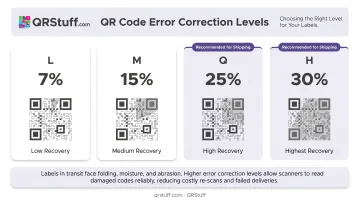
QR codes support four error correction levels:
| Level | Damage Recovery |
|---|---|
| L | ~7% |
| M | ~15% |
| Q | ~25% |
| H | ~30% |
For shipping labels — which get scuffed, wet, partially covered by tape, and generally abused — Level Q or H is appropriate. A label damaged in transit can still scan correctly if the code was generated with sufficient error correction. QRStuff automatically optimizes error correction based on data type and any logo customization applied, so you get reliable scans without manually tuning each setting.
When QR Code Package Tracking Makes the Most Sense
QR code tracking delivers clear value in specific operational contexts — but only when the infrastructure and volume justify the addition.
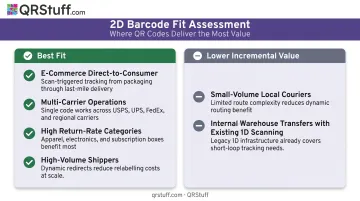
Best fit for:
- E-commerce brands shipping direct-to-consumer — customers expect real-time visibility, and a scannable label reduces "Where is my order?" support tickets
- Multi-carrier operations — a unified tracking URL pulls updates from each carrier into one destination, cutting the handoff confusion that plagues split shipments
- High return-rate categories like apparel and electronics, where reverse logistics costs are a material line item
- High-volume shippers — where manual tracking follow-up is expensive at scale and QR analytics surface operational bottlenecks
Lower incremental value:
- Small-volume local couriers with manual driver handoffs and no digital tracking infrastructure
- Internal warehouse transfers where existing 1D barcode scanning hardware already handles routing perfectly well
If neither scenario fits your operation, the setup overhead won't pay for itself. The sections below focus on the contexts where it does.
Common Mistakes to Avoid When Setting Up QR Code Tracking
Most QR code tracking failures come down to a handful of avoidable setup errors. These are the ones that cause the most damage.
Generating static codes instead of dynamic ones. Businesses print thousands of labels using a free static code, then discover they can't update the destination URL, can't track scans, and have to reprint everything if anything changes. Dynamic codes are a hard requirement — not an upgrade.
Skipping the physical print test. A code that scans cleanly on a monitor can fail on the actual label stock. Test every label template with both a smartphone camera and a handheld warehouse scanner before printing at scale. Finding the problem after thousands of labels ship is far more expensive than a 30-minute test beforehand.
Leaving out a printed fallback. If a label is damaged, a scanner is unavailable, or a recipient doesn't have a smartphone, a package with only a QR code becomes untraceable by conventional methods. Always include the tracking number and key text fields as a backup. QR codes add a layer — they don't replace the foundation.
Inconsistent sizing and placement across label templates. When label design isn't standardized, codes end up too small, too close to label edges, or partially blocked by carrier barcode zones. This creates variable scan reliability across a shipment batch and makes it harder to determine whether a tracking gap is a system problem or a label problem.
Frequently Asked Questions
Can I use QR codes alongside existing barcodes on shipping labels?
Yes, and they serve different functions without conflict. 1D barcodes carry standardised carrier identifiers for internal routing systems, while QR codes add a richer layer linking to web-hosted tracking pages, returns portals, or customs documents. Both can appear on the same label.
What is the difference between static and dynamic QR codes for package tracking?
Static codes encode a fixed URL that cannot be changed or tracked after printing. Dynamic codes use a redirect URL that can be updated at any time and capture real-time scan analytics. Shipping labels are printed once but used across a changing shipment lifecycle, making dynamic codes the only practical option.
What size should a QR code be on a shipping label?
Use at least 1.5 cm × 1.5 cm for close-range warehouse scanning, and 2 cm × 2 cm or larger for customer-facing scanning at arm's length. Maintain a quiet zone margin of at least four modules wide on every side of the code.
How do I know if my shipping QR codes are actually being scanned?
Dynamic QR codes record every scan event including timestamp, device type, and geographic location. QRStuff's analytics dashboard shows scan activity across your label inventory in real time, with CSV export for integration into operations dashboards or TMS platforms.
Do QR codes on shipping labels expire?
Carrier-generated labels often expire within days or weeks if unused. Dynamic QR codes generated through QRStuff remain active for as long as the subscription is current. Codes on paid plans never expire while the account is active, and stay functional for 30 days after a subscription lapses before deactivating.
What information should a package tracking QR code link to?
The code should link to a URL, not embed raw data. That URL can point to a live tracking page, delivery instructions, a customs document, or a returns portal — depending on the intended user (customer, driver, or customs officer) and the stage of the shipment when the code is scanned.