QR code analytics tools fix this. Every scan on a dynamic QR code passes through the platform's server, logging who scanned, where, when, and on what device — turning physical touchpoints into measurable data points.
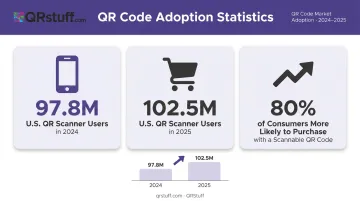
According to EMARKETER, 97.8 million U.S. consumers used smartphone QR scanners in 2024, rising to 102.5 million in 2025. Yet only 12% of marketers connect QR scans to revenue, and 45% say analytics is the QR feature most in need of improvement.
This guide covers what QR code analytics actually tracks, the top five platforms available today, and how to choose the right one for your use case.
Key Takeaways
- Analytics only works with dynamic QR codes — static codes bypass the tracking layer entirely
- Key metrics to look for: total scans, unique scans, location data, and device breakdown — with CSV export for reporting
- Top tools covered: QRStuff, Bitly, Uniqode, QR Tiger, and Scanova — each suited to different use cases and budgets
- Check data retention windows, whether codes stay active after cancellation, and compliance certifications before committing
What Is QR Code Analytics and Why Does It Matter?
QR code analytics is the process of capturing scan-level data each time a dynamic QR code is scanned. The mechanism is a redirect layer: when someone scans the code, the scan hits a short URL hosted by the platform, which logs data — scan time, location, device type — before routing the user to the final destination.
Only dynamic QR codes support this. Static QR codes encode the destination URL directly into the pattern, so scans go straight to the destination with no logging step. As GS1 explains in their redirection guide, the tracking itself lives in the redirect service, not in the QR image.
This matters because QR adoption has gone mainstream. GS1 US research found that nearly 80% of consumers are more likely to purchase products with a scannable QR code. With codes now standard across retail, hospitality, packaging, and marketing campaigns, measuring scan performance is a campaign essential — not an afterthought.
Top QR Code Analytics Tools: Features Compared
These five platforms were selected based on analytics depth, pricing transparency, compliance posture, and suitability across SMB and enterprise deployments.
QRStuff
Operating since 2008, QRStuff serves over 250,000 businesses worldwide — from local restaurants to Fortune 500 brands including Coca-Cola, Walmart, Amazon, and Google. It supports 40+ QR code types and targets businesses that need scalable, secure analytics across multiple industries.
Analytics highlights:
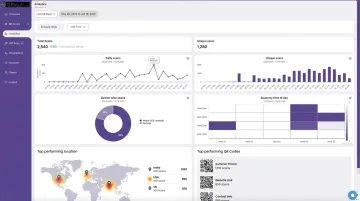
- Real-time dashboard updates with no meaningful data lag
- Geographic tracking at both country and city level
- Device/OS breakdown (iOS vs. Android, mobile vs. desktop)
- Total and unique scan counts with hourly scan velocity tracking
- GPS coordinate capture on Full Suite and Enterprise plans
- CSV export and API access (Enterprise tier)
| Feature | Detail |
|---|---|
| Key Analytics | Real-time scans, device/OS breakdown, city-level location, scan timestamps, unique scan identification, GPS coordinates |
| Compliance | GDPR compliant, SOC2 compliant, password-protected codes, 2FA (Lite+), SSO (Enterprise) |
| Integrations | Slack, Shopify, Google Sheets, Meta Pixel, Google Ads, Workato, Make |
| Pricing | Free $0 · Lite $10/mo · Full $25/mo · Enterprise $250/mo |
| Best For | Enterprises, SMBs, retail, hospitality, healthcare, and marketing teams needing scalable, compliant QR analytics |
Free plan dynamic codes expire after 30 days, and dynamic codes on any plan require an active subscription to stay functional. Canceling a monthly plan gives a 30-day grace window before codes deactivate.
Bitly
Bitly started as a link shortener and extended into QR codes, bringing mature click-attribution infrastructure with it. Its UTM parameter handling is the strongest of the five platforms reviewed — making it a natural fit for marketers running cross-channel campaigns where QR codes need to feed into the same attribution stack as paid ads and email links.
| Feature | Detail |
|---|---|
| Key Analytics | Total scans, scans by day, location, browser, operating system |
| UTM Support | Full UTM builder for destination URLs and QR codes |
| Data Retention | Core 30 days · Growth 120 days · Premium 1 year · Enterprise 2 years |
| Pricing | Free (2 QR/mo) · Core $10/mo · Growth $29/mo · Premium $199/mo · Enterprise custom |
| QR Code Limits | Free 2/mo · Core 5/mo · Growth 10/mo · Premium 200/mo |
| Best For | Digital marketers already using Bitly for link management who want integrated QR and URL analytics in one dashboard |
City-level location and deeper device analytics become available at the Premium/Enterprise tier. The free plan offers very limited QR functionality, and meaningful analytics require a paid subscription.
Beaconstac (Uniqode)
Beaconstac rebranded to Uniqode in January 2024. It targets enterprise QR deployments with the strongest published compliance posture of any platform in this list — GDPR, SOC 2 Type II, HIPAA, and ISO 27001:2022 certifications are all documented on their security pages.
| Feature | Detail |
|---|---|
| Key Analytics | Real-time scans, city-level location, device/OS breakdown, CRM-integrated scan data |
| Compliance | GDPR, SOC 2 Type II, HIPAA, ISO 27001:2022 |
| CRM Integrations | Salesforce (contact export), HubSpot (lead integration) |
| Access Controls | SAML SSO, role-based permissions (Plus/Business+ plans) |
| Pricing | Free (static only) · Dynamic plans from $9/mo · Core at $49/mo · 14-day free trial |
| Best For | Enterprise teams with Salesforce/HubSpot requirements and compliance-heavy industries |
Marketo integration and lifetime data retention were not confirmed in official documentation reviewed — verify both directly on Uniqode's current pricing and integration pages before relying on those features.
QR Tiger
QR Tiger offers a polished platform with multi-language support and a solid mid-range analytics feature set. It's a practical choice for small teams that want recognizable branding, global campaign capability, and real-time scan tracking without enterprise-level pricing.
| Feature | Detail |
|---|---|
| Key Analytics | Real-time scans, total/unique scans, device types, geographic location |
| GPS Tracking | Available on Premium plan ($37/mo annually) |
| Google Analytics | Available on Advanced plan and above |
| Free Plan Limits | 3 dynamic codes, 500 scans per dynamic code |
| Paid Plans | Regular $7/mo · Advanced $16/mo · Premium $37/mo (billed annually) |
| Best For | SMBs and marketing teams wanting accessible analytics pricing with a recognised platform |
Analytics remain active while the subscription is active — QR Tiger does not publish a separate independent data retention window. Verify this before committing if historical data matters to your reporting workflow.
Scanova
Scanova positions itself as an analytics-forward platform, going beyond scan counts to track post-scan behaviour. Its Event Tracking feature records button clicks and downloads on mobile landing pages — useful for measuring what happens after the scan, not just that the scan occurred.
| Feature | Detail |
|---|---|
| Key Analytics | Real-time scans, geographic data (city/country), device/OS, scan timestamps, post-scan event tracking |
| Lead Capture | Built-in lead generation forms; Standard plan includes lead capture with Scanova footer; white-labelled on Pro/Enterprise |
| Export Options | XLS, XLSX, PDF export |
| Integrations | Google Analytics 4, Zapier, Webhooks (Standard plan and above — verify current tier availability) |
| Pricing | Basic $9/mo · Lite $15/mo · Standard $50/mo · Pro $100/mo · Enterprise custom (14-day free trial) |
| Best For | Marketers and campaign managers who need scan analytics, lead generation, and GA4 integration in one platform |
Scanova's Event Tracking records total post-scan clicks, not unique clicks — relevant context if your campaign KPIs rely on distinct user interactions rather than total engagement events.
How to Choose the Right QR Code Analytics Tool
The most common mistake is choosing a platform based on brand recognition, then discovering that the analytics you need are locked behind a more expensive tier, or that your codes stop working if you cancel. Two questions before anything else: what data do you actually need, and what happens to your codes if you leave?
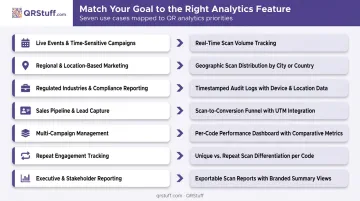
Match Analytics Depth to Your Business Goal
| Business Goal | What to Prioritise |
|---|---|
| Live event campaigns | Real-time tracking with no data lag |
| Regional marketing attribution | City-level geographic data |
| BI tool integration | CSV/API export availability |
| Regulated industries (healthcare, finance) | GDPR, SOC2, HIPAA certifications |
| Sales pipeline from scan data | Native CRM integration (Salesforce, HubSpot) |
| Multi-channel campaign attribution | UTM parameter support |
| Post-scan engagement measurement | Event tracking and lead capture |
Check Data Retention Before You Commit
Retention windows vary widely across platforms:
- Bitly publishes clearly: 30 days (Core), 120 days (Growth), 1 year (Premium), 2 years (Enterprise)
- QRStuff extends retention on paid plans; free codes expire after 30 days
- Scanova Basic caps analytics at 30 days, per its pricing documentation
- QR Tiger and Uniqode tie data availability to active subscription status without publishing explicit windows
A 30-day window works for short campaign bursts. Teams doing quarterly analysis need 60–90 days minimum. Check this limit against how often you pull reports before signing up.
Three Questions to Ask Before Finalizing
- Does the analytics tier you can actually afford deliver the metrics you need?
- Do your codes stay active if you downgrade or cancel — and for how long?
- Does the platform hold the compliance certifications your industry requires?
Conclusion
The right QR code analytics tool is the one whose tracking depth, compliance standards, and integration options match your campaign goals and team size. Bitly fits link-management workflows. Scanova suits lead-focused marketers. Uniqode is the strongest compliance bet. QR Tiger hits a practical mid-range price point. QRStuff covers the broadest range of use cases from SMB to enterprise scale.
Teams running multi-channel campaigns or managing codes at scale will find QRStuff's feature set purpose-built for that workload. Used by brands like Coca-Cola, Walmart, and Google, it covers:
- Real-time scan tracking with GPS and city-level geographic data
- Device and OS breakdowns for audience insight
- GDPR and SOC2 compliance
- Dynamic codes that update destinations without reprinting
Explore QRStuff's plans and pricing to find the tier that fits your team.
Frequently Asked Questions
How do you track analytics from a QR code?
Tracking requires a dynamic QR code, not a static one. When scanned, the code routes through the platform's server, which logs the scan count, location, device type, and timestamp before redirecting the user. The data then appears in the platform's analytics dashboard, typically in real time.
What features do QR code analytics tools typically include?
Most platforms track total and unique scan counts, geographic location, device type, OS, and timestamps. More advanced tools add CSV/API export, post-scan event tracking (button clicks, file downloads), lead capture forms, and Google Analytics integration.
Can static QR codes be tracked with analytics tools?
No. Static QR codes encode the destination URL directly into the pattern, so scans go straight to the destination without passing through any tracking layer. Only dynamic QR codes support analytics, because they route scans through the platform's redirect server before forwarding the user.
What is the difference between total scans and unique scans?
Total scans count every scan event, including repeat scans from the same device. Unique scans count distinct devices. Unique scan data gives a more accurate picture of actual audience reach and prevents campaign results from being inflated by the same person scanning multiple times.
Are QR code analytics tools GDPR compliant?
Compliance varies by platform. Reputable tools limit collection to IP-derived location, device type, and timestamps, but these can qualify as personal data under GDPR when combined with other identifiers. Look for published GDPR and SOC2 certifications, and request a Data Processing Agreement before running any EU-audience campaigns.
What should I look for when comparing QR code analytics tools?
Prioritize these criteria when evaluating platforms:
- Analytics depth — which data dimensions are available at your price tier
- Data retention window — how far back scan history is accessible
- Code continuity — whether codes stay active if you cancel or downgrade
- Export options — CSV download and API access for deeper analysis
- Compliance certifications — GDPR, SOC2, and available Data Processing Agreements
- Integrations — CRM, Google Analytics, and third-party tool support