QR Code Generator
Create customizable QR codes for Google Forms and 40+ other data types, with options for brand colors, logos, custom shapes, and high-resolution downloads in multiple formats.


Create a scannable QR code for any Google Form in minutes with QRStuff. Share surveys, registrations, feedback forms, event signups, and classroom resources without typing long links. Customize your code, download high-resolution files, and use QRStuff’s broader platform when you need dynamic editing, scan analytics, or branded campaign management.
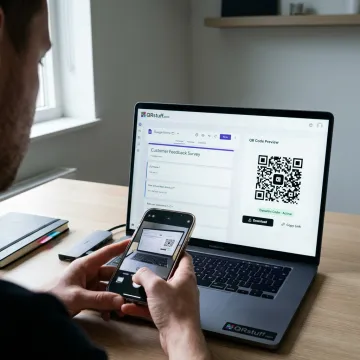
Generate, customize, manage, and track QR codes for Google Forms and related digital campaigns.
Create customizable QR codes for Google Forms and 40+ other data types, with options for brand colors, logos, custom shapes, and high-resolution downloads in multiple formats.
Start at no cost with basic QR code generation, including free static codes and limited dynamic QR codes for simple form sharing, small campaigns, and everyday use.
Generate QR codes directly from Google Sheets with one-click creation, batch processing, dynamic tracking, and support for Google Form QR code workflows inside Google Workspace.
Track scan activity with performance metrics such as time, device type, location insights, GPS coordinates, Google Analytics integration, and email reporting on paid plans.
Turn long Google Form links into compact, trackable short URLs that power dynamic QR codes and allow destination updates without reprinting materials.
Create large batches of QR codes for events, classrooms, product campaigns, or multi-location form distribution using spreadsheet-based workflows and dashboard management.
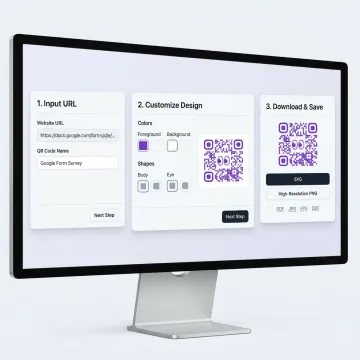
Open your Google Form, confirm the sharing settings allow responses, and copy the public form link. This ensures anyone scanning your QR code can access the survey, registration form, or feedback page.
QRStuff supports creators, businesses, and global brands with scalable QR code tools.
QRStuff combines easy QR creation with enterprise-ready customization, analytics, and security.
Create Google Form QR codes at no cost with the Free Suite.
Update QR destinations on supported plans without reprinting printed campaign materials.
Track scans by time, device, location, and campaign performance across QR codes.
GDPR and SOC2 compliance support secure QR workflows for business users.
A trusted QR platform built for scale.
QRStuff has provided reliable QR code technology since 2008, helping businesses, creators, schools, agencies, and enterprise teams connect physical touchpoints to digital destinations. The platform has grown into a comprehensive QR code solution used worldwide, with support for Google Forms, websites, payments, social links, WiFi, digital business cards, product information, and more. QRStuff’s vision is to make QR code creation simple for everyday users while offering advanced capabilities for organizations that need analytics, dynamic editing, security controls, custom branding, batch processing, and integrations. From one-off form sharing to enterprise-scale QR campaigns, QRStuff is built to be practical, flexible, and dependable.
Yes. Copy the share link from your Google Form and paste it into QRStuff’s QR code generator to create a scannable code. You can use it for surveys, event registrations, feedback forms, applications, and classroom activities. Before publishing, make sure the form is set to accept responses and is accessible to the people who will scan it.
Use QRStuff to generate, customize, and manage form QR codes.

Supports privacy-conscious QR code workflows
Built with enterprise security standards
Used by leading global enterprises
Start with a free QR code, then explore dynamic editing, analytics, branding, and integrations when your campaign needs more control.