A well-configured QR code collapses that entire journey into a single scan. But the gap between "a QR code" and "a QR code that actually drives downloads" is wider than most marketers expect. Static codes, missing CTAs, poor placement, and zero tracking are why campaigns with premium placements still underperform.
This guide covers everything — from prerequisites to step-by-step creation in QRStuff, deployment strategy, design rules, and how to track performance across channels.
Key Takeaways
- Use a dynamic QR code — it allows destination URL updates without reprinting and enables full scan analytics
- A single code can route iOS users to the Apple App Store and Android users to Google Play via automatic OS detection
- Always include a CTA frame (e.g., "Scan to download the app") — codes without instructions consistently underperform
- Create separate codes per deployment channel to measure which placement — packaging, signage, events, or website — drives the most installs
- Track total scans, unique scans, device type, and geography to identify top-performing placements
What You Need Before Creating an App Download QR Code
Getting these three things ready before you open any QR generator will save you considerable rework later:
1. Your App Store URLs Locate the exact listing URL for both the Apple App Store and Google Play. Don't use a generic store homepage or a marketing landing page — the destination must resolve directly to your app's download page .
2. Your QR Code Type Decision For most campaigns, one smart-redirect dynamic code handles everything. It detects the scanning device's operating system and routes users automatically — iOS to the App Store, Android to Google Play. This is the recommended approach because it simplifies all printed and digital materials.
3. Brand Assets and CTA Copy
- App icon or brand logo (for embedding into the code centre)
- Brand colours for module and background customisation
- Short CTA text — aim for under 8 words. Examples: "Scan to Download Free" or "Get the App on iOS & Android"
Before choosing a code type, here's the key distinction:
| Static | Dynamic | |
|---|---|---|
| Destination | Permanently encoded — cannot change after printing | Points to a redirect URL you can update any time |
| Tracking | No scan data collected | Records scans, devices, locations, and time |
| Best for | One-off, permanent use cases | Any active app download campaign |
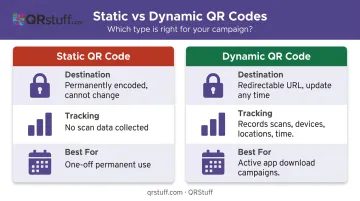
For app promotions, dynamic is the only practical choice.
How to Create a QR Code for App Downloads (Step-by-Step)
Each step below builds on the last. Skipping any of them — especially testing — is how campaigns end up with broken links after materials have already shipped.
Step 1: Select the App Store QR Type and Enter Your Links
In QRStuff, select the dedicated App Store QR data type from the generator. This is purpose-built for app download campaigns — it accepts both your Apple App Store and Google Play Store URLs and automatically routes users to the correct store based on their device's operating system. No manual URL logic required.
The most common setup error at this stage: linking to a generic app store homepage or a non-mobile page. Both URLs you paste must resolve directly to your app's listing.
QRStuff's App Store QR type also supports additional platforms beyond iOS and Android, including iPad-specific App Store links, tablet Play Store links, and the Microsoft Store for Windows apps.
Step 2: Customize the Design
QRStuff provides full design control — module and eye shapes, foreground colors, gradients, and background colors. Key rules:
- Use dark modules on a light background — this is the most reliably scannable combination across devices and lighting conditions
- Avoid light-on-dark (inverted) color schemes; older and budget scanners frequently fail to read them
- Upload your app icon to the code centre — QRStuff automatically centres, scales, and raises error correction to accommodate the logo. Keep the embedded image below 20% of the total code area for reliable scanning (15% is the recommended optimum)
- Add a CTA frame with instructional text around the code. Codes with a visible action label remove ambiguity about what happens on scan and consistently outperform unframed codes
Step 3: Test Before Deployment
Test on at least two physical devices — one iOS, one Android — using each device's native camera app, not a third-party scanner. Confirm that:
- iOS routes correctly to the Apple App Store listing
- Android routes correctly to Google Play
- The code scans reliably at the intended distance for your placement (arm's length for packaging; 1–2 meters for in-store signage)
Never skip this step for print materials — a broken link discovered after 10,000 units ship is far more expensive than two minutes of testing.
Step 4: Download in the Right Format
| Use Case | Recommended Format |
|---|---|
| Print (packaging, signage, banners) | SVG or EPS — infinitely scalable, no quality loss |
| Digital (website, email, social) | High-resolution PNG at minimum 300 DPI |
| Avoid for all QR uses | JPEG — compression artifacts cause scan failures |
Where to Use App Download QR Codes
Deployment context determines campaign performance as much as code quality. The same code in a high-dwell, high-intent environment will outperform one placed where users have no time or motivation to scan. Create a separate dynamic code for each channel to attribute installs accurately to each placement.
Physical Retail and Product Packaging
Product packaging reaches users at peak brand engagement — the moment they're holding the product. According to a 2025 GS1 US survey, 66% of U.S. consumers scan QR codes on food packaging. A 2024 GS1 US report found 79% of consumers are more likely to buy a product if a QR code provides the information they want — a clear signal that the scanning habit is well established at the point of purchase.
High-dwell retail placements worth testing:
- Product box, label, or bag (primary packaging)
- Point-of-sale counter displays
- Fitting room signage
- Receipt paper (particularly effective for post-purchase onboarding flows)
Out-of-Home and Print Materials
An OAAA/Morning Consult study found that 14% of adults downloaded or used an app featured in an OOH ad, with 76% of OOH ad engagements occurring via smartphone. Billboards, transit posters, and bus shelter panels convert passive exposure into active acquisition.
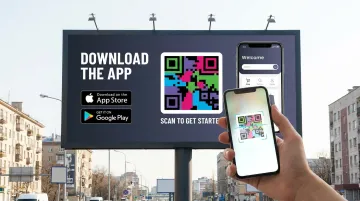
Sizing for distance placements: Use the 10:1 distance-to-size ratio as a working guide — a code scannable from 1 meter should be at least 10 cm × 10 cm. For close-range materials like brochures and flyers, a minimum of 2 cm × 2 cm ensures reliable scanning.
Website and Email Campaigns
On desktop websites, place QR codes in:
- Post-signup confirmation pages (high intent, low friction)
- Exit-intent popups for engaged visitors
- Persistent header banners during app launch campaigns
In email, onboarding sequences and re-engagement campaigns are the highest-ROI placements. Mobile/desktop note: Mobile email readers can't self-scan a code on their own screen — always pair the QR code with a tappable deep link for mobile readers, and use the QR code as a device-bridge for desktop readers.
Events and Trade Shows
According to Bitly's 2025 marketer survey, 43% of marketers use QR codes at events. High-converting event placements include:
- Large-format booth banners (visible from across the aisle)
- Badge or lanyard attachments (the code travels with the attendee)
- Demo station follow-up materials
Attach a tangible incentive to the scan — exclusive in-app access, a contest entry, or a free resource — to lift conversion rates from passerby to downloader.
Design and Placement Tips for Better Scan Rates
A well-designed QR code fails if the physical execution is wrong. Here are the three areas that account for most preventable scan failures in print campaigns.
Size and Quiet Zone The quiet zone is the white border surrounding the code's perimeter. ISO/IEC 18004 specifies a minimum of four module widths on all four sides, free of any other markings. Crowding the code against text or imagery is one of the most common design errors in print. For posters, the OAAA recommends 250–300 pixels (roughly 6–7.5 inches) on a 55-inch digital screen for scanning at 4–7 feet.
Contrast and Background Dark modules on a light background is the reliable standard. Specific combinations to avoid:
- Similar-value hues (such as dark blue modules on a navy background)
- Gradients placed directly behind the code
- Placing the code over a photograph without a solid backing
When placing over a colored surface or photograph, add a solid white backing behind the code. This resolves the majority of contrast-related scan failures in one step.
CTA Copy The frame text should communicate three things concisely:
- The action: tell users to scan
- The outcome: make clear they're downloading the app
- An incentive (optional): "Free" or "No sign-up required" if applicable
Keep it under 8 words. "Scan me" and "Learn more" are too vague — specificity about what happens after the scan drives higher engagement.
How to Track and Optimise Your App QR Code Campaign
What to Monitor in QRStuff's Analytics Dashboard
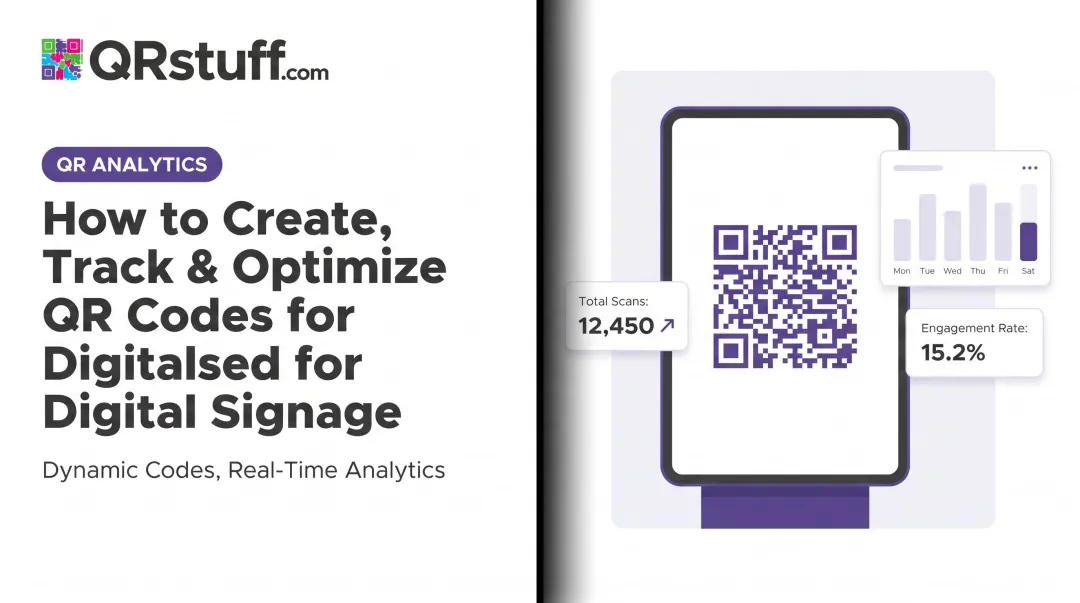
QRStuff's analytics dashboard provides real-time data on:
- Total scans — cumulative interaction volume
- Unique scans — distinct users or devices (more reliable measure of actual reach)
- Device type breakdown — iOS vs. Android split, informing where to concentrate App Store vs. Google Play promotion
- Geographic distribution — country and city-level data
- Scan trends — daily, weekly, and custom date range views
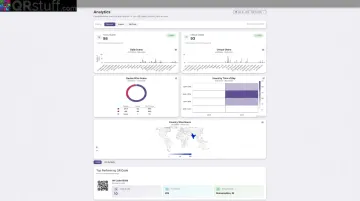
CSV export is available for integration with external business intelligence tools.
Attribution by Channel
Create a separate dynamic code for each deployment channel and append UTM parameters to each destination URL — for example, utm_source=packaging&utm_campaign=app-launch-2025. This creates two independent tracking layers:
- QR scan data from QRStuff (how many people scanned, where, on what device)
- Downstream behaviour from your mobile analytics platform (what they did after arriving in the store)
- Compare scan-to-install rates across placements to identify where to increase spend and where to pull back.
Optimisation Cadence
Dynamic QR codes can have their destination URLs updated at any time without reprinting — use this to redirect to seasonal promotions, updated store listings, or A/B test variants. According to Bitly's 2025 survey, 69% of marketers update or redirect dynamic QR codes at least monthly.
Review scan data weekly or bi-weekly during active campaigns. Placements with consistently low scan volume should be repositioned or discontinued rather than left running unchanged.
Frequently Asked Questions
Can you download an app from a QR code?
Yes. Scanning an app download QR code takes users directly to the app's listing on the App Store or Google Play, where they can download it in one tap. No manual searching required — just scan and download.
What is the difference between a static and dynamic QR code for app downloads?
Static codes permanently encode the destination URL and cannot be changed or tracked after creation. Dynamic codes use a redirectable short URL, so you can update destinations, redirect traffic, and monitor performance at any time. For any active app campaign, dynamic is the right choice.
Can one QR code work for both the Apple App Store and Google Play?
Yes. QRStuff's App Store QR type detects the scanning device's operating system and automatically routes iOS users to the Apple App Store and Android users to Google Play. One code handles both platforms in a single print run.
How do I track which placement drives the most app downloads?
Create a separate dynamic QR code for each channel and append unique UTM parameters to each destination URL. Review QRStuff's scan analytics alongside your mobile analytics platform to compare scan volume and scan-to-install conversion rates by placement.
What size should an app download QR code be for print materials?
The accepted minimum for close-range materials (packaging, flyers) is 2 cm × 2 cm. For posters and signage viewed from a distance, apply the 10:1 ratio — a code scannable from 1 metre should be at least 10 cm × 10 cm.
Do app download QR codes expire?
Dynamic QR codes remain active as long as your subscription is active; static codes never expire but cannot be updated or tracked. For time-limited campaigns using dynamic codes, align your subscription lifecycle with how long your printed materials will be in circulation.