Introduction
Legal professionals network constantly — at bar association events, courthouse corridors, CLEs, client pitches, and referral lunches. Yet most still hand out paper cards that become outdated within months, offer zero follow-up intelligence, and end up forgotten in someone's desk drawer.
The scale of competition makes this a real problem. According to the ABA's 2025 Profile of the Legal Profession, there are now 1,374,720 resident active lawyers in the United States — up from 1,355,963 in 2024. With over 190,000 law firm establishments competing for clients, standing out after a networking handshake matters.
Paper cards compound that challenge in ways specific to legal practice:
- Require reprinting every time a title, practice area, or office changes
- Carry no scan analytics or follow-up intelligence
- Raise data privacy questions in a profession bound by strict confidentiality rules
This article breaks down what makes a digital business card suitable for legal practice — covering compliance, ethics, and professional branding requirements — then evaluates five platforms built for attorneys and law firms.
Key Takeaways
- Lawyers can share contact details, bar admissions, and booking links instantly via QR code, NFC, or link — and update everything without reprinting
- Law firms require GDPR/SOC 2 compliance, attorney advertising disclaimers, and centralized team management
- Five platforms reviewed on legal-specific criteria: QRStuff, HiHello, Blinq, Uniqode, and V1CE
- QRStuff's dynamic vCard QR codes deliver real-time updates and scan analytics — no app required for recipients
- A print card with a QR code on the back covers both modern clients and traditional audiences
Why Legal Professionals Are Switching to Digital Business Cards
The Problem With Static Cards in a Mobile Profession
NALP reported that 2024 lateral hiring increased nearly 14% overall, with lateral associate hiring rising almost 25%. That level of attorney movement means printed contact details become outdated immediately — new firm, new title, new direct line. Any card printed before a lateral move is immediately wrong.
Beyond mobility, paper cards create operational friction:
- Offer zero post-exchange intelligence — no way to tell whether a card handed out at a state bar dinner ever led to a consultation call
- Trigger a new print run with lead times for every title change, practice area addition, or office relocation
- Vary in disclaimer language, logo placement, and color usage when individual attorneys design their own cards
Why Compliance Raises the Stakes
Legal professionals handle sensitive client information. That context makes the data practices of any technology platform — including digital business cards — a legitimate due diligence question, one that requires actual documentation review.
Two specific compliance areas matter most:
specifically:
- Which events drove the most profile views
- Which recipients clicked through to a booking or contact page
- When engagement happened relative to the original exchange
For law firm marketing teams trying to justify event spend, that attribution data has direct practical value.
Best Digital Business Cards for Law Firms & Legal Professionals
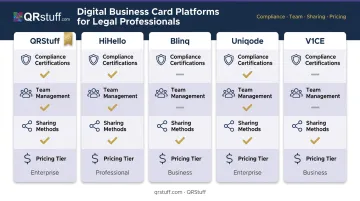
Each platform below was evaluated on criteria specific to legal practice: compliance certifications, team management, real-time update capability, sharing methods, analytics, and pricing transparency.
QRStuff
Founded in 2008 and trusted by 250,000+ businesses globally — including Deloitte and JP Morgan — QRStuff offers a dedicated vCard QR code type that lets attorneys create a scannable digital business card containing full contact details, practice areas (via notes field), firm branding, and links to a website or booking page. No app required on the recipient's side; the card opens natively through the phone's camera.
What sets QRStuff apart for law firms is the combination of dynamic updating and compliance infrastructure. When an attorney changes firms or earns a new bar admission, the card content updates in the dashboard — the printed QR code keeps working without reprinting. For firms already using QR codes on letterheads, email signatures, or event badges, this integrates without introducing a separate platform.
QRStuff supports bulk vCard creation via CSV upload (up to 500 codes per batch on the Full Suite), making it practical to onboard an entire associate class at once. The Enterprise tier adds API access, SSO via SAML 2.0, role-based permissions, and a dedicated account manager — relevant for large firms integrating QR code management into existing IT infrastructure.
| Key Features | Dynamic vCard QR codes with real-time content editing, scan analytics (device type, location, time, unique vs. repeat), custom branding with logo and firm colors, bulk CSV creation, GDPR & SOC 2 compliant, 99.9% uptime SLA |
| Best For | Law firms wanting a compliance-first, analytics-driven QR-based digital card that integrates into existing print materials without requiring recipients to download an app |
| Pricing | Free Suite: $0/month. Lite Suite: $10/month (dynamic QR codes, limited analytics). Full Suite: $25/month (advanced analytics, 500-code batch). Enterprise: $250/month (API, SSO, bulk, dedicated support) |
HiHello
HiHello is a digital business card platform built for professional teams, widely adopted by enterprise and mid-size organizations. Cards are accessible via QR code, NFC, link, or email signature embed — no app download required for recipients.
For law firms, the standout capability is the team admin dashboard. Firm administrators can provision, edit, and deactivate attorney cards centrally, enforce branded templates firm-wide, and capture prospect contact information directly from card shares. HiHello holds SOC 2 Type II certification.
| Key Features | Team admin dashboard, centralized provisioning, contact capture, NFC support, email signature integration, analytics, SOC 2 Type II certified |
| Best For | Mid-size to large law firms needing centralized management of dozens or hundreds of attorney cards with consistent branding |
| Pricing | Personal: Free. Professional: $8/month (or $72/year). Business and Enterprise tiers available — verify current per-seat pricing directly at hihello.com/pricing |
Blinq
Blinq is a mobile-first digital business card app built for fast setup and frictionless in-person sharing — a natural fit for attorneys who network frequently. Setup takes minutes, and the card interface supports headshots, credentials, practice area tags, and direct-dial/email buttons.
The Apple/Google Wallet integration enables offline card sharing in courthouses or conference venues where connectivity is limited. Blinq holds SOC 2 Type II certification.
| Key Features | QR and NFC sharing, Apple/Google Wallet pass (offline sharing), practice area fields, one-tap contact save, clean mobile UX, SOC 2 Type II certified |
| Best For | Solo practitioners and small-firm attorneys who prioritize fast, professional sharing at in-person legal networking events |
| Pricing | Free: $0. Premium: ~$7.33/month. Business: ~$4.99/user/month (5-card minimum) — verify current pricing at blinq.me/pricing |
Uniqode
Uniqode is a QR code and digital business card platform with the most extensive compliance credentials in this comparison. Its Trust Center lists ISO 27001:2022, SOC 2 Type II, HIPAA, and GDPR/UK GDPR — positioning it well for large firms, legal departments at healthcare organizations, or any practice handling cross-border EU client data.
Bulk card creation via CSV is documented, and the platform supports Google Analytics GA4 integration and Meta/Facebook Pixel retargeting — useful for firms running paid campaigns alongside their networking efforts.
| Key Features | Bulk creation via CSV, two-way contact sharing, Google Analytics GA4 integration, retargeting pixels, ISO 27001:2022/SOC 2 Type II/HIPAA/GDPR compliant |
| Best For | Large law firms and legal departments requiring enterprise-scale rollout and the broadest compliance certification stack |
| Pricing | First card: Free. Team: $6/user/month. Business+: custom pricing — verify at uniqode.com/pricing |
V1CE
V1CE combines a physical NFC card (available in metal or standard formats) with a fully customizable digital profile — a hybrid suited to attorneys who want both the tactile weight of a physical card and the intelligence of a digital one.
The metal card format carries the weight and finish that M&A, BigLaw, and private client practices typically expect from a first impression. The linked digital profile can include a bio, case study PDFs, intro video, and booking link. Engagement analytics track which recipients clicked through to the firm's website or scheduled consultations. Apple/Google Wallet integration is also supported.
One important note: no third-party SOC 2, ISO 27001, or equivalent compliance certification was verified from V1CE's official pages during research. Firms with formal data security requirements should confirm V1CE's current compliance posture directly before deploying at scale.
| Key Features | Physical NFC card (metal/standard), linked digital profile, multimedia embeds (video, PDF), booking link, engagement analytics, Apple/Google Wallet |
| Best For | Partners and senior attorneys at premium practices who want a prestige physical card paired with a full digital profile |
| Pricing | 30-day free trial of Client Capture OS available. Physical card and software subscription pricing — verify current figures directly at v1ce.co/pricing |
What to Look for in a Digital Business Card for Your Law Firm
Choosing a platform based on design aesthetics alone is the most common mistake law firms make. Four criteria should drive the decision before anything else.
Compliance Certifications
SOC 2 Type II and GDPR compliance are not bonus features; they are the baseline. Scan data (device type, location, timestamp) tied to identifiable individuals qualifies as personal data under GDPR. Any platform processing that data on behalf of a law firm should be able to provide current audit reports, not just marketing claims.
HIPAA certification matters for firms serving healthcare clients. Of the five platforms reviewed here, Uniqode's Trust Center provides the most comprehensive publicly documented certifications.
Attorney Advertising and Disclaimer Support
Most state bars treat a digital business card as attorney advertising. That means the platform must allow required disclaimers — such as "Attorney Advertising. Not legal advice. No attorney-client relationship is created." — to be embedded directly in the card template. Leaving that to each attorney to add manually is a compliance gap, not a workflow preference.
Platforms offering locked, firm-level templates solve this problem. Giving every attorney unrestricted freeform editing creates compliance exposure, particularly across large associate classes where card content is hard to audit.
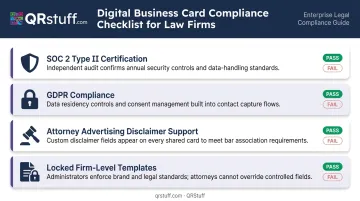
Per NYSBA Opinion 704, business cards identifying an attorney and firm must also make clear the jurisdiction(s) in which the attorney is admitted to practice.
Team Management Controls
For any firm with more than one attorney, centralized management is essential:
- Provision cards for new hires without relying on individual setup
- Deactivate cards instantly when attorneys depart (a real risk given current lateral mobility rates)
- Enforce logo, font, and approved practice area language firm-wide
- Review card content without requiring each attorney to self-report changes
Sharing Method Coverage
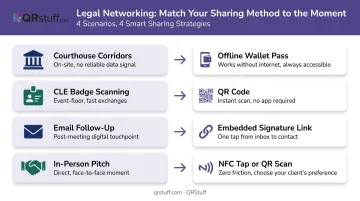
A platform that supports QR code, NFC, shareable link, Apple/Google Wallet, and email signature embed handles the full range of scenarios legal professionals encounter:
- Courthouse corridors → offline Wallet pass (no connectivity needed)
- CLE badge scanning → QR code
- Email follow-up → embedded signature link
- In-person pitches → NFC tap or QR scan
Verify that recipients can open the card in a phone browser without downloading any app. Recipients shouldn't need to install anything to view it — and keeping the exchange browser-based avoids the friction of app-gated platforms.
Conclusion
Digital business cards address real operational problems for legal professionals: contact details that go stale after every lateral move, zero visibility into whether a networking handoff ever converted, inconsistent branding across attorney cards, and data privacy gaps that paper cards cannot address.
Evaluate platforms on compliance certifications, team management depth, and whether the sharing mechanism fits the actual contexts where your attorneys network — not just on design or price.
Those criteria point toward QRStuff's dynamic vCard QR codes as a strong fit for law firms — whether you're already embedding QR codes on print materials or starting from a compliance-first baseline. Key features for legal use include:
- GDPR- and SOC 2-compliant data handling
- Updateable after printing — no reprint required after a lateral move or contact change
- Embeddable across letterheads, email signatures, and event materials
- Scan analytics that show which networking touchpoints generated follow-up
Frequently Asked Questions
What is the best digital business card app for legal networking?
The right choice depends on firm size, compliance requirements, and sharing context. QR-code-based solutions like QRStuff's vCard QR work without the recipient needing any app, while platforms like HiHello and Blinq add team management and NFC options for firm-wide deployment.
Are NFC digital business cards worth it for legal networking?
NFC cards offer fast, one-tap sharing at in-person events without requiring a QR scan, making them useful for high-volume networkers at bar conferences or litigation partners doing client pitches. They work best paired with a platform that tracks engagement — though QR code fallback remains essential for recipients with older devices.
Can lawyers ethically use digital business cards?
ABA Model Rule 7.3 distinguishes lawyer-initiated solicitation from communications recipients can easily disregard. QR- or link-shared cards, where the recipient initiates the exchange, generally sit on the permissible side of that line, but card content must still comply with each state bar's advertising rules.
What information should a lawyer include on a digital business card?
At minimum, include:
- Full name with credentials (JD, Esq.), role, and firm name
- Practice areas, bar admissions, and licensed jurisdictions
- Direct phone, email, booking link, and LinkedIn profile
- Any disclaimers required by your state bar
NYSBA Opinion 704 specifically requires cards to identify the jurisdiction(s) in which the attorney is admitted to practice.
How do law firms manage digital business cards for all their attorneys?
Enterprise-capable platforms, including HiHello, Uniqode, and QRStuff's Enterprise tier, let firm administrators create branded templates with locked disclaimer language and provision cards in bulk via CSV. Individual cards can also be deactivated immediately when attorneys leave, with no action required from the attorney themselves.
Do recipients need to download an app to view a digital business card?
Most modern platforms are browser-based — recipients open the card in their phone's browser by scanning a QR code or tapping an NFC card, with no download required. This frictionless approach is preferred for legal networking because it doesn't require the other party to join a third-party platform.