The gap between creating a QR code and deploying it effectively is where most campaigns quietly fall apart. Poor placement, missing context, and codes that blend into their surroundings all kill scan rates before a single phone comes out of a pocket.
This article covers the full picture: physical placement ideas for in-venue and print materials, digital display strategies for screens and platforms, design principles that protect scannability, and how to measure which displays are actually earning their keep.
Key Takeaways
- QR codes fail at the display level — placement, sizing, and CTA clarity matter more than the code itself
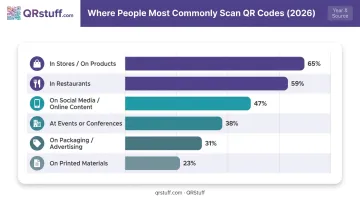
- In-person contexts drive the most scans: 65% scan in stores, 59% in restaurants, per 2026 survey data
- Physical formats like table tents, window clings, and packaging are high-converting — users are already stationary
- Pair every code with a CTA under 8 words that answers "why scan" and "what you get"
- Use dynamic codes for any campaign — they're editable and trackable without reprinting
Why Your QR Code Display Strategy Matters More Than the Code Itself
The technology is not the problem. QR code scanning is built into every modern smartphone camera — no app required. When a code doesn't get scanned, the display is almost always to blame.
A 2026 survey via AccessNewswire found that 53% of users won't scan QR codes from sources they don't recognise, and 46% ignore codes on random flyers or posters. Context and trust drive the decision to scan — and both are determined entirely by how and where the code appears.
The Psychology Behind the Scan Decision
Users decide within a second whether to scan. The mental checklist is fast and mostly subconscious:
- Do I know where this code will take me?
- Is it worth picking up my phone right now?
- Does this feel legitimate?
If the answer to any of those is unclear, the scan doesn't happen. QR codes work best when they appear exactly where someone is already looking for a next step — finishing a meal, picking up a product, or waiting in line. Placement that matches that moment removes the hesitation entirely.
What Strong Display Strategy Actually Delivers
The same 2026 survey found that 65% of users scan codes in stores and on products, and 59% scan in restaurants — the two highest-reported contexts. These aren't coincidences. They're environments where customers are stationary, engaged, and already primed for the next action.
The global QR code market is forecast to reach USD 33.14 billion by 2031, growing at 16.82% CAGR from USD 15.23 billion in 2026, according to Mordor Intelligence. As adoption climbs, the businesses that get display right will pull further ahead of those running codes nobody scans.
Getting display right means thinking across two channels — physical and digital — and knowing when to use each:
- Physical placements — table tents, stickers, posters, packaging, business cards
- Digital placements — signage screens, email, social media, websites
The strongest campaigns use both.
Creative Physical QR Code Display Ideas
Tabletop and In-Venue Displays
Table tents, tabletop inserts, and wooden block or coaster-style displays are the workhorses of restaurant and hospitality QR deployment. The logic is straightforward. Customers sitting at a table are stationary, not distracted by movement, and actively looking around. The National Restaurant Association reports that 59% of full-service restaurant customers would use a QR code to pull up a menu on their phone.
A few practical considerations:
- Use spill-resistant, laminated materials: codes get wiped down multiple times a day
- Include a short, specific CTA on every display: "Scan to view today's menu" or "Scan to earn loyalty points"
- Keep the code on a flat, non-glossy surface to avoid reflection issues
For venues where table surfaces are cramped (fast casual counters, small café bars), back-of-chair or seatback displays solve the clutter problem without sacrificing visibility.
Stickers, Labels, and Window Clings
Stickers are one of the most cost-effective QR display formats available. They apply to almost any surface and scale easily across locations or product lines.
High-value sticker placements:
- Product packaging and takeout containers
- Coffee cups and cold drink cups
- Retail shelf labels and hang tags
- Branded glassware or reusable cups
Use waterproof, high-contrast materials. Codes on condensation-covered cups or wet packaging fail to scan: the contrast degrades and modules blur. Matte finishes outperform glossy ones in varied lighting.
Window clings are underused. An eye-level cling on a storefront window captures walk-up customers and pickup audiences before they even enter, a moment of high purchase intent. A simple CTA like "Scan to order ahead" does the job. The key is eye-level placement; a cling near the floor or above the door frame gets ignored.
Posters, Sandwich Boards, and Billboards
Posters are efficient QR vehicles because they're often already being printed for an event or promotion. Adding a QR code costs nothing extra. The critical variable is size: codes must be large enough to notice and scan from the intended viewing distance.
Practical sizing guidance:
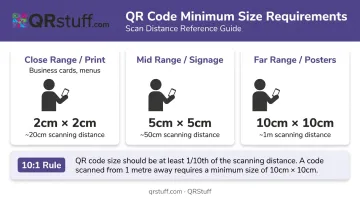
- Minimum ¾" × ¾" (2cm × 2cm) for close-range print (business cards, menus)
- For signage viewed from 3 feet (1 metre) away, scale up proportionally. A common vendor guideline is ~0.4" of code size per 4" (10cm) of scanning distance
- For posters viewed from 20" (50cm), aim for at least 2" × 2" (5cm × 5cm)
Sandwich boards work well for exterior placement. Positioned at a doorway or along a footpath, they intercept foot traffic before people enter and give them a reason to engage.
Billboard QR codes are a different calculation entirely. They work in pedestrian zones and slow-traffic areas — not on roads where a driver has two seconds of visibility. Pair them with a bold, short CTA (5 words or fewer) and a memorable short URL as a fallback.
Business Cards, Loyalty Cards, and Packaging
A QR code on a business card lets a contact instantly access a portfolio, LinkedIn profile, or digital contact card without typing anything manually. It also signals that the person or business is current and detail-oriented — a concrete trust signal in competitive networking situations.
Loyalty and coupon cards are high-intent placement surfaces. The person holding one is already invested in the brand. QR codes on loyalty cards work naturally for:
- Checking reward point balances
- Unlocking exclusive offers
- Accessing referral programs
For packaging, a 2025 GS1 US survey found that 66% of consumers would scan a QR code on food packaging to access ingredient and freshness details, driven partly by rising grocery prices pushing people to scrutinize labels more closely. That's a significant and growing audience for packaging-based display.
Creative Digital QR Code Display Ideas
Digital placements extend QR code reach beyond physical spaces without any printing costs.
High-value digital placement surfaces:
- Website pages — product pages, contact pages, and blog posts work especially well for driving app downloads or survey completions
- Email signatures — every outbound email becomes a touchpoint, particularly useful for B2B teams
- Digital presentations and pitch decks — conferences, client meetings, and webinars where a scan replaces typing a URL
For digital signage in retail stores, hotel lobbies, and event venues, QR codes on screens open up measurable opportunities. Burger King ran a TV campaign in 2020 that used a floating QR code to distribute 10,000 free Whoppers to viewers who scanned.
Chick-fil-A saw a 14% increase in mobile app downloads after placing QR codes on in-restaurant digital signage linked to their app stores — a straightforward result from a simple placement decision.
A practical note on animated or pulsing frames around on-screen QR codes: subtle motion draws the eye without making the code harder to scan. The key word is subtle — a gentle border pulse or rotating CTA message, not a full animation that competes with the code itself.
Social Media and Video Placements
These channels work best used selectively. The conversion window is short — someone scrolling Instagram or watching a YouTube video has seconds to decide whether to scan. Placements that perform well include:
- Instagram Stories tied to limited-time promotions
- YouTube end screens linking to a resource or event registration
- LinkedIn posts where the QR code connects to a demo or download
Immediacy drives action here, so pair these placements with a clear, time-sensitive reason to scan.
Design Principles That Make QR Codes Worth Scanning
A well-placed code with poor design still gets ignored. These fundamentals determine whether your code actually gets scanned.
Scannability Fundamentals
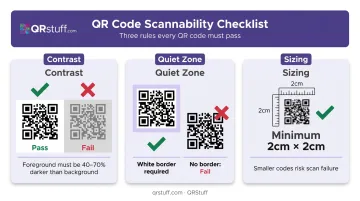
- Contrast: Dark modules on a light background is the baseline. Dynamsoft recommends keeping the foreground at least 40% darker than the background — QRStuff's platform requires at least 70% darker for reliable scanning
- Quiet zone: Never crop the white border around a QR code. It's how scanners locate and isolate the code; remove it and scan rates drop
- Sizing: At minimum 2cm × 2cm for close-range materials; scale up using the 10:1 rule (1cm of code per 10cm of scanning distance) for signage
CTA Placement and Wording
A QR code with no explanation is almost always ignored. The CTA must appear directly next to the code and answer two things:
- What to do — "Scan"
- What they get — "to see the full menu" / "for 15% off today"
Keep CTAs under 8 words. Anything longer introduces friction and competes with the code for attention.
Branded QR Codes
Adding brand colors, a logo in the center, and custom module shapes increases trust and visual coherence with surrounding marketing materials. The 2026 scan behavior survey found that 53% of users won't scan codes from sources they don't recognize — a branded code that matches the visual identity of the material it's on directly reduces that hesitation.
QRStuff supports full customization out of the box:
- Custom colors with gradient options and multiple module shapes
- Logo placement in the center, with automatic error correction level increases to compensate
- Logos can safely cover up to 30% of the code surface without affecting scannability
- Export in print-ready formats (SVG, PDF, or PNG at 300 DPI minimum)
Common Design Mistakes That Kill Scans
Avoid these:
- Placing codes on textured, patterned, or reflective surfaces
- Printing on folded edges or rounded corners — modules distort
- Linking to non-mobile-optimized landing pages (the code scans fine; the destination fails)
- Inverted colors (dark background, light modules) — many older scanning apps struggle with this
Always test on both iOS and Android before deploying — in the actual lighting conditions and from the intended scanning distance.
One more advantage of dynamic QR codes: if the destination needs to change after deployment, the physical code doesn't need reprinting. QRStuff's dashboard lets you update the destination URL instantly.
How to Track Which QR Code Displays Are Actually Working
Static vs. Dynamic: The Foundational Choice
Static QR codes encode the destination directly into the visual pattern — once printed, the destination is fixed and nothing is tracked. Dynamic codes use a redirect URL that captures scan data before forwarding users to the destination. The code pattern stays the same; the destination and analytics sit on the platform side.
For any display campaign where performance matters, dynamic codes are the right choice. Mordor Intelligence reports that dynamic QR codes accounted for 64.92% of QR code market revenue in 2025 and are forecast to grow faster than static codes through 2031. For businesses running physical display campaigns, that momentum reflects a practical shift toward accountability over assumption.
Metrics That Reveal Placement Performance
QRStuff's analytics dashboard captures the following for every dynamic code:
| Metric | What It Tells You |
|---|---|
| Total scans | Overall reach of the placement |
| Unique scans | New users vs. repeat interactions |
| Scan time/day patterns | When engagement peaks (optimize timing) |
| Device type (iOS/Android) | Informs landing page design |
| Geographic data (country/city) | Which locations or regions are driving scans |
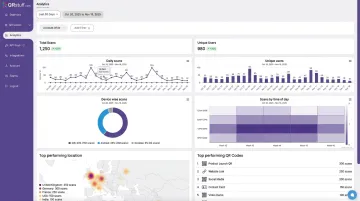
These metrics show which placements are actually working. If table tent codes are generating 3× the scans of window clings, the budget and production priority should reflect that. If evening scans dominate, shift promotions to match.
Comparing Placements Across Locations or Campaigns
QRStuff's campaign tagging feature lets businesses assign tags to individual codes and compare performance across different placements — table tents vs. window clings, or Location A vs. Location B — directly in the analytics dashboard. Scan logs can also be exported as CSV for deeper analysis or importing into other reporting tools.
Once you know which placements perform best, dynamic codes let you go a layer deeper. They support live destination updates without reprinting, making it practical to A/B test linked content across the same physical displays — comparing conversion outcomes on different landing pages while the printed code stays unchanged.
Frequently Asked Questions
How do you display your QR code?
QR codes can be displayed physically — on table tents, posters, stickers, packaging, and business cards — or digitally on websites, email signatures, social media, and digital signage. Whichever format you choose, effective display requires a clear CTA adjacent to the code and correct sizing for the intended scanning distance.
What size should a QR code be for display purposes?
For close-range print materials, vendor guidance recommends a minimum of 2cm × 2cm (roughly 0.8" × 0.8"). For signage viewed from a distance, apply the 10:1 rule: 1cm of code size per 10cm of scanning distance. A poster viewed from 1 metre needs a code at least 10cm wide.
Can I customize the look of my QR code without affecting scannability?
Yes — colors, custom module shapes, and logos can all be incorporated. The key requirements are high contrast (foreground significantly darker than background) and keeping any logo within the data area limit. QRStuff automatically increases error correction when logos are added, supporting up to 30% coverage without reliability issues.
What is the best place to put a QR code?
The highest-converting placements are where someone is already paused and looking for a next step: at a table, near a checkout counter, on packaging they're holding, or at a venue entrance. Avoid placements on reflective surfaces, at awkward scanning angles, or in fast-moving environments where nobody has time to stop.
What is the difference between a static and a dynamic QR code for display use?
Static codes are permanent — the destination can't be changed after creation and scans can't be tracked. Dynamic codes let you update the destination at any time post-print and capture full scan analytics, making them the right call for any campaign where performance or content flexibility matters.
How do I know if my QR code display is working?
Dynamic QR codes capture scan data including total scans, unique users, device types, location, and time patterns. Reviewing this data regularly shows which placements are driving engagement and which aren't — so you can adjust placement, CTA copy, or destination based on what the numbers actually show.