The practical problem is that traditional lot tracking — paper logs, shared spreadsheets, manual data entry — breaks down fast when dozens of batches move through a facility daily. A missed entry at receiving creates phantom inventory. A skipped dispatch scan leaves a recalled lot showing as active in the system for weeks.
This guide covers how to use QR codes for lot tracking in a warehouse, step by step: from deciding when you actually need lot-level tracking, through setup, active operation, and dispatch closeout.
Key Takeaways
- QR codes store batch-specific identifiers and sync with your WMS to update quantity, location, and status on every scan
- Generate unique codes before goods arrive at the receiving dock, not after they're already on shelves
- Scan at every movement stage: receipt, internal transfer, picking, and dispatch — any gap breaks the traceability chain
- Use dynamic QR codes so lot status and location can be updated without reprinting labels
- Food, pharma, medical devices, and cosmetics face the strictest mandates, though the same workflow applies to any operation handling expiry-dated or safety-critical goods
When Should You Use QR Codes for Lot Tracking?
Not every warehouse needs lot tracking. The decision comes down to whether your inventory shares batch-level characteristics that you'll ever need to trace back.
Lot Tracking vs. Serial Tracking vs. SKU Tracking
These three approaches serve different purposes:
| Tracking Type | Granularity | Typical Use Case |
|---|---|---|
| SKU tracking | Product level only | General retail stock with no expiry or batch differentiation |
| Lot tracking | Batch level | Groups of items sharing production date, supplier, or shift |
| Serial tracking | Individual item level | High-value, warrantied, or regulated single assets |
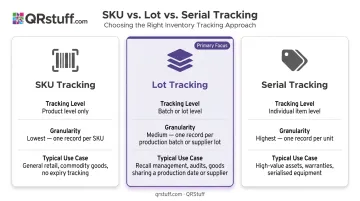
Lot tracking is appropriate when a group of items shares production characteristics — a batch date, a supplier code, a manufacturing shift — and when tracing back to those characteristics matters. This matters most for recalls, audits, and expiry-based inventory rotation.
When QR-Based Lot Tracking Fits Best
- High-SKU warehouses managing perishable or regulated goods
- Operations receiving inventory from multiple suppliers simultaneously, where batch origins must be distinguishable
- Businesses required to demonstrate backward or forward traceability under FDA, FSMA, or GS1 standards
- Mid-size e-commerce operations handling supplements, skincare, or specialty foods — even without a formal regulatory mandate, return management and brand protection justify the investment
Common Misapplications
Two patterns consistently break lot traceability:
- Attaching one QR code to an entire pallet that holds multiple lots — without individual batch differentiation, granularity is gone before the goods reach storage
- Generating codes after goods have been moved — if a batch has already traveled from receiving to storage before a code is assigned, the receipt event goes unrecorded and the traceability chain opens with a gap
What You Need Before Getting Started
Get these in place before generating a single code:
- QR code generator with bulk and dynamic output: Each lot needs a unique, updatable code. QRStuff supports bulk generation up to 500 codes per batch (Full Suite) with unlimited batches on Enterprise, plus real-time scan tracking for a timestamped audit trail.
- WMS or inventory software with lot tracking support: QR codes capture the data; the WMS stores it. Lot records — quantity, location, expiry, supplier — live in the WMS. QRStuff feeds into existing WMS or ERP systems via integrations and API rather than replacing them.
- Durable label stock and a suitable printer: Standard paper labels fail fast in warehouse conditions. Use waterproof stock for cold chain environments; print at 300 DPI minimum or use vector formats (SVG, EPS) for sharper output.
- Scanning devices at every touch point: Dedicated barcode scanners or smartphones with scanning apps, stationed at the receiving dock, storage zones, pick faces, and shipping bay.
- A defined lot data schema: Agree on exactly which fields constitute a "lot" before generating any codes. Inconsistent naming — some teams using supplier codes, others using internal codes — is the primary reason lot records fragment at audit time.
What to Encode in the QR Code
Keep the code itself lean. The QR code should carry the lot identifier, following these GS1 Application Identifiers where relevant:
- AI (10): Batch/lot number
- AI (17): Expiry date
Fields like quantity, current location, and supplier details live in the WMS — accessed by scan, not embedded in the code. With dynamic codes, the less static data you encode, the more flexibility you retain when lot details change.
How to Use QR Codes for Lot Tracking (Step-by-Step)
Effective QR lot tracking follows a defined sequence tied to physical movement. Skipping any stage — especially receipt or dispatch — creates gaps that can't be reconstructed later.
Setup and Preparation
- Define the lot numbering convention — establish a consistent format before generating codes (e.g., supplier code + production date + sequence number). This becomes the human-readable identifier printed below each QR code
- Generate unique codes before goods arrive — use bulk generation to create codes in advance of the receiving shipment. Each code should link to a pre-created lot record stub in the WMS, not be created on the fly at the dock
- Print with human-readable text below the code — so staff can identify a lot visually if a scanner fails
- Affix to every pallet, bin, and carton in a consistent, unobstructed position before goods enter the facility
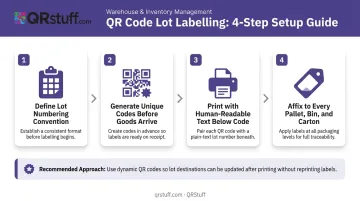
The most common setup error: encoding too much static data into the code itself. Use dynamic QR codes — like those generated through QRStuff — so that lot status, location, and quantity adjustments can be updated in the WMS without reprinting labels.
Receiving (Initiating the Lot Record)
- As each lot arrives, workers scan the QR code at the dock to log receipt into the WMS
- This scan triggers the lot record: quantity, supplier, arrival date, and initial location are all written at this moment
- The WMS should return an on-screen lot summary after each scan — staff must verify the correct lot before moving goods to storage
- Partial receipt scanning (logging some cartons but not others from the same batch) is a known source of phantom inventory — every distinct batch needs a complete scan-in
Internal Movement and Storage Operations
Scan discipline at every transfer point is what keeps lot records accurate throughout the facility.
One lot = one QR code. Mixing inventory from different lots into the same bin without re-labeling destroys trace capability in both directions. In a recall scenario, commingled lots make it impossible to confirm which unit shipped to which customer.
Scan at every internal transfer:
- Receiving dock → bulk storage
- Bulk storage → pick faces
- Between warehouse zones or sub-locations
Each scan updates the lot's current location in the WMS. This is also what enables automatic FIFO/FEFO enforcement during picking — under 21 CFR Part 211.150, drug distribution requires the oldest approved stock to be distributed first, and the lot record must evidence which lot was picked and when.
Monitoring Active Lots
Consistent scanning through internal movements feeds the data that makes monitoring meaningful. Watch for these signals in the analytics dashboard:
- Lot age — days since receipt or days to expiry, flagging anything approaching rotation thresholds
- Movement frequency — lots that haven't been scanned in an expected window may indicate a stuck pallet or a missing transfer scan
- Scan anomalies — a lot appearing in two locations simultaneously, duplicate lot numbers, or a lot showing zero quantity while physically present all indicate a process failure at a specific movement stage
QRStuff's per-code analytics show total scans, last scan time, and scan location for each dynamic code. When each lot has its own code, this data translates directly into lot-level movement monitoring.
Dispatch Closeout
The lot record closes at dispatch. When the picking and packing team fulfills an order:
- Scan the lot QR code during pick — this deducts the correct quantity from the lot record
- The WMS logs the destination (customer, order number, or outbound shipment)
- If the lot is fully consumed, the record closes; if partially consumed, the remaining quantity updates
Skipping the dispatch scan leaves the lot "active" in the system after goods have left the facility. Recall searches will return inaccurate results, and audit reports won't reflect actual stock distribution.
Where QR Code Lot Tracking Is Used in Practice
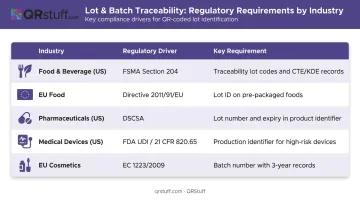
QR-based lot tracking is most established in industries where regulatory traceability frameworks define explicit batch-level requirements:
| Industry | Regulatory Driver | Key Requirement |
|---|---|---|
| Food & beverage (US) | FSMA Section 204 | Traceability lot codes + CTE/KDE records; enforcement date extended to July 20, 2028 |
| EU food | Directive 2011/91/EU | Lot identification on all pre-packaged foods |
| Pharmaceuticals (US) | DSCSA | Product identifier includes lot number and expiry date |
| Medical devices (US) | FDA UDI / 21 CFR 820.65 | Production identifier including lot/batch for high-risk devices |
| EU cosmetics | Regulation (EC) 1223/2009 | Batch number required; supply chain records kept for 3 years |
For operations requiring GS1-compliant codes, QRStuff supports GS1 Digital Link as a dedicated QR data type, encoding GTIN, lot, and expiry in a standardized URI format. This makes it compatible with the industry-wide Sunrise 2027 transition to QR codes at retail.
Beyond regulated industries, mid-size e-commerce warehouses handling supplements, skincare, and specialty foods are adopting QR lot tracking for customer return management and brand protection — even where no mandate exists.
Best Practices for QR Code Lot Tracking
Getting QR lot tracking right comes down to a handful of decisions made before the first label prints. These four practices prevent the most common failure points.
- Standardize lot numbering first — agree on the naming convention warehouse-wide before rollout. Inconsistent lot IDs are the leading reason traceability reports fail at audit time.
- Use dynamic codes for all active lots — dynamic QR codes let you update status, location, and quantity in the backend without reprinting labels. QRStuff's dynamic codes redirect to updated data without altering the physical code's visual pattern, so labels stay valid throughout the lot's lifecycle.
- Label at both pallet and carton level — when a pallet breaks down during picking, carton-level codes keep traceability intact for individual units, not just the original configuration.
- Run quarterly lot audits — scan a random sample of active lot codes and compare the physical count against your WMS record. This catches data drift before it becomes a compliance issue and reinforces scanning discipline across the team.
Frequently Asked Questions
Frequently Asked Questions
How do you use QR codes to track inventory?
QR codes are scanned at each inventory movement stage — receiving, storage, picking, and dispatch — to update item quantity and location in real time within WMS or inventory software. Each scan replaces manual data entry, and with dynamic codes, every event is timestamped and logged automatically.
What information should be encoded in a lot tracking QR code?
Encode the lot number (GS1 AI 10) and, if needed, expiry date (GS1 AI 17). Quantity, location, and supplier details are best stored in the WMS and retrieved by scan — dynamic codes link to a live record rather than embedding static data directly.
What is the difference between lot tracking and serial number tracking?
Lot tracking assigns one identifier to a batch of similar items sharing production characteristics. Serial number tracking assigns a unique identifier to each individual item. Lot tracking suits bulk goods and compliance scenarios; serial tracking suits high-value or warrantied assets where individual unit history matters.
Can QR codes replace manual lot tracking spreadsheets?
QR scanning paired with WMS software replaces spreadsheets entirely, eliminating manual entry errors and enabling real-time lot visibility. Unlike spreadsheets, this combination enforces FIFO/FEFO rules automatically and generates the timestamped audit trail regulators expect.
Do QR codes work in cold storage or harsh warehouse environments?
With the right label stock, yes. Standard paper labels fail under condensation and abrasion, so use waterproof, cold-resistant materials. Print at 300 DPI minimum and place codes on flat, non-reflective surfaces away from folds or seams.
Which industries require lot tracking in warehouses?
Food and beverage, pharmaceuticals, medical devices, cosmetics, and certain chemical operations face the strictest mandates under FDA, FSMA, DSCSA, GMP, and EU regulations. Any business handling perishable or safety-critical goods benefits from implementing lot tracking regardless of whether a specific mandate applies.