QR code coupons sit squarely in this shift. Scan, get the deal, done. But the difference between a campaign that drives real revenue and one that bleeds margin comes down to the details: code type, destination quality, placement channel, and whether you're measuring anything at all.
This guide covers what QR code coupons are, how to build one correctly, where to deploy them, which variables actually move the needle, and the mistakes that quietly kill campaigns before they have a chance.
Key Takeaways
- QR code coupons eliminate friction by linking a scannable code directly to a discount with no printing or typing required.
- Dynamic QR codes are the right choice for coupon campaigns: they're trackable, updatable, and can expire without reprinting.
- Placement matters as much as the offer — the channel determines who sees the code and why they'd scan it.
- Missing a call-to-action, a slow landing page, or no usage cap will undermine even a strong offer.
- Scan-to-redemption rate is the metric that shows whether your campaign is actually working.
What Are QR Code Coupons and Why They Outperform Traditional Coupons
A QR code coupon is a scannable 2D barcode that, when read by a smartphone camera, takes the customer directly to a discount offer. Depending on how it's set up, scanning can reveal a coupon code, load a branded promotional page, or redirect to a cart with the discount already applied. Customers don't need an app, a printer, or even a pen.
The practical advantages over traditional coupons are straightforward:
- Faster distribution — share via email, SMS, packaging, or social media instantly
- Lower production cost — no print runs for distributing new offers
- Updatable offers — dynamic codes let you change the destination, extend the expiry, or pause the campaign without reprinting
- Real-time tracking — scan data shows exactly when, where, and on what device customers are engaging
Static vs. Dynamic: The Decision That Determines Everything
Which code type you choose determines whether your campaign is measurable, recoverable, and worth running at scale.
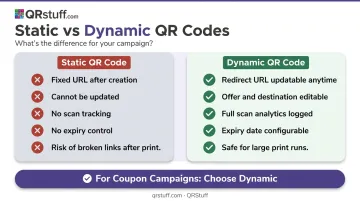
Static QR codes encode a fixed URL or discount code directly into the pattern. Once printed, they cannot be changed, and they provide zero scan data. If you print 10,000 flyers with a static code and the offer expires or the URL breaks, you have 10,000 pieces of material pointing nowhere.
Dynamic QR codes work through a redirect. The code points to a short URL on QRStuff's servers, and that redirect can be updated anytime — new destination, new offer, new expiry — without altering the printed code at all. Every scan gets logged, including time, location, and device type.
For any coupon campaign where performance matters, dynamic is the correct choice.
How to Create a QR Code Coupon Step by Step
Step 1: Define the Offer and Choose Your Code Type
Start with the offer itself — percentage off, fixed amount, BOGO, free shipping. Be specific. "20% off your next order, expires Sunday" outperforms "get a deal" every time.
Then decide what happens when the code is scanned:
- A branded landing page showing the discount code and terms
- A cart URL with the discount pre-applied
- QRStuff's dedicated Coupon QR code type, which displays offer details in a structured, mobile-ready template
If your campaign has an expiry date, needs scan tracking, or might require an offer update after printing, choose a dynamic QR code. That rules out static for almost every coupon campaign.
Step 2: Build the Coupon Destination
The destination is what customers see after scanning. It needs to:
- Load fast on mobile (slow pages cause immediate abandonment)
- Show the offer immediately — no scrolling, no hunting
- Include the discount code or redemption button above the fold
- Display expiry date and any terms clearly
QRStuff's Coupon QR code type handles this with a purpose-built template. You fill in fields for the coupon code, button name, button link, description, promotional image, and detail points. The platform assembles the mobile-optimized page automatically.
Step 3: Generate and Customize the QR Code
In QRStuff, select the Coupon data type and enter your offer details. Then customize the design:
- Add your logo in the centre of the code
- Set brand colours using hex codes — dark foreground on a light background for reliable scanning
- Choose module and eye shapes from QRStuff's options (square, round, dot, and several connected variants)
- Add a call-to-action frame with text like "Scan for 20% off"
Keep the foreground-to-background contrast high. Gradient fills and connected shapes work well visually but should be tested for scan reliability before production printing.
Step 4: Set Expiry and Security Controls
Open-ended offers invite over-redemption. Configure limits before you distribute:
- Set an expiry date so the campaign closes on schedule
- For high-value offers, use unique per-customer codes instead of one shared code. A shared code posted to a deal forum will be redeemed well beyond your intended audience
- QRStuff's Enterprise plan supports password-protected QR codes, restricting access to recipients who have the password. This works well for VIP or partner-exclusive promotions
- QRStuff's bulk generation feature creates individual unique codes at scale, making per-customer distribution practical for large campaigns
Step 5: Test Before Publishing
Test on both iOS and Android devices before anything goes live. Check:
- The code scans reliably at the intended print size
- The landing page loads correctly on mobile
- The offer details, expiry date, and coupon code all display as expected
- The discount applies at checkout if you're using a cart URL
Skip this step and you risk discovering errors after 50,000 units are already in the field.
Step 6: Export in the Right Format
- SVG or EPS for print materials — these vector formats scale without quality loss for flyers, packaging, and signage
- PNG at minimum 300 DPI for digital placements: email, social media, web
- Minimum print size: 2cm × 2cm (0.8" × 0.8") for simple URL codes — more complex codes need more space
QRStuff recommends never cropping the quiet zone (the white border surrounding the code). Removing it disrupts scanning. Place codes on flat, non-reflective surfaces at eye level where possible.
How to Deploy QR Code Coupons Across Channels
The offer is only half the equation. Where and how you place the code determines whether customers see it, understand what to do, and actually scan.
Email and SMS
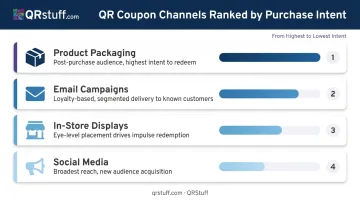
Email is ideal for loyalty-based or personalized coupon delivery — each recipient gets the offer directly, and campaigns can be segmented by purchase history or customer tier.
A few placement basics make the difference between scans and ignored codes:
- Embed the QR code as an image in the email body with a subject line that signals the offer clearly
- For SMS, include a short fallback link for recipients on devices that don't display images
- Tie scan data back to ad performance using QRStuff's Meta Pixel and Google Ads integrations — valuable when running coordinated digital campaigns alongside email
Social Media and In-Store Displays
Social media (Instagram, Facebook, TikTok) extends reach beyond existing customers. Limited-time offers work best here — pair the QR code image with urgency-driven copy and a visible countdown. Paid ads with embedded QR codes drive offline-to-online conversion effectively.
In-store placements — end caps, window signs, table tents, receipts — work best with a single clear benefit and a visible CTA. A Uniqode case study cited by the U.S. Chamber of Commerce reported more than 150,000 QR code scans from 80,000 unique customers in one year from an offline QR campaign, showing the scale a well-placed offline QR campaign can reach.
Product Packaging and Post-Purchase Inserts
Packaging placements reach customers at peak satisfaction — right after a purchase decision. Use this moment for repeat purchase incentives ("Scan for 15% off your next order") or cross-sells. The QR code inside a package or on a receipt is one of the highest-intent placements available because the audience has already bought.
Key Variables That Determine Campaign Performance
Two businesses can run nearly identical QR coupon campaigns and get very different results. Four variables control the outcome.
Code Type
Static codes are permanent and untrackable. If your offer has an expiry, if you need scan data, or if there's any chance you'll need to update the destination, use a dynamic code. Once printed, a static code's destination is locked — there's no updating it after the fact.
QRStuff's dynamic QR codes are available from the Lite plan upward, with full analytics visible in the dashboard for every scan.
Design and Placement Visibility
A QR code that's too small, too low-contrast, or lacks a CTA simply won't be scanned. Practical rules:
- Minimum 2cm × 2cm for printed codes
- Maintain quiet zone — never crop the white border
- Use a frame with a short CTA ("Scan for 20% off")
- Test under the lighting conditions where the code will actually appear
Offer Mechanics
Specific, time-bound offers outperform vague ones. "20% off, expires Sunday" creates urgency. "Get a deal" does not.
Shared codes (one code, many users) are convenient to set up but hard to control. A single screenshot posted to a coupon forum can drive redemptions far past your intended audience — and your budget. Unique per-customer codes or usage caps prevent this — QRStuff's bulk generation feature makes individual code creation scalable.
Analytics and Tracking
QRStuff's analytics dashboard captures total scans, unique scans, device type, geographic location (country and city level), and time-of-day data for every dynamic QR code. This is what makes a campaign optimisable rather than just executable.
Teams that track scan-to-redemption rates by channel can identify which placements are driving actual purchases versus just scans, then reallocate accordingly. That separation between "scanned" and "converted" is where most campaigns find their biggest efficiency gains.
Common Mistakes That Kill QR Code Coupon Campaigns
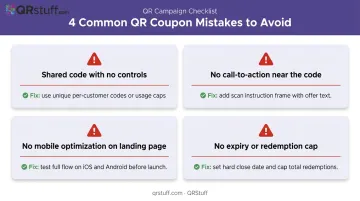
Most QR code coupon campaigns don't fail because of the offer — they fail because of avoidable setup errors. Here are the four most common ones:
- Single shared code with no controls. A QR code encoding "SAVE20" can be screenshotted and shared publicly within hours. Use unique per-customer codes, usage caps, or platform-level redemption limits instead.
- No call-to-action near the code. A bare QR code with no context gets ignored. Always pair it with a short instruction ("Scan for 20% off") and a visible label or frame.
- No mobile optimization on the landing page. If the destination is slow, unresponsive, or buries the offer behind multiple steps, most scanners abandon before redeeming. Test the full flow on both iOS and Android before launch.
- No expiry date or redemption cap on high-value offers. Open-ended promotions invite over-redemption and kill urgency. Set a hard close date, and for significant discounts, cap total redemptions — this protects your budget and drives faster action.
Frequently Asked Questions
How do I use a QR code coupon?
Open your smartphone camera (no app needed), point it at the QR code, and tap the notification that appears. You'll be taken to a coupon page or have the discount applied automatically — the whole process takes a few seconds and works in-store or online.
What is the difference between a static and dynamic QR code coupon?
Static codes are fixed after creation and can't be updated, tracked, or expired without reprinting. Dynamic codes route through a redirect that can be changed anytime and log every scan. For coupon campaigns, dynamic codes are the right choice.
Can QR code coupons be screenshot-shared?
Yes, if you're using a single shared code. Preventing overuse requires unique per-customer codes, usage caps, or locking a code after first redemption. QRStuff's bulk generation feature makes unique code distribution practical at scale.
Where should I place QR code coupons to get the most scans?
High-intent placements include product packaging, segmented email campaigns, and in-store displays at eye level. Social media broadens reach for new audiences. Packaging and email consistently deliver the strongest redemption rates.
How do I track whether my QR code coupon campaign is working?
Dynamic QR codes provide scan-level data — total scans, unique scans, location, device type, and time. Pair this with redemption tracking on your coupon or checkout platform to calculate your scan-to-redemption rate and measure actual campaign ROI.
Do customers need to download an app to scan a QR code coupon?
No. Modern iOS and Android smartphones scan QR codes directly through the native camera app. No third-party app required.