But most people scanning or displaying these codes don't fully understand what actually happens. What information gets shared? Can you see who scanned yours? Does scanning one give someone access to your account?
The confusion is understandable — and it creates real blind spots. This guide breaks down exactly what happens when your WhatsApp QR code is scanned, what's visible to the scanner, what isn't, and how to stay in control.
Key Takeaways
- Two QR types exist: the in-app contact QR (WhatsApp Settings) and a link QR (encodes a wa.me URL for businesses)
- Scanning your in-app QR lets someone add you as a contact and see your name, profile photo, and status — nothing else
- A link QR opens a chat window directly on the scanner's phone — no contact saving needed
- WhatsApp does not notify you when your in-app QR is scanned
- Reset your in-app QR anytime to invalidate it; link QR codes built on platforms like QRStuff can be tracked, updated, or deactivated
What Is a WhatsApp QR Code?
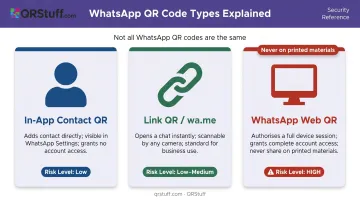
Not all WhatsApp QR codes work the same way. There are three distinct types, and confusing them leads to most of the security concerns people have.
The In-App Contact QR
Found in WhatsApp Settings → QR icon next to your name, this code encodes your WhatsApp contact identity. When someone scans it, they can add you as a contact without manually typing your number — that's the full extent of what it does.
The WhatsApp Link QR
This encodes a wa.me/[number] URL. Any camera or QR reader app can scan it, and WhatsApp opens immediately with a pre-populated chat window. No WhatsApp QR scanner needed. Businesses use this type on menus, websites, and printed materials to let customers start conversations instantly.
Platforms like QRStuff let you generate these with a phone number and optional pre-filled message, plus custom branding (logos, colors, shapes) on paid plans. You can also create them as dynamic codes, which means you can edit the destination or track scans without reprinting.
The WhatsApp Web/Linked-Device QR
This one is different from the other two. It authorises a full device session — appearing only on web.whatsapp.com or within the linked-device flow. This is the only WhatsApp QR that grants account access.
A contact QR or link QR printed on a business card cannot log anyone into your account. Only the WhatsApp Web QR can do that — which is why it should never appear on physical materials.
What Happens When Someone Scans Your WhatsApp QR Code?
The sequence of events depends entirely on which type is being scanned.
Scanning Your In-App Contact QR
- The scanner opens WhatsApp and navigates to Settings → QR Code → Scan Code (or uses their camera directly through WhatsApp)
- A confirmation screen appears showing your display name and profile photo — the scanner must actively tap "Add to contacts" to proceed
- You appear in their contacts once confirmed; they can message or call you
- You receive no notification — WhatsApp does not alert you that the scan occurred
- You are not automatically added back to your own contacts list
The in-app QR doesn't expire on its own. According to WhatsApp, it remains valid until you manually reset it or delete your account.
Link QR codes work differently — and any camera can read them, no WhatsApp scanner required.
Scanning a WhatsApp Link QR
- Any camera app can decode it — no WhatsApp QR scanner required
- WhatsApp opens on the scanner's phone with a chat window pre-loaded to your number
- If the QR creator added a pre-filled message, that text appears in the message field ready to send
- The scanner can contact you immediately without saving you as a contact first
- You have no visibility into who scanned unless you created the QR on a platform with scan analytics
This is the key tradeoff for businesses: link QR codes are more accessible (no WhatsApp scanner required) but offer zero native tracking. Dynamic QR codes with analytics fill that gap by logging each scan's timestamp, device type, and geographic location — so you know exactly when and where your code is being used.
What Can (and Can't) the Scanner See?
Understanding exactly what a scanner can access — and what stays locked — clears up most concerns about sharing your WhatsApp QR code.
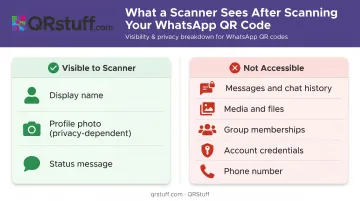
What IS visible after scanning your in-app QR
- Your display name as set in WhatsApp
- Your profile photo (subject to your privacy settings)
- Your status message (subject to your privacy settings)
Exactly what any WhatsApp contact would see. No more.
Your privacy settings apply to strangers who scan your QR too. If your profile photo is set to "My Contacts" and the scanner hasn't been added as a contact yet, they'll see a placeholder, not your actual photo.
What is NOT accessible
| Data | Accessible via QR scan? |
|---|---|
| Your messages or chat history | No |
| Media, files, or documents | No |
| Group memberships | No |
| Account credentials | No |
| Phone number (via QR alone) | No — may appear once a chat opens |
The account access question
Scanning your contact QR or a link QR cannot log someone into your WhatsApp. It cannot let them read your messages. WhatsApp's end-to-end encryption protects messages in transit, and a QR scan doesn't touch that layer at all.
The only QR that authorises account access is the WhatsApp Web/linked-device QR — a completely different flow that requires real-time generation inside the app.
Security Risks Worth Knowing
The risks from sharing your WhatsApp QR code are real but scoped. Understanding which type carries which risk matters.
In-app contact QR risks:
- Strangers can add you as a contact if the code is shared publicly
- WhatsApp itself warns to share your QR only with trusted people, since anyone with the code can forward it to others
- Unwanted contacts can send phishing messages or spam once added
WhatsApp link QR risks:
- Widely distributed link QRs can funnel unlimited inbound messages to your number
- For businesses, this is by design; for individuals, it can feel invasive
- No native way to revoke access once the code is circulating
The WhatsApp Web confusion risk — most serious of all:
Malwarebytes documented a campaign where attackers pushed victims to scan device-linking QR codes, effectively authorising a malicious device to access their account. This isn't a contact QR attack — it exploits the WhatsApp Web/linked-device flow.
WhatsApp Web QR codes only appear on web.whatsapp.com or inside the app's linked-device flow. They are never on printed materials. A QR code on a physical sign or flyer claiming to be WhatsApp is a contact QR or link QR — not a session-authorization code.
How to Control Who Can Scan Your WhatsApp QR Code
For personal in-app QR codes
- Reset it via Settings → QR Code → Reset QR Code. The old code becomes invalid immediately — useful if you shared it somewhere you now regret.
- Tighten privacy settings by setting your profile photo, status, and "Last Seen" to "My Contacts" or "Nobody" — unknown scanners will see minimal information even after adding you.
- Enable two-step verification (Settings → Account → Two-Step Verification) to add a PIN requirement if someone tries to re-register your number.
For business link QR codes
Static QR codes offer no control after printing — anyone with a copy can keep using it indefinitely. Dynamic QR codes solve this.
With a dynamic WhatsApp QR code from a platform like QRStuff, you can:
- Track scans by count, location (country and city), device type, and timing
- Update the destination without reprinting — point the code to a new number or landing page instantly
- Deactivate the code if it's been misused or the campaign has ended
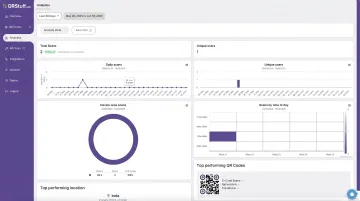
For any business running WhatsApp QR codes across printed menus, flyers, or signage, the ability to update or deactivate without reprinting is the difference between a minor fix and a costly reprint run.
Frequently Asked Questions
What happens if someone scans your WhatsApp QR code?
For the in-app QR, they see a confirmation screen with your name and profile photo, then can choose to add you as a contact. They gain access to your name, photo, and status — nothing else. For a link QR, WhatsApp opens directly on their phone with a chat window ready.
Can someone hack my WhatsApp by scanning my QR code?
No. Scanning your in-app contact QR or a link QR cannot compromise your account. The only WhatsApp QR that authorizes account access is the WhatsApp Web/linked-device QR, which only appears on web.whatsapp.com — never on printed materials.
Does WhatsApp notify you when someone scans your QR code?
No. WhatsApp sends no notification when your in-app QR is scanned. The only way you'll know is if they message you afterward or you spot a new unknown contact in your list.
Can I see who scanned my WhatsApp QR code?
WhatsApp's built-in QR feature offers no scan tracking. If you use a third-party platform like QRStuff with a dynamic link QR, you can see aggregate data: scan count, location, device type, and timestamps. Individual scanner identities are not revealed.
How do I stop someone from using my WhatsApp QR code?
For the in-app QR: Settings → QR Code → Reset QR Code. This invalidates the existing code. For link-based QR codes created through a platform, you can update or deactivate the destination URL without reprinting.
Do WhatsApp QR codes expire?
WhatsApp's in-app QR code does not expire on its own — it's valid until you reset it or delete your account. For QRStuff-generated link QR codes, static codes don't expire, while dynamic codes remain active as long as your subscription is active.