The problem is that most businesses stop at "generate and display." They pick a code, print it, and move on. Then scan rates disappoint, transactions get abandoned, or worse, a tampered code redirects a customer to a fraudulent page. According to Juniper Research, global QR payment value is forecast to grow 50% from $5.4 trillion in 2025 to over $8 trillion by 2029 — but that growth only benefits businesses that set things up correctly.
This guide covers what you need before accepting QR payments, how to set them up properly, where they work best, and the practices that separate reliable deployments from broken checkout flows.
Key Takeaways
- Match code type to use case: static for fixed payment pages, dynamic for anything that may change
- You need a payment processor account, a payment URL, and a QR generator before deploying
- Always test end-to-end on at least two devices before any code goes live
- Dynamic QR codes let you update destination URLs without reprinting and track scan-level analytics
- Inspect physical QR codes regularly for sticker overlays that redirect to fraudulent payment pages
When Should You Use QR Code Payments?
QR payments make sense when your customers have smartphones available and when reducing hardware dependency, minimising contact, or enabling remote payment collection is a clear operational goal.
They fit best in these scenarios:
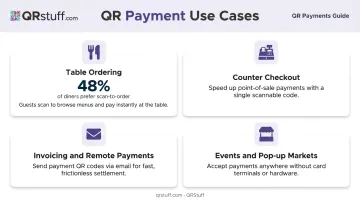
- Table ordering and pay-at-table — restaurants see strong uptake here; the National Restaurant Association found that 48% of limited-service and 46% of full-service restaurant customers were willing to pay by QR code in 2024
- Counter checkouts — a single mounted code handles all transactions without additional hardware
- Invoicing and remote payments — QR codes embedded in PDFs or emails let clients pay immediately on any device
- Events and pop-up markets — QR codes replace card terminals entirely in temporary setups
Where QR Payments Are Frequently Misused
Not every context is appropriate. Common mistakes include:
- Placing a static code in a low-visibility location with no fallback payment option
- Deploying QR payments without briefing staff or informing customers what to expect after scanning
- Using a single shared code across multiple locations, which breaks attribution and creates a single point of failure
- Applying QR payments in environments where customer smartphone access is inconsistent
QR payments work alongside staffed POS flows. In settings where customers regularly need help completing a transaction, they should be one option available, not the only one.
What You Need Before Accepting QR Code Payments
Three things must be in place before any code goes live:
1. A Payment Service Provider Account
You need a merchant account with a PSP that supports QR checkout — Square, Stripe, PayPal, or a bank-hosted equivalent. The QR code itself carries no payment logic; it links to an active checkout page hosted by your processor. Without a live merchant account, the code scans to nothing useful.
2. A QR Code Generator
Your PSP may provide a basic generator, but a dedicated platform gives you more control. QRStuff supports payment-specific QR code types for PayPal, Venmo, UPI, and other services, allowing you to pre-fill payment amounts and item descriptions directly into the code's data. The platform also supports dynamic codes on paid plans — meaning you can update the destination URL if your payment provider changes without reprinting materials.
For ongoing payment use, a paid plan is required. Here's how the tiers compare:
- Free Suite: Caps codes at 50 scans/month and expires them after 30 days — neither works for ongoing payment flows
- Full Suite (from $15/month): Removes scan limits and supports 250 dynamic codes, enough for most small-to-mid-size payment deployments
3. A Display and Placement Plan
Decide before generating the code where it will live: printed signage, a screen at checkout, an invoice PDF, or a website. The display environment affects scan success rate and determines what output format you need. Vector files (SVG or EPS) work best for printed signage; high-resolution PNG is sufficient for digital use.
How to Set Up and Use QR Code Payments
Effective QR payment deployment follows a defined sequence. Skipping steps, especially testing, accounts for most real-world failures.
Setting Up Your Payment and Code Configuration
Step 1: Retrieve your payment URL. Log into your PSP dashboard and copy the exact payment URL, hosted checkout link, or merchant ID. This is the data your QR code carries, and any error here means every subsequent scan sends customers somewhere broken.
Step 2: Choose static or dynamic. Make this decision before generating:
| Code Type | Best For | Limitations |
|---|---|---|
| Static | Fixed-price pages, permanent payment links | Cannot update after generation; no tracking |
| Dynamic | Updatable destinations, multi-location, analytics | Requires paid plan; adds redirect layer |
For most businesses, dynamic is the right default. QRStuff's dynamic codes on Lite, Full, and Enterprise plans let you update the destination URL at any time without regenerating or reprinting the physical code.
Generating and Deploying Your QR Code
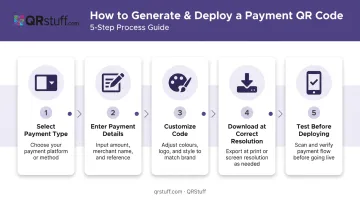
In QRStuff, the process runs as follows:
- Select your payment type — PayPal, Venmo, UPI, or a standard URL for other processors
- Enter payment details — email address or phone number, optional pre-filled amount and item description
- Customize the code — add your logo, brand colours, and adjust styling (available on paid tiers)
- Download at appropriate resolution — SVG/EPS for print, high-resolution PNG for digital
- Test before deploying — scan on at least two different devices and confirm the full checkout flow completes correctly, including currency, amount display, and confirmation screen
Managing Transactions in Practice
Before customers see the code, tell them exactly what to expect when they scan it. Unclear expectations cause hesitation and abandoned transactions. At minimum, customers should know:
Before customers scan, make sure they know what to expect. Unclear flows cause hesitation and abandoned transactions. At minimum, they should understand:
- Whether an amount is pre-filled or they need to enter it
- Which payment methods are accepted
- What the confirmation screen looks like so they know the payment went through
Staff at in-person locations should be able to walk a customer through the flow, not just point at the code. At restaurant counters and pop-up events, one confused customer during checkout creates a queue.
Monitoring Performance
QRStuff's analytics dashboard for dynamic codes tracks:
- Total and unique scans — distinguishes new customers from repeat engagements
- Time-of-day and date patterns — identifies peak transaction periods
- Device type and OS — informs mobile payment page optimization
- Geographic data — country and city-level breakdown
A sharp drop in scans after initial deployment usually indicates a display problem — poor lighting, code positioned too high or too low — rather than customer disinterest. Adjust placement and retest before swapping code types or regenerating entirely.
Best Practices for QR Code Payment Deployments
Use Dynamic Codes as the Default
Static codes cost nothing extra per code, but they offer no tracking and require reprinting for any change. For businesses operating across more than one location or channel, dynamic codes pay for themselves quickly in avoided reprint and redistribution costs alone.
Inspect Physical Codes Regularly
The FBI has warned that malicious QR codes can steal credentials, install malware, and redirect payments. Cofense reported a 331% increase in QR-code active threat reports in 2023. The most common physical attack is simple: a fraudster places a sticker overlay on your printed code and customers unknowingly pay a different destination.
Practical countermeasures:
- Laminate printed QR code signage and use sealed display holders to reduce the tamper surface
- Check codes at the start of every shift in high-traffic locations
- Instruct customers to verify the destination URL before completing payment
Size, Contrast, and Quiet Zone
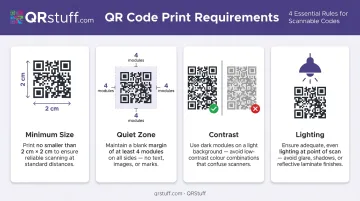
Scanning fails when codes are too small, too low-contrast, or missing their quiet zone. Follow these minimums:
- Minimum size: 2 cm × 2 cm for simple URLs (QRStuff recommends this as a conservative baseline)
- Quiet zone: At least four modules of clear border on all sides — nothing printed in this margin
- Contrast: Dark code on a light background; avoid printing on textured or reflective materials
- Lighting: Test under the actual lighting conditions of the deployment location, not at your desk
Separate Codes Per Location
Once your physical placement is solid, the next operational step is code isolation. Never share one code across multiple locations or payment points — use a separate code for each so that:
- Scan attribution stays accurate in analytics
- Individual codes can be retired or updated without affecting others
- A compromised code at one location doesn't cascade to others
For multi-location operators, generating location-specific codes at scale doesn't have to be manual. QRStuff's Full Suite supports bulk generation of up to 500 dynamic codes, and the Enterprise tier offers unlimited bulk generation via API.
Frequently Asked Questions
What is the best QR payment app?
The right choice depends on your business model. Square suits in-person retail and restaurants with native QR tools and POS integration. Stripe fits businesses needing custom or developer-configured checkout flows. PayPal works well for remote and invoice-based payments.
What is the safest way to interact with QR codes for payments?
Scan only codes from verified merchants and preview the destination URL before proceeding. Tampered codes, unsolicited codes sent via email or text, and unbranded codes in public spaces carry elevated fraud risk. Tokenization and biometric authentication in payment apps add a further layer of protection.
What is the difference between static and dynamic QR codes for payments?
Static codes contain fixed data and cannot be changed after generation — suited for permanent payment pages. Dynamic codes store a redirect URL that can be updated at any time, support real-time scan analytics, and are the practical choice for any business that needs flexibility or scan-level data.
Do customers need a specific app to pay via QR code?
Most hosted checkout flows — linked to platforms like Stripe or Square — require no customer app. The scan opens a payment page in the device's browser. App-dependent flows like Venmo QR payments require the customer to have that specific app installed.
How do I set up a QR code for payment?
Establish a merchant account with a payment processor, retrieve your payment URL or hosted checkout link, generate a QR code using a tool like QRStuff, and test it end-to-end before displaying it. For ongoing deployments, use a dynamic code so you can update the destination without reprinting.
Can QR code payments be used for both online and in-person transactions?
Yes. The same underlying infrastructure — a payment URL or hosted checkout page — supports both channels. Embed the QR code in invoices, emails, or web pages for remote payments; display it at physical locations for in-store checkout.