Introduction
A single expired destination URL can silently redirect customers to a dead page across every location in your network simultaneously. That's the reality of managing QR codes at scale — and it catches most multi-location operators off guard.
That operational reality is what separates multi-location QR management from single-site deployments. A retail chain, restaurant group, or franchise network faces three simultaneous problems: keeping destination content current at every site, understanding which locations are actually driving scans, and controlling who can modify codes without creating chaos across the campaign.
Static QR codes — still common at launch because they're simpler to generate — make all three problems worse. Once printed on signage across 200 branches, a static code cannot be updated without physically replacing materials at every location.
The scale of that risk is growing. The U.S. QR scanner user base is projected to hit 99.5 million by 2025, with restaurants, retail, and hospitality driving the bulk of adoption. The cost of getting this wrong — in wasted print materials and lost customer conversions — compounds quickly.
This guide breaks down what actually separates capable multi-location QR platforms from the rest, so you can make a decision before the next promotion goes live — not after.
Key Takeaways
- Dynamic QR codes are essential — update destinations instantly without reprinting a single code
- Multi-location management requires per-location analytics, not just aggregate scan counts
- QRStuff is built for enterprise scale: bulk generation, per-location analytics, API access, and SOC2/GDPR compliance
- Evaluate platforms on dynamic editing, location-segmented analytics, bulk creation, and role-based permissions
- Pick a platform that scales from 10 to 1,000 locations without a rebuild
What Makes Multi-Location QR Code Campaigns Uniquely Complex
The Core Problem With Static Codes at Scale
For a single-location business, a broken QR code means reprinting one sign. For a 200-location chain, it means the same broken experience playing out across every storefront at once.
Static QR codes embed the destination URL permanently into the code's pattern. Once printed, the destination is locked. When a promotional URL changes, a seasonal landing page goes offline, or a web team restructures URLs during a site migration, every printed static code breaks — across every location where it appears.
The Heinz ketchup campaign offers a cautionary example: QR codes printed on bottles in Germany between 2012 and 2014 pointed to a domain that expired after the campaign ended, redirecting scanners to an adult website. The brand had no way to fix it without physically replacing millions of units of packaging.
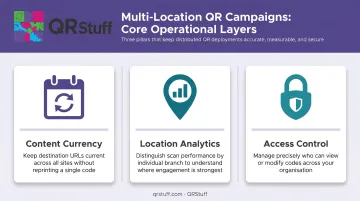
Three Layers of Operational Complexity
Multi-location QR campaigns require managing three distinct problems at once:
- Keeping each location's QR destinations current as promotions change, URLs shift, or seasonal content rotates
- Distinguishing scan performance by individual location rather than treating all branches as a single aggregate
- Controlling who can modify codes — and preventing local staff from accidentally breaking a network-wide campaign
Common Mistakes That Surface After Deployment
Most problems are avoidable, but they're rarely considered before launch:
- Deploying static codes because they seem easier to generate
- Failing to tag codes by location before printing, making post-deployment analytics useless
- Having no documented process for what happens when a destination URL breaks or a campaign ends
- Assigning all team members the same access level, allowing local staff to modify codes beyond their location
Best Solutions for Managing Multi-Location QR Code Campaigns
Each platform below was evaluated on multi-location fit: centralized management, location-segmented analytics, bulk operations, and enterprise security — not just QR generation capability.
QRStuff
Background: QRStuff has operated since 2008, serving over 250,000 businesses globally including Coca-Cola, Walmart, Marriott International, and Amazon. That track record makes it one of the most proven options for enterprise-scale multi-location deployments.
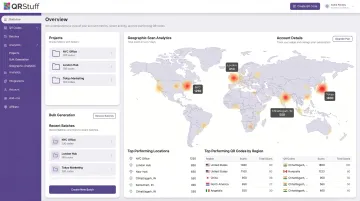
Why it works for multi-location management: The platform combines dynamic QR codes with geographic scan analytics, unlimited bulk generation at the Enterprise tier, and a full RESTful API for programmatic code creation. Enterprise accounts support project-based organizational hierarchy with role-based access controls — administrators can restrict location managers to their own codes while headquarters retains global oversight. Additional user seats are available at £50/user/month on Enterprise plans.
The API covers creation, management, and analytics retrieval across 40+ QR code types, making it viable for organizations that need QR management integrated into existing CMS, POS, or marketing automation systems.
| Feature Area | Details |
|---|---|
| Key Multi-Location Features | Dynamic QR codes, unlimited bulk generation (Enterprise), project-based organization, RBAC, API access, white-label custom domains, 40+ QR types |
| Analytics Capability | Geographic data (country + city level), device/OS breakdown, total vs. unique scans, time-based insights, CSV export |
| Security & Compliance | SOC2 and GDPR compliant, SSO (SAML 2.0 + OpenID Connect), 2FA, password-protected codes, audit logging |
| Pricing (GBP) | Lite £8/mo, Full Suite £20/mo, Enterprise £185/mo (or £2,000/year); no scan limits on paid tiers |
| Enterprise Support | Dedicated account manager, 24/7 priority support, structured onboarding across consultation, configuration, deployment, and optimization |
Uniqode (formerly Beaconstac)
Background: Uniqode is an enterprise QR platform with a strong focus on brand management and multi-location retail use cases, serving marketing teams that need structured campaign organization across distributed operations.
Standout for multi-location use: Uniqode's folder and subfolder system lets teams group codes by campaign, event, or location. Labels, filters, and watchlists support large-scale code management, while its Organizations feature includes Admin, Editor, and Viewer roles for governance. GPS analytics and location-based QR management are documented in its help resources.
| Feature Area | Details |
|---|---|
| Key Multi-Location Features | Folders/subfolders, labels, filters, watchlists, bulk creation, bulk operations, role-based organizations |
| Analytics Capability | GPS analytics, location-based QR reporting, campaign-level scan tracking |
| Pricing | Starter, Lite, Pro, Plus, and Business+ (custom enterprise tier); verify current pricing at uniqode.com/pricing |
Bitly
Background: Bitly is widely recognized for link management and URL shortening, with QR code generation integrated into its broader link infrastructure. It's a natural fit for teams already managing links through Bitly's platform.
Standout for multi-location use: Bitly supports dynamic QR codes with CSV/XLSX bulk creation, and its Campaigns feature lets teams organize codes by initiative, geographic region, or product line. The unified link and QR analytics interface is a genuine advantage for marketing teams already operating in Bitly's ecosystem. Higher pricing tiers unlock city-level and device-type analytics. Enterprise customers can access 55+ pre-built integrations through the Bitly Marketplace.
| Feature Area | Details |
|---|---|
| Key Multi-Location Features | Dynamic QR codes, CSV/XLSX bulk creation, campaign organization by region or initiative, Bitly Marketplace integrations |
| Analytics Capability | City-level and device-type analytics on higher tiers; aggregate/country-level on lower tiers |
| Pricing | Free, Core ($10/mo), Growth ($29/mo), Premium ($199/mo), Enterprise (custom); verify at bitly.com/pages/pricing |
QR Tiger
Background: QR Tiger serves 850,000+ brands across 17+ industries, with strong positioning in retail and hospitality. Its multi-URL routing capability makes it particularly relevant for brands running location-based content variations.
Standout for multi-location use: QR Tiger's Smart QR feature routes users based on scan location/geofencing, device language, time of day, or number of scans — enabling location-specific content without maintaining separate codes for every placement. White-label options and custom short domains support brand consistency, and dashboard folders organize codes by campaign. Bulk QR creation is available on enterprise tiers.
| Feature Area | Details |
|---|---|
| Key Multi-Location Features | Multi-URL routing (location, device, time), dashboard folders, white-label domains, bulk creation |
| Analytics Capability | Real-time dashboard: scan frequency, location, timestamp, device type |
| Pricing | Free, Regular ($7/mo), Advanced ($16/mo), Premium ($37/mo), Enterprise (custom); verify at qrcode-tiger.com/payment |
Flowcode
Background: Flowcode is a design-forward enterprise QR platform trusted by over 75% of Fortune 500 companies. Its analytics and offline-to-online attribution set it apart for performance-focused marketing teams.
Standout for multi-location use: Flowcode's Brand Kits and design studio enforce visual consistency across deployments, while its parent-child data structure and workspace-based permissions support organizational hierarchy. Analytics include advanced geolocation, UTM traffic charts, conversion pixel attribution, and SmartFlow optimization. CRM and CDP integrations (Salesforce, HubSpot, Snowflake, Mailchimp) make it strong for teams tracking offline-to-online attribution.
| Feature Area | Details |
|---|---|
| Key Multi-Location Features | Brand Kits, workspaces, parent-child data structure, Admin/Member/View Only roles |
| Analytics Capability | Advanced geolocation, device/time/date breakdowns, UTM charts, conversion pixel attribution |
| Pricing | Free, Pro Plus ($25/mo annually), Growth ($250/year), Growth Plus (usage-based), Enterprise (custom); verify at flowcode.com/pricing |
Key Features to Look for in a Multi-Location QR Code Platform
Dynamic QR Codes With Editable Destinations
This is the single feature that changes the operational math at scale. Dynamic QR codes use an intermediary redirect: when scanned, the code points to a short URL that records the scan and forwards to the final destination. That destination can be changed from the dashboard at any time without altering the printed code.
For a 100-location retailer, this means a broken URL or expired promotion is fixed in minutes, not days of physical reprinting. Static codes offer no equivalent option.
Location-Segmented Analytics
Aggregate scan counts answer the wrong question. A multi-location manager needs to know which branch in Manchester is underperforming compared to Birmingham, whether the issue is placement, timing, or the destination itself, and what device breakdown looks like at each site.
Platforms like QRStuff provide geographic data at country and city level, combined with device/OS breakdowns, unique vs. total scan differentiation, and time-based trends — all filterable per individual code or campaign.
Bulk Generation and Batch Management
Best practice for multi-location campaigns is one unique QR code per placement per location. A 50-location chain running codes at the entrance, on menus, and on receipts needs 150 separate codes — each tracked individually. Manual creation at that volume is a bottleneck.
Look for:
- CSV or Excel-based batch upload
- Print-ready export formats (PDF, SVG, high-res PNG at 300 DPI minimum)
- Bulk download in organized ZIP files with consistent naming
- Enterprise tiers that remove batch size ceilings
Team Permissions and Access Controls
Centralized marketing teams set brand guidelines and global campaign rules. Local branch managers need access to their own data — not the ability to modify codes belonging to other locations.
Role-based access controls (RBAC) with project-level permissions resolve this. QRStuff's Enterprise plan supports title and department controls, specific QR code access grants, and project-level permissions — giving headquarters global oversight while branch managers operate within defined boundaries.
API and System Integrations
Enterprise organizations running dozens of locations need QR management integrated into existing systems. An API that supports programmatic code creation, destination updates, and analytics retrieval removes manual overhead that would otherwise grow with every new location added.
Common integration needs across retail, hospitality, and franchise environments include:
- Loyalty and rewards platforms
- POS and inventory systems
- CRM tools for attributing offline scans to customer records
- Marketing automation and CMS platforms
How We Chose These Solutions
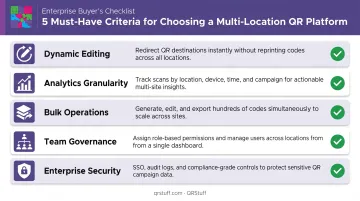
Platforms were assessed on multi-location campaign fitness — not general QR generation quality. The criteria weighted most heavily:
- Dynamic editing capability — can destinations be updated without reprinting?
- Analytics granularity — does reporting segment by location, device, and time, or only by aggregate?
- Bulk operations — can hundreds of codes be generated, organized, and exported efficiently?
- Team governance — are role-based permissions granular enough for distributed organizations?
- Enterprise security — does the platform hold SOC2, GDPR, or equivalent compliance certifications?
These criteria expose where most platforms fall short at scale — and where buyer mistakes typically happen. The most common one: choosing based on the cost of generating a single code. The real cost comparison includes:
- Operational overhead for managing codes manually across locations
- Reprinting expenses when destinations break or campaigns change
- Revenue impact from campaign data too coarse to drive location-specific decisions
Every platform below was evaluated against all five criteria — with particular weight given to analytics depth and bulk operations, since those are what separate capable tools from genuinely enterprise-ready ones.
Conclusion
Managing QR codes across multiple locations is an operational discipline. The right platform reduces reprinting costs, surfaces location-level performance data, and lets marketing teams move fast without compromising brand consistency or creating broken customer experiences at individual sites.
If your current setup uses static codes, lacks per-location analytics, or relies on spreadsheets to track what's deployed where, you're likely missing campaign performance data you can't recover retroactively.
QRStuff's Enterprise plan is built specifically to close those gaps. Key capabilities include:
- Dynamic QR codes — update destinations without reprinting
- Bulk generation — deploy hundreds of location-specific codes at once
- Geographic scan analytics — track performance by location in real time
- Project-based organization with RBAC — control who manages which sites
- API access — integrate QR workflows into existing systems
- SOC2 & GDPR compliance — meet enterprise security requirements
If multi-location QR management is a recurring operational challenge, QRStuff's Enterprise tier provides the infrastructure to run it at scale.
Frequently Asked Questions
What is the difference between static and dynamic QR codes for multi-location campaigns?
Static QR codes permanently embed the destination URL. Once printed, you can't change the destination without reprinting. Dynamic QR codes store a redirect updatable from a dashboard, making them essential when destinations change and reprinting across dozens of sites is costly.
How do I track QR code performance across multiple locations?
You need a platform that assigns each code to a specific location and reports scan data segmented by location, device type, and time. Aggregate scan counts alone won't tell you which sites are underperforming or where individual placements need adjustment.
Can I update QR code destinations without reprinting across all locations?
Yes. Dynamic QR codes allow destination changes from a dashboard without altering the printed code. A promotion can be updated, a broken URL fixed, or seasonal content swapped across all locations instantly — no reprinting required.
How many QR codes do I need for a multi-location campaign?
Best practice is one unique code per distinct placement per location. A 50-location chain with entrance, menu, and receipt placements would use 150 separate codes, each tracked individually. That volume makes bulk generation a core platform requirement, not an optional feature.
What precautions should be taken when using QR codes in public places?
Key precautions include:
- Use tamper-evident placement to prevent code swaps with malicious alternatives
- Point codes only to HTTPS destinations
- Use password protection for sensitive content
- Display a clear CTA near the code so users know where they're scanning before they do
How do I maintain brand consistency across a multi-location QR code campaign?
Use a platform with centralized design controls — custom styling (colors, logos, shapes) applied at the campaign level ensures every location uses on-brand codes. Role-based permissions prevent individual locations from generating off-brand or unauthorized codes.