Pick the wrong platform and you're looking at broken links after a subscription lapses, print runs with no way to track performance, and static codes that can't adapt when your campaign changes. The difference between a basic static generator and a business-grade dynamic platform isn't just features — it's the difference between a QR code that works once and one that powers measurable campaigns over time.
This guide covers what to look for, which platforms lead in 2026, and how to match the right tool to your actual use case.
Key Takeaways
- Dynamic QR codes let you update destinations post-print and track every scan — static codes do neither
- Enterprise-grade platforms require GDPR/SOC2 compliance, custom domains, and API access
- Free tools work for one-off needs; ongoing campaigns require analytics, security, and codes that don't expire
- QRStuff, Uniqode, Bitly, QRCode Monkey, and QR Tiger cover the range from free static codes to enterprise-grade platforms
- Shared short-link domains carry real security risks if they expire — platform ownership matters
What to Look for in a QR Code Generator
Static vs. Dynamic: The Core Decision
Static QR codes permanently encode their destination in the pattern itself. Once printed, they cannot be changed. Dynamic codes encode a short redirect URL instead — meaning you can update the destination from a dashboard at any time without touching the physical code. Only dynamic codes support scan tracking.
Static works fine for a one-time flyer or personal use. Any campaign involving print runs, evolving links, or performance measurement requires dynamic codes — there's no practical alternative.
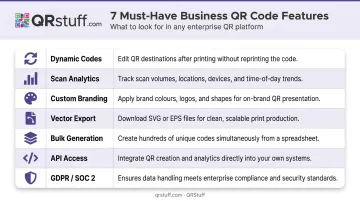
Must-Have Features for Business Use
| Feature | Why It Matters |
|---|---|
| Dynamic QR codes | Update destinations post-print; essential for active campaigns |
| Scan analytics | Track location, device, time — ties directly to campaign ROI |
| Custom branding | Logo, colors, shapes for brand-safe deployment |
| Vector export (SVG, EPS) | Required for professional print without pixelation |
| Bulk generation | Scales to product packaging, retail, and enterprise rollouts |
| API access | Enables programmatic creation and CRM integration |
| GDPR / SOC2 compliance | Required for regulated industries or EU audiences |
Common Pitfalls to Avoid
- Shared short-link domains — if a platform's domain expires or gets acquired, your QR codes redirect somewhere you didn't intend. The Heinz ketchup incident in 2015 is the most-cited real-world case: their campaign domain lapsed, got purchased by an adult entertainment company, and bottles already in market started redirecting to pornography.
- Scan limits and watermarks on free plans — QR Tiger's free tier shows a logo popup before redirecting; Bitly's free plan caps users at two QR codes per month.
- No HTTPS or compliance documentation — any platform handling user scan data should have clear GDPR and security documentation.
Best QR Code Generators for 2026
These tools were evaluated on reliability, feature depth, security, pricing value, and real-world business applicability.
QRStuff
QRStuff has been running since 2008 — which in QR code terms is practically ancient. The platform now serves 250,000+ businesses globally, with Fortune 500 clients including Coca-Cola, Walmart, Amazon, Google, Marriott, and JP Morgan.
The platform supports 40+ QR code types, spanning URLs, vCards, WiFi credentials, payment platforms, social media, events, audio, video, and PDF files. Dynamic codes allow unlimited destination changes post-print, with no limit on how many times you update them.
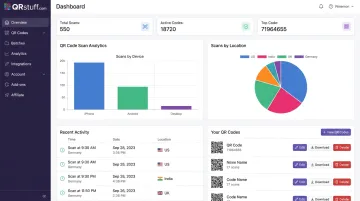
Analytics cover total and unique scans, geographic data at country and city level, device and OS breakdowns, and time-based insights. Paid plans include no expiration and unlimited monthly scans. The Enterprise tier adds unlimited bulk generation, full API access (RESTful, covering creation, management, and analytics), SSO, white-label branding, custom short URL domains, and a dedicated account manager with 24/7 support.
For export formats, free users get 72dpi PNG only. Paid plans unlock high-resolution raster (up to 600dpi) and vector formats: SVG, EPS, PDF, DXF.
| Key Features | 40+ QR types, dynamic editing, real-time scan analytics, bulk generation, API, password protection, 2FA, SSO, white-label |
| Security & Compliance | GDPR compliant, SOC2 compliant, 99.9% uptime SLA (actual uptime 99.968% since 2008) |
| Pricing | Free ($0), Lite ($10/month), Full ($25/month), Enterprise ($250/month) |
| Best For | Businesses of all sizes needing scalable, secure QR infrastructure — particularly enterprises requiring compliance, API access, and bulk generation |
Uniqode (formerly Beaconstac)
Uniqode is built specifically for enterprise marketing teams and large organizations. The platform's analytics dashboards go deep — device, location, and time-based breakdowns with native CRM integrations for HubSpot, Salesforce, and Google Analytics. It also supports retargeting via Facebook and Google Ads, which is unique among QR platforms.
Dynamic codes, bulk generation, role-based access, and audit logs are standard. SOC2 and GDPR compliance are included.
The trade-off: pricing is higher than most alternatives, and the platform has a steeper learning curve than simpler tools. Dynamic QR codes become inactive if a subscription lapses, so operational continuity requires an active plan.
| Key Features | Dynamic QR codes, bulk creation, CRM integrations (HubSpot, Salesforce, GA), retargeting, role-based access, audit logs |
| Security & Compliance | SOC2, GDPR compliant |
| Pricing | Essential at $9/month (billed annually); Core at $49/month; 14-day free trial |
| Best For | Enterprise marketing teams and agencies managing large-scale, multi-channel campaigns that need deep CRM integration and retargeting |
Bitly
Bitly started as a URL shortener and grew into a full link management platform — QR codes came later but integrate tightly with what Bitly already does well. Every QR code is dynamic by default, and scan analytics feed directly into the same dashboard used for tracking shortened links.
If your team already uses Bitly for campaign tracking, adding QR codes to that workflow is seamless — that cross-channel visibility in a single dashboard is what sets it apart. Branded short URLs, SVG/PNG export, device data, geographic location, and referrer tracking are all included.
The trade-offs are worth knowing: the free plan caps at two QR codes per month, visual customization is more limited than dedicated QR platforms, and the Core plan's analytics only retain 30 days of data.
| Key Features | Dynamic QR codes by default, branded short links, scan analytics, cross-channel tracking, SVG/PNG export |
| Security & Compliance | HTTPS enforced; enterprise plans available |
| Pricing | Free (2 QR codes/month); Core at $10/month (billed annually) |
| Best For | Marketers already in the Bitly ecosystem who want QR codes integrated into existing link analytics workflows |
QRCode Monkey
QRCode Monkey is a static-first generator with strong visual customization — and it's genuinely free, with no watermarks on downloaded codes and no account required for basic use. Logo uploads, custom dot patterns, eye shapes, transparent backgrounds, and EPS/SVG/PDF export are all available without paying.
For designers and small businesses that need branded static codes for packaging, menus, or printed collateral, it's hard to beat the combination of customization depth and zero cost. There's no scan tracking at all, and dynamic codes aren't offered directly on the platform — users needing those features are redirected elsewhere.
| Key Features | Logo embedding, custom shapes and patterns, transparent backgrounds, EPS/SVG/PDF export, no account required |
| Pricing | Free for static codes; no dynamic QR pricing available directly on the platform |
| Best For | Designers and small businesses needing visually polished static QR codes for print — no tracking required |
QR Tiger
QR Tiger sits in the mid-market range, balancing a reasonably broad feature set against accessible pricing. It supports both static and dynamic codes, folder-based organization for managing multiple campaigns, multi-user access, Canva integration, and branded short URLs.
The free plan includes 3 dynamic QR codes but displays a logo popup/ad before redirecting and caps scans at 500 per code. The paid Regular plan ($7/month billed annually) removes ads, allows 12 dynamic codes, and includes advanced analytics and 500 API requests. Bulk creation at scale requires the Advanced plan ($16/month).
The interface can feel cluttered for new users, and analytics are less detailed than enterprise-focused platforms like Uniqode or QRStuff.
| Key Features | Static and dynamic QR codes, folder management, multi-user access, Canva integration, branded URLs, bulk creation (higher tiers) |
| Pricing | Free (3 dynamic codes, logo popup); Regular at $7/month; Advanced at $16/month (billed annually) |
| Best For | SMBs and growing marketing teams that need team collaboration and scalable QR management at a reasonable price |
How We Chose the Best QR Code Generators
Evaluation Framework
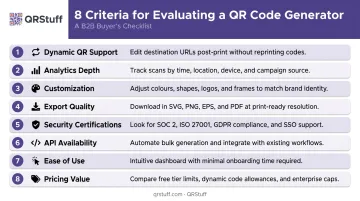
Each tool was assessed against eight criteria:
- Dynamic QR support — can destinations be updated post-print?
- Analytics depth — what scan data is available, and for how long?
- Customization — logo, colors, shapes, gradient support
- Export quality — vector formats for print-ready output
- Security certifications — GDPR, SOC2, HTTPS enforcement
- API availability — programmatic creation and management
- Ease of use — onboarding complexity relative to feature depth
- Pricing value — what you actually get at each tier
The most common selection mistake is evaluating only the free plan. Free tiers show capability under minimal load — they don't show how a platform performs when campaigns scale, compliance audits arrive, or the domain behind a printed code changes hands. Scalability, security, and domain control deserve as much weight as the feature checklist.
Why Security Isn't Optional
The Heinz incident from 2015 is memorable, but the underlying risk persists. Shared short-link domains can be acquired if a platform lets them expire. Any QR code printed on packaging, signage, or marketing materials that uses a third-party domain is only as safe as that domain's continued ownership.
QR code phishing ("quishing") has been documented in enterprise attacks, including a large campaign targeting a major energy company via QR codes embedded in email attachments. The UK NCSC notes that QR fraud frequently occurs in physical spaces like stations and car parks.
For business deployments, HTTPS enforcement, custom domain control, and formal compliance certifications aren't nice-to-haves. Verify that any platform you evaluate can show current GDPR or SOC2 certification documentation — not just a checkbox on a marketing page.
Scalability as a Selection Criterion
The gap between consumer tools and business platforms is most visible at scale. Bulk generation, API access, team permissions, and CRM integrations transform QR codes from a utility into a measurable channel. According to Uniqode's 2026 report, 98% of marketers report a positive impact from QR codes. Capturing that impact means having scan data broken down by device, location, and time — not just a total scan count.
Conclusion
The best QR code generator is the one that matches your actual requirements — not the one with the most features or the lowest price. Static tools handle one-off needs cleanly. Businesses running ongoing campaigns need dynamic codes, real-time analytics, and security infrastructure that won't create liability down the line.
QRStuff has been delivering QR code infrastructure since 2008 — with 40+ code types, GDPR and SOC2 compliance, real-time analytics, and a client roster that includes Coca-Cola, Walmart, and Google. If you're evaluating platforms for ongoing campaigns or enterprise use, their plans are a practical starting point.
Frequently Asked Questions
What is the difference between static and dynamic QR codes?
Static QR codes permanently encode their destination — once created, they cannot be changed. Dynamic codes store a short redirect URL, letting you update the destination from a dashboard at any time without reprinting, and only dynamic codes support scan tracking.
Are free QR code generators safe for business use?
Free tools using shared short-link domains carry real risks — if the domain expires or changes ownership, your codes can redirect to unintended content. For business use, look for platforms with HTTPS enforcement, custom domain support, and GDPR or SOC2 certification.
Can I update a QR code after it has already been printed?
Only dynamic QR codes support post-print editing. You can change the destination URL, swap a PDF, or redirect to a new landing page from the platform dashboard — the printed code itself never changes.
What QR code generator features matter most for marketing campaigns?
The most critical: dynamic codes for link flexibility, real-time scan analytics (device, location, time), custom branding (logo, colors, shapes), vector export formats (SVG/EPS) for print quality, and API or bulk generation support for larger deployments.
Do QR codes expire?
Static QR codes don't expire — they'll work as long as the destination URL remains active. Dynamic QR codes on free or lapsed subscriptions may be deactivated, which is why paid plans with guaranteed uptime and no expiration policies matter for any long-running deployment.
Which QR code generator is best for enterprise use?
Enterprise deployments need dynamic codes, advanced analytics, team access controls, API integration, and compliance certifications. QRStuff and Uniqode are both purpose-built for this, offering bulk generation, role-based access, SSO, and dedicated account support at scale.