This scenario plays out daily at gyms across the country — and those friction points add up. Slow manual sign-ups frustrate prospective members before they've even taken their first class. Forgotten cards delay check-in queues. Paper forms introduce data errors that staff have to fix later.
The fitness industry is too large to absorb these inefficiencies. According to the Health & Fitness Association, 81 million Americans held a gym membership in 2025, generating an estimated 7 billion facility visits. With member retention averaging just 66.4% industry-wide, every friction point that annoys a member is a churn risk.
QR codes address the full membership lifecycle — from the moment a prospect walks past your front window to the day they renew their annual plan. This article covers how to deploy them effectively across sign-up, check-in, class booking, equipment guidance, loyalty programs, and performance tracking.
Key Takeaways
- Dynamic QR codes let gyms update destinations without reprinting, keeping schedules, promotions, and plan links current at no extra cost
- QR code sign-up flows eliminate paper forms and reduce data entry errors at the front desk
- Per-member unique QR codes replace plastic cards for contactless check-in and membership verification
- Equipment tutorial QR codes reduce new member intimidation and staff time on repetitive instruction
- Scan analytics reveal peak check-in windows, popular classes, and underperforming signage placements
Why Gyms Are Switching to QR Codes for Membership
From Key Fobs to Mobile Credentials
Legacy access systems — plastic membership cards, printed barcodes, key fobs — share the same fundamental problem: they're static. Once printed, they can't be updated. If a member upgrades their plan or a promotion changes, you reprint.
QR codes break that constraint. A dynamic QR code stores a short redirect URL rather than the destination itself. Change the destination in your dashboard, and the printed code now points somewhere new — no new card, no new signage, no reprinting cost.
Beyond flexibility, QR codes simply cost less to deploy than RFID programs and don't require proprietary hardware. Any smartphone camera reads them. Pew Research reports that 91% of U.S. adults owned a smartphone as of mid-2025 — meaning almost every member already carries the hardware needed to scan in.
Two Roles, One Code
QR codes serve two distinct functions in a gym environment:
- Outward-facing: Sign-up pages, class schedules, equipment tutorials, feedback forms, social media links — placed on posters, flyers, and equipment for anyone to scan
- Inward-facing credential: A unique per-member code for entry, check-in verification, and membership status confirmation
One technology covers both member acquisition and day-to-day operations — fewer systems to manage, fewer points of failure.
Contactless Is Now the Baseline Expectation
That operational efficiency matters, but member expectations are pushing the shift just as hard. Visa's Back to Business Study found that 47% of consumers would not shop at a store that doesn't offer contactless payment options. That preference extends well beyond retail. Members arriving at a gym expect to scan their way through the door — handing over a plastic card to be swiped feels dated by comparison.
How to Streamline Gym Sign-Up and Onboarding with QR Codes
Turning Walk-Ins into Members in Minutes
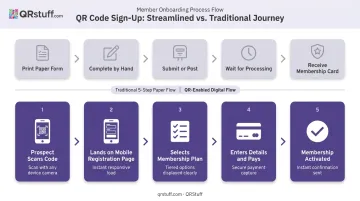
The traditional new-member flow has a lot of hand-offs: prospect fills out a paper form, staff enters data into the system, payment is processed separately, membership card is issued later. Each step is a potential drop-off point.
A QR code compresses that entire sequence. Place a code at the front desk, on an exterior poster, or in a digital ad — a prospective member scans it, lands directly on a mobile-friendly registration page, chooses their plan, enters their details, and completes payment. Staff involvement becomes optional for the transaction itself.
The "QR code menu" approach takes this further. A kiosk or printed display shows separate codes for each membership tier:
- Monthly membership → Code A
- Annual membership → Code B
- Premium all-access → Code C
Prospects self-select and complete purchase independently. Staff are freed to handle relationship-building, tours, and member questions — not form processing.
For drop-in guests, a single QR code can handle waiver signing, drop-in fee payment, and check-in simultaneously. When a group of eight arrives together for a trial class, they can all scan and complete registration in parallel rather than queuing at the desk one by one.
Delivering the Membership QR Code to New Members
Once someone signs up, they need their unique member QR code. Three practical delivery methods cover different member preferences:
- Confirmation email delivers a scannable image in the welcome message, accessible immediately on their phone
- Member portal or gym app keeps the code in their account, retrievable anytime
- Physical card or key tag provides a printed backup for members who prefer something tangible
Dynamic codes remove the need to reissue credentials. When a member upgrades from monthly to annual, or when their membership renews, the updated status is reflected in the destination data the code links to. No need to print a new physical card — the same code now displays their current membership details.
QR Codes for Gym Check-In and Member Access
Self-Scan Entry: How It Works
From a member's perspective, the check-in flow takes under ten seconds:
- Open gym app or saved email confirmation
- Display QR code on phone screen
- Hold up to entrance scanner or front desk reader
- Access granted — visit logged, membership status confirmed
The scan does real work: it confirms active status, records the visit timestamp, and flags expired or suspended memberships before the member reaches the turnstile. That last point alone eliminates the awkward "I thought I was still active" conversation at the front desk.
Choosing the Right Credential for Your Setup
Gym operators often ask how QR codes compare to barcodes and RFID for access control. Here's a practical breakdown:
| Credential | Best For | Trade-offs |
|---|---|---|
| Barcode | Basic kiosk setups, budget-conscious operations | Lower data density, requires closer scan distance |
| QR Code | Mobile-first and tablet-based workflows | Requires smartphone or display screen |
| RFID/NFC | Unstaffed 24/7 entry, high-volume doors | Higher hardware cost, proprietary readers required |
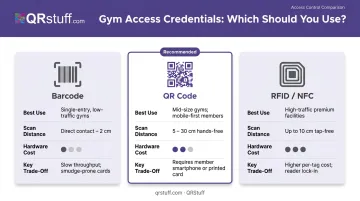
QR codes hit the middle ground well — they're more capable than standard barcodes, significantly cheaper to deploy than RFID infrastructure, and align naturally with how members already use their phones.
Membership Verification and Contactless Access Control
A QR scan can surface real-time membership data at the point of entry: active or expired status, membership tier, and renewal date. Front desk staff see this instantly, with no manual lookup required.
Contactless entry also matters to members in a practical way. QR check-in removes shared touchpoints (fingerprint scanners, PIN pads) that gym-goers have grown more conscious of since 2020 — and most now simply expect it.
For gyms managing large member bases, QRStuff supports bulk generation of per-member unique QR codes through its Full Suite plan (up to 500 codes) and Enterprise plan (unlimited). The Enterprise tier also includes API access, allowing a gym's membership management software to programmatically generate and assign unique codes to new members at sign-up — no manual process required.
Enhancing the Member Experience Beyond Check-In
Class Schedules, Booking, and Real-Time Updates
Place QR codes on studio doors, bulletin boards, and near reception — each linking directly to the live class schedule and booking page for that space. Members scan to see availability and reserve spots without queuing or opening a separate app from scratch.
This is where dynamic codes earn their keep. When a class moves times, an instructor cancels, or a seasonal schedule goes live, you update the destination URL in your dashboard. The printed code on the studio door stays the same — no reprinted schedules, no outdated posters left up over the weekend.
Equipment Tutorials and Workout Guidance
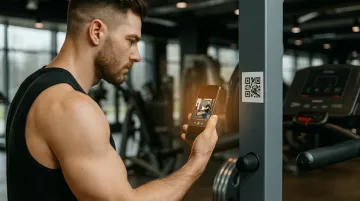
QR codes attached to fitness equipment, each linking to a 30–60 second instructional video covering proper form, safe setup, and suggested progressions, serve two distinct member groups at once:
- New members can self-serve guidance without hunting down a staff member, removing the intimidation of unfamiliar machines
- Experienced members can progress independently through advanced variations without waiting for a trainer
The location matters too. Research published in the Journal of Science and Medicine in Sport found that muscle or tendon strains account for 59% of gym-based injuries, many linked to incorrect technique. On-equipment QR codes put proper form guidance exactly where it's needed — at the machine, at the moment of use.
Loyalty Programs, Rewards, and Member Feedback
Loyalty mechanics: A scan at check-in or at designated stations can earn visit streak points, unlock rewards, or deliver a personalized promo code. This turns a routine Tuesday morning workout into something with a small reward attached — which drives repeat attendance more effectively than passive membership alone.
Feedback collection: Place survey QR codes at exit points or in locker rooms, linking to a short two or three question form. Members are more likely to complete a 20-second mobile form than to fill out a paper comment card. Real-time responses let managers act on issues — a broken locker, a scheduling complaint — before they become cancellation reasons.
How to Create Gym Membership QR Codes with QRStuff
QRStuff supports 40+ QR code types, covering every gym use case from check-in credentials to class booking pages to equipment tutorial videos. Here's the creation process for a membership sign-up URL code:
Step 1: Log in and select data type Go to qrstuff.com, log in or register, and select Website URL as your data type. For membership sign-up, this is the right choice. For PDF membership guides, select the PDF type — QRStuff hosts the file directly, so no external hosting is needed.
Step 2: Enter your URL
Paste your membership registration page link. Always include the https:// prefix. Add your booking system link, event registration page, or class schedule URL at this stage.
Step 3: Customize the design Upload your gym's logo to the center of the code, apply brand colors using the custom color picker, and select module and eye shapes that match your visual identity. Gradient effects are available for a gradient finish on print materials. All changes preview in real-time. Design customization is available on paid plans.
Step 4: Configure and download Choose your file format — SVG or EPS for print materials and signage (they scale without quality loss), PNG for digital use and emails. Select dynamic code to enable URL editing and scan tracking. Name the code and assign it to a project folder for organization.
Updating a dynamic code later: When your sign-up offer changes or a schedule updates, log into the QRStuff dashboard, select the code, and update the destination URL. The printed code stays the same — no reprinting needed.
On paid plans, dynamic codes don't have a built-in expiration date. The codes remain active as long as the subscription is active, removing the scan limits and time restrictions of the free tier.
Security is equally important when handling member data. QRStuff is both GDPR and SOC2 compliant, using industry-standard encryption in transit and at rest, and does not store personally identifiable information about individual scanners.
For gyms connecting members to sign-up forms and payment flows through QR codes, this matters. The platform handling those redirects should meet enterprise security standards — and QRStuff does.
Tracking and Optimizing QR Code Performance at Your Gym
QRStuff's analytics dashboard updates in real-time — the moment a dynamic code is scanned, the data populates in your account with no waiting for batch processing.
What the dashboard shows:
- Scan timestamps (date and time for each scan event)
- Total scans vs. unique scans (distinguishing repeat visits from new engagements)
- Device type breakdowns (iOS vs. Android, mobile vs. desktop)
- Geographic data (country and city level)
How this drives operational decisions:
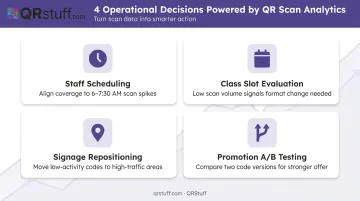
- Schedule front desk coverage to match check-in scan spikes — if volume consistently peaks between 6:00–7:30 AM on weekdays, staff accordingly
- Evaluate underperforming class slots using booking code engagement — low scan volume on a specific class code signals low interest and a potential format change
- Reposition signage based on scan data — a bulletin board code with no activity is likely placed too high or in a low foot-traffic area
- Run A/B tests on promotions by creating two code versions linked to different landing pages, then compare scan volumes and downstream conversions to identify the stronger offer
All of this data is exportable as CSV or Excel files for deeper analysis, with daily, weekly, and custom date range views available — so your decisions are backed by actual usage patterns, not guesswork.
Frequently Asked Questions
How do I scan a gym membership QR code?
Open your gym's mobile app or saved confirmation email and display your unique QR code on your phone screen. Hold it up to the scanner at the entrance, no contact needed. Most modern smartphones can display and scan QR codes natively through the camera app.
How do I get my gym membership QR code?
Most members receive their QR code via confirmation email immediately after signing up, or find it within the gym's mobile app or member portal. If you haven't received it or need it reissued, contact your gym's front desk and they can resend it or generate a replacement.
What type of QR code is best for gym membership sign-up?
A dynamic URL QR code is the best fit: the destination updates without reprinting, which matters when offers or sign-up pages change. For sharing membership guides or facility rules, a PDF QR code works well since the file is hosted directly.
Can a QR code replace a traditional gym membership card?
Yes. A QR code stored on a member's smartphone fully handles check-in and membership verification. Many gyms also offer a printed card as a backup, but the phone-based code is sufficient for day-to-day access.
Are gym membership QR codes secure?
QR codes are as secure as the destination they point to. Gym operators should ensure linked forms use HTTPS and that their QR platform is GDPR and SOC2 compliant. QRStuff meets both standards and supports password-protected codes for extra access control on member credentials.
How do I create a QR code for my gym's membership sign-up page?
Log into QRStuff, select Website URL, paste your sign-up link, customize the design with your gym's logo and brand colors, then download as a PNG or SVG. Choose a dynamic code and you can update the destination any time without reprinting.