According to SurveyMonkey, a "good" online survey response rate sits between 10% and 30%. That means up to 90% of customers who had something to say — didn't. QR codes address this by collapsing the gap between experience and feedback to a single phone scan.
This guide covers the full process: when QR feedback works (and when it doesn't), what to set up before you generate a single code, how to deploy it correctly, and how to turn responses into operational change.
Key Takeaways
- Deploy QR feedback codes at points of completion — checkout, end of meal, discharge, event exit — not at entry points
- Start with a mobile-optimized survey and a dynamic QR code — both are required before deploying anything
- Placement location, CTA copy, and code size affect scan rates as much as the survey itself
- Track scan volume by location to identify what's working and where to adjust
- Close the feedback loop: act on responses and let customers know — that's what drives repeat participation
When QR Code Feedback Actually Works
QR feedback codes succeed at one specific type of moment: when a customer has just finished an interaction and the experience is still fresh.
Timing matters. A code placed at a restaurant entrance captures opinions from people who haven't eaten yet — that's not feedback, it's speculation. A code on a discharge form captures reactions from someone who just experienced your care firsthand. Those two data sets aren't comparable.
Where QR feedback fits vs. where it doesn't
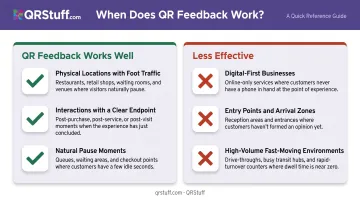
Works well for:
- Physical locations with consistent foot traffic (restaurants, retail, clinics, hotels, events)
- Interactions with a clear endpoint that customers can evaluate
- Settings where customers have a natural pause moment — waiting for change, sitting after a meal, reviewing paperwork
Less effective for:
- Digital-first businesses, where in-app prompts or post-session emails reach customers more naturally
- Entry points, lobbies, or arrival zones — customers are orienting, not reflecting
- High-volume, fast-moving environments where customers don't pause (fast food drive-throughs, transit gates)
A 2024 U.S. Census Bureau working paper found participants could scan a QR code to access a survey in an average of 12.4 seconds, rating the process as extremely easy. The barrier to participation is genuinely low. The catch is that scanning ease only converts to responses when customers are in a reflective mindset — not rushing out the door.
What You Need Before Setting Up Your Feedback QR Code
Don't generate a QR code until these three things are ready:
1. A Mobile-Optimized Feedback Survey
Build your form first — the QR code is just a delivery mechanism. Options include Google Forms, Typeform, or SurveyMonkey, all of which generate shareable URLs that work with any QR code generator.
Critical requirements:
- Completable on a phone in under 60 seconds
- No desktop-only layouts (matrix questions and wide tables break on small screens)
- 3–5 questions maximum
SurveyMonkey notes that roughly 3 in 10 U.S. survey responses are completed on a smartphone or tablet — in some international markets, that rises to 50%. If your form isn't optimized for mobile, you're designing against your own scan rate.
2. A Dynamic QR Code Generator
Static codes embed the destination URL permanently. If your survey link changes, the code breaks and you need to reprint everything.
Dynamic QR codes use a redirect layer, so you can update the destination URL at any time without touching the physical code. QRStuff supports dynamic codes across all paid tiers with no expiration on active subscriptions, and provides real-time scan analytics — scan volume, device type, and geographic data — useful when managing multiple placements.
3. Defined Placement Materials
Know where the code will live before you download it. A code destined for a small receipt insert needs different sizing than one going on a table tent or wall poster. Deciding this before generation saves you from printing the wrong format.
How to Use QR Codes to Collect Customer Feedback (Step-by-Step)
Step 1: Build and Configure Your Survey
Keep it short and specific. A well-structured feedback survey includes:
- One rating question — use CSAT (1–5 satisfaction scale) for a specific interaction, or NPS (0–10 likelihood to recommend) for overall loyalty
- One open-text question — gives customers room to explain what the number means
- An optional contact field — only include this if you have a process for following up; a contact field you never use erodes trust
Common mistakes to avoid:
- Surveys longer than 5 questions (completion rates drop significantly with length)
- Generic questions like "How was your experience?" that aren't tied to a specific interaction
- Open-text questions as the first question — SurveyMonkey data shows surveys starting with a simple multiple-choice question achieve 89% completion vs. 83% when the first question is open-ended
Step 2: Create and Customize Your QR Code
Once your survey URL is ready:
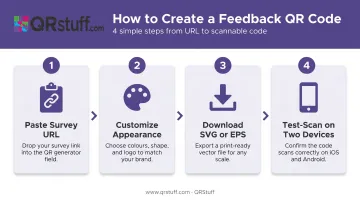
- Paste the URL into QRStuff's dynamic QR code generator
- Customize the appearance — colors, logo placement, module shapes, and gradient options (available on all paid tiers)
- Download in SVG or EPS format for print use — vector formats scale to any size without losing sharpness
- Test-scan across at least two different devices before printing anything
QRStuff also offers a dedicated Survey QR code type designed specifically to link to Google Forms or any other online survey platform, which keeps setup straightforward.
Step 3: Deploy and Place Your Code
Position the code where customers have both context (they've had the experience) and a free moment (they're not rushing out).
Sizing guidance: The code needs to be large enough to scan at the expected viewing distance. A code on a table tent viewed from arm's length can be 1.5–2 inches wide. A wall poster viewed from 6 feet away needs to be significantly larger — at minimum 7–8 inches wide. ISO/IEC 18004 also requires a clear quiet zone border at least 4 modules wide on all sides; cutting into this margin causes scan failures.
CTA copy matters. "Scan Me" tells customers what to do but not why. More effective alternatives:
- "Tell us about your visit — takes 60 seconds"
- "Something not right? Let a manager know instantly"
- "How was your service today? Quick feedback helps us improve"
Step 4: Monitor Performance and Act on Responses
After deployment, watch two numbers:
- Scan volume — tells you whether customers are noticing the code
- Completion rate (scans vs. submitted responses) — a high scan count with low submissions means the survey is too long, too hard to navigate on mobile, or the landing experience isn't working
QRStuff's analytics dashboard provides real-time scan data including device type, geolocation at country and city level, and scan time. This helps you identify which placements are generating engagement and which need adjustment.
Submission tracking happens on the survey platform side. Cross-reference QRStuff scan data with your form's response count to calculate completion rate.
Closing the loop is where most businesses drop the ball. Review responses on a regular schedule. Flag negative feedback for prompt follow-up, as research on service recovery shows response speed directly influences loyalty outcomes.
When you make a change based on customer input, communicate it. A sign, a social post, or a simple in-store message that says "You told us. We listened." does more to drive repeat participation than any placement or CTA change ever will.
Where QR Feedback Codes Work Best by Industry
The general rule: codes succeed where customers are naturally pausing, and fail where they're in motion.
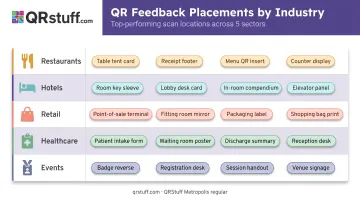
| Industry | Highest-Performing Placements |
|---|---|
| Restaurants & cafés | Table tents after ordering, receipt holders, takeout packaging inserts, exit door signage |
| Hotels & hospitality | In-room desk cards, key card sleeves, checkout desk displays |
| Retail | Checkout counters, fitting room mirrors, packaging inserts, return desk |
| Healthcare & clinics | Discharge paperwork, reception desk, waiting area signage, post-appointment printouts |
| Events & conferences | Session slides (during transitions), attendee badges, post-session handouts |
Industry-specific notes:
- Healthcare: Patient satisfaction surveys can qualify under HIPAA's health care operations exemption, but 2024 HHS guidance cautions against tracking technologies that risk impermissible disclosures of protected health information. Verify your QR platform's data handling before deployment — look for GDPR and SOC2 compliance plus password protection as baseline requirements.
- Hospitality: Codes near points of service completion (end of meal, checkout desk) consistently outperform generic lobby placements where guests are arriving, not evaluating.
Best Practices for Higher Scan Rates and Better Responses
Your CTA should explain the benefit, not just the action. "Scan Me" tells people nothing. "Rate your experience — takes under a minute" gives them a reason. That single change consistently lifts scan rates.
Keep the survey short enough to complete in under 60 seconds — that's typically 3–5 focused questions. Avoid requiring personal details before submission; asking for a name or email upfront signals distrust and drops completions.
Maintain design quality:
- Include your brand logo or name near the code — unbranded codes look suspicious
- Ensure high contrast between the code and its background (dark code on light background, not reversed)
- Avoid reflective or busy surfaces that interfere with scanning
- Periodically audit physical placements to confirm codes haven't been obscured, damaged, or tampered with
Use analytics to adjust, not just to report. QRStuff's scan data — including device breakdown, geographic location, and time-of-scan — lets you compare performance across placements and test CTA copy on an ongoing basis, not just at launch.
To keep the program running smoothly over time:
- Update survey questions after major service changes or seasonally
- Retire codes that consistently underperform rather than leaving them in place
- Assign a specific team member or role to review responses and act on them
- Use bulk code generation for multi-location programs to avoid managing codes one at a time
Frequently Asked Questions
How do I create a survey with a QR code?
Build a mobile-optimized survey using Google Forms, Typeform, or SurveyMonkey, then copy the survey URL into a dynamic QR code generator like QRStuff. Customize the code's appearance, download it in a print-ready format (SVG or EPS for physical materials), and deploy it at your chosen touchpoint.
Should I use a dynamic or static QR code for customer feedback?
Dynamic codes are strongly recommended. They let you update the linked survey URL without reprinting and provide scan tracking data including volume, device type, and location. Static codes lock in the destination permanently and offer no analytics, making them a poor fit for any active feedback program.
How many questions should my QR code feedback survey include?
Aim for 3–5 questions completable in under 60 seconds. A rating question, one open-text question, and an optional contact field covers the essentials. Longer surveys see significantly higher abandonment, especially on mobile.
Where is the best place to put a QR code to get customer feedback?
At points of completion or natural pause — receipt holders, table tents, checkout counters, in-room cards, discharge paperwork. Avoid entry points where customers haven't yet had the experience you want to measure.
How do I get more customers to scan my feedback QR code?
Use a benefit-oriented CTA near the code rather than a generic prompt, size it appropriately for the viewing distance, ensure high contrast design, and place it at a natural pause moment in the customer journey.
Can I track how many people scan my feedback QR code?
Yes. Dynamic QR codes provide real-time scan tracking including total scans, unique scans, device type, geographic location, and time of scan. This data identifies which placements are working — submission rates are tracked separately on your survey platform.