This scenario is more common than most businesses expect. With 89 million US smartphone users scanning QR codes in 2022 — and that number projected to hit 100 million by 2025 — the stakes of a broken code have never been higher.
The good news: dynamic QR codes don't fail randomly. There are specific, diagnosable causes behind every failure, and most can be fixed in minutes without reprinting a single piece of material.
This article covers the four most common causes, a step-by-step fix process, and what to do to prevent it from happening again.
Key Takeaways
- Dynamic QR codes don't expire on their own — the service, subscription, or destination link behind them breaks
- Four things cause failures: a lapsed subscription, a broken destination URL, an exceeded scan limit, or physical print damage
- Most failures are fixed directly in your QR code platform dashboard — no reprinting required
- Prevention comes down to a reliable platform, regular URL audits, and keeping an eye on scan analytics
What Is a Dynamic QR Code?
A static QR code permanently encodes a destination URL into its pattern at creation. Once printed, it cannot be changed. A dynamic QR code works differently: it encodes a short redirect URL that points to a server-managed destination, which you can update anytime from a dashboard.
That redirect layer is what makes dynamic codes so useful — and what makes them fragile.
The code depends on two things staying active simultaneously: the redirect service and the destination URL. If either one fails, the scan breaks — even if the printed image itself is intact. Common culprits include:
- A lapsed or cancelled QR platform subscription
- A deleted or moved destination webpage
- An expired domain that no longer resolves
This is why dynamic QR codes, despite holding 64.92% of QR market revenue share in 2025, require more active management than static codes. That flexibility comes with a trade-off — the infrastructure behind the code must stay active and maintained.
Why Dynamic QR Codes Stop Working
Most failures fall into four categories. Identifying which one applies is the essential first step before attempting any fix.
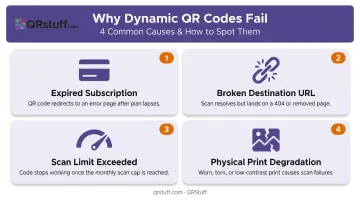
Expired Subscription or Free Trial
Symptoms: The code scans correctly but redirects users to a provider page saying the code is inactive or deactivated, rather than your intended content.
Cause: When a paid plan lapses or a free trial ends, the QR code platform disables the redirect server for associated dynamic codes.
On QRStuff, when a full paid subscription expires, a 50 scans/month limit is automatically applied to each code. Once that limit is hit, users see a "Scan Quota Exceeded" message. Scans that occur during a lapsed period are not recovered retroactively once the account is reactivated.
Free plan codes carry additional time-based restrictions:
- Codes created without an account expire after 7 days
- Free account codes expire after 30 days
Broken or Deleted Destination URL
Symptoms: The code scans and redirects successfully, but users land on a 404 error, a "page not found" message, or an unrelated page.
Cause: The destination URL was moved during a website redesign, a linked file was deleted from cloud storage, a campaign page was taken down, or a domain wasn't renewed.
This is called link rot. Pew Research found that 25% of webpages that existed between 2013 and 2023 were inaccessible by October 2023, with 38% of 2013-era pages gone entirely a decade later. A QR code deployed on product packaging or permanent signage faces this risk every time a website is restructured.
The Heinz ketchup case illustrates the worst-case outcome: a campaign that ran from 2012 to 2014 later routed scanners to an adult website after the campaign domain expired and was reassigned to a new owner.
Scan Limit Exceeded
Symptoms: The code works fine up to a point, then stops redirecting. Owners typically receive no notification when this happens.
Cause: Many free and entry-level QR plans impose monthly or per-code scan caps. On QRStuff, the limits by tier are:
- Free Suite: 50 scans per code per month
- Lite Suite: 200 scans per code per month
Once the cap is reached, the redirect suspends until the account is upgraded or the next billing cycle begins.
High-traffic environments (restaurant menus during peak season, product packaging for popular SKUs) can exhaust free-tier limits faster than expected.
Physical Print Degradation
Symptoms: The code cannot be scanned at all. Devices fail to read it or produce no result.
Why it happens: Outdoor exposure causes fading. High-touch surfaces like table tents cause scratching. Low-contrast or undersized printing can produce codes that were never reliably scannable.
Note that physical degradation is the only failure type that cannot be fixed remotely. It always requires a reprint.
QR codes include built-in error correction, meaning they can tolerate some damage and still scan. But once degradation crosses the error-correction threshold, no software fix will help.
How to Fix Your Dynamic QR Code (Step-by-Step)
Applying the wrong fix wastes time and leaves the root problem unresolved. Follow these steps in order.
Step 1: Identify What Happens When You Scan
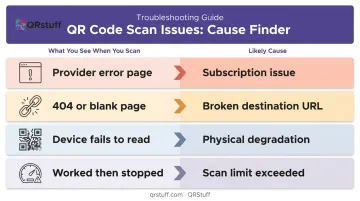
Scan the code, note the result, then match it to the table below:
| What you see | Likely cause |
|---|---|
| Provider error or "code inactive" page | Subscription or account issue |
| 404, blank page, or wrong content | Broken destination URL |
| Device fails to read the code at all | Physical print degradation |
| Worked before, stopped after heavy use | Scan limit exceeded |
Step 2: Log Into Your QR Code Platform Dashboard
Check the following from your code management panel:
- Code status — is it active, inactive, or paused?
- Destination URL — is it still the correct, live address?
- Scan count — how close is it to the plan limit?
- Account/subscription status — is the plan current?
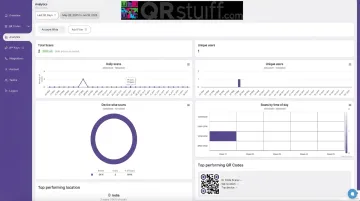
QRStuff's analytics dashboard shows scan trends via line and bar charts, giving you a visual timeline of scan volume. A sudden drop-off on the chart is often the first visible sign of a failure, appearing before any user complaint reaches you.
Step 3: Apply the Fix Based on Root Cause
Subscription Lapsed or Trial Ended
Renew or upgrade your plan. On QRStuff, activation processes automatically upon payment and full functionality is restored immediately. Paid plans carry no QR code expiration, which eliminates this as a recurring problem for codes on long-running printed materials.
Broken Destination URL
Log into the dashboard and update the destination to the correct, live address. Verify the URL resolves in a browser before saving. The printed code never changes — only the backend destination does. That's the core advantage of dynamic codes.
Scan Limit Exceeded
Review your current plan's limits and upgrade to a tier that matches your actual scan volume. Full Suite and Enterprise plans include unlimited monthly scans, which removes this ceiling for high-traffic deployments.
Physical Print Degradation
Download a fresh, high-resolution version from your dashboard (the pattern is identical — only output quality improves). Reprint using:
- SVG or EPS for professional printing (vector format scales without pixelation)
- Minimum 300 DPI for PNG files
- Minimum 2cm × 2cm physical size
- Weatherproof stock for outdoor use; laminated surfaces for high-touch areas
- Dark code on light background — never inverted
Step 4: Test and Validate the Fix
- Scan from both iOS and Android devices under different lighting conditions
- Confirm the destination loads correctly and new scans register in your analytics dashboard
- Check scan volume over the next 48–72 hours — a flat line after active use usually means the fix didn't take
When to Reactivate vs. Recreate Your QR Code
Reactivating an existing code is almost always the right call when it's already printed and distributed. Starting fresh only makes sense in a few specific situations.
Reactivate the existing code when:
- The code is already printed on materials that would be costly to replace
- The platform is still operational and allows reactivation
- The fix is a subscription renewal, URL update, or plan upgrade
Reactivation restores the redirect immediately — no changes to the physical code required.
Recreate a new QR code when:
- The original code was generated on a free tool that has shut down or cannot be reactivated
- The code is physically damaged beyond scannability on materials that need reprinting regardless
- You're migrating to a more reliable platform with better uptime guarantees
Switching platforms? Generate the new code before reprinting and update all materials at once — this avoids a second reprint cycle.
How to Prevent Dynamic QR Code Failures
Choose a Platform Built for Long-Term Reliability
Look for guaranteed uptime, no forced expiration on paid plans, and clear documentation on what happens if a subscription lapses. QRStuff has maintained 99.968% actual uptime since 2008, which works out to under three hours of total downtime per year including scheduled maintenance. Full Suite and Enterprise plans carry no QR code expiration, making them well-suited for codes on permanent or long-life printed materials.
Monitor Scan Analytics Regularly
A sudden drop in scan volume is usually the earliest visible sign of a broken code, often appearing before any user reports it. QRStuff's analytics dashboard provides real-time scan data, trend chart views, geographic breakdowns by country and city, and device-type data. Set a calendar reminder to review scan trends at least monthly.
Audit Destination URLs on a Set Schedule
- Document every URL linked to an active QR code
- Enable domain auto-renewal for any domain a QR code depends on
- Avoid linking to third-party pages you don't control (temporary file shares, social posts, campaign microsites with short lifespans)
- Test each code after any website redesign or content migration
Beyond URL management, a few deployment habits account for a disproportionate share of preventable failures:
- Don't print free trial codes on permanent materials — they will deactivate when the trial ends
- Don't ignore gradual scan drops — they signal a problem before it becomes customer-facing
- Don't skip post-print testing — always scan the physical printed output on multiple devices before mass distribution
Frequently Asked Questions
Frequently Asked Questions
What happens when a dynamic QR code expires?
When the underlying service becomes inactive — due to a lapsed subscription, an exceeded scan limit, or a free trial ending — users who scan the code see a provider error page or a "Scan Quota Exceeded" message instead of your intended destination. The printed code itself is unaffected; it's the redirect service that has stopped functioning.
How do I reactivate a dynamic QR code?
Reactivation is done through your QR code platform dashboard: renew or upgrade your subscription, and the redirect service restores automatically. No changes to the printed code are needed. Once the account is active again, the code resumes working and tracking scans normally.
Why does my QR code say "invalid"?
An "invalid" result typically means the destination URL is broken, the associated account has been deactivated, or the platform no longer exists. Log into your dashboard to check the code's status and destination URL — that will identify the cause.
What does it mean to have a dynamic QR code?
A dynamic QR code stores a short redirect URL rather than encoding the final destination directly. This lets you update the destination from a dashboard at any time without reprinting, and it enables scan tracking by device, location, and time.
What is the difference between a dynamic QR code and a regular QR code?
A static QR code permanently encodes the destination at creation: it cannot be edited and offers no analytics. A dynamic QR code uses a redirect layer that can be updated anytime and supports scan tracking, but requires an active service account to keep functioning.
How do I get a dynamic QR code?
Dynamic QR codes are created through a QR code platform — on QRStuff, select the dynamic option, enter a destination URL, and generate the code. A paid plan (Lite Suite and above) is required for permanently active codes and full analytics access.