But adoption doesn't equal effectiveness. Marketers regularly generate a code without a clear strategy, send traffic to a desktop homepage that loads slowly on mobile, or use static codes that can't be tracked or updated after printing. These aren't minor oversights — they're the difference between a measurable campaign and wasted print budget.
This guide walks through exactly how to use QR codes in a marketing strategy: identifying the right scenarios, building the campaign correctly, deploying it with purpose, and measuring what's actually working.
Key Takeaways
- QR codes work best on physical materials where a scan moment exists — packaging, print ads, event signage, and direct mail
- Always use dynamic QR codes for printed campaigns — they let you update URLs, track scans, and run A/B tests without reprinting
- Every code needs a specific CTA adjacent to it and a mobile-optimized destination — never a generic homepage
- Define your campaign objective before generating anything — it determines QR type, landing page, and what to measure
- Track scan data from your QR platform and conversion data via UTM parameters in Google Analytics
When Should You Use QR Codes in Your Marketing Strategy?
A QR code works when three conditions exist simultaneously: the user has their phone in hand, they have time to act, and there's a clear reason to scan. Without all three, the code is decoration.
The Right Conditions for a Scan Moment
High-dwell-time environments consistently outperform low-dwell environments. The OAAA identifies subway train cards as a captive-audience format with 5–20 minutes of dwell time — enough for users to scan, engage with the destination, and complete an action. Contrast that with a highway billboard, where exposure runs under 3 seconds. The code may be technically scannable, but there's no moment to use it.
Strong scan environments include:
- Product packaging at home (user is already engaged with the brand)
- Restaurant tables, waiting rooms, and transit interiors
- Trade show booths and event venues
- Direct mail pieces, where the recipient controls the pace
- In-store displays at or near the point of decision
Scenarios Where QR Codes Advance a Marketing Goal
Each of these has defined user intent and a measurable next action:
- Bridge print to digital — add a code to ads, brochures, or OOH where a URL is too long to type
- Remove checkout friction — payment codes let customers complete purchases without cash or card
- Replace paper sign-ups at events — scan-to-form captures leads instantly
- Add product transparency — link packaging to ingredient details, sustainability info, or certifications
- Grow social followings in-store — a single scan from a shelf display converts browsers into followers
What to avoid:
- Multiple QR codes on a single piece — users presented with several codes rarely scan any of them
- Using a QR code as a substitute for actual content strategy (the destination matters as much as the scan)
- Deploying codes anywhere the user is moving at speed, such as roadside billboards or transit platforms
What You Need Before Launching a QR Code Campaign
Skipping setup is where most QR campaigns fail. Three things must be in place before generating a single code.
A Defined Campaign Objective
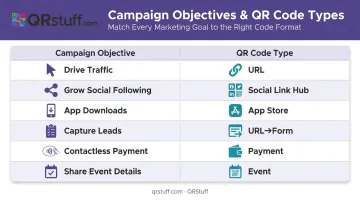
The objective determines everything downstream — which QR code type to use, what landing page to build, and which metrics matter. Be specific:
| Campaign Objective | QR Code Type |
|---|---|
| Drive traffic to a landing page | URL QR code |
| Grow social media following | Social Link hub QR code |
| Promote app downloads | App Store QR code (auto-detects iOS/Android) |
| Capture leads at events | URL QR code → form destination |
| Enable contactless payment | Payment QR code |
| Share event details / RSVP | Event QR code |
A Mobile-Optimised Destination
The page users land on after scanning determines whether that scan converts. Google and Deloitte's analysis of 30 million user sessions found that a 0.1-second improvement in mobile load time increased retail conversions by 8.4%, and that bounce probability rises 32% when load time increases from 1 to 3 seconds.
Your destination page must:
- Load in under 3 seconds on mobile
- Display one clear CTA above the fold
- Deliver exactly what the ad, flyer, or signage promised
- Remove navigation that pulls users away from converting
A QR Platform Built for Campaign Use
Static codes generated by free tools lock in the destination URL and produce zero scan data. For any campaign that needs to adapt — whether printed or digital — you need a platform that supports dynamic codes, real-time URL editing, and scan analytics.
QRStuff covers all of this — 40+ QR code types, scan analytics (total scans, unique scans, device type, geographic breakdown, and timestamps), UTM integration for Google Analytics, and GDPR/SOC2-compliant security. Paid plans cover dynamic codes, unlimited scans, and full analytics; see the QRStuff pricing page for current tier details.
How to Use QR Codes in Your Marketing Strategy (Step-by-Step)
Effective QR code marketing follows a defined sequence. Skipping steps, especially mobile optimization and post-launch tracking, is where most campaigns lose their return.
Define Your Campaign Objective First
The objective is the filter for every decision that follows. A lead generation campaign needs a form-linked landing page and a URL QR code. An app download campaign needs OS-detection routing to the correct app store. A feedback campaign needs a short survey destination. Start here, not with the code.
Choose the Right QR Code Type for Your Goal
Not all QR codes point to a URL. Modern platforms support 40+ types, and choosing the wrong one adds unnecessary friction. Common options include:
- URL — web pages, landing pages, menus
- vCard — contact sharing and digital business cards
- WiFi credentials — guest network login without passwords
- App store links — OS-detected routing to iOS or Android
- SMS / email triggers — pre-populated messages for campaigns
- PDF documents — product sheets, instructions, menus
with error correction enabled at the appropriate level
QRStuff's design tools allow custom module shapes, brand colors, gradients, logo embedding, and frame text adjustable before export. Among marketers, 49% customize QR codes with a business logo and 38% use custom colors, reflecting how widely brand-aligned design has become standard practice.
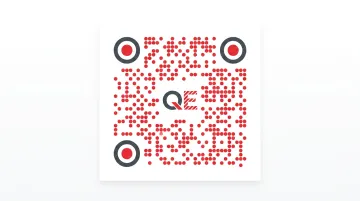
Common errors that kill scan rates:
- Insufficient contrast between foreground and background
- Over-customisation that degrades the data pattern
- Low-resolution export for print materials
Test Before Deployment — At Actual Print Size
Test at the exact dimensions the code will be printed, under the lighting conditions of the intended environment. A code that scans on screen may fail at 4cm on a product label in dim retail lighting. Test with multiple iOS and Android devices, at the intended scanning distance.
One failed scan in a consumer's hands is difficult to recover from.
Deploy with Placement Strategy
Placement determines whether the scan moment exists at all. Minimum sizing guidance:
- Close-range items (brochures, business cards, receipts): approximately 2cm × 2cm
- Larger formats: divide the intended scanning distance in centimetres by 10 — a code scanned from 1 metre needs to be at least 10cm × 10cm
For multi-placement campaigns, create one unique QR code per distinct placement — packaging, in-store poster, direct mail — all pointing to the same destination. This reveals which channel drives scans and informs budget decisions.
Track Performance and Optimize
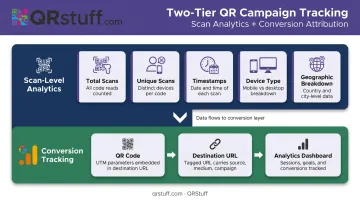
Tracking operates at two levels:
- Scan-level analytics from your QR platform — total scans, unique scans, timestamps, device type, and geographic breakdown
- Conversion tracking via UTM parameters appended to the destination URL, feeding campaign source and medium data into Google Analytics
QRStuff's analytics dashboard provides all scan-level data as scans happen and supports UTM tagging and campaign labeling for attribution across platforms. Dynamic codes allow the destination URL to be swapped mid-campaign without reprinting, enabling A/B testing of landing pages and rapid course-correction when a placement underperforms. Use scan geography and device data to decide where to scale and what to cut.
Where QR Codes Work Best in Marketing
Physical Marketing Materials
Product packaging is the strongest environment: the user is already engaged, phone nearby, and 64% of shoppers have scanned QR codes in-store to compare prices, check reviews, or view product details — up from 46% the prior year, according to a 1WorldSync survey of 1,750 US and Canadian shoppers.
Other strong physical placements:
- Print ads and brochures — where typing a URL creates friction
- Direct mail — USPS confirms QR codes enable scan-to-landing-page tracking that text-only CTAs cannot provide; among consumers who acted on direct mail, 55% visited the brand website
- OOH in high-dwell locations — transit interiors, waiting rooms, retail displays at eye level
Events and Experiential Marketing
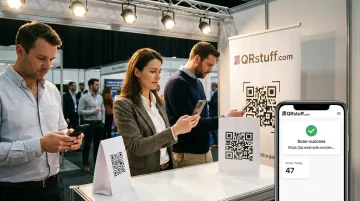
Events offer the highest scan intent of any environment — attendees are already engaged and phone-in-hand. Effective applications:
- Digital ticketing and contactless check-in via event QR codes
- Trade show booths replacing paper collateral with scan-to-download flows
- Session feedback forms displayed on screen post-presentation
- Post-event swag linking to exclusive content pages
Bitly's 2025 marketer survey found 43% of marketers use QR codes at events, with 49% using them specifically to provide event information.
Digital-Physical Hybrid Channels
QR codes in connected TV ads bridge the TV screen to mobile action. Two brands show what's possible:
- Pringles ran a shoppable CTV ad with a QR code for mobile purchase, achieving a 6.4% engagement rate — 4x the benchmark, according to IAB
- Del Taco used QR end cards on CTV to let viewers find locations or place delivery orders directly
Landing page requirements are the same across every channel. Mobile load speed and single-CTA design apply whether the scan originates from packaging or a TV screen.
Best Practices for QR Code Marketing
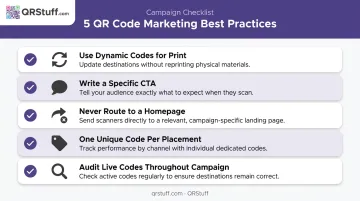
Getting QR codes in front of people is the easy part. Getting them to work — and keep working — is where most campaigns either succeed or fall apart. Follow these five rules.
Always use dynamic codes for printed materials — static codes lock in the destination, produce no data, and can't be updated if the URL breaks or the campaign changes. Dynamic codes eliminate that risk entirely.
Write a specific CTA next to every code — "Scan to get 20% off your first order" outperforms "Scan here" because it communicates value before the user commits. The CTA must match what's on the landing page; if it promises a free guide, deliver the guide immediately on arrival.
Never route scans to a generic homepage — sending QR traffic to a homepage without a clear next step kills conversions. Build a campaign-specific page with one primary action above the fold.
Use one unique code per placement in multi-location campaigns — this enables accurate attribution across channels (packaging vs. in-store vs. direct mail) and prevents aggregate data from masking which placements are actually driving results.
Audit live codes throughout the campaign — verify destination pages load correctly, UTM parameters pass data accurately, and redirect chains stay intact. Catch a broken link in week one, not after a print run is already in the field.
Conclusion
QR code marketing is less about the code itself and more about the sequence behind it — clear objective, right code type, honest design, tested deployment, and consistent measurement. Brands that treat QR codes as complete campaign infrastructure, rather than a shortcut to add to existing materials, generate measurable returns.
Start with one objective. Build the right landing page. Use a dynamic code and track both scan and conversion data from day one. Then expand from there. Platforms like QRStuff handle the analytics infrastructure — so you can focus on what the data tells you, not how to collect it.
Frequently Asked Questions
How do you track QR code marketing campaign metrics?
Tracking works at two levels. Scan-level data — total scans, unique scans, device type, geography, and timestamps — comes from your QR platform's analytics dashboard. Conversion-level data comes from UTM parameters appended to the destination URL, feeding into Google Analytics. Dynamic QR codes are required for scan-level data; static codes collect none.
What's the difference between a static and dynamic QR code?
A static QR code encodes the destination URL directly into the pattern. It cannot be edited after printing and collects no scan data. A dynamic QR code points to a redirect URL that can be changed at any time without altering the printed code, and records scan data including timestamps, device types, and geographic locations.
What is an example of a QR code marketing campaign?
Taco Bell placed QR codes on Doritos Locos Tacos packaging linking to weekly-updated SXSW artist performances, giving consumers a reason to scan repeatedly. The campaign worked because of a clear scan incentive on the packaging, destination content tied to the campaign, and dynamic updates that kept the experience fresh.
How big should a QR code be for print marketing materials?
The minimum recommended size for close-range items like brochures, business cards, and receipts is approximately 2cm × 2cm. For larger formats, divide the intended scanning distance in centimetres by 10 — a code scanned from 1 metre away should be at least 10cm × 10cm to scan reliably.
What should happen when someone scans my marketing QR code?
The user should land on a mobile-optimized page that loads in under 3 seconds, fulfils the exact promise of the adjacent CTA, and presents one clear next action above the fold — a discount code, form, download, or product page. Routing to a generic homepage is the most common cause of scan abandonment.
Can I use QR codes in both print and digital marketing?
Yes — in print they bridge physical materials to digital actions; in digital contexts (email footers, presentation slides, CTV ads) they enable cross-platform routing, such as moving a viewer from a TV ad to a mobile checkout page. The design and destination optimisation requirements are identical regardless of channel.