Introduction
TV advertising has always had a fundamental problem: viewers watch, but they can't act. There's no "click" on a broadcast spot. A compelling ad ends, and the viewer either remembers to Google something later — or doesn't.
QR codes change that equation. Point your phone at the screen, and you're instantly on a landing page, in an app, or claiming an offer. It's the closest thing to a clickable TV ad that's ever existed.
Over 94 million U.S. consumers scanned a QR code in 2023, up 26% since 2020 — meaning audiences no longer need to be taught how QR codes work. The behavior is already there.
Broadcasters and device makers are responding in kind. Samsung, LG, and Tubi now offer native QR-enabled ad formats, and U.S. CTV ad spend hit $23.6 billion in 2024, up 16% year-over-year.
This guide covers why QR codes are gaining traction in TV commercials, what real campaigns proved about the format, and exactly what makes the difference between a code viewers scan and one they ignore.
TL;DR: Key Takeaways
- Use dynamic QR codes — they let you update destination URLs and track every scan without re-editing your commercial
- Size matters: the code should cover at least 15–20% of the screen and sit on a high-contrast background
- Stay on screen for 7–10 seconds minimum — viewers need time to notice the code, grab their phone, and scan
- Your CTA must state the action and the reward: "Scan for 20% off" outperforms "scan here" every time
- Link to a fast, mobile-optimized landing page that delivers exactly what the ad promised, not your homepage
Why QR Codes Are Changing TV Advertising
The Second-Screen Habit Is Already There
The biggest misconception about QR codes on TV is that getting viewers to pick up their phones is a hurdle. It isn't — they already have them in hand.
YouGov found that 76% of Americans use a phone or another device at least sometimes while watching TV at home — with 12% doing so always, and 33% often. That's not a niche behavior. It's the majority of your audience, waiting for a reason to engage.
QR codes give them that reason. The scan is low-friction, immediate, and doesn't require memorising a URL or typing anything.
TV Becomes a Performance Channel
Traditional TV advertising measured success through brand recall surveys, rough reach estimates, and post-campaign sales lift studies. Attribution was always approximate.
A dynamic QR code changes that entirely. Every scan generates a data point:
- Scan volume — how many people responded
- Unique scanners — distinct individuals vs. repeat engagement
- Device type — iOS vs. Android, for landing page optimisation
- Geographic data — city and country-level location data
- Time-of-scan patterns — which airings, dayparts, and networks drove the most responses
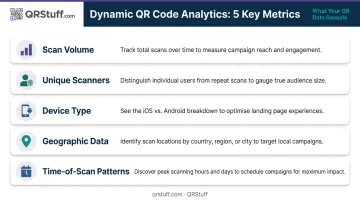
QRStuff's dynamic QR codes deliver all of these metrics in real time. For campaigns where proving ROI matters, this shifts TV from a branding channel into one with measurable, direct outcomes.
CTV vs. Traditional Broadcast
Connected TV viewers sit closer to the screen and are more likely to have a phone already in hand — partly because CTV viewing tends to be more casual and solo. This translates to noticeably better scan conditions than traditional broadcast.
Scan rates still vary widely by platform, creative, and offer. Sky Media reported response rates of 0.3%–0.8% across around 20 campaigns; Roku has cited figures as low as 0.04% in some benchmarks. The spread shows how much creative quality and incentive strength matter. There's no universal number to plan against.
Real-World QR Code TV Campaigns That Worked
Coinbase Super Bowl 2022
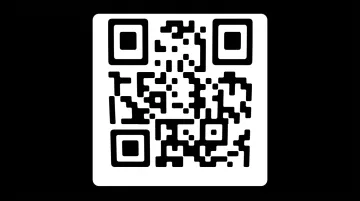
A 60-second ad consisting of nothing but a bouncing QR code and a $15 Bitcoin offer. No voiceover, no product demo. Just a code drifting across a black screen.
The result: the Coinbase landing page received more than 20 million hits in one minute. The app briefly crashed. Traffic was reportedly six times higher than projected, and the app climbed from No. 186 to No. 2 in the App Store.
The real lesson here is that infrastructure matters as much as creative execution. A QR code that drives massive traffic to a crashed page wastes every scan. Load testing before a high-reach TV campaign isn't optional — it's the difference between a viral win and a public failure.
Burger King's QR Whopper
In April 2020, Burger King aired a national TV spot featuring a QR code that moved around the burger on screen. Viewers who scanned quickly enough received a free Whopper. The time-pressure mechanic turned passive watching into an active game.
Pairing a time-sensitive reward with a moving target created genuine engagement during a period when audiences were stuck at home. The incentive drove the behavior; the QR code was simply the mechanism that made it measurable.
QR Campaigns Driving Measurable Retail Results
QR codes on TV aren't limited to Super Bowl stunts:
- Mondelez/Nabisco ran a CTV campaign in 2024 using QR codes linked to SmartCommerce's Click2Cart, allowing viewers to add Nabisco products directly to their Walmart cart. Vendor-reported results: 10x higher conversions than CTV industry benchmarks and a 12% increase in new buyers.
- JCPenney's QR-enabled campaign reportedly drove $20 million in revenue with a 2.93% conversion rate, showing the format works for measurable retail outcomes — not just awareness campaigns.
Visual and Design Best Practices
Sizing for the Living Room
A QR code that's too small for the viewing distance simply won't scan. The practical rule of thumb: minimum code size = scanning distance ÷ 10. Since most viewers sit 2–3 meters from their TV, your code needs to be at least 20–30 cm wide in real terms — which translates to occupying at least 15–20% of the screen area in the broadcast frame.
QRStuff's own guidance applies the same 10:1 distance principle: if someone scans from 3 meters away, the code should be at least 30 cm wide.
One rule overrides all others: test on an actual TV before launch. What looks large enough in a design file often looks smaller on a 55" screen from across the room.
Contrast and Quiet Zone
Two design requirements that aren't negotiable:
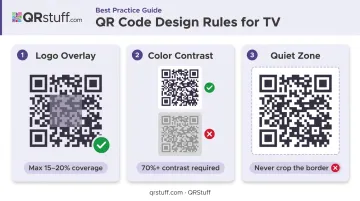
High contrast: Dark modules on a white background (or white on dark) is the safest approach. Placing a QR code over busy video footage, gradients, or moving backgrounds degrades scan reliability regardless of size. QRStuff's guidelines specify that dots should be at least 70% darker than the background — pale grey on white will fail on many devices.
Quiet zone intact: The blank margin surrounding the QR code pattern isn't decorative. Without it, surrounding visuals bleed into the code's pixels and cause scan failures. Never crop the white border. QRStuff explicitly flags this as a critical requirement across its documentation.
Branding Without Sacrificing Function
Modern QR generators — including QRStuff — support custom colors, logo overlays, and branded shapes. Branded codes can boost perceived trust and scan intent, but only when the customization stays within functional limits.
Key limits to stay within:
- Logo overlays should cover no more than 15–20% of the code area (theoretical maximum is 30%, but conservative is safer)
- Color customization must maintain sufficient contrast — never use pale or low-contrast color combinations
- Always test branded codes on multiple devices (iOS and Android, native cameras) before finalizing
Keep the Code Still
The Coinbase bouncing QR code became iconic because it was unusual. That novelty doesn't make it worth copying. Moving or animated QR codes dramatically reduce scan success rates for the average viewer. The code should hold a fixed, stable position for its entire on-screen duration.
Placement, Timing, and CTA Best Practices
Where to Place the Code
Corner placement (bottom-right or bottom-left) keeps the code visible without competing with the ad's main visual narrative. Avoid placing it in the center of the screen during storytelling sequences.
Marketing Architects' research found that keeping a QR code in the corner for the full ad duration increased response by 5%, while integrating it more centrally into the creative drove 15% higher response. When the code is designed into the creative concept rather than appended to it, it performs better — but corner placement remains the safer default.
For CTV specifically, the end card is prime QR real estate. Non-skippable CTV formats guarantee the full ad is watched. Dedicating the final 7–10 seconds entirely to the QR code and CTA outperforms codes shown briefly mid-ad.
How Long the Code Needs to Stay on Screen
The minimum on-screen duration for reliable scanning is 7–10 seconds. QRStuff's documentation recommends 10–15 seconds to give viewers adequate time to notice the code, pick up their phone, open the camera, and complete the scan.
On 15-second spots, there simply isn't room to tell a story and give viewers scan time. 30-second spots are the practical minimum for QR code campaigns. A code that appears for 3 seconds at the end of a 15-second ad isn't a campaign — it's wasted inventory.
CTA: Specific Beats Generic
A QR code with no CTA is screen real estate doing nothing. The CTA must communicate:
- The action — "Scan now"
- The reward — "for 20% off" / "to claim your free Whopper" / "to book your free consultation"
Generic prompts like "scan here" or "learn more" consistently underperform against specific, value-driven ones. The Coinbase and Burger King campaigns worked because the reward was unambiguous before viewers even picked up their phones.
Timing Within Programming
Viewers won't pause to scan during high-stakes moments. Avoid these placements:
- Final minutes of live sports or playoff coverage
- Film climaxes or dramatic plot reveals
- High-tension news segments or breaking coverage
Instead, target lower-engagement windows: slower narrative sequences, natural ad breaks, or moments where the audience is already watching passively.
Technical and Measurement Best Practices
Dynamic Codes Only
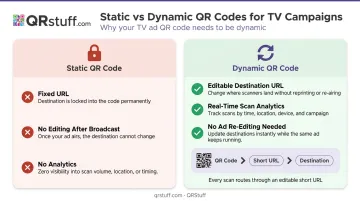
Static QR codes permanently encode a URL. Once that code is in a broadcast file, the destination is locked. If the page breaks, the offer expires, or you want to redirect traffic — you're editing a finished ad.
Dynamic QR codes redirect through a short URL. The destination can be updated at any time through your dashboard without touching the video file. For TV campaigns where re-editing means production costs and broadcast lead times, this flexibility is essential.
QRStuff's dynamic codes include built-in analytics — scan volume, unique scanners, device type, geographic data, and time-based patterns — surfaced in real time. This gives marketers the closed-loop measurement that broadcast advertising has historically made impossible.
Build a Dedicated Landing Page
Every QR scan arrives on a mobile device. The landing page must:
- Load in under 3 seconds — Google data shows 53% of mobile visitors leave pages that take longer than 3 seconds to load
- Match the exact offer in the ad — if the ad promises 20% off, the page opens with 20% off
- Feature a single, prominent CTA — not a navigation menu, not a product catalogue
- Require minimal form fields — every extra field reduces conversion
Linking to your homepage or a general product page after a TV scan destroys conversion rates. The viewer had one specific reason to scan. Give them exactly that.
UTM Parameters and Conversion Tracking
Key steps before launch:
- Stress-test your server for concurrent traffic spikes
- Add a CDN if you're on shared hosting
- Confirm page load times under simulated surge conditions
A code that scans but lands on a crashed page converts at zero.
QRStuff maintains a 99.9% uptime SLA (actual performance since 2008 has been 99.968%) — so the redirect infrastructure is reliable. The vulnerability is almost always the destination page, not the code itself.
Frequently Asked Questions
What is a QR code on a TV commercial?
A TV commercial QR code is a scannable graphic displayed on screen that, when captured with a smartphone camera, instantly takes the viewer to a digital destination (a landing page, app, or promotional offer). It bridges passive TV viewing with active digital engagement in a single camera tap.
How big should a QR code be on a TV screen?
At minimum, the code should occupy 15–20% of the screen area. The practical sizing rule is: scanning distance ÷ 10 = minimum code size. Always test on an actual TV at typical viewing distances before the campaign runs — what looks correct in a design file often looks smaller on a physical screen.
Should I use a dynamic or static QR code for a TV commercial?
Use dynamic codes. They let you update the destination URL without re-editing the ad file and provide scan-level analytics (volume, device type, location, and timing). Static codes offer neither capability, making them a poor fit for any TV campaign where performance measurement matters.
How long should a QR code stay on screen during a TV commercial?
Aim for 10–15 seconds of on-screen visibility — 7–10 seconds is the floor, but the extra time accounts for viewers who need to reach for their phones. Thirty-second spots are the practical minimum commercial length; 15-second spots rarely give viewers enough time to scan.
How do I track whether my TV QR code is driving results?
Use a two-layer approach: a dynamic QR code platform (like QRStuff) captures scan-level data (volume, timing, device, and location), while UTM parameters on the destination URL track visitor behavior inside Google Analytics. Together, these create closed-loop attribution from TV spot to conversion.
Do QR codes work better on CTV or traditional broadcast TV?
CTV tends to outperform traditional broadcast because viewers sit closer to the screen and are more likely to have a phone in hand. That said, both formats benefit from the same core practices: correct sizing, high contrast, a clear incentive-driven CTA, and sufficient on-screen duration. Platform matters less than execution quality.