The problem isn't awareness of that requirement. It's execution. Teams using paper checklists run into wrong forms being pulled, incorrect equipment IDs entered by hand, records lost between the field and the office, and no reliable way to prove who inspected what and when. These aren't edge cases — they're daily friction that accumulates into audit failures.
This guide covers exactly how to use QR codes for equipment inspection: what you need before you start, how to create and label codes, how to link them to checklists, how to run inspections in the field, and how to track compliance over time.
Key Takeaways
- Each asset gets a unique QR code linked to its own inspection checklist, eliminating manual form selection and ID errors
- Use dynamic QR codes so you can update the linked checklist without replacing the physical label
- The setup sequence matters: create codes → label equipment → link checklists → scan and inspect → store records → monitor compliance
- Scan analytics reveal which assets haven't been inspected recently, giving you oversight without chasing paperwork
- Durable label materials and consistent naming conventions determine long-term field reliability
When to Use QR Codes for Equipment Inspection
QR code inspections make sense when you manage multiple assets across shared spaces or rotating crews — where the risk of someone pulling the wrong form or logging the wrong asset ID is high and hard to catch until an audit surfaces it.
The fit is strongest when:
- You have five or more assets requiring the same recurring inspection cycle
- Different asset types require different checklists (a forklift and an overhead crane are not the same form)
- Multiple inspectors rotate across the same equipment
- You need a documented audit trail with timestamps, not just completed paper forms
Where they're often misused:
- Single-asset environments with no checklist variation — a QR code adds a step without solving a problem
- Operations where inspectors don't have mobile devices on the floor
- Sites where the inspection form hasn't been finalized — linking a QR code to a draft checklist creates more confusion than paper would
If the misuse cases don't apply to your operation, those warning signs point toward a real gap. Watch for rising compliance errors, failed audits, missed inspections on rotating equipment, or teams defaulting to one generic checklist for multiple asset types.
Enforcement context worth noting: Powered Industrial Trucks (29 CFR 1910.178) rank as OSHA's 8th most frequently cited standard for FY 2025 — forklift inspection records are under active enforcement scrutiny.
What You Need Before Setting Up QR Code Inspections
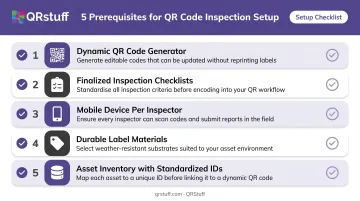
Skipping prerequisites is the most common reason QR inspection systems fail within the first month. Each item below is a dependency, not a suggestion.
The Essential Checklist
| Prerequisite | Why It Matters |
|---|---|
| Dynamic QR code generator | Allows checklist URLs to be updated without reprinting labels |
| Finalized inspection checklists | The QR code can only link to what exists — incomplete forms defeat the purpose |
| Mobile device per inspector | Standard camera app handles URL-linked codes; no dedicated scanner needed |
| Durable label materials | Outdoor, high-humidity, and high-touch surfaces require tested substrates |
| Asset inventory with standardized IDs | Each asset needs a unique, consistent identifier before codes are generated |
Choosing the Right QR Code Platform
For equipment inspection at scale, you need a platform that supports dynamic codes, bulk generation, and per-code scan analytics. QRStuff covers all three, with tiers sized for everything from a pilot test to full fleet deployment.
- Free Suite: 10 dynamic QR codes — suitable for pilot testing
- Lite Suite: 50 dynamic codes ($4/month)
- Full Suite: 250 dynamic codes with 500-code batch generation ($15/month)
- Enterprise: 1,000 dynamic codes with unlimited batch processing, API access, and SSO ($185/month)
The Full Suite covers most mid-sized fleets. Enterprise is the right tier when you need API integration with a CMMS or asset management system, or when inspectors authenticate through your organization's SSO.
Label Materials
Label durability is a system property, not a material property. UL evaluates labels as complete systems — stock, ink, and overlamination — under conditions like water immersion, UV weathering, and chemical exposure per ANSI/UL 969.
3M's Thermal Transfer Polyester Label Material 7864, for example, reports no significant change after 24 hours at 100°F and 100% relative humidity, with temperature resistance from -51°C to 121°C.
For outdoor and high-abrasion equipment, verify the specific label product's data sheet covers your actual operating conditions before committing to a substrate.
How to Set Up and Use QR Codes for Equipment Inspection
Creating and Labeling Your Equipment QR Codes
Generate one unique QR code per asset, using the asset's standardized inventory ID as the reference point. This creates one-to-one mapping between physical equipment and digital records, eliminating any ambiguity about which machine the scan is tied to.
A few placement rules that affect whether inspectors actually use the system:
- Place labels consistently — near the operator entry point or primary identification plate on every asset of the same type
- Use the same height and position across asset categories — an inspector shouldn't have to search for the label
- Verify scan readability before deployment — test from the same angle and lighting conditions inspectors will face in the field

Inconsistent placement is one of the most underrated causes of low adoption. If finding the label takes more than five seconds, inspectors start skipping the scan.
Linking QR Codes to Inspection Checklists
Connect each QR code to the asset-specific checklist URL, not a shared generic form. When a crane operator scans the code on crane #4, they should land directly on the crane #4 pre-shift inspection form, with the asset already identified.
QRStuff's dynamic codes allow the destination URL to be changed through the dashboard at any time after printing. If a checklist is revised, updated, or migrated to a different platform, you update the destination and the physical label stays on the equipment unchanged.
QRStuff links to any external URL, including forms hosted on Google Forms, Microsoft Forms, or a CMMS. The platform doesn't restrict destinations to QRStuff-hosted content, which matters if your organization already has an established inspection system.
Scanning and Completing Inspections in the Field
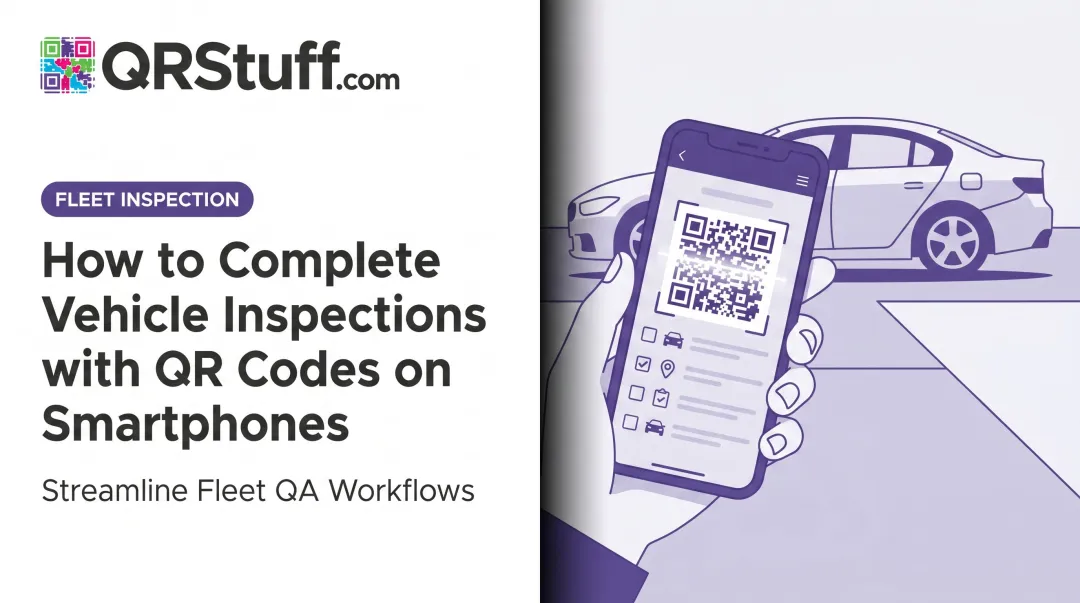
The inspector scans the QR code with their phone camera — no dedicated app needed for URL-linked codes. The checklist opens immediately with the asset identified. They complete the form, note deficiencies, attach photos if required, and submit.
What correct initiation looks like vs. a failure state:
| Scenario | What Happens | Correct Response |
|---|---|---|
| Clean scan on intact label | Checklist opens with asset pre-identified | Inspector completes and submits |
| Damaged or unreadable label | Scan fails to resolve | Inspector uses asset ID to find form via filtered equipment list |
| Broken link (deleted or moved form) | Scan resolves to error page | Flag for safety manager; inspector uses fallback workflow |
| No connectivity | Page fails to load | Inspector uses offline-capable app; syncs on reconnection |
The fallback workflow is not optional. Define it before rollout and train every inspector on it.
Tracking Scan Data and Inspection Records
Inspection records should be stored digitally with a timestamp the moment a form is submitted. This creates an auditable trail showing which asset was inspected, by whom, and when — without paper logs or manual data transfer.
QRStuff's analytics dashboard captures per-scan data in real time, including:
- Scan timestamp (date and time)
- Device type and operating system
- Geolocation (country and city level)
- Total scans vs. unique scans per code
Each dynamic QR code has its own analytics view. Safety managers can filter by individual code, review scan history for a specific asset, and export data as CSV for external analysis.
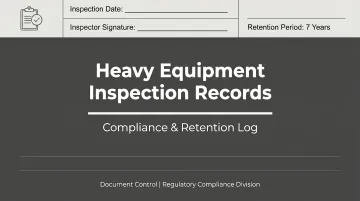
OSHA's crane inspection rules require monthly inspection records retained for 3 months and annual documentation retained for 12 months. Required fields include items checked, results, inspector signature, and date. Your digital records must capture and preserve all of it.
To identify uninspected assets, pull the scan log, filter by date range, and look for codes with zero activity. It's a manual check, but the filtered export gives you a clear gap list to act on.
Closing Out and Acting on Inspection Results
Submitting a form that identifies a fault but triggers no follow-up action creates a compliance liability, not protection. The inspection cycle is complete only when:
- Deficiencies are formally logged in a maintenance or work order system
- A responsible party is assigned by name, not just noted in the form
- Resolution is tracked through to close-out and confirmed complete
Build close-out confirmation into the workflow before rollout. A digital record that shows a flagged fault with no follow-up action is direct evidence of negligence in any regulatory review.
Where QR Code Inspections Are Used in Practice
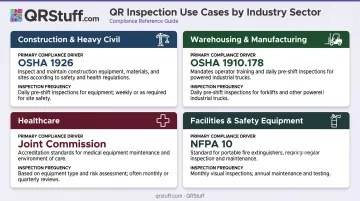
QR-based inspection workflows are active across several sectors, each with different compliance drivers:
- Construction and heavy civil: Excavators, cranes, and motor vehicles require pre-shift inspections under OSHA 1926.601 and 1926.1412. Outdoor conditions demand ruggedized labels and offline form capability.
- Warehousing and manufacturing: Forklifts require daily or per-shift examination under OSHA 1910.178. High inspection frequency with consistent asset locations makes QR workflows a natural fit. OSHA penalties reach $16,550 per serious violation and $165,514 per willful or repeated violation, effective after January 15, 2025.
- Healthcare: The Joint Commission requires a medical equipment inventory, identification of high-risk equipment, and documented maintenance strategies for all inventory. QR workflows should connect each device to its inspection, testing, and maintenance record — not just a static asset page.
- Facilities and safety equipment: Fire extinguishers under NFPA 10 require monthly inspection. Eyewash stations under ANSI Z358.1 require weekly activation tests. Monthly route-based inspections are one of the clearest QR use cases: scan the code on the device, complete the check, record passes.
The setup process follows the same steps regardless of industry. Label material selection and offline capability are the two variables that shift based on your environment — both covered in the implementation steps below.
Best Practices for QR Code Inspections
Use asset-specific forms, not generic ones. A single "Crane Inspection" form shared across five models will miss model-specific checks — the QR code's value is that inspectors get exactly the right form without searching.
Establish a label replacement protocol before rollout. Labels on field equipment will get damaged — decide who prints replacements, where stock is stored, and what inspectors do when a label is unreadable, all before the first one fails.
Monitor at the asset level, not just fleet-wide. QRStuff's per-code analytics let safety managers review scan history for individual assets across custom date ranges. Export the scan log to surface equipment with zero recent activity.
Apply consistent placement and naming conventions. Inspectors should find the QR code on any asset in under five seconds — if position varies by crew or install date, scan rates will drop.
Train on both the primary and fallback workflows. One pre-rollout site meeting covering the scan-to-inspect process and the fallback-by-asset-ID method prevents most adoption issues from arising.
Conclusion
QR codes for equipment inspection are straightforward in concept and easy to undermine in execution. The code on the equipment is just an entry point. The compliance value comes from what it links to, how reliably the label survives the environment, and whether flagged deficiencies actually get resolved.
Treat the setup as a one-time investment. Get these four things right and the system runs itself:
- Finalized checklists linked to each asset before labels go out
- Durable labels rated for the operating environment (heat, moisture, abrasion)
- Consistent naming so asset IDs match across every connected system
- A defined fallback workflow for when a scan isn't possible
Done correctly, the system eliminates the daily friction of wrong forms, manual ID entry, and paper record chasing. It also leaves an auditable trail that holds up when an inspector arrives.
If you're building this from scratch, QRStuff's dynamic QR codes let you update linked destinations without reprinting labels — useful when checklist forms change or assets get reassigned. You can generate and manage inspection codes at scale from a single dashboard, with scan tracking to confirm codes are actually being used in the field.
Frequently Asked Questions
How do I perform a QR code equipment inspection?
The inspector scans the QR code on the equipment using their phone camera, which opens the linked inspection checklist directly. They complete the form, note any deficiencies, and submit — records are stored automatically with a timestamp.
Should I use a static or dynamic QR code for equipment inspection?
Dynamic QR codes are the right choice. They allow the linked inspection form URL to be updated at any time without replacing the physical label. Static codes are permanent: any checklist change requires reprinting every label.
What happens if a QR code label is damaged or unreadable?
Inspectors should have a defined fallback: search an equipment list by asset ID and open the form manually. Label replacement protocols (who prints them, where stock is kept) should be set before rollout, not after the first failure.
Can one QR code link to multiple inspection forms for the same asset?
Yes. The QR code should link to a landing page or menu listing the relevant checklists (pre-shift, post-shift, mechanic-specific). QRStuff's Multi-URL feature supports this natively — one code per asset, with the inspector selecting the appropriate form on arrival.
Can QR code inspections work without internet connectivity?
Standard URL-linked QR codes require connectivity to load the checklist. Teams in low-connectivity areas should use inspection apps with offline form access that sync records once a connection is restored.
How durable are QR code labels on heavy outdoor equipment?
Durability comes down to the label system: stock, ink, and overlaminate together. Polyester labels with UV-resistant laminate tested to ANSI/UL 969 hold up outdoors and in high-abrasion environments; standard paper labels do not.