The problem? Most exhibitors print QR codes without a clear strategy. Codes end up on banners with no call-to-action, linking to desktop-only pages that load slowly on a convention centre floor. Scans happen — or don't — and there's no data to show for it after the show.
This guide covers how to use QR codes at trade shows correctly: what to set up before the show, how to deploy codes during the event, which use cases actually drive results, and how to measure performance when it's all over.
Key Takeaways
- Use dynamic QR codes — not static — so you can update destination URLs after printing and track real-time scan data
- Assign a specific goal to each QR code before the show (lead capture, demo, networking, giveaway, feedback)
- Place codes at spots where attendees naturally pause — banners, product displays, business cards, and handouts
- Every QR code needs a clear call-to-action — without one, most attendees won't scan
- Track scan analytics during and after the show to measure what worked — and what to fix next time
What You Need Before Using QR Codes at Trade Shows
Dynamic vs. Static QR Codes
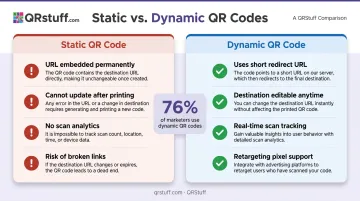
This is the most important decision you'll make. Static QR codes embed the destination URL directly into the code — once printed, that URL is permanent. If a landing page breaks or a URL changes after your banners are printed, you're stuck.
Dynamic QR codes use a short redirect URL instead. The printed code never changes, but the destination can be edited at any time from your dashboard. According to Uniqode's 2026 State of QR Codes report, 76% of marketers now use dynamic QR codes — and for trade shows specifically, they're the only practical choice.
With dynamic codes, you can swap a broken landing page mid-show, enable or disable codes on the fly, and add retargeting pixels — all without reprinting a single banner.
Pre-Show Checklist
Before your booth materials go to print, confirm you have these in place:
- A dynamic QR code platform with analytics — look for real-time scan tracking, custom branding (logos, colors), and data broken down by device, location, and time. QRStuff supports 40+ code types including URL, vCard, Wi-Fi, coupon, and video
- Mobile-optimized destination pages — slow or desktop-only pages kill conversions fast. Google's research shows bounce probability increases 32% when load time goes from 1 to 3 seconds
- A testing plan — scan every code on iOS and Android at actual print size and expected scanning distance, including under the venue's connectivity conditions
Convention centres frequently have poor cellular service. QRStuff's Wi-Fi QR code type lets you offer in-booth Wi-Fi credentials as a scannable code — attendees connect instantly without typing a password, which also keeps them engaged at your display longer.
How to Use QR Codes at Trade Shows
Effective trade show QR code use follows three phases. Skipping the pre-show or post-show phases is one of the most common reasons exhibitors see no ROI from QR codes.
Pre-Show: Setup and Promotion
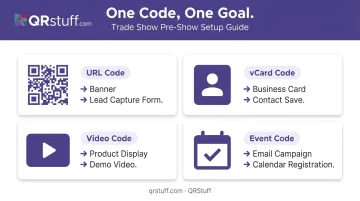
Create codes with specific goals assigned to each one. Don't create a single generic QR code for your booth. Before the show, map out your objectives:
- One URL code → lead capture form on a banner
- One vCard code → business cards and badges for every sales rep
- One video code → product demo display
- One event code → email campaigns for calendar saves and pre-registration
Embed QR codes into booth graphics during the design phase, not as an afterthought. Size matters: follow a 1:10 ratio — the code should be 1 unit wide for every 10 units of expected scanning distance. A 1-foot-wide code on a back wall banner works for 10-foot scanning distances.
According to CEIR data reported by Trade Show Executive, 81% of exhibitors conduct pre-event marketing, with email campaigns used by 60%. Embedding an event QR code in those emails — linking to a calendar save or pre-registration page — converts pre-show interest into guaranteed booth traffic before the doors open.
Avoid this setup error: Printing static codes. If anything changes after materials are printed — URL structure, landing page, offer — static codes leave you with no recourse. Dynamic codes eliminate this entirely.
During the Show: Booth Deployment
Every QR code needs a visible, specific call-to-action. "Scan Me" is not a CTA. Tell attendees exactly what they'll get:
- "Scan to watch the 90-second demo"
- "Scan to enter our giveaway"
- "Scan to save my contact details"
- "Scan to download the product spec sheet"
Booth staff should facilitate, not just stand nearby. Staff who actively invite attendees to scan — and walk through the experience with them — generate better quality leads and longer dwell time than codes left to perform on their own.
Monitor scan data live. QRStuff's analytics dashboard updates in real time as codes are scanned. During a busy show floor, this lets you see which codes are underperforming. If a particular banner QR code isn't generating scans by midday, you can reposition the signage or update the CTA copy. Because the code is dynamic, no reprinting is needed.
Post-Show: Follow-Up and Measurement
QR codes should extend engagement beyond the show floor. A lead capture scan can automatically trigger an email sequence or deliver a promised resource, creating follow-up without manual data entry.
After the show, review your scan data across these dimensions in QRStuff's dashboard:
| Metric | What It Tells You |
|---|---|
| Total vs. unique scans | Overall reach vs. distinct individuals |
| Scan timing (by hour/day) | Which days and sessions drove the most activity |
| Device type (iOS vs. Android) | How to optimize landing pages |
| Geographic location | Where your audience came from |
| Code-by-code comparison | Which materials and placements performed best |
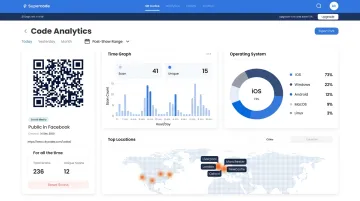
Export your data as CSV for deeper analysis, or use UTM parameters to pipe scan data directly into Google Analytics alongside your other campaign metrics.
Trade Show QR Code Use Cases That Drive Results
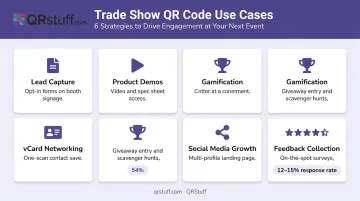
Not all QR codes serve the same function. These six use cases cover the most consistent performers:
Lead Capture
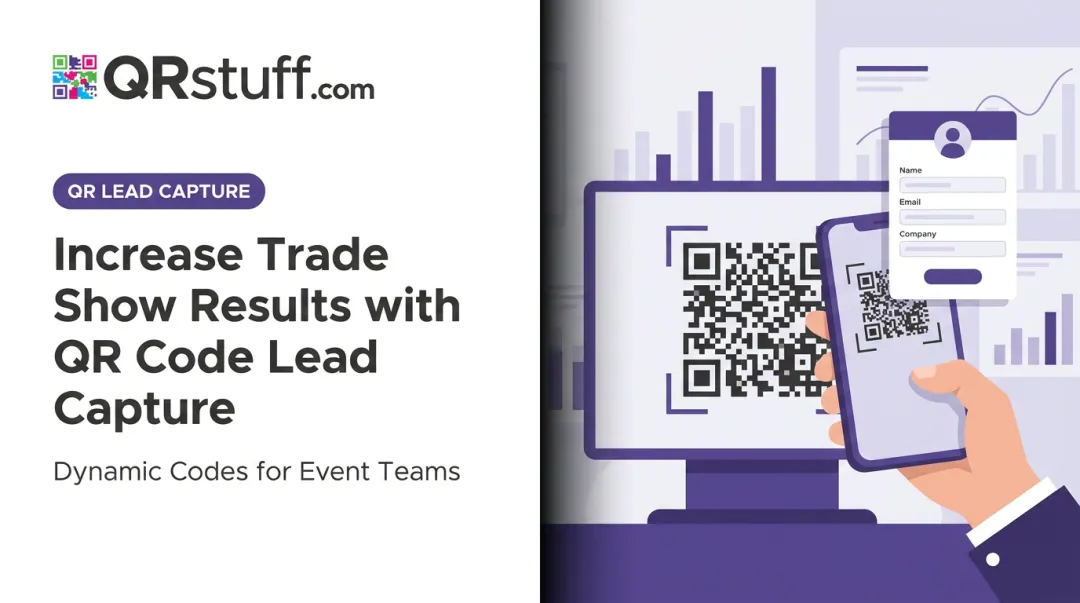
Link a URL QR code on banners or booth signage to an opt-in form. Attendees submit their details in exchange for a resource — product guide, discount, or whitepaper. CEIR identifies lead generation as the top exhibiting objective, and digital capture supports CRM integration and on-the-spot follow-up that paper forms simply can't.
Product Demos and Content Access
Place a video or URL QR code on product displays to direct attendees to demo videos, spec sheets, or interactive presentations. Most effective for complex products where a full live demo isn't always possible with a crowd.
vCard and Digital Networking
Print a vCard QR code on business cards and badges so contacts can save your full details with one scan. QRStuff's dynamic vCard lets you update contact information after printing — no reprints needed when sales reps work multiple shows a year.
Gamification and Giveaways
Run a QR code scavenger hunt or giveaway entry to pull foot traffic to your booth. CEIR reports that 54% of exhibitors see high attendee engagement with games at trade shows. QRStuff's coupon QR code type can reward participants and drive post-show purchases.
Social Media Growth
Direct attendees to a branded landing page listing all your social profiles — LinkedIn, Instagram, Facebook — in a single scan. QRStuff's Social Link Pages QR code type converts in-person interest into long-term digital engagement without attendees hunting for each account separately.
Feedback Collection
A feedback QR code on brochures or booth signage makes it easy for attendees to respond on the spot. QRStuff's native form builder handles custom surveys without a third-party tool, or link directly to Google Forms. Explori benchmarks live trade show survey response rates at 12–15% — pairing a QR code with a small incentive pushes that number higher.
Where to Use QR Codes at Your Trade Show Booth
Strategic Placement Principles
QR codes work best where attendees naturally pause. Poor placement — too high, too low, or buried in a cluttered visual area — drops scan rates significantly.
High-performance placement locations:
- Eye level on back wall banners
- Demo tables and product displays
- Near seating areas or charging stations
- Directly on items handed to attendees (business cards, brochures, swag)
Physical materials that commonly carry QR codes:
- Banner stands and retractable banners
- Booth counters and product packaging
- Giveaway items: tote bags, lanyards, branded merchandise
- Name badges and brochures
- Staff apparel — a creative placement that turns every team member into a walking touchpoint
One real-world example: EXHIBITOR Magazine documented that Poor Richards Promos placed QR codes on the backs of staff T-shirts under the tagline "Stop looking at my apps," driving more than 100 prospects to their website — where visitors spent an average of four minutes.
Size Guidelines by Material
Sizing depends on viewing distance. For large-format booth signage, Nielsen Norman Group recommends a minimum of 2 cm × 2 cm, adding 1 cm of width for every 10 cm of expected scanning distance. For 55-inch display screens, the OAAA recommends 250–300 px (6.25–7.5 inches) — appropriate for scanning from 4–7 feet.
Venue Connectivity
Large convention centers frequently throttle shared Wi-Fi, so test connectivity conditions before the show if possible. If cellular service is unreliable, offer in-booth Wi-Fi via a QRStuff Wi-Fi QR code so attendees can connect instantly.
If technical issues arise during the show, dynamic QR codes let you update destination URLs on the fly — no reprinting required.
Best Practices for Trade Show QR Codes
Follow these five rules and your QR codes will perform on the show floor — not just look good on your booth materials.
Design and Setup
Before printing anything, get the fundamentals right:
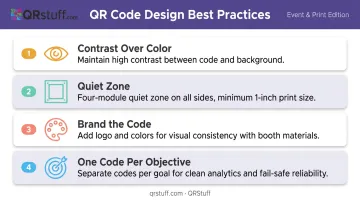
- Contrast over color: High contrast between code and background matters more than color choice. Colored codes work fine as long as contrast is maintained.
- Quiet zone: Follow DENSO WAVE's requirement for a four-module quiet zone on all sides. Never print smaller than 1 inch regardless of placement.
- Brand the code: Adding your logo and colors — available on QRStuff's Lite Suite and above — makes codes visually consistent with your booth materials.
- One code per objective: Separate codes for each goal and each physical location. One broken link won't disable all your QR interactions, and you get clean data on which placements generate the most scans.
CTAs and Testing
Generic codes are the lowest performers at every show. "Scan to download our product guide" consistently outperforms "Scan Me." Keep CTA copy short, action-oriented, and specific about the outcome.
Testing is non-negotiable:
- Use QRStuff's preview feature to verify codes before downloading
- Scan on both iPhone and Android using native camera apps
- Confirm landing pages are mobile-optimized and load within 3 seconds
- Assign a team member to re-test every code each morning of a multi-day event
Reliability During the Event
QRStuff has logged 99.968% actual uptime since 2008 — under 3 hours of downtime per year on average. For a 3-day trade show, that means your codes stay live and scannable from opening bell to close.
Frequently Asked Questions
What is a QR code for a trade show booth?
A trade show QR code is a scannable 2D barcode placed on booth materials — banners, business cards, signage, giveaways — that directs attendees to digital content via their smartphone camera. Common destinations include product demos, lead capture forms, contact details, and social media profiles.
Should I use dynamic or static QR codes for trade shows?
Dynamic QR codes are the right choice for trade shows. They let you update the destination URL after printing (essential if a landing page changes), and they provide real-time scan analytics. Static QR codes offer neither capability.
Where should I place QR codes at a trade show booth?
QR codes perform best at eye level in high-dwell locations: back wall banners, demo tables, product displays, and directly on materials handed to attendees like business cards and brochures. Always pair each code with a clear call-to-action.
How big should a QR code be on a trade show banner?
Use a 1:10 ratio — the code should be 1 unit wide for every 10 units of expected scanning distance (for example, a 1-foot-wide code on a banner if attendees scan from 10 feet away). Never print smaller than 1 inch regardless of placement.
Can I change what my QR code links to after it's already printed?
Yes, if you're using a dynamic QR code, you can edit the destination URL at any time without reprinting. This lets you fix a broken link, swap a landing page, or update content between show days.
How do I measure QR code performance at a trade show?
Dynamic QR code platforms like QRStuff provide analytics including total scans, unique scans, scan timing by hour and day, device type, and geographic location. Use this data mid-show to optimize placement and CTAs, and post-show to evaluate ROI and plan your next event.