QR codes change that equation. They turn a 30-second impression into a scannable moment that bridges the screen and the smartphone.
The Coinbase Super Bowl 2022 spot proved this at scale: a bouncing, colour-changing QR code linked to a $15 bitcoin offer briefly crashed the Coinbase app after a surge in traffic. Consumer comfort with scanning has only grown since — 68% of consumers used a QR code at least once in the past year, and the US scanner base is projected to reach 99.5 million by 2025.
This article covers why 2026 is the right moment to adopt this combination, where QR codes fit across video formats, how to set up a campaign that converts, and what to watch out for before you start.
Key Takeaways
- QR codes turn passive video viewers into active participants with an immediate next step — scan to shop, claim an offer, or learn more
- They work across CTV/streaming, social video, YouTube pre-roll, in-store displays, and product packaging
- Dynamic QR codes are the right choice for video campaigns — update destinations, run tests, and track performance without touching the creative
- Success comes down to a clear CTA, smart placement, a fast mobile-optimized landing page, and solid analytics
Why 2026 Is the Right Moment to Add QR Codes to Video
Three shifts have converged to make this combination viable at scale.
Native scanning removed the friction. No app required. Every modern iPhone and Android camera reads QR codes instantly, built directly into the OS. That single change eliminated the biggest barrier to consumer adoption.
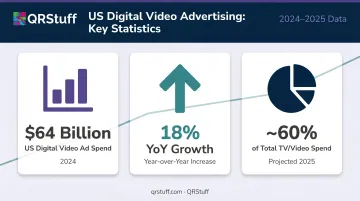
Video ad spend hit $64 billion — and it's still climbing. US digital video ad spend grew 18% year-over-year to $64 billion in 2024, with digital video on track to capture nearly 60% of total TV/video ad spend in 2025. CTV commands enormous audience attention, yet performance attribution has historically lagged behind display and search. QR codes give CTV ads hard scan data — the closest thing to a click-through rate that TV has ever had.
The major platforms have formalized it. Samsung Ads officially lists QR-enabled interactive ads in its CTV creative formats. Google Ads supports QR codes on CTV campaigns through Demand Gen and Performance Max — standard options, not hacks or add-ons.
What QR Codes Actually Add to Your Video Marketing
Engagement and Measurable Response
A QR code transforms a 30-second ad from a branding impression into an actionable moment. According to a study of nearly 7,000 respondents cited by NextTV, 50% of consumers said they'd likely scan a QR code in a relevant and engaging ad, with 48% motivated specifically to learn more about an advertised product.
The measurement upside is just as significant. Traditional TV attribution relies on surveys, panel data, and inferred lift. QR codes produce hard evidence:
- Total scans and unique scans (reach vs. repeat behaviour)
- Device type and operating system
- Geographic distribution at country and city level
- Scan timing down to the minute
For brands that have historically guessed at video ROI, that's a meaningful shift in accountability.
The Dynamic QR Code Advantage
Not all QR codes are equal for video campaigns. Static codes lock you into a single destination — if the URL breaks, the offer expires, or you want to test a different landing page, you're stuck.
Dynamic QR codes solve this. The code image stays identical, but the destination lives in a dashboard you control. With QRStuff's dynamic codes, you can:
- Update the destination URL at any time without re-editing or reprinting the creative
- Create separate dynamic codes for A/B testing different landing pages or offers
- Redirect based on time windows or campaign phases
- Track all scan behaviour in a consolidated analytics view
For a video ad that may run for weeks or months, that flexibility matters. A campaign launched in January can point to a Valentine's Day offer in February, then a clearance sale in March — same QR code, same creative, zero production costs.
Bridging Screen to Action
That dynamic flexibility only matters if the viewer takes action. Here's how the journey typically unfolds:
- Viewer sees a product featured in the ad
- Scans the on-screen QR code with their phone
- Lands on a shoppable page, video tutorial, exclusive discount, or sign-up form
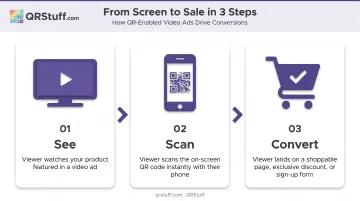
No URL to type, no app to download — just a direct path from passive viewing to conversion.
Custom-branded QR codes — with logo embedding, brand colours, gradient fills, and distinct module shapes — integrate cleanly into video creative without looking like an afterthought.
Where QR Codes Fit in Your Video Marketing Mix
CTV and Streaming Ads
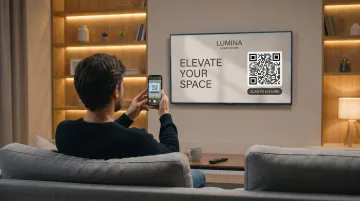
CTV is the highest-opportunity placement, and the reason is straightforward: viewers are leaned back with phones in hand. Research from YouGov shows three-quarters of Americans at least sometimes use another device while watching TV — meaning the scan behaviour requires almost no extra effort.
Best practices specific to CTV:
- Display the QR code for at least 30 seconds — viewers need time to notice it, pick up their phone, and scan
- Size it large enough to scan from couch distance (roughly 10–15% of screen width as a starting point)
- Lead with a time-sensitive or value-driven CTA: "Scan for 20% off — tonight only" outperforms "Scan to learn more"
- Don't show the code in the first 5 seconds; let the creative hook the viewer first
Those best practices aren't theoretical. The Mondelez/Nabisco CTV campaign using QR codes was reported by trade sources to have delivered 10x higher conversions than CTV benchmarks and 12% new buyer acquisition. Benchmark methodology wasn't disclosed, so treat those figures as directional — but the pairing of precise targeting, a concrete offer, and a well-placed code drove measurable new customer acquisition.
Social Media and Short-Form Video
In social video — Instagram Reels, TikTok, YouTube Shorts — the viewer is already on their phone. Scanning a QR code is more friction than tapping a link, so the use case shifts accordingly.
Effective uses in social/short-form contexts:
- End cards: QR code appears in the final 3–5 seconds as a persistent visual anchor
- Thumbnail overlays: Code visible before playback starts, driving curiosity-driven scans
- Brand identifier: The QR code signals "there's more here" without being the primary conversion mechanic
- Distinct landing page: Link the code to a page different from your link-in-bio, so you can track social video traffic separately
Product Packaging, Events, and In-Store Video
Physical-world video touchpoints are underused:
- In-store displays: Video screen + QR code linking to a product tutorial or comparison guide
- Event screens: QR codes for live polls, exclusive downloads, or post-event content
- Product packaging: Unboxing videos with QR codes on the box linking to setup guides or recipe content
QRStuff supports GS1 Digital Link QR codes specifically designed for product packaging — codes that handle retail POS scanning requirements while simultaneously linking consumers to video tutorials, sustainability information, or promotional content. A single code satisfies retail compliance and drives consumer engagement without requiring separate print assets.
How to Create a Video QR Code Campaign That Converts
CTA Design
The CTA is the single biggest lever. Vague prompts underperform. Specific, benefit-driven prompts drive scans.
| Weak CTA | Stronger CTA |
|---|---|
| Scan to learn more | Scan for 20% off your first order |
| Scan here | Scan to see it work in 60 seconds |
| Find out more | Scan for a free sample |
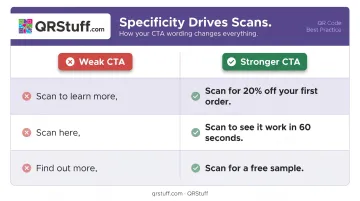
Keep CTA copy to 5–7 words maximum and position it directly adjacent to the code, not above or below a separate design element.
Placement and Timing
- Don't show the QR code before the 5-second mark — let the story hook first
- Minimum on-screen time: 10–15 seconds for digital pre-roll, 30+ seconds for CTV
- Size: large enough that a viewer doesn't need to pause the video to scan
- Position: corner placement works for CTV; centre or lower-third works for shorter formats
Post-Scan Experience
The landing page determines whether a scan becomes a conversion. It must:
- Load in under 3 seconds on mobile
- Deliver exactly what the CTA promised — not a homepage, not a product category page
- Be fully mobile-optimised with minimal form fields if conversion is the goal
If the CTA says "Scan for 20% off," the discount code needs to be the first thing on screen. Any mismatch between the promise and the page kills conversion.
UTM Parameters and Analytics
Every QR code in a video campaign should carry UTM parameters so scan-driven traffic is correctly attributed in Google Analytics or GA4. QRStuff's platform supports UTM parameter appending directly within the dynamic code setup — source, medium, and campaign fields are configurable without a separate URL builder.
The consolidated analytics dashboard tracks all key metrics in real time:
- Total scans and unique scans
- Device type breakdown
- Geographic distribution
- Scan timing across campaign duration
For teams running multiple variants, scan data exports as CSV for deeper analysis or integration with BI tools.
Limitations and Considerations Before You Start
Audience fit matters. QR codes in video work best when the target audience is phone-adjacent during viewing. Younger demographics index significantly higher — TEAM LEWIS research found 83% of Gen Z are more likely to use QR codes — while older demographics in lean-back TV viewing contexts may scan less frequently. Factor this into your expected scan rates before setting performance targets.
Security and consumer trust. According to CNBC, 73% of Americans scan QR codes without verifying where they lead, and over 26 million have been directed to malicious sites. Branded QR codes — with a recognizable logo and brand colors — signal legitimacy visually. Always ensure destination pages use HTTPS.
For enterprise campaigns, QRStuff's GDPR and SOC2 compliance, combined with platform-level security features (password protection, 2FA, SSO, and full audit trails), address data privacy requirements at scale.
QR codes don't rescue weak creative. If the video doesn't earn attention in the first 5 seconds, viewers won't stay long enough to scan. A QR code is an enhancement to strong creative — not a substitute for it.
Frequently Asked Questions
Can you use QR codes for video marketing?
Yes. QR codes can be embedded in CTV ads, social video, YouTube pre-roll, in-store video displays, and video on product packaging. They function as a scannable CTA, connecting the viewing moment directly to a digital action like a purchase, sign-up, or content experience.
Do QR codes work in YouTube or social media video ads?
In social and YouTube contexts, viewers are already on their phones, so clicking a link is easier than scanning. QR codes work better here as end-card visuals or brand identifiers rather than the primary conversion trigger. Use them to drive traffic to a dedicated landing page separate from your link-in-bio for cleaner attribution.
What is the difference between static and dynamic QR codes for video marketing?
Static codes encode a fixed URL that cannot be changed. Dynamic codes use a redirect layer, so the destination updates through a dashboard without re-editing the video. They also track scan analytics and support A/B testing, making them the only practical choice for video campaigns.
How long should a QR code stay on screen in a video ad?
A minimum of 10–15 seconds for shorter digital video ads, and 30+ seconds for CTV placements. The code needs to be visible long enough for a viewer to notice it, pick up their phone, open the camera, and complete a scan. Shorter exposures produce significantly lower scan rates.
What are the biggest mistakes brands make with QR codes in video?
Three consistent pitfalls: a vague CTA that doesn't communicate specific value, a post-scan landing page that isn't mobile-optimized or doesn't match what the ad promised, and using a static QR code with no tracking — which leaves the team with no data to measure or improve performance.