Introduction
Most travelers today check in, clear security, and board without touching a single paper document. That shift didn't happen by accident—it happened because QR codes became reliable enough to replace printed boarding passes at every stage of the journey.
The technology underpinning this is more structured than most passengers realize. IATA's Bar Coded Boarding Pass (BCBP) standard governs exactly what data a flight QR code must contain and how airport systems read it, ensuring a boarding pass generated in one country scans cleanly at a gate on the other side of the world.
This article covers what flight QR codes actually encode, how they work from check-in through boarding, the measurable benefits for airlines and passengers, and what it takes to deploy QR codes at scale across an airport operation.
Key Takeaways
- QR code boarding passes pack all passenger and flight data into a single scannable code following IATA's BCBP standard.
- QR codes reduce friction at check-in, security, and boarding—and eliminate paper costs entirely for mobile passes.
- Airlines use QR codes far beyond boarding passes—in-flight orders, baggage reporting, and airport parking included.
- Dynamic QR codes let airlines update flight data in real time without reissuing passes to passengers.
- Getting implementation right means meeting contrast standards, preserving quiet zones, and testing across devices before launch.
What Information Does a Flight QR Code Contain?
A boarding pass QR code is a compact data container, not just a visual pattern. It encodes everything an airport system needs to verify a passenger and process their journey, replacing the printed document entirely.
The IATA BCBP Standard
The governing specification is IATA Resolution 792, the Bar Coded Boarding Pass (BCBP) standard, which defines mandatory and conditional data fields for all compliant boarding pass barcodes. IATA's BCBP covers four symbologies: PDF417, Aztec, Data Matrix, and QR code.
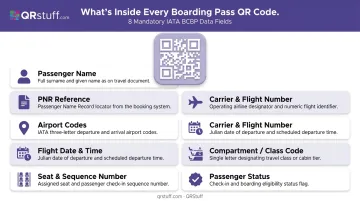
Mandatory data fields encoded in every compliant boarding pass include:
- Passenger full name
- Operating carrier PNR (booking/confirmation reference)
- From and to airport codes
- Operating carrier designator and flight number
- Flight date and departure time
- Compartment code (travel class)
- Seat number and check-in sequence number
- Passenger status indicator
Conditional fields can include baggage tag licence plate numbers, selectee indicators for additional security screening, international documentation verification flags, fast-track eligibility, and digital signature data.
Static vs. Dynamic Codes
Standard BCBP boarding pass codes are static—the passenger data is encoded directly into the symbol at the time of issue. Once generated, the code cannot be changed.
Dynamic QR codes work differently. They embed a short redirect URL rather than the data itself. When scanned, the code resolves to a server record that can be updated in real time. Gate changes, seat reassignments, and delay notifications can all be reflected without issuing a new code to the passenger.
For non-boarding applications — in-flight payment terminals, food ordering, and baggage reporting — dynamic codes are the standard approach. United's PayPal QR payment rollout in 2021 and LAX's scan-to-order food service are two prominent examples.
The table below summarizes the key differences:
| Static Code | Dynamic Code | |
|---|---|---|
| Data location | Encoded in the symbol | Stored on a server |
| Updateable after issue | No | Yes |
| Typical use case | Boarding passes | Payments, menus, baggage reporting |
| Scan tracking | Not available | Real-time analytics |
How Scanners Read the Code
Airport scanners and smartphone cameras decode the QR pattern in milliseconds. The decoded data feeds directly into the airline's Departure Control System (DCS), which cross-references the passenger record and triggers gate access or boarding confirmation.
Staff see the booking details instantly: name, seat, class, and status — no manual lookup required. For static boarding pass codes, the process is entirely local. For dynamic codes used at payment or food-ordering terminals, the scan resolves to a live server record before returning a response to the reader.
How QR Codes Work at Every Stage of Air Travel
QR codes touch nearly every point of the modern airport experience. Here's how they function across the passenger journey.
At Check-In
After completing online check-in, passengers receive their QR code boarding pass via email, the airline's mobile app, or SMS. Major carriers—Delta, United, British Airways, Emirates, Qantas—all support mobile boarding pass workflows on their apps, and passes can be saved to Apple Wallet or Google Pay for offline access.
At a self-service kiosk or staffed counter, the scanner reads the QR code to:
- Pull up the passenger reservation
- Verify identity against the booking record
- Tag checked baggage
- Confirm final boarding status
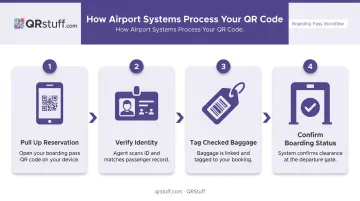
No paper required at any step.
At Security and the Gate
At security checkpoints, the mobile boarding pass QR code is scanned as part of the verification process. American Airlines confirms that mobile boarding pass barcodes are scanned at airport security checkpoints; Southwest describes mobile boarding passes as scannable electronic passes used to clear security and board.
TSA's Digital ID program operates at more than 250 US airports, where travelers can scan a Digital ID QR code or tap a mobile device as part of identity verification. This is a distinct workflow from the boarding pass scan. Travelers still need an acceptable physical ID at most checkpoints.
At the gate, agents scan each passenger's QR code to:
- Confirm the passenger is on the correct flight
- Verify boarding group sequence
- Register the passenger as boarded in real time
Qantas's help documentation explicitly states that passengers hold the boarding pass QR code under the barcode reader—a direct confirmation of QR scanning in the boarding workflow.
On the Flight
QR codes don't stop working once the door closes. Verified in-flight applications include:
- In-flight payments: United introduced PayPal QR codes as an in-flight payment option in 2021, allowing passengers to pay for snacks and drinks by scanning the PayPal QR code from their phone—with or without Wi-Fi.
- Entertainment pairing: Qatar Airways' Zero-Touch technology lets passengers pair personal devices with seat-back IFE by scanning a QR code displayed on the screen.
- Seat-based ordering: QR codes on tray tables or seat cards link directly to food and beverage menus, safety videos, destination guides, and customs forms.
End-of-flight uses include feedback surveys, loyalty program summaries, and connecting gate information—keeping passengers informed from boarding through deplaning.
Key Benefits of QR Codes for Airlines and Passengers
Efficiency and Cost Savings
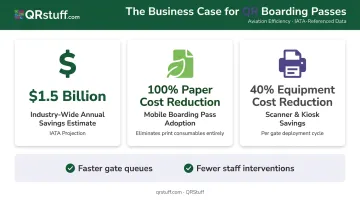
IATA estimates that full worldwide adoption of 2D bar-coded boarding passes could save the industry up to USD $1.5 billion annually. The IATA BCBP Implementation Guide puts the operational impact in sharper focus: home and mobile boarding passes reduce paper costs by 100% and equipment replacement costs by 40%.
At the gate, those savings compound into faster operations:
- Quicker scans reduce queue times and increase throughput per boarding lane
- Fewer staff interventions are needed to resolve ticketing issues
- Dynamic codes eliminate reprint requests when flights change
Passenger Experience
For travelers, consolidating all travel documents on a smartphone removes a specific anxiety: the lost boarding pass. Key experience benefits:
- Fully contactless journey from curb to seat
- Passes accessible offline via Wallet apps
- No reprinting needed if a flight changes (with dynamic codes)
- Consistent experience across airline apps, email, and SMS
Sustainability
Eliminating paper boarding passes, printed menus, and informational leaflets across thousands of daily flights reduces paper consumption at scale. Across a single large carrier's annual operations, that shift can mean millions of fewer printed documents — a measurable reduction without any change to the passenger experience.
Beyond Boarding Passes: Other Ways Airlines Use QR Codes
Airport Services
QR codes are embedded throughout terminals for functions passengers use independently:
- Parking: San Diego International and Philadelphia International both confirm QR-code-based entry at barrier gates using confirmation email codes.
- Food ordering: LAX deployed QR-code food ordering across terminals via its "LAX Order Now" program in 2020, followed by QR-code delivery through AtYourGate in 2021.
- Wayfinding: Airports embed QR codes in signage so passengers can pull terminal maps and amenity guides to their own devices without asking staff.
- WiFi access: Lounges and gate areas use WiFi QR codes to connect passengers instantly, no credential entry needed.
Baggage and Logistics
American Airlines provides QR-code signs at baggage claim—passengers scan to access the delayed bag reporting portal and enter their bag tag number or booking reference, bypassing the queue. That consumer-facing convenience relies on a deeper infrastructure: SITA's WorldTracer system handles real-time bag tracking across airlines, ground handlers, and airports at the system level.
Operational and Marketing Uses
Airlines use QR codes in promotional emails linking to fare deals, loyalty program sign-ups, and travel content for international destinations. Delta's app download page itself uses a QR code. From the parking garage to post-flight follow-up, QR codes now touch nearly every stage of the passenger journey.
Best Practices for Implementing QR Codes in Air Travel
Design for Scanability in Variable Conditions
A few non-negotiable technical requirements:
- Quiet zone: Per DENSO Wave's QR code guidance, the quiet zone must be 4 modules wide on all sides. Cutting into this margin causes scan failures.
- Contrast: The IATA BCBP guide specifies a Print Contrast Signal of at least 80% at 633 nm for printed codes. For digital displays, high contrast between the dark modules and light background is equally critical.
- Branding: Custom colours, logos, and patterns are acceptable—but automatic error correction must be enabled to compensate for any logo coverage over the code pattern.
Use Dynamic Codes for Time-Sensitive Information
Gate reassignments, delays, and seat swaps are facts of airline operations. Dynamic QR codes allow the destination URL or data the code points to to be updated instantly without reissuing the code to the passenger. The physical code stays the same; only the data it resolves to changes.
This is especially useful for:
- Gate and departure signage
- In-flight information cards
- Any passenger communication distributed before final details are confirmed
Testing Across Devices and Airport Systems
Before any large-scale rollout:
- Test codes across iOS, Android, and older device models common among international travellers
- Coordinate with airport scanner systems—IATA's Common Use Standards (Resolution 792, CUPPS, CUSS) govern shared passenger processing infrastructure
- Verify that generated codes meet BCBP format requirements for interoperability across airlines, ground handlers, and airports
Support Passengers with Access Barriers
QR adoption creates a gap for passengers without smartphones or those facing technical issues. Best practice:
- Maintain backup verification using booking references or government-issued ID
- Train front-line staff to resolve scan failures quickly and confidently
- Provide multilingual guidance at high-traffic international terminals
As a practical example, American Airlines notes that the entire barcode must be visible on screen for a successful scan. A simple screen brightness check resolves many of these issues before boarding.
How Airlines Can Create and Scale QR Codes with QRStuff
Airlines and travel operators face a volume challenge that consumer QR tools aren't built for. A single hub might need thousands of unique codes across boarding passes, gate signage, in-flight seat cards, parking systems, and passenger feedback touchpoints—all requiring consistent branding, real-time updatability, and reliable scan performance.
QRStuff is built for this scale. The platform has served over 250,000 businesses since 2008, including Fortune 500 companies across hospitality, logistics, and travel.
Key capabilities for airline operations:
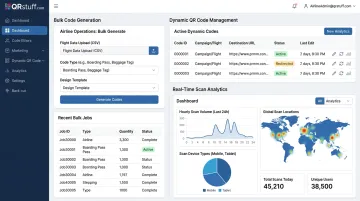
- Generates codes in bulk — unlimited batch processing for static and dynamic codes; jobs over 20,000 codes run at $2.50 per 1,000 with a 48–72 hour turnaround
- Updates dynamic code destinations instantly on the next scan — no reprinting, no reissuing to passengers; essential for live gate changes
- Integrates via RESTful API, generating boarding pass or ancillary QR codes programmatically as bookings are processed
- Applies airline logos, brand colors, and custom patterns with automatic error correction to maintain scan reliability
- Tracks scans in real time — total and unique scans, device type, OS, geographic location, and time of scan; CSV export connects to existing BI tools
- Stores passenger-adjacent data on European servers with full audit logging; SOC2 and GDPR compliant
- Maintains 99.968% actual uptime since 2008 — under three hours of downtime per year on average
| Enterprise Plan | What's Included |
|---|---|
| Price | $235/month |
| Dynamic codes | 1,000 included |
| Batch processing | Unlimited |
| API access | ✓ |
| White-label branding | ✓ |
| Support | Dedicated account manager + 24/7 |
This is a practical starting point for carriers managing QR codes across multiple routes and terminals.
Frequently Asked Questions
What is the QR code for a flight?
A flight QR code is a digital boarding pass that encodes your name, flight number, seat, booking reference, and boarding group. Airport staff scan it at security and the gate to verify your identity and process boarding without paper documents.
How do I get my QR code for my flight?
After completing online check-in, your airline sends the QR code boarding pass via email, SMS, or through the airline's app. Save it to Apple Wallet or Google Pay for offline access so it's available without a signal at the airport.
Can you use a QR code as a boarding pass?
Yes. QR code boarding passes are accepted by all major airlines and at most international airports. A valid digital boarding pass on your smartphone is sufficient to clear security and board without printing anything.
Can I travel without a printed boarding pass?
Printed passes are no longer required at most airports. As long as your digital QR code is saved and accessible on your device, you're covered. Carry a valid government-issued ID regardless—QR codes verify your booking, not your identity.
What happens if my boarding pass QR code doesn't scan at the gate?
Increase your screen brightness and clean the display, then try again. If scanning still fails, gate agents can verify your boarding eligibility using your booking reference or ID. Every major airline maintains a manual backup process for exactly this situation.
Do QR code boarding passes work for international flights?
Yes, QR code boarding passes are accepted on international routes. The boarding pass doesn't replace country-specific entry requirements: visas, paper entry cards, or other documentation your destination requires remain separate obligations.