Today, 76% of Americans use another device at least sometimes while watching TV, according to YouGov. Brands noticed. Broadcasters noticed. The result? QR codes on TV screens — turning a 30-second commercial into a direct-response moment, or a streaming login screen into a frictionless two-tap experience.
This guide covers both sides of that equation: what viewers are actually seeing when a QR code appears on screen, and what advertisers need to know to run TV QR campaigns that actually work.
Key Takeaways
- TV QR codes turn passive viewing into instant action — scan the screen to access deals, content, or purchases in seconds
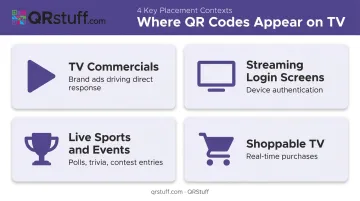
- They appear in TV commercials, streaming login screens, live sports broadcasts, and shoppable TV formats
- For advertisers, they create a measurable, direct-response channel out of a traditionally untrackable medium
- Best results come from correct sizing, prominent placement, a clear CTA, and dynamic codes updatable without re-broadcasting
- Viewers should always check the URL preview before tapping through, especially on unfamiliar streams
What's Behind the QR Code on Your TV Screen
A TV QR code is a two-dimensional barcode encoded with a URL or action, displayed on screen long enough for a viewer to scan with their smartphone camera. No separate app needed — iPhones and Android devices both read QR codes natively through the camera.
How the Scan Flow Works
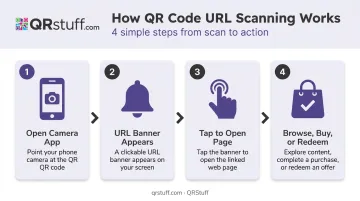
From a viewer's perspective, the process takes about five seconds:
- Open the native camera app and point it at the TV screen
- A notification banner appears with the destination URL
- Tap the banner to open the linked page on your phone
- Browse, buy, or redeem — without leaving the couch
That covers broadcast video — but streaming app UIs are a slightly different case. Android's Circle to Search feature (introduced in 2024) can recognize on-screen text and URLs, and third-party reporting suggests it can also scan QR codes embedded within apps. For CTV placements in streaming interfaces, it's a useful fallback worth knowing about.
Static vs. Dynamic: What Changes After Broadcast
Not all TV QR codes behave the same way after broadcast:
- Static codes encode the destination directly into the pattern — once aired, they can't be changed. If the linked page moves or goes down, the code breaks permanently.
- Dynamic codes use a short redirect URL, so the destination can be updated at any time through a web dashboard. For live or recurring placements, dynamic is the only practical choice.
Technical Requirements for TV QR Codes
Video compression is the hidden enemy of QR codes on TV. Compression artifacts — blocking, blurring, pixelation — can degrade a code enough to make it unscannable. Key requirements to survive broadcast delivery:
- Minimum size: At least 300×300 pixels on a 1920×1080 screen for viewing from roughly 10 feet, per MediaVillage
- Safer floor for CTV: Shoppable creative guidance from Roundel/Innovid recommends 400×400 pixels to account for compression loss
- Error correction: Higher correction levels (Q at 25% or H at 30% damage recovery) provide more tolerance for compression artifacts
- Display duration: The code needs to remain on screen long enough for viewers to notice, pick up their phone, and scan — at minimum 10–15 seconds
- Placement and contrast: Uncluttered background zone, high contrast (black on white remains most reliable), positioned away from busy visual elements
Where QR Codes Show Up on TV
TV Commercials and Brand Ads
The most visible use case. Brands embed QR codes in 30- or 60-second spots to drive viewers directly to landing pages, product pages, coupon redemptions, or app downloads — turning a one-way ad into a direct-response moment that's measurable by the second.
Burger King ran one of the earlier documented examples in 2020, embedding scannable QR codes in TV commercials offering free Whoppers — and tracking which spots triggered the most response. The mechanic hasn't changed; the scale has grown considerably since.
Streaming Platforms and Smart TV Apps
Most viewers encounter QR codes on streaming platforms without thinking twice about it. Netflix, Amazon Fire TV, Apple TV, YouTube TV, and Roku all use on-screen QR codes so users can authenticate on their phone instead of pecking through a remote keyboard to type a password — point, scan, and you're in.
It's a UX improvement that eliminates a frustrating extra step — and it's conditioned millions of viewers to be comfortable scanning their TV screen.
Live Events, Sports, and Broadcast Television
QR codes during live events invite real-time participation. Common activations include:
- Polls and trivia that feed results back into broadcast graphics
- Contest entries timed to specific broadcast moments
- Exclusive content unlocked during the event window
- Sponsor activations tied to in-game milestones
Sports Video Group reported in 2024 that platforms like AE Live and CUE are deploying live-sports QR activations — including polls and trivia fed back into broadcast graphics — for events like the CAF Tournament on SuperSport.
The time-sensitivity of live events makes the scan feel more urgent, which tends to drive higher engagement than the same code in a pre-recorded spot.
How TV QR Codes Are Changing the Viewer Experience
From Spectator to Participant
The core shift is behavioral. A scannable QR code changes what a viewer does during a commercial break. Instead of mentally noting "I should look that up later" — and never doing it — they act immediately. The phone is already in hand. The code is on screen. The gap between discovery and action collapses.
Interactive CTV ad formats averaged 2.47% engagement, compared with 0.25% for standard video, according to the 2024 Roundel/Innovid CTV x Commerce report. A 10x difference in viewer response rate.
Shoppable TV
QR codes are the primary mechanism behind shoppable TV: the ability to purchase a product seen on screen in real time. EMARKETER noted in 2024 that retailers are actively experimenting with shoppable TV ads where viewers scan a code, navigate to a product, and complete a purchase without interrupting their viewing session.
LG Ad Solutions surveyed CTV users and found:
- 7 in 10 like TV ad creatives that include QR codes
- 62% are open to scanning a QR code on a TV ad
- 38% are likely to make a purchase after scanning
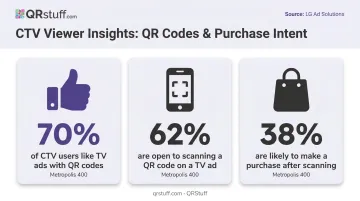
These are vendor-reported figures, but the trend is consistent across multiple sources.
Exclusive Content and Incentive-Driven Engagement
Not every scan leads to a checkout page. Beyond commerce, broadcasters and streaming platforms use QR codes to unlock:
- Behind-the-scenes footage or extended cuts
- Bonus episodes or companion content
- Viewer-only discounts or contest entries
- Time-limited offers tied to specific airings
Platforms like QRStuff offer password-protected QR codes that add another layer to this, letting advertisers create genuinely exclusive experiences where the password is revealed during the broadcast itself.
The Coinbase Benchmark
The most-cited proof point for TV QR scale remains Coinbase's 2022 Super Bowl ad: a bouncing QR code, 60 seconds, no voiceover. The ad generated more than 20 million hits on Coinbase's landing page within a single minute, crashing the app briefly. The takeaway: viewers will scan at scale when the creative is compelling enough — and the industry has been building on that lesson ever since.
Best Practices for TV QR Code Campaigns
Sizing, Placement, and Duration
The living room is not a conference room. Viewers sit 8–10 feet from the screen, phone often at a different angle. Size and placement aren't optional details.
- Size: 300×300 pixels minimum on 1080p; 400×400 for shoppable CTV formats
- Position: Lower-right corner — where viewers have been conditioned to look for this kind of element
- Duration: Visible for the full ad, not just a 5-second end card
- Background: Clear zone with no competing graphics; high-contrast design
- Format: Download as PNG or SVG for broadcast use; SVG scales without quality loss
Test the code after final encoding and platform delivery, not just from the source file. Compression changes things.
Calls to Action and Incentives
A QR code alone doesn't tell a viewer what they'll get. Short, specific CTAs placed directly beside or above the code drive meaningfully higher scan rates:
- "Scan for 20% off your next order"
- "Scan to watch exclusive behind-the-scenes footage"
- "Scan to enter — winner announced live"
The incentive has to justify the effort of picking up the phone. Vague CTAs like "Scan to learn more" rarely do.
Mobile Optimization and Dynamic Codes
Scan rates mean nothing if the destination experience fails. 53% of mobile visits are abandoned if pages take longer than 3 seconds to load, according to Google research. For TV QR scans specifically, that figure runs higher — viewers are switching from a passive activity and have little patience for friction.
Dynamic codes address a separate problem: what happens when the campaign changes after the code is already on air. With QRStuff, advertisers can update the destination URL instantly — rotating offers, fixing broken links, or adapting landing pages mid-flight — without touching the broadcast creative. The on-screen code stays the same; advertisers simply update the destination in QRStuff's dashboard.
Analytics and ROI Tracking
That campaign flexibility pairs directly with measurable attribution — something traditional broadcast has never offered. QRStuff's analytics dashboard for dynamic codes captures:
- Total vs. unique scans — reach versus repeat engagement
- Device type and operating system (iOS vs. Android, mobile vs. desktop)
- Geographic data at country and city level
- Scan time and date with precision, exportable as CSV for BI integration
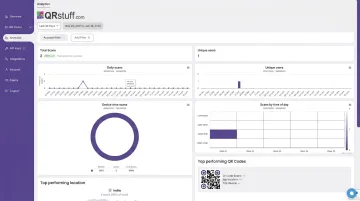
For TV campaigns specifically, time-of-scan data lets advertisers correlate scan spikes with specific airings, identify which markets are responding, and optimize media buys accordingly. That kind of attribution has historically been impossible with traditional broadcast.
Security: How to Stay Safe When Scanning TV QR Codes
QR-based phishing — sometimes called "quishing" — is a recognized threat. The FTC and HHS have both documented cases where malicious QR codes redirect users to spoofed sites designed to steal login credentials or personal information.
The TV-specific risk is lower than QR codes in public spaces (where anyone can place a sticker over a legitimate code), but it's not zero — particularly with pirated streams where content overlays can't be verified.
For viewers, practical safety steps:
- Use the native camera app, which shows a URL preview before you tap through
- Check that the destination shows HTTPS and a recognizable domain
- Don't download apps prompted by a code from an unrecognized source
- Be cautious of any code appearing on an unofficial or pirated stream
For advertisers, the responsibility is structural:
Use a platform with a documented uptime guarantee and verified compliance certifications. QRStuff holds a 99.9% uptime SLA (actual tracked uptime since 2008 is 99.968%) and is both GDPR and SOC2 compliant — meaning viewer data is handled without storing personally identifiable information.
That last point matters at broadcast scale. When millions of viewers scan simultaneously, a single point of infrastructure failure means broken campaign links, missed conversions, and viewer frustration that reflects on the brand — not the platform.
Frequently Asked Questions
How do I scan a QR code on my TV using my phone?
Open your native camera app, point it at the TV screen, and tap the notification banner that appears — the link will open directly in your browser. Android users can also try Google Lens or Circle to Search for codes embedded within on-screen app interfaces.
Why is there a QR code on my TV screen?
Brands, broadcasters, and streaming platforms use on-screen QR codes to give viewers a fast path to offers, content, app downloads, or account logins. No typing a URL. No remembering to search later.
Where do I find the QR code on my TV?
In TV commercials, look for the lower-right corner of the screen. In streaming apps, QR codes typically appear on login or device activation screens. During live events, they often appear as graphic overlays or lower-third elements.
Do QR codes on TV commercials expire?
Static codes may break if the linked page is taken down. Dynamic codes let you update the destination URL at any time without changing the code itself, which is why most advertisers running recurring campaigns use them.
Can I track how many people scanned my TV QR code?
Yes. Dynamic QR code platforms like QRStuff provide real-time scan data including total scans, unique scans, device type, location, and exact scan time. That makes it possible to tie viewer response directly to specific TV airings.
What makes a QR code work well on a TV screen?
Five factors determine scan success:
- Size: 300–400px minimum on 1080p screens for scan distance
- Contrast: High contrast between the code and background
- Placement: Consistent position viewers can anticipate
- Duration: Long enough on screen to scan comfortably
- CTA: A clear prompt telling viewers what they'll get by scanning