Most enterprise teams discover this gap the hard way: codes that can't be updated without reprinting, scan data that can't be attributed to specific locations, and landing pages that alienate half their audience. Over 94 million U.S. smartphone users scanned QR codes in 2023, with projections reaching 102.6 million by 2026 — yet the measurement infrastructure to support that scale often isn't there. Nielsen's 2024 Annual Marketing Report found that while 84% of global marketers express confidence in ROI measurement, only 38% actually measure traditional and digital channels together.
This guide covers the specific practices that close the gap between "we have QR codes" and "we have a scalable, trackable, compliant QR code program."
Key Takeaways
- Use dynamic QR codes for regional scaling — static codes create reprinting chaos every time a destination changes
- Assign one unique code per region or placement — it's the baseline for meaningful attribution
- Localization means adapted CTAs, local offers, and regional timing — not just translated text
- A centralised folder structure with consistent naming conventions prevents data fragmentation at scale
- Regional compliance (GDPR, CCPA, APAC laws) must be built into your infrastructure before you scale — not retrofitted later
Why Scaling QR Code Campaigns Gets Complicated
The most common failure mode is treating a regional rollout as a copy-paste job — same code, same landing page, same tracking setup across dozens of markets, then wondering why data is unusable and engagement is inconsistent.
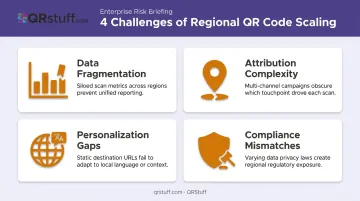
Four compounding challenges make regional scaling genuinely hard:
- Data fragmentation: Shared codes pool scan data across locations, making it impossible to isolate performance by market
- Attribution complexity: Without region-specific codes, you can't tie results back to individual markets with any confidence
- Personalization gaps: A single landing page can't serve audiences across different languages, cultures, or promotional windows
- Compliance mismatches — privacy laws differ significantly by country, and in some cases by state
Each of these is addressable — but only if your campaign is built to handle them from the start. The following sections cover exactly how to do that.
Build the Right Infrastructure Before You Scale
Dynamic QR Codes as the Foundation
Static QR codes have one fatal flaw at regional scale: when a destination changes, every physical asset containing that code becomes a dead end. Whether a promotion pivots, a landing page is refreshed, or a regional campaign needs a compliance update, the only fix with static codes is reprinting.
Dynamic QR codes solve this at the infrastructure level. The physical code stays identical; only the destination URL changes, managed through a dashboard. GS1's Digital Link standard is built on exactly this logic — a single barcode symbol can redirect to multiple brand-controlled destinations over its lifetime, without touching the printed asset.
For enterprise teams, that means full control over deployed assets without the cost or delay of physical reprints.
Unique Codes Per Region or Location
The rule is straightforward: one unique QR code per distinct location, placement, or region. Reusing the same code across multiple sites pools all scan data into a single stream. You can't identify which store, city, or billboard is driving performance — which makes the campaign impossible to optimize.
At scale, generating unique codes one by one isn't practical. QRStuff's batch processing lets teams upload an Excel file of destination URLs and generate hundreds of location-specific codes in a single operation. The Full Suite handles up to 500 codes per batch; the Enterprise plan offers unlimited batch processing, with large jobs exceeding 20,000 codes processed server-side within 48–72 hours.
Bulk downloads are available in JPG, PNG, SVG, EPS, PDF, TIFF, and DXF formats — covering everything from digital deployment to large-format print production.
Naming Conventions and Project Organization
Naming chaos is one of the most underestimated costs of scaling. When codes aren't organized consistently, teams spend hours hunting for the right code — or worse, accidentally edit the wrong one mid-campaign.
A practical baseline naming convention:
[Region]_[Campaign]_[Placement]_[Date]
Example: APAC_Q4Promo_ShelfTalker_2025-10
Beyond naming, project-based organization keeps large deployments manageable:
- Top-level projects by region or business unit
- Sub-folders (or campaign tags) by campaign
- Individual codes named by specific placement
QRStuff's platform supports project management with campaign tagging, letting teams filter and compare performance across initiatives directly in the analytics dashboard — without manually tallying individual code results.
API Integration for Programmatic Scaling
At true enterprise scale — thousands of product SKUs, hundreds of store locations, multi-country rollouts — manual code creation becomes a bottleneck quickly.
QRStuff's RESTful API handles programmatic QR code generation, project assignment, and bulk operations, authenticated via Bearer token. Because it works with any system capable of making HTTP requests, it connects directly to existing infrastructure without pre-built connectors:
- Syncs with CRM and ERP platforms to generate codes tied to product or location records
- Updates destination URLs in bulk as inventory, campaigns, or compliance requirements change
- Assigns codes to projects automatically, keeping regional deployments organized at the source
This matters most for retail, CPG, and logistics teams where codes must stay in sync with live product or location data.
Localise Your QR Campaigns Without Fragmenting Your Brand
The Core Tension
Regional campaigns need to feel locally relevant — in language, offers, cultural context, seasonal timing — while remaining visually consistent with the global brand. The solution: localise the destination, not the code design.
The QR code itself maintains brand colours, logo, and styling across every market. The landing page it routes to is fully adapted for each region.
This approach requires pre-built localised landing pages — not just translated text, but locally relevant offers, imagery, and CTAs that reflect regional consumer behaviour.
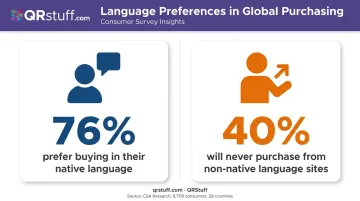
CSA Research's survey of 8,709 consumers across 29 countries found that 76% prefer buying products in their native language, and 40% will never purchase from websites in other languages. That's a hard conversion barrier, not a marginal preference.
CTA localisation matters beyond language too. What drives a scan-and-convert action in one market ("Get 20% off today") may underperform where local consumers respond to different incentives.
Timing and Regional Promotional Calendars
Global marketing schedules don't translate cleanly across regions. A QR code campaign running on in-store signage during the US holiday season is poorly timed in Southeast Asia or the Middle East, where major shopping events fall on entirely different dates.
Build region-specific activation windows into the campaign plan. Dynamic codes make this operationally simple: swap destination pages at the right time without touching physical materials. Physical assets keep working; the experience behind them evolves with each market.
Device QA by Market
Landing page testing needs to account for the OS mix in each market, not just global averages. According to Statcounter's April 2026 data, the OS split varies sharply by region:
| Market | Dominant OS | Share |
|---|---|---|
| United States | iOS | 63% |
| Japan | iOS | 60% |
| Europe | Android | 59% |
| South Korea | Android | 68% |
| Indonesia | Android | 84% |
A page that performs well in an iOS-heavy market may behave differently for Android-dominant audiences. Test across both platforms in each major region before launch.
Tracking Performance Across Regions
Scan volume alone is a vanity metric. What matters is understanding which regions are engaging, why some outperform others, and what happens after the scan.
Geographic and Device-Level Analytics
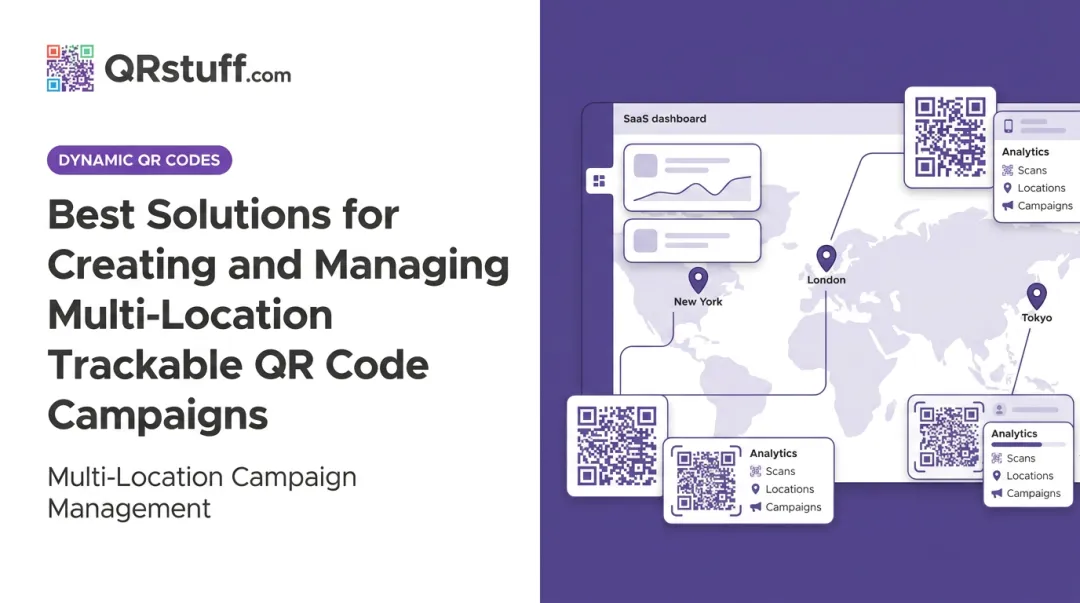
QRStuff's analytics dashboard provides:
- Country and city-level scan breakdowns
- Device type segmentation (iOS vs. Android, mobile vs. desktop)
- Time-of-day and time-of-week scan patterns
- Total scans vs. unique scans
This data separates two distinct problem types: low scan volume in a high-traffic location points to a placement or visibility issue, while high scan volume with low conversion points to a landing page or CTA problem. Without this breakdown, both look identical in aggregate data.
UTM Parameters and Downstream Attribution
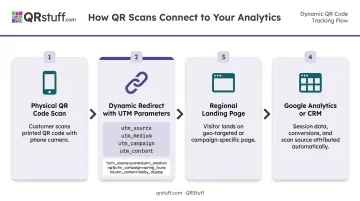
UTM parameters close the attribution loop between a physical scan and a downstream conversion. Each unique code's destination URL carries campaign, region, medium, and placement parameters that flow through to Google Analytics or the brand's CRM.
A practical structure for a multi-region campaign:
utm_source=qr
utm_medium=print
utm_campaign=Q4_APAC_InStore
utm_content=ShelfTalker_Tokyo_Shinjuku
This lets you see not just that someone scanned in Tokyo, but that the Shinjuku placement drove a specific loyalty sign-up or purchase. QRStuff supports UTM parameter appending on destination URLs alongside its own native scan analytics — giving teams two complementary data streams.
A/B Testing Across Placements
Assigning unique codes to different placements or creative variants within the same region enables structured testing: same city, two different store placements, or same placement with two different CTAs.
QRStuff's campaign tagging makes this comparison straightforward — tag two codes as variants of the same test, then compare their performance directly in the dashboard. When the winning variant is clear, roll it out to underperforming locations with a destination URL update, no reprinting required.
Setting Regional Benchmarks
Comparing a Tokyo campaign to a New York campaign without accounting for market-specific scan behavior leads to false conclusions. Establish baseline scan rates and conversion rates per market before optimizing.
During active rollout phases, a structured review cadence keeps performance on track:
- Review weekly or bi-weekly to catch underperformance early
- Avoid daily reviews during initial rollout — too much noise, too little signal
- Set market-specific thresholds before flagging a region as underperforming
Navigating Regional Compliance and Data Privacy
QR scan data — even aggregated device type and location — can qualify as regulated personal data depending on the region and how it's processed.
The Regulatory Landscape
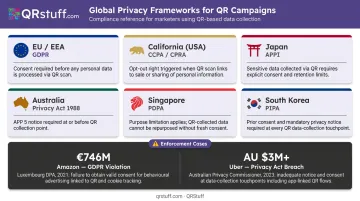
| Region | Framework | Key Trigger for QR Campaigns |
|---|---|---|
| EU/EEA | GDPR | Location data and device identifiers may constitute personal data |
| California | CCPA/CPRA | Covers geolocation, internet activity, cross-context behavioural advertising |
| Japan | APPI | Consent required before sharing personal data with third parties |
| Australia | Privacy Act / APPs | APP 7 restricts use of personal info for direct marketing |
| Singapore | PDPA / DNC | Governs collection, use, and disclosure of personal data |
| South Korea | PIPA | Applies when campaign data can identify an individual |
The enforcement stakes are real. California's 2022 Sephora settlement reached $1.2M over CCPA violations tied to third-party tracking and failure to process opt-outs. CNIL fined Google €325 million in 2025 for cookies and ad insertion practices.
Practical Compliance Steps
- Verify your QR platform is compliant in every region where codes are deployed — not just your home market
- Add opt-in mechanisms to destination pages where regulations require active consent rather than passive tracking
- Retain data retention documentation, particularly for supply chain or product codes that remain active for years
- Brief local teams on what scan data is collected, how it's used, and what user rights apply in each jurisdiction
Platform choice matters too. QRStuff is GDPR and SOC2 compliant, with scan data stored on European servers and no collection of personally identifiable information by default.
Dynamic codes add another layer of compliance flexibility: if a privacy notice or consent mechanism needs updating due to a regulatory change, the destination can be updated centrally — no reprint campaign across hundreds of locations required.
Common Mistakes to Avoid
Three errors account for most failed regional QR campaigns. Here's what to watch for:
Deploying static codes at scale. When a promotion ends or a landing page changes, static codes become dead ends — and fixing them means physically reprinting and replacing materials across every location. Dynamic codes eliminate this problem entirely.
Sharing one code across multiple locations. Reusing a single code makes attribution impossible. You can't identify best-performing regions, justify regional spend, or run meaningful placement tests when all scan data flows into a single pool.
Non-mobile-optimized landing pages. Every QR scan happens on a mobile device. A joint study by Deloitte and Google found that a 0.1-second improvement in mobile site speed increased retail conversion rates by 8.4% and average order value by 9.2%. That's a measurable cost for every slow page a scanner hits.
Test landing pages across device types and connection speeds before launch in each region.
Frequently Asked Questions
How do you upscale a QR code for large-format print?
Export in vector formats — SVG or EPS — which scale to any size without pixelation. All QRStuff paid plans include SVG and EPS downloads. Maintain the ISO-required quiet zone of at least 4 modules around the code at every size to preserve scannability on large signage.
What are the most common QR code mistakes?
Using static instead of dynamic codes, reusing one code across multiple locations (losing attribution), skipping scannability testing across devices, and routing users to non-mobile-optimized pages. All are preventable with the right setup before launch.
What makes dynamic QR codes different from static ones?
Dynamic codes allow destination URL updates after printing, deliver real-time scan analytics (location, device, time, unique vs. total scans), and support campaign management features like A/B testing and folder organisation. On QRStuff's Full Suite and Enterprise plans, dynamic codes never expire.
How do you localise QR campaigns for different regions?
Assign each region its own dynamic code pointing to a locally adapted landing page — translated content, region-specific offers, and local CTAs. Time campaigns around local promotional calendars, comply with regional data privacy laws, and keep visual design consistent with global brand standards.
Can I update a QR code's destination after it's been printed?
Yes — dynamic QR codes allow destination URL changes at any time through the platform dashboard, with no alteration or reprinting of the physical code. On QRStuff, this can be done as many times as needed throughout the code's active lifetime.
How do I track QR code performance across multiple locations?
Assign a unique dynamic QR code to each location, then append UTM parameters to each destination URL so scan data flows into your analytics platform. QRStuff's centralized dashboard surfaces geographic data, device breakdowns, and time-based patterns across all regions in one view.