QR codes bridge that gap. A small square at each table transforms every guest with a smartphone into a contributor to your wedding story. And that's just the start — the same technology can handle RSVPs, seating charts, menus, and music requests, all without a single paper card or awkward announcement.
This post covers 10 creative ways to use QR codes at your wedding, where to place them for the best scan rates, and how to design them so they look like part of your décor.
Key Takeaways
- QR codes serve multiple roles: collecting memories, streamlining logistics, and creating interactive moments
- Strategic placement at the bar, welcome table, table cards, and restrooms dramatically increases guest scan rates
- Customizing colors, shapes, and logo overlays makes codes feel intentional, not corporate
- Dynamic QR codes let you update the destination URL after signs are printed, so there's no reprinting needed
- No app download required; any modern smartphone camera works instantly
Why QR Codes Are Trending at Modern Weddings
Pew Research's 2025 Mobile Fact Sheet reports that 91% of U.S. adults own a smartphone — including 78% of adults 65 and older. That number matters for weddings specifically, because your guest list spans generations.
The multi-generational appeal is real. Since iOS 11 and Android 8 (both released in 2017), native QR scanning has been built directly into phone cameras. No app, no account, no friction. A 70-year-old aunt and a 22-year-old groomsman can both scan the same code in seconds.
QR codes are no longer plain black-and-white utility squares. Couples are now designing them with custom colors, monogram overlays, and shapes that match their wedding palette — turning what was once a tech afterthought into a deliberate design element on the table.
The logistics case is just as compelling. Collecting guest photos after a wedding is notoriously chaotic, coordinating RSVPs involves chasing paper cards, and managing seating at the door creates bottlenecks. QR codes address all three without adding complexity for guests.
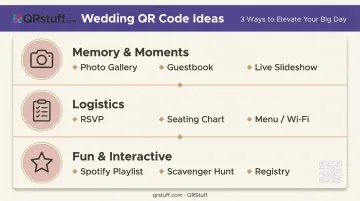
10 Creative Wedding QR Code Ideas to Engage Your Guests
Memory and Moment-Capturing Ideas
Idea 1 — Guest Photo Sharing Gallery
Link a QR code to a private shared album where guests upload photos and videos in real time. Your professional photographer covers the ceremony, but guests capture angles a hired photographer can't — the bridal party's reaction during the best man's speech, a spontaneous dance circle at 11pm, the cousins sneaking cake from the kitchen.
Place the code on table cards and bar signage. When guests have a drink in hand and a moment to pause, they're far more likely to scan. QRStuff's URL QR codes work seamlessly here, linking to any photo-sharing platform or gallery page you're already using.
Idea 2 — Digital or Audio Guestbook
Instead of a paper book that gets scribbled in quickly and forgotten, a QR code can link to a digital guestbook where guests leave written messages, video notes, or audio recordings. Zola lists audio guestbooks among its top wedding trends, noting a surge in popularity driven partly by TikTok.
The appeal is real: a handwritten note is nice, but hearing a friend's voice, mid-laugh, saying something heartfelt is a different thing entirely. Audio recordings capture moments that ink simply can't.
Idea 3 — Live Photo Slideshow Feed
Place a QR code near a TV or projector screen during the reception. As guests scan and upload, those photos populate a live slideshow the whole room watches together. When someone spots themselves on screen, the reaction is immediate — laughter, pointing, more people reaching for their phones to upload. That momentum tends to grow as the night goes on.
Logistics That Make Everyone's Day Smoother
Idea 4 — Paperless RSVP
Embedding a QR code in your save-the-date takes guests directly to a mobile-friendly RSVP form in under 30 seconds. Meal preferences, dietary restrictions, and plus-one details all captured in one step — no paper cards, no manual data entry.
QRStuff's URL QR codes link directly to third-party RSVP platforms including Google Forms, Zola, and The Knot. According to The Knot's RSVP guide, 25% of couples now offer digital RSVP options — either exclusively or alongside print. Setting your RSVP deadline two to four weeks before the wedding gives vendors enough time to coordinate.
Idea 5 — Digital Seating Chart
A QR code at the reception entrance replaces the traditional escort card table entirely. Guests scan to see their table assignment on their phone, which cuts crowding at the entrance and eliminates the inevitable "I can't find my card" confusion.
Some couples include a brief intro to tablemates — a fun fact or shared connection — which works especially well at destination weddings where not everyone knows each other.
Idea 6 — Menu and Wi-Fi Access
Two practical uses, one section:
- Menu QR code: Link each table to the dinner menu, including dietary info and buffet rotation timing. Cleaner than printed cards, and easy to update if the caterer makes last-minute changes.
- Wi-Fi QR code: QRStuff supports a dedicated WiFi QR code type that encodes your network credentials directly. Guests scan once and connect automatically — no password hunting, no asking the venue staff. Particularly valuable at longer receptions where guests want to upload photos throughout the night.
Fun and Interactive Ideas Guests Will Love
Idea 7 — Collaborative Spotify Playlist
Spotify's Collaborative Playlist feature lets anyone you invite add, remove, and reorder tracks. Link a QR code to your shared playlist so guests can add their song requests during cocktail hour.
Couples can pre-approve additions or let it run open. Either way, it gives guests a stake in the energy of the room — and the playlist becomes a keepsake of exactly what the night sounded like.
Idea 8 — Wedding Scavenger Hunt
Hide QR codes around the venue, each linking to a clue, a fun fact about the couple, or a photo challenge. Guests complete the hunt during cocktail hour or between courses. This works particularly well for two groups who are often hardest to keep engaged: kids, and guests who don't know many other people. A shared mission is a natural icebreaker.
Idea 9 — Honeymoon Fund or Registry Link
A single QR code on the invitation or a small table sign takes guests directly to your registry or cash fund page — no long URLs to type, no website addresses to remember. It's a cleaner experience for everyone.
Idea 10 — QR Codes on Favors and Thank-You Cards
Attach a QR code to wedding favors or post-wedding thank-you cards that links to a highlight video, a personal message from the couple, or the shared photo gallery. QRStuff supports direct video file uploads (MP4, MOV, WEBM) as well as YouTube and Vimeo links. The favor becomes something guests actually hold onto — it opens directly to the night they shared with you.
Where to Place Wedding QR Codes for Maximum Engagement
A single QR code sign near the entrance won't cut it. Repetition matters — the more places a guest encounters the code, the higher the chance they scan.
Highest-impact locations:
- Welcome and gift table (guests pause here on arrival)
- Bar area (guests have a drink in hand and a natural moment to look around)
- Individual table cards or menu inserts (captive audience during dinner)
- Photo booth or selfie station (guests are already in "capture" mode)
- Restroom vanity (surprisingly effective — guests have a quiet moment alone with their phone)
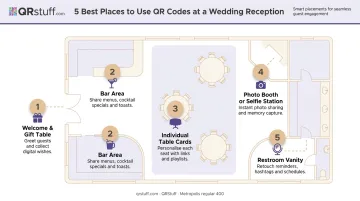
Print codes at a minimum of 2cm x 2cm (0.8" x 0.8") for reliable scanning, and test on both an iPhone and Android device under the venue's actual lighting before the wedding day.
On timing: cocktail hour consistently produces the most scans. Guests are relaxed, mingling, and not focused on a ceremony or speech — so if photo uploads are the goal, make sure the gallery code is prominently displayed during that window.
How to Design Wedding QR Codes That Match Your Theme
A QR code doesn't need to look like it was pulled from a logistics manual. Modern generators — including QRStuff — allow full customization of colors, dot shapes, corner styles, and logo or monogram overlays. A boho palette, a classic black-and-white scheme, a tropical destination wedding aesthetic — the code can reflect all of it.
One important constraint: QR codes scan based on contrast, not color. The dots must be significantly darker than the background — QRStuff recommends at least 70% darker. Most scanning devices read in greyscale, so contrasting hues alone won't compensate for low contrast. Always test your customized code on multiple devices before printing.
Sign Wording That Gets Guests to Actually Scan
The wording around the code matters as much as the code itself. Match the tone to your wedding:
- Romantic: "Share your view of our love story"
- Playful: "Snap it. Scan it. Share it."
- Direct: "No app needed. Just scan and upload."
Always include a brief instruction. According to NNGroup's QR code usability guidelines, unlabelled QR codes feel suspicious or unclear to users — context drives action.
The right materials carry that wording and put it in front of guests where it actually gets seen.
Material Choices
- Acrylic or wood signs: Suit rustic, boho, or modern minimalist themes
- Mirrored frames: Work well for glamorous or art-deco aesthetics
- Laminated paper: Budget-friendly and practical — essential for outdoor venues or bar areas where moisture is a factor
The Dynamic Code Advantage
QRStuff's dynamic QR codes allow you to update the destination URL after signs are already printed. If you need to swap the photo gallery link, correct an RSVP form URL, or redirect guests to a highlight video after the wedding — no reprinting required. For couples using QR codes across invitations, signage, and favors, that single change covers every printed piece at once.
Dynamic codes also enable scan analytics, so you can see how many guests scanned each code, what device they used, and when — so you know which placements actually drove engagement.
Pro Tips to Maximise Guest Participation
Pro Tips to Maximize Guest Participation
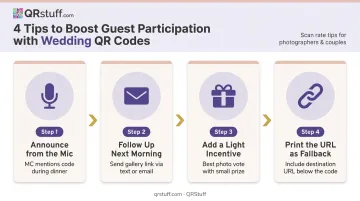
Even a well-placed QR code won't work if guests don't know it's there. A few small actions before and after the wedding make a real difference in how many people actually engage.
- Announce it from the mic. Have the MC or DJ mention the code briefly during dinner: "There's a QR code at your table — scan it to share your photos with [names]." Fifteen seconds from a microphone does more than three table signs combined.
- Follow up the morning after. Many guests intend to upload photos but forget once the night winds down. A short thank-you text or email with the gallery link included catches those delayed uploads before they vanish into camera rolls.
- Add a light incentive. A casual "best photo" vote — where the couple picks a favourite and offers a small prize like a gift card or bottle of wine — gives guests a reason to upload their best shot rather than skip the code.
- Print the URL as a fallback. Not everyone will scan. Including the destination URL below the QR code gives less tech-comfortable guests an easy alternative, and it's good practice regardless.
Frequently Asked Questions
What should I put on a QR code for a wedding?
Wedding QR codes can link to a guest photo-sharing gallery, an RSVP form, a digital guestbook, a seating chart, a dinner menu, a Spotify playlist, or a honeymoon registry. Each code works best when tied to a specific location or purpose. One code per function keeps things clear for guests.
Are wedding QR codes worth it?
Yes. They reduce logistics friction (no chasing paper RSVPs, no lost guestbooks), increase guest participation, and help couples collect photos from perspectives the professional photographer can't reach — often at little to no added cost.
Do guests need to download an app to scan a wedding QR code?
No. Any iPhone running iOS 11 or later and any Android running version 8.0 or later can scan QR codes natively using the built-in camera app. For older devices, QRStuff's free browser-based scanner at qrstuff.com/scan works without any app or account.
Where should QR codes be placed at a wedding?
The highest-impact spots are the welcome table, bar area, individual table cards, photo booth, and restrooms. Placing codes in multiple locations dramatically increases the likelihood that every guest encounters and uses them.
Can I customize my wedding QR code to match my theme?
Yes. QRStuff allows you to customize colors, dot shapes, corner styles, and add a logo or monogram overlay — so the code matches your stationery and décor rather than looking like a generic tech element. Just ensure strong contrast between dots and background for reliable scanning.
How far in advance should I create QR codes for my wedding?
Create and test your QR codes at least 4–6 weeks before the wedding, allowing time for sign printing, multi-device testing, and any adjustments. If you use dynamic QR codes through QRStuff, you can update the destination URL any time after printing, so every link doesn't need to be finalized before materials go to print.