The problem isn't adoption. It's execution. Most restaurants deploy QR codes on tables and stop there, missing the full operational value—real-time menu control, structured feedback collection, loyalty enrollment, and analytics that inform staffing decisions. This guide walks through exactly how both core use cases work in practice, plus the setup mistakes that quietly undermine everything.
Key Takeaways
- A restaurant QR code links a printed square to a live digital destination — no app download needed, just a phone camera scan
- Dynamic QR codes let operators update menu content instantly — no reprinting required
- Feedback QR codes capture diner sentiment at the moment it's freshest — right after the meal
- Beyond menus and feedback, QR codes support ordering, payments, loyalty, and social engagement
- Top 3 setup mistakes: static codes, poor placement, and PDF links instead of mobile-optimized pages
What Is a Restaurant QR Code?
A restaurant QR code is a machine-readable square that redirects a diner's smartphone to a digital destination—typically a mobile-optimized menu, survey, or ordering page—when scanned with the built-in camera app. No third-party app required. On iOS 11+ and Android 8.0+, the camera detects the code natively and opens the linked page in the phone's browser.
Static vs. Dynamic: The Distinction That Matters
The type of QR code you choose directly affects how much ongoing work it creates for your team.
| Static QR Code | Dynamic QR Code | |
|---|---|---|
| Destination fixed after printing? | Yes | No |
| Update menu without reprinting? | No | Yes |
| Scan analytics available? | No | Yes |
| Best for... | One-time use, simple links | Ongoing restaurant use |
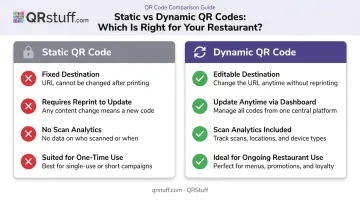
Static codes encode the destination directly into the printed image. Change the destination, and you need a new code—and new printed materials. Dynamic codes use a short redirect URL, so the printed code stays the same while the linked content can be updated anytime from a dashboard.
For restaurants, dynamic is the only practical choice. A static code linking to a seasonal menu becomes a dead end the moment the menu changes. With a dynamic code, operators can update the linked menu, redirect to a new ordering page, or pull scan analytics—all without reprinting a single table tent or door sign.
How QR Codes Work for Restaurant Menus
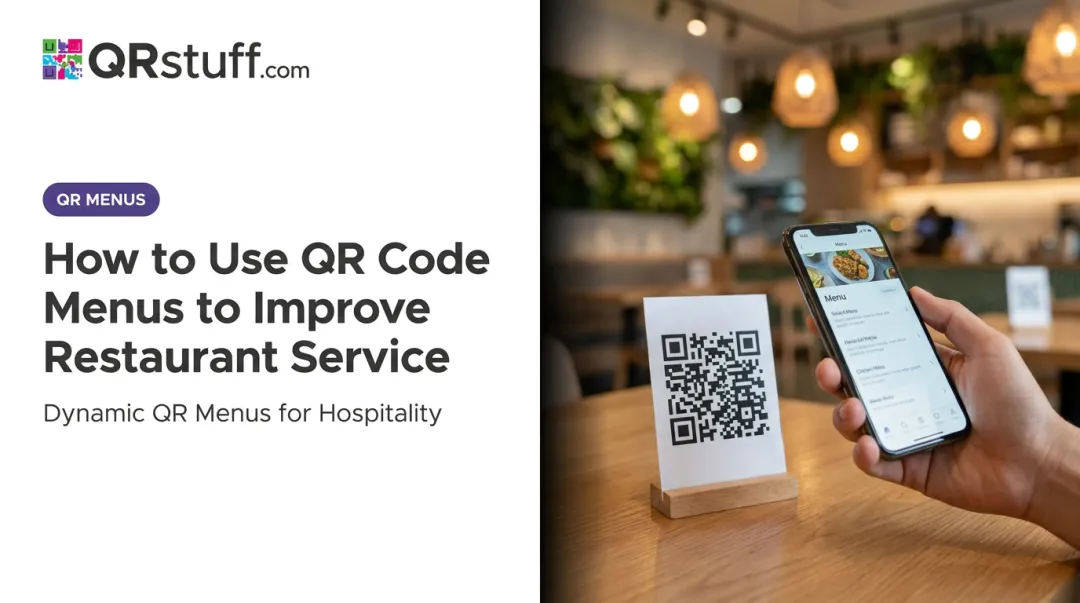
A guest sits down, opens their camera, and scans the code on the table tent. The digital menu loads in their browser—no login, no waiting for a server to bring a laminated card. From that moment, the guest has full control of the browsing experience.
What they see on a well-built digital menu:
- Browsable categories with photos and descriptions
- Allergen tags and dietary filters
- Real-time pricing (no crossed-out items or "ask your server")
- Language options for multilingual dining rooms
- Upsell prompts like "popular pairing" or "add a side"
This richer display does more than improve the experience—it influences spend. Restaurants using Toast's QR-enabled Mobile Order & Pay workflow typically see a 10% increase in revenue, driven by higher average check sizes when guests browse at their own pace.
Keeping Menus Current With Dynamic QR Codes
The printed code stays fixed. What it points to can change in seconds.
Remove a sold-out dish, adjust a price, add a Friday night special—every update reflects instantly across every table simultaneously. No reprinting, no guests ordering something unavailable, no server explaining that the menu is out of date.
With QRStuff's dynamic QR codes, operators log into the dashboard, edit the destination URL or update the linked menu page, and the change propagates immediately. A single restaurant with 30 table codes manages them all from one place. A multi-location group can push a menu update chain-wide without touching a single printed material.
Menu Analytics: What Scan Data Tells Restaurants
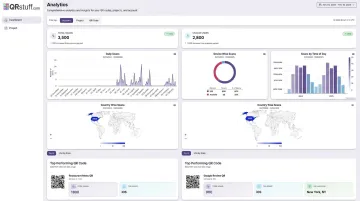
Every scan on a dynamic code generates data. QRStuff's analytics dashboard captures:
- Total and unique scans per code
- Peak scan times by hour and day
- Device type — iOS vs. Android, mobile vs. desktop
- Geographic data at city and country level
- Custom date ranges for campaign periods
If table scans spike between 12:00–12:30pm and drop after 1:00pm, that's a staffing signal. If scan volume is low at certain tables, it might indicate a placement or lighting issue. Campaign tags let operators label codes by location or table section, making side-by-side comparisons straightforward from one centralized dashboard.
How QR Codes Work for Customer Feedback
The best moment to ask a diner for feedback is before they leave. A QR code on the receipt, table card, or checkout display captures that window—when the experience is immediate and the opinion is unfiltered.
Compare that to an email follow-up survey that arrives hours later. General survey research from Medallia puts typical survey response rates at 5–30%, and that range shrinks further as time passes between the experience and the prompt. In-moment QR feedback sidesteps that delay entirely.
The Feedback Collection Flow
When a diner scans a feedback QR code, they land on a short mobile-optimized form. A well-designed restaurant feedback prompt includes:
- A star rating (food, service, atmosphere)
- Two or three multiple-choice questions
- One optional open-text comment field
- A submit button
The whole interaction should take under 60 seconds. That brevity matters: SurveyMonkey's completion rate data shows 10-question surveys average 89% completion, while 40-question surveys drop to 79%. Keep it short and you keep completions high.
QRStuff supports multiple feedback destinations depending on what the restaurant needs:
- Google Business review page — builds public reputation and local search visibility
- Private internal survey — captures operational data without broadcasting it publicly
- Staged flow — directs diners to an initial satisfaction question first, then routes them to the appropriate destination based on their response (requires a custom landing page)
From Scans to Actionable Insights
The value of structured QR feedback isn't any single response—it's the pattern that emerges across hundreds of them. Aggregated in a dashboard, feedback data lets managers:
- Spot recurring complaints by day or shift ("slow service on Tuesday evenings")
- Identify high-performing menu items or staff members
- Track satisfaction trends across weeks and months
- Catch problems before they become public Yelp reviews
Occasional online reviews surface the outliers. Structured QR feedback captures the full picture—including the quiet majority who had a fine experience but would never post unprompted.
That distinction matters most on the reputation side. Google is direct about the relationship between review volume and local search ranking.
Per Google's own guidance, review count and score factor into local search prominence. Restaurants that consistently prompt for Google reviews via QR codes build review volume faster than those relying on diners to post unprompted. Placing that prompt on receipts, table cards, or checkout screens puts the ask exactly where attention is highest.
Beyond Menus and Feedback: Other QR Code Uses in Restaurants
Menus and feedback are the two most common use cases, but the infrastructure that supports them extends further.
High-Value Secondary Applications
Scan-to-order and scan-to-pay: Guests browse, order, and pay from the same QR flow without waiting for a server. First Watch reported that QR codes on checks alone saved 30 seconds per transaction and more than 1,000 combined staff and customer hours in a single week, according to the National Restaurant Association. Toast's mobile QR payment data showed guests tipped on 18% more transactions compared to standard checkout.
Loyalty program enrollment: A QR code replaces the punch card. Guests scan to enroll digitally, and the platform tracks visit frequency automatically. Toast's data from mobile QR workflows showed a 25% increase in loyalty signups versus standard checkout methods.
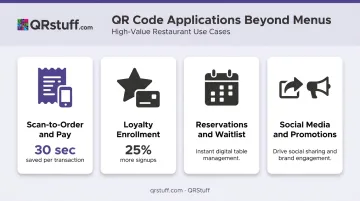
Reservations and waitlist management: A QR code in the window or on takeaway packaging lets potential diners see the menu and book a table before they walk in the door—no phone call, no third-party reservation app required.
Social media and promotions: QR codes on coasters, bags, or receipts can direct guests to Instagram or TikTok, generate user-created content, or unlock a return-visit discount. A single scan turns one dining experience into an ongoing customer touchpoint.
Multi-Location Scalability
Restaurant groups face a different operational reality than single locations. These four applications above work well for individual venues, but scaling them across dozens of sites requires a different approach.
QRStuff's Enterprise tier supports bulk dynamic code generation with codes created per table, per location, or per campaign via spreadsheet upload. All scan data feeds into one centralized analytics dashboard, so a group running 20 locations can compare QR performance across all of them without managing 20 separate accounts.
Setting Up QR Codes: What Restaurants Need to Know
Most QR code failures come down to three avoidable mistakes.
The Three Most Common Setup Mistakes
1. Using static instead of dynamic codes Static codes lock the destination at print time. One menu change means reprinting every code. Use dynamic codes from the start—QRStuff's dynamic codes allow unlimited destination updates and provide scan analytics that static codes can never offer.
2. Poor placement and sizing A QR code that's too small, poorly lit, or printed on a dark surface won't scan reliably. Bitly's sizing guidance recommends a minimum of 2 cm × 2 cm for close-range table scanning, with a 10:1 distance-to-size ratio as a general rule. Entrance signage needs to be proportionally larger. Every QR code also needs a clear quiet zone—an unprinted margin around the symbol—to register correctly.
3. Linking to a PDF instead of a mobile-optimized page A PDF menu forces guests to pinch-zoom on a phone screen. It's frustrating, and most guests will simply leave. The destination should be a responsive mobile webpage that loads cleanly at phone width without any manual resizing.
Placement Best Practices
| Location | Purpose | Format |
|---|---|---|
| Table tent / menu stand | Menu access, ordering | Eye-level, at seated height |
| Receipt | Post-meal feedback, Google review | Printed on check or receipt slip |
| Entrance window | Reservations, waitlist, preview menu | Larger format for standing distance |
| Takeaway packaging | Loyalty enrollment, social media | Bag, box, or sticker |
Maintenance Matters
Ongoing management is what separates a working QR code program from a neglected one. Effective upkeep includes:
- Checking that codes still scan after physical wear, lamination aging, or cleaning
- Verifying destination URLs haven't broken after website or menu platform changes
- Reviewing scan analytics regularly to spot dead links or low-performing placements
- Updating linked content when the menu changes seasonally or items sell out
A monthly scan data review turns this maintenance routine into a genuine improvement cycle. Track which tables drive the most engagement, which feedback prompts get completed, and which placements are generating Google reviews. That data compounding over time is where the real operational value shows up.
Frequently Asked Questions
How do restaurants use QR codes for menus and feedback?
Restaurants place dynamic QR codes on tables, receipts, and entrance signage. Scanning them opens a mobile-optimized menu or short feedback form in the diner's browser—no app required. The same physical code can serve both purposes depending on placement and timing.
How do you give feedback using a restaurant QR code?
Scan the QR code on the receipt or table card after your meal. It opens a short survey or review page directly in your phone's browser. Most take under 60 seconds—typically a star rating, a few quick questions, and an optional comment field.
Can I update my restaurant's QR code menu without reprinting?
Dynamic QR codes make this possible. The printed code stays the same, but the linked menu page can be edited anytime from the QRStuff dashboard. Price changes, sold-out items, and seasonal updates reflect immediately across every table.
Do QR code menus work without a smartphone app?
No app download is needed. Both iOS (version 11+) and Android (version 8.0+) camera apps recognize QR codes natively and open the linked page directly in the phone's browser.
What types of feedback can restaurants collect through QR codes?
Star ratings, multiple-choice service questions (food quality, wait time, atmosphere), open-text comments, and NPS scores. Depending on the goal, the code can route diners to a public Google review page or a private internal form for operational feedback.
How do restaurants track whether their QR codes are working?
QR code analytics platforms like QRStuff provide scan counts, peak time-of-day patterns, device breakdowns, and geographic data per code. Multi-location operators can compare performance across all locations from one centralized dashboard, with results exportable as CSV.