This scenario plays out constantly, and most businesses don't see it coming. The assumption is usually that "QR codes expire like coupons," but that's not quite right. Whether a QR code stops working depends entirely on what type it is and what's behind it — not some built-in countdown clock.
This article breaks down the two QR code types, what actually causes them to fail, and how to choose the right one so you're not caught reprinting materials mid-campaign.
Key Takeaways
- Static QR codes never expire — the destination is encoded directly into the image
- Dynamic QR codes can stop working when a subscription lapses, scan limits are hit, or an account goes inactive
- The QR code image itself doesn't expire — what breaks is the destination or the service managing it
- Free dynamic QR codes carry hidden risks: scan caps, trial expirations, and inactivity timeouts
- On QRStuff paid plans, dynamic codes carry no forced expiration — and reactivate fully when a subscription is renewed
What "QR Code Expiration" Actually Means
A QR code is a printed pattern — an image that encodes data. There's no internal clock, no expiration date baked into the standard. The ISO/IEC 18004 specification defines QR codes purely in terms of symbology, data encoding, symbol formats, and error correction. Nothing in that standard triggers a code to "expire."
What people experience as expiration is typically one of three things:
- The destination fails — the URL behind the code returns a 404, the domain lapses, or the linked file is deleted
- The platform fails — the redirect service managing the code goes inactive
- The physical code degrades — fading, scratches, or poor print quality prevent scanning
Identifying which cause is at play changes everything. Reprinting materials because you assumed the code "expired" — when the destination URL was simply restructured — is an avoidable and costly mistake.
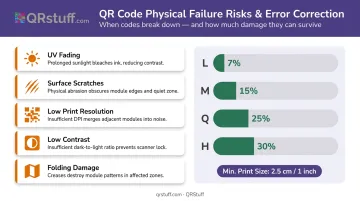
Physical degradation catches businesses off guard most often. DENSO WAVE, who created the QR standard, requires a four-module quiet zone on all sides. Error correction can recover from damage only within defined limits — roughly 7–30% depending on the correction level selected.
A code printed too small, at low resolution, or placed where it folds or fades will fail long before any subscription does.
Static vs Dynamic QR Codes Explained
The type of QR code you use determines almost everything about its long-term reliability. Here's how they differ.
Static QR Codes
A static QR code encodes the final destination — typically a URL or plain text — directly into the pattern at creation. No third-party server is involved. When someone scans it, their phone reads the encoded data straight from the image.
Strengths:
- No subscription required
- No platform dependency — works forever as long as the image is intact
- Free to create on most platforms
- No scan limits
Limitations:
- Cannot be updated after printing — the encoded data is permanent
- No scan analytics
- If the destination URL breaks, the only fix is reprinting
Dynamic QR Codes
A dynamic QR code encodes a short redirect URL managed by the QR platform (not the final destination itself). When scanned, the user hits the platform's redirect server, which logs the scan and forwards them to wherever the destination is currently set. That destination can be changed at any time without touching the printed code.
QRStuff's dynamic codes work this way: each code contains a QRStuff-managed short URL that routes through their redirect infrastructure before reaching the final destination.
Strengths:
- Destination can be updated without reprinting
- Full scan analytics: device type, location (city/country), time of scan, unique vs. repeat scans
- Ideal for campaigns where content changes
Limitations:
- Only works while the redirect service is active — a lapsed subscription stops the redirect
- On QRStuff's paid plans, dynamic codes carry no forced expiration; Full Suite subscribers retain code functionality even after a subscription ends
Quick Comparison
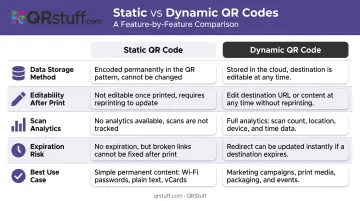
| Feature | Static | Dynamic |
|---|---|---|
| Data storage | Encoded directly in image | Encoded as short redirect URL |
| Editable after printing | No | Yes |
| Scan analytics | No | Yes |
| Expiration risk | Destination URL only | Platform subscription + destination URL |
| Best use case | Permanent content, no tracking needed | Campaigns, updatable content, performance tracking |
What Actually Causes a QR Code to Stop Working
Destination URL Failure (Link Rot)
This is the most common cause — and it has nothing to do with the QR code itself. Destination pages get deleted during website redesigns, domains expire, file-sharing links break, and content moves without redirects in place.
Research from the Pew Research Center found that 25% of webpages that existed between 2013 and 2023 were inaccessible by October 2023 — and 38% of pages from 2013 were gone a decade later. A QR code on a product printed in 2020 linking to a page that's since been restructured is a broken QR code, regardless of code type.
The Heinz ketchup case is a clear example: a printed QR code on bottles sent users to an adult website after the promotion domain lapsed and was reassigned. The code scanned perfectly. The destination was the problem.
Platform and Subscription Failures
For dynamic QR codes, functionality depends entirely on the redirect service staying active. Several specific failure modes exist:
- Trial expirations — QR Code Generator PRO deactivates dynamic codes created during its 14-day free trial when the trial ends
- Scan caps — QRCodeChimp's free plan allows 1,000 scans/month combined; QRStuff's Free Suite caps individual codes at 50 scans
- Time-based expiration — QRStuff Free Suite dynamic codes expire after 30 days; anonymous (no sign-up) codes expire after 7 days
- Inactivity policies — QRStuff defines codes as inactive after 12 months without any scan activity, at which point they may be purged
When a QRStuff subscription lapses, scanned codes display a "Scan Quota Exceeded" message rather than loading the destination. Renewing the subscription resets this automatically — no reprinting needed.
Physical Degradation
Platform failures aren't the only risk. Physical wear is a common culprit for outdoor and high-traffic deployments:
- UV fading on exterior signage
- Scratches on high-touch surfaces (menus, packaging)
- Insufficient print size or resolution
- Low contrast between code and background
- Folding directly through the code area
DENSO WAVE's error correction can compensate for partial damage, covering up to 30% of the code area at the highest correction level. Past that threshold, the code won't scan.
For any printed QR code intended for outdoor or long-term use, enforce higher error correction levels and a minimum print size of at least 2.5 cm (roughly 1 inch) square.
How to Choose the Right QR Code Type
Choosing between static and dynamic QR codes is a practical decision, not a technical one. Four factors determine which type fits your situation.
Content Permanence
If the destination will never change — a permanent product page, a fixed contact card, a printed manual — a static code is the simpler, lower-risk choice. No subscription to maintain, no redirect dependency.
For content that may be updated (seasonal promotions, event details, pages under revision), dynamic is the correct choice. Printing a static code for changing content forces a reprint every time.
Analytics Requirements
Only dynamic codes provide scan tracking. If you need to measure campaign performance, geographic reach, or device type breakdowns, static isn't an option.
QRStuff's dynamic codes on paid plans include:
- City-level location data
- Device type breakdown (iOS vs Android)
- Time-of-scan tracking
- Unique vs. repeat scan identification
These analytics are available from the Lite Suite tier and above.
Print Lifespan
This is the factor most businesses underestimate. The longer a printed material stays in circulation, the greater the risk associated with dynamic codes. Product packaging, permanent signage, and physical menus might be in use for years. A dynamic code on those materials is only as reliable as the platform subscription behind it.
Platform Reliability
Before committing to a dynamic code provider for long-lived materials, check:
- Whether they guarantee no forced expiration on paid plans
- What happens to codes if the subscription lapses
- Documented uptime track record
QRStuff has operated since 2008, currently serves 495,000+ businesses, and guarantees 99.9% uptime — with actual historical uptime of 99.968% since launch. That track record matters when codes are printed on materials you can't quickly replace.
Industry Guidance
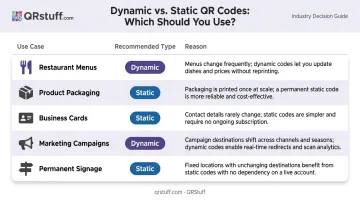
| Use Case | Recommended Type | Reason |
|---|---|---|
| Restaurant menus | Dynamic | Menus change; reprinting is costly |
| Product packaging | Static (or dynamic with long-term plan) | Long shelf life; destination must remain stable |
| Business cards | Dynamic | Job changes, contact updates happen |
| Marketing campaigns | Dynamic | Tracking and redirect flexibility required |
| Permanent signage | Static | No need for updates; no subscription risk |
Mistakes That Lead to QR Code Failures
Free plan reliance on long-lived print materials. Free platforms impose scan caps, trial cutoffs, and inactivity timeouts — and policies can change with little notice. A code on a product label that circulates for 18 months will almost certainly hit at least one of these limits. If the material can't be quickly swapped out, don't rely on a free plan to sustain it.
Skipping URL audits after printing. A significant portion of QR failures happen because the destination website was restructured after the code was printed — not because the code itself failed. Schedule quarterly link checks for any active QR campaigns. With dynamic codes, you can fix a broken destination by updating the redirect without reprinting; with static codes, you can't.
Mismatched code type for the use case. Using a static code for a seasonal promotion forces a reprint every cycle. Using a dynamic code for a permanent company address introduces unnecessary subscription risk. Both mismatches carry real costs: wasted print runs on one side, avoidable campaign disruptions on the other.
Avoiding these mistakes comes down to one decision made early: matching the code type and platform tier to what the campaign actually demands.
Frequently Asked Questions
How long does a QR code last?
Static QR codes last indefinitely as long as the destination URL remains active. Dynamic QR codes last as long as the platform subscription stays current. Neither has an inherent time limit; the risk comes from what's behind the code, not the code itself.
How do I know if a QR code has expired?
Scan it yourself. A working code loads the destination; a broken one shows an error page, a "code inactive" message, or — in QRStuff's case — a "Scan Quota Exceeded" notification. For active campaigns, watch your analytics dashboard for sudden drops in scan volume, which often signal a destination failure before users report it.
Do static QR codes ever expire?
Static QR codes don't expire on their own. They can stop working if the destination URL is deleted, the domain lapses, or the linked file is removed. The code image remains permanently scannable; the content it points to is what can break, as the Heinz ketchup case demonstrated.
Can an expired QR code be reactivated?
For dynamic codes on QRStuff, renewing your subscription automatically restores all codes to full functionality, with historical scan data and settings preserved — no reprinting required. For static codes, the only fix is restoring the broken destination URL or reprinting if it has permanently changed.
Do free QR codes expire?
Free static QR codes don't expire. Free dynamic QR codes typically do: QRStuff's Free Suite dynamic codes expire after 30 days with a 50-scan-per-code limit. Other platforms use trial periods or combined scan caps instead. Always review terms before deploying free dynamic codes on printed materials.
What happens when a dynamic QR code's subscription ends?
On QRStuff, scans are throttled and users see a "Scan Quota Exceeded" message, and analytics stop capturing data during that period. Renewing the subscription restores full functionality immediately without reprinting, but scans from the inactive window are not recoverable — those attribution gaps are permanent.