The type of code you choose (static vs. dynamic), how you customise the design, where you place it, and whether you've tested it properly — these variables determine whether your QR code drives results or collects dust.
This guide walks through the entire process: what to choose, how to build it step by step, what variables to control, and what mistakes to avoid before you print a single copy.
Key Takeaways
- Use dynamic QR codes for printed materials — destinations stay editable and scan data stays trackable without reprinting.
- Pick the right QR code type upfront: URL, vCard, Wi-Fi, payment — a plain URL link is rarely the best choice.
- Customization drives trust: logo, brand colors, and pattern shapes directly influence whether someone scans your code.
- Size, contrast, and placement determine real-world performance — correct code, wrong placement, still fails.
- Always test across multiple devices before printing at scale.
How to Create a QR Code for Your Business
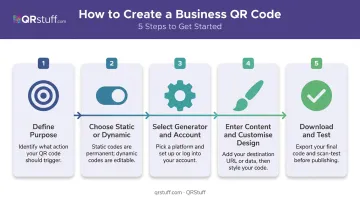
Most mistakes don't happen during generation — they happen in the decisions made before clicking "create." Follow these five steps to get it right.
Step 1: Define What Your QR Code Will Do
Start with the business goal, not the tool. Each use case maps to a specific QR code type:
- Website or landing page → URL QR code
- Contact sharing → vCard or Digital Business Card QR code
- Customer reviews → Google Review QR code
- Guest Wi-Fi → Wi-Fi QR code (encodes SSID, password, and security type)
- Social media → Platform-specific codes (Instagram, LinkedIn, TikTok, etc.)
- Payments → Venmo, UPI, EPC, or Bitcoin QR codes
- Events → Event or Eventbrite QR codes
- Feedback collection → Google Form or Feedback Form QR codes
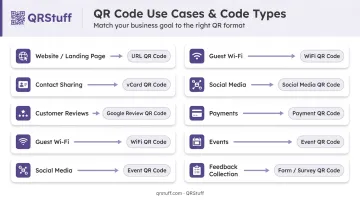
Platforms like QRStuff support 40+ QR code data types, so selecting the right category upfront ensures the output is actually optimized for its intended purpose, not just a generic URL drop.
Step 2: Choose Between Static and Dynamic
This decision has real downstream consequences:
| Static | Dynamic | |
|---|---|---|
| Destination editable after creation | ✗ | ✓ |
| Scan analytics | ✗ | ✓ |
| Works without active subscription | ✓ | Requires active plan |
| Best for | One-time/permanent content | Printed materials, campaigns |
For anything appearing on printed materials, packaging, or signage, dynamic is the practical choice. The destination can be updated through a dashboard at any time — the printed code never changes.
Step 3: Select a QR Code Generator and Set Up Your Account
For business use, a free single-use generator rarely meets requirements. You need high-resolution output, dynamic code support, and scan analytics.
QRStuff has operated since 2008 and serves over 495,000 businesses across 250+ countries — including Coca-Cola, Walmart, and Marriott. The Lite Suite (£4/month) covers dynamic codes with no expiry; the Full Suite (£15/month) adds unlimited scans, bulk generation up to 500 codes, and full design customization. The platform is GDPR and SOC2 compliant, which matters when QR codes collect or route customer data.
Sign up for an account rather than generating anonymously — free anonymous codes expire after 7 days, and account-linked codes on paid plans don't expire while your subscription is active.
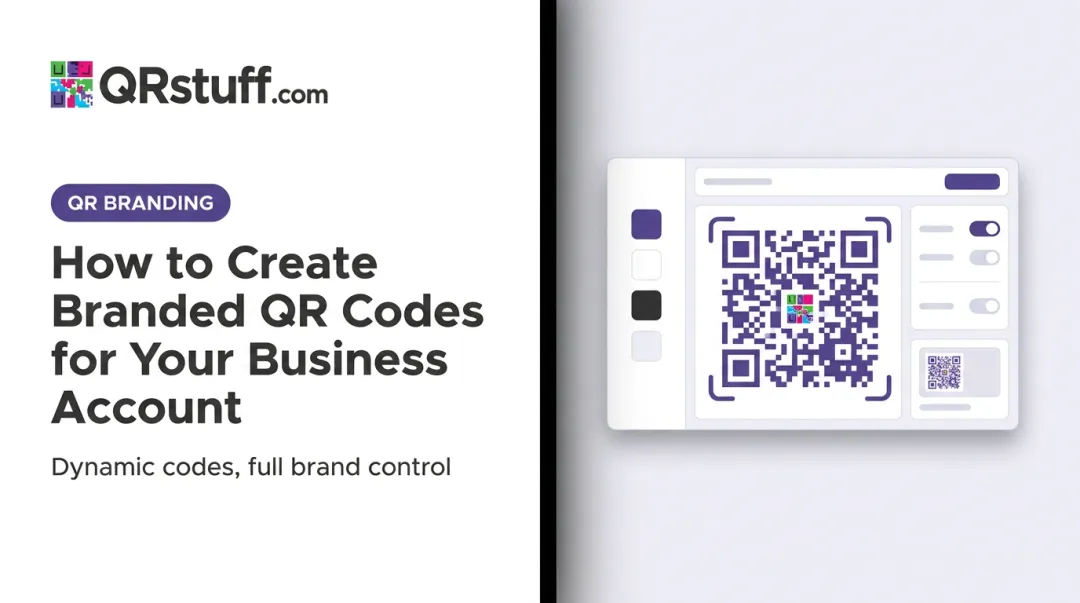
Step 4: Enter Your Content and Customise the Design
Input your destination content, then apply brand customization:
- Upload your logo to the centre of the code
- Select brand colours using a custom colour picker or preset palette
- Adjust module and eye shapes for visual distinction
- Set the error correction level — use Level H when adding a logo overlay (restores up to 30% of damaged codewords, per Denso Wave's error correction specifications)
- Check contrast — dark foreground on light background, never the reverse without thorough testing
Per GS1 UK colour guidance, black on white is best. Red and orange should be avoided for dark code elements. Brand colours can work — but test carefully.
On QRStuff, styling options (colours, shapes, logo) are available to all paid subscribers.
Step 5: Download in the Correct Format and Test Before Deploying
Format selection:
- SVG or EPS → professional print (scales to any size without quality loss)
- High-res PNG/TIFF (up to 600dpi) → large-format digital or print
- JPG → digital-only placements where file size matters
- Free tier on QRStuff: 72dpi PNG only — not suitable for print
Before printing anything:
- Scan on at least two different devices
- Test with both the native camera app and a third-party scanner
- Confirm the destination loads correctly and the mobile experience matches the intended flow
- Check that the quiet zone (the clear border around the code) is intact — Denso Wave specifies a minimum 4-module quiet zone on each side
Print a test batch before committing to a full run — catching a broken destination at 10 copies costs nothing compared to catching it at 5,000.
Static vs. Dynamic QR Codes: Which Does Your Business Need?
The choice affects more than setup. It determines flexibility, long-term cost, and what data you can actually collect from every scan.
Static QR Codes
Static codes embed the destination directly into the pattern. Once printed, nothing changes.
Where they work:
- Permanent Wi-Fi codes in private offices
- Product labels where the destination will never change
- One-off personal use
The trade-off: There's no scan tracking, and if the destination URL breaks or changes, reprinting is the only fix. For anything customer-facing, that's a costly limitation to discover after a print run.
Dynamic QR Codes
Dynamic codes store a short redirect URL in the pattern. The redirect routes through a platform server to the actual destination — meaning the destination can be swapped at any time through a dashboard.
What you get with dynamic codes:
- Update destinations without reprinting — fix broken links, redirect seasonal campaigns, update a restaurant menu, or swap out an outdated offer — all without touching the printed code
- Scan analytics: total scans, unique scans, device types (iOS vs. Android), geographic location at country and city level, and time-based scan trends
- Pause or resume codes without reprinting
On QRStuff, the analytics dashboard updates in real time and supports CSV export for integration with other reporting tools.
Recommendation: Dynamic codes are the default for any QR code on printed materials, packaging, signage, or marketing collateral. Static codes are appropriate only when the content is genuinely permanent and tracking is unnecessary.
Key Factors That Determine QR Code Effectiveness
Generating a correct code is half the job. A technically valid QR code still fails in the field if these variables aren't controlled.
Size and Scanning Distance
There's no single universal size rule, but the guiding principle is straightforward: the further away the scanner, the larger the code needs to be. GS1's guidance confirms that appropriate size depends on the encoded data volume, print resolution, and expected scanning distance.
Practical benchmarks most platforms use:
- Business card: minimum 2–2.5 cm × 2.5 cm
- A4 flyer or poster: at least 3–4 cm
- Window signage or outdoor displays: scale proportionally for the expected viewing distance
A code that's too small, printed on a curved surface, or placed in poor lighting will fail to scan reliably regardless of how well it was designed.
Contrast and Color
Strong contrast between the dark module pattern and the light background determines whether a code scans at all. GS1 UK's color guidance is clear: dark on light is preferred, black on white is optimal, and reflective finishes that cause glare must be tested across devices before deployment.
Never invert a QR code (light pattern on dark background) without testing across multiple devices — many readers struggle with inverted codes.
Error Correction and Logo Overlays
QR codes have four error correction levels:
| Level | Codewords Restorable | Best For |
|---|---|---|
| L | ~7% | Clean environments, minimal data |
| M | ~15% | General use baseline |
| Q | ~25% | Environments with possible wear |
| H | ~30% | Logo overlays, outdoor/dirty environments |
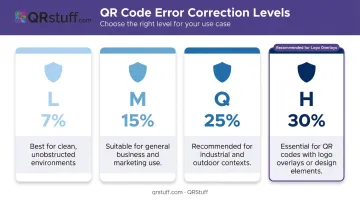
For branded codes with a logo in the centre, Level H provides the most resilience. QRStuff's platform notes that a logo can safely cover up to 30% of the code surface at this level without affecting scannability — but test the final version regardless.
Mobile Landing Page Optimization
A QR code that leads to a non-mobile-optimized page fails the moment it's scanned. Most users won't wait — they'll move on within seconds. Google's mobile speed research found that 53% of mobile visits are abandoned when load time exceeds 3 seconds. Before deploying any QR code campaign, run the destination URL through a mobile speed test — a fast, responsive landing page is as important as the code itself.
Smart Ways to Deploy QR Codes Across Your Business
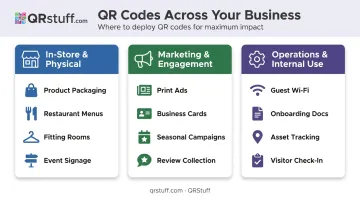
The businesses seeing the highest engagement are those matching the QR code type to the specific customer touchpoint.
In-store and physical locations:
- Product packaging linking to ingredient details, tutorials, or reviews — GS1 US research found 66% of consumers would scan a QR code on food packaging for freshness and ingredient information
- Restaurant table tents for digital menus — the National Restaurant Association found 57% of limited-service customers would access menus via QR code
- Fitting rooms with size guides or styling suggestions
- Event signage at natural pause points where phones are already out
QR codes also extend the reach of traditional marketing materials — connecting them directly to digital action.
Marketing and customer engagement:
- Print ads, direct mail, and business cards connecting print materials to landing pages, loyalty sign-ups, or video content
- Dynamic codes let campaigns redirect to updated seasonal offers without reprinting
- Google Review codes at checkout counters to capture in-the-moment feedback
Operations and internal use:
- Wi-Fi QR codes for guest networks — QRStuff's dynamic Wi-Fi codes let you rotate passwords without reprinting signage
- Onboarding document links for new staff
- Asset tracking in warehouses and logistics — Microsoft already uses serial number QR codes on Surface for Business devices for IT asset management
- Visitor check-in forms at front desks
For teams deploying at scale, QRStuff's Enterprise tier includes unlimited bulk generation and API access, making it a practical fit for logistics operations, retail chains, and marketing agencies managing codes across hundreds of locations.
Common QR Code Mistakes to Avoid
Test before you print. Scanning on multiple devices is the single most important step before any print run. Confirm the destination loads, the mobile experience works, and the code reads from the expected distance.
Use vector formats for print. Free generators typically output low-resolution PNGs. Scaling those up for large-format printing produces blurry, unscannable codes — use SVG or EPS instead.
Placing codes in unscannable environments. Reflective glossy surfaces, curved packaging (bottles, cups), formats under 1.5 cm, or low-light locations without adequate contrast are common failure points. Match the placement to actual scanning conditions.
Ignoring mobile optimization. If the destination page isn't mobile-friendly, the QR code creates more friction than it solves. Test the full user journey, not just whether the code scans.
Avoid static codes for anything that might change. Seasonal campaigns, updated menus, and relocated pages all render a static code useless — and require a full reprint. Dynamic codes let you update the destination without touching the physical material.
Frequently Asked Questions
How do I get a QR code for my business account?
Sign up on a QR code platform like QRStuff and choose your code type from 40+ options (URL, vCard, Wi-Fi, payment, and more). Enter your destination content, customize the design, and download. No technical skills are needed — the whole process takes under a minute.
Is it worth having a QR code on a business card?
Yes. A QR code on a business card can link to a digital vCard, LinkedIn profile, portfolio, or booking page — extending the card well beyond static contact details. Use a dynamic code so the destination can be updated without reprinting cards.
What's the difference between a static and dynamic QR code?
Static codes permanently embed the destination in the pattern with no editing or tracking possible. Dynamic codes use a redirect that can be updated anytime through a dashboard and provide real-time scan analytics, including total scans, device types, and geographic data.
How do I make my QR code look professional and on-brand?
Upload your logo to the centre, apply brand colours with strong contrast against the background, customize the module and eye shapes, and set error correction to Level H before adding the logo. Always test the branded version on multiple devices before printing.
How do I know if my business QR code is working?
Dynamic QR codes provide a real-time dashboard showing total scans, unique users, device types, geographic location, and time-of-scan data. Static codes offer no tracking. The only way to verify them is periodic manual test scanning.
Can I change the destination of a QR code after it's been printed?
Only dynamic QR codes allow this. The printed pattern stays the same, but the redirect target can be updated through the platform dashboard at any time — no reprinting needed. Static codes cannot be edited after creation.