QR codes on event badges solve several problems at once — entry control, session tracking, networking, and exhibitor lead capture — but only when implemented correctly. The common failure points aren't technical mysteries: codes printed too small, static QR data that can't be updated after print, and no testing before the full run are responsible for most on-site scanning problems.
This guide covers the complete workflow — what to encode, how to generate at scale, print specifications, and live monitoring — so you can execute without the common missteps.
Key Takeaways
- QR codes on event badges handle access control, attendee ID, contact sharing, session check-ins, and lead capture in one scan
- Always use dynamic QR codes so destination content can be updated without reprinting badges
- Generate unique codes in bulk by uploading an attendee spreadsheet, with one unique code assigned per attendee
- Print at a minimum of 2 cm × 2 cm, include a clean quiet zone, and test before the print run
- Monitor scan data in real time during the event to track attendance flow and exhibitor activity
When Should You Use QR Codes on Event Badges?
QR codes earn their place on badges when identity verification, access management, or data exchange happens repeatedly across an event. Conferences, trade shows, expos, corporate summits, and festivals all qualify. A small informal gathering of 20–30 people where manual sign-in takes seconds? Not worth the setup overhead.
Three conditions make QR codes on badges genuinely necessary:
- High attendee volume pushes manual check-in into bottleneck territory — scanning clears lines faster
- Multi-session or multi-zone access requires permissions enforced consistently across every entry point
- Exhibitor lead capture lets sponsors collect contact data on the spot, without exchanging business cards
- Repeated identity verification across a full-day event makes a scannable credential worth the setup
Get those conditions right and QR codes on badges pay for themselves in minutes saved. Get them wrong, and the implementation creates new friction instead of removing it.
Where Badge QR Codes Get Misused
Even well-intentioned setups run into avoidable problems. The most common:
- Encoding too much raw data in a static code — dense codes are harder to scan, and any data change requires a full reprint
- Printing codes too small for real venue conditions (more on sizing below)
- Skipping test scans before committing to the print run, only to discover rendering issues on event day
None of these are hard to prevent — they just require a pre-print checklist covering code density, minimum print size, and a test scan from the actual scanning device you'll use on the day.
What Information Should You Encode in Event Badge QR Codes?
Before designing your badge QR codes, you need to settle one decision: static vs. dynamic. A static QR code encodes data directly in the symbol — change the data, reprint the badge. A dynamic QR code encodes a short redirect URL pointing to a profile or page you can update anytime after printing. For event badges, dynamic is the right choice in nearly every case.
Four Common Encoding Strategies
| Strategy | Best For |
|---|---|
| Attendee profile URL | Networking-focused events; links to name, org, title, social links, contact details |
| vCard/contact data | Business conferences and trade shows; scanning saves contact instantly |
| Unique attendee ID or access token | Tiered ticket events or restricted zones; door scanner checks ID against an access list |
| Session check-in link | Multi-track conferences; enables session-level attendance logging |
QRStuff covers all four scenarios through its URL, Contact Details (vCard), Plain Text, and Attendance tracking code types. Dynamic vCard codes are particularly practical here — if a speaker's title or contact details change before the event, you update the linked record rather than reprinting their badge.
A Note on Data Privacy
If you encode personal data directly in the QR symbol — email, phone number — any smartphone camera can read it, no app required. For sensitive information, deliver it via a secure URL with access controls rather than embedding it raw in the code. GDPR Article 5(1)(c) requires personal data to be limited to what is necessary for the processing purpose, which means every field you encode in a badge QR code needs a clear justification.
How to Set Up QR Codes on Event Badges
The sequence matters: plan → generate in bulk → design for scannability → test → print → monitor. Skipping the test step is the single most consistent cause of on-site failures.
Planning and Bulk Generation
Every attendee needs a unique code. That means bulk generation from an attendee spreadsheet — one row per person, one code per output. Generating codes individually is not viable at any meaningful event scale.
QRStuff's bulk generation accepts Excel (.xlsx) files. The workflow:
- Select your data type and download the sample Excel template
- Populate the template with your attendee data (URLs, names, IDs)
- Upload the completed file — QRStuff validates it before processing
- Receive a ZIP file of individual QR code images by email when complete
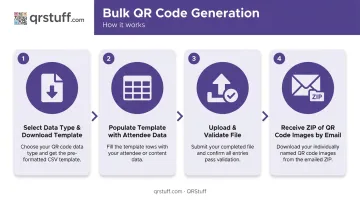
The Full Suite plan handles batches up to 500 codes. The Enterprise plan has no batch limit — relevant for large-scale events. For events requiring more than 20,000 codes, an offline processing service is available separately.
Generate dynamic codes pointing to unique attendee profile URLs. If attendee data changes between registration and the event, only the profile content needs updating — not the printed badge, and not the QR code itself.
Designing for Scannability
Minimum print specifications:
- Size: 2 cm × 2 cm minimum; 3–4 cm recommended for event environments with mixed lighting and varied scanning distances
- Quiet zone: Preserve the white border on all four sides — never crop it. DENSO Wave specifies a four-module-wide margin; QRStuff explicitly warns against removing this border
- Contrast: Dark modules on a light background. Avoid red, orange, or yellow codes — some scanners using red-spectrum light (~660 nm) struggle to read them
For branded badge designs, logo embedding should stay within 30% of the code area, and error correction should be set to Level H (30% damage tolerance) to compensate for the obstructed modules. QRStuff supports all four error correction levels and automatically raises the level when a logo is embedded.
Place the code in a high-contrast area, clear of background images, gradients, lanyard holes, and folds. Any obstruction or physical damage affects scannability.
Testing Before the Print Run
Test every QR code variation on the badge — each attendee tier, each access zone. Confirm:
- Destination URL resolves correctly
- Access permissions reflect the right tier
- Code renders at print resolution (not just on-screen)
- Scans successfully across multiple devices: dedicated badge scanners, smartphone native cameras, and any exhibitor lead capture app being used
A failed tier caught in testing means a targeted reprint. The same failure discovered on event day means a line at the door.
Monitoring Scan Activity During the Event
Dynamic QR codes feed real-time analytics into QRStuff's dashboard. During the event, this gives you a running picture of attendance flow, session occupancy, and exhibitor booth activity.
The dashboard tracks:
- Total scans and unique scans
- Device type (iOS, Android, desktop)
- Geographic location at city level
- Time of scan — all updating live
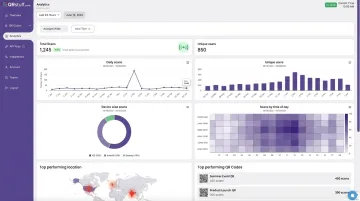
Scan logs export as CSV for post-event reporting or integration with your event management system. The Enterprise plan adds API access for direct platform integration.
When exhibitors scan attendee badges for lead capture, their scanning app must be compatible with the QR encoding format on the badge. Confirm this before the event.
Where QR Codes on Event Badges Are Commonly Used
Different event formats use badge QR codes differently:
- Trade shows and expos — Exhibitor lead capture is the dominant use case. Companies exhibiting at B2B events allocate an average of 41% of their annual marketing budget to these activities, making badge scan data high-stakes. Exhibitors scan attendee badges to pull contact details directly into lead retrieval systems.
- Conferences — Session check-in and access control. Badge scans log attendance, enforce session capacity, and support CE-credit reporting.
- Corporate summits — Attendance tracking and networking. vCard-style codes let attendees exchange contacts without manual entry.
- Festivals and large-scale events — Zone access and ticketing validation at entry points.
- Hybrid events — A physical badge scan can trigger a connection inside the event's virtual platform, keeping in-person and remote attendee data in one unified system.
The Dual-Use Dynamic at Trade Shows
At exhibitor-heavy events, badge QR codes serve two audiences simultaneously. Attendees want to share their contact details; exhibitors want to scan and collect those details. The encoding strategy has to account for both directions.
A URL pointing to a structured attendee profile works better than raw vCard data here. It's more flexible, supports permission controls, and connects more cleanly to lead retrieval platforms.
For hybrid formats specifically, the same encoding approach applies across both audiences — the badge QR code becomes the single handshake point between physical and digital participation.
Best Practices for QR Codes on Event Badges
Four practices separate events that run smoothly from those that spend the first hour troubleshooting at the entrance.
Use Dynamic QR Codes
If a session link changes, attendee details are corrected, or access permissions shift after badges are printed, a dynamic code redirects to updated content without reprinting. Static codes lock you in. Dynamic codes don't.
Run a Full Test Before the Live Event
Create a small sample batch covering each attendee tier and zone type. Run those badges through every scanning touchpoint — entrance scanners, session check-in stations, exhibitor lead capture apps — and confirm data flows correctly to your event management system. This is the step most organizers skip and most organizers regret.
Enforce Minimum Size Specifications
Designers unfamiliar with QR codes routinely scale them down to fit a layout. QRStuff recommends a minimum of 2 cm × 2 cm for simple URLs; event environments with variable lighting and scan distance warrant 3–4 cm. Put the size requirement in writing before design begins.
Brief Staff on the Failure Protocol
Staff at every scanning touchpoint should know three things: what a successful scan looks like, what to do when a badge won't scan (manual lookup by attendee ID), and who to escalate to. A line that stops moving because no one knows the backup procedure is entirely avoidable.
Frequently Asked Questions
What information should I put in a QR code on an event badge?
The most useful encoding depends on your event's primary goal. A URL linking to an attendee profile works best for networking and lead capture events; a unique access token or ID works best for tiered access control. Dynamic codes pointing to a profile URL offer the most flexibility across both use cases.
Should I use a static or dynamic QR code for event badges?
Dynamic QR codes are the right choice for event badges. They allow destination content to be updated after printing — critical when attendee details change or session links are updated between registration and event day.
What is the minimum size a QR code should be on an event badge?
2 cm × 2 cm is the accepted minimum for reliable scanning. For event environments where scanning happens at arm's length or under mixed lighting, 3–4 cm is the better target. Always preserve the quiet zone (white border) on all four sides — never crop it.
How do I generate unique QR codes for every attendee at a large event?
Use a bulk QR code generator that accepts a spreadsheet and outputs a unique code per row. QRStuff accepts Excel (.xlsx) files and returns a ZIP of individual code images. Manual one-by-one generation is not viable at event scale.
Can QR codes on badges work if the venue has poor Wi-Fi or no internet?
Static QR codes encoding data directly (like a vCard) work fully offline — no URL needs to resolve. Dynamic QR codes require connectivity to load the destination page, though many event apps cache attendee data locally and sync when reconnected.
How do exhibitors scan attendee badges to capture leads?
Exhibitors use a dedicated lead capture app or event platform scanner to read the attendee's badge QR code, pulling up the attendee's profile and saving it as a lead. Confirm compatibility between the badge QR encoding format and the exhibitor's scanning app well before the event — ideally during setup, not at check-in.