Introduction
Running a plumbing business means juggling a lot more than wrenches and pipe fittings. Between paper work orders stuffed in a van's glove box, missed callbacks from customers who called during a job, and equipment logs that somehow never make it back to the office, the admin side of the trade can eat up serious time.
91% of homeowners rely on online reviews before picking a contractor, yet most plumbing businesses still hand over a paper invoice and hope for the best. A single printed QR code can pull up a boiler's service history, collect a five-star review, and do it all without any extra effort from the tech on-site.
QR codes have moved well past restaurant menus. Independent plumbers and small plumbing businesses are now using them to cut admin time, reduce callbacks, and give customers a faster, more professional experience.
This guide covers the highest-impact use cases, the best places to put codes, and how to set one up in minutes.
Key Takeaways
- QR codes on installed equipment give field technicians instant access to service history — without calling the office
- A code on a completed-job invoice sends satisfied customers directly to your Google review page in one tap
- vCard QR codes on your vehicle or business card let homeowners save your number on the spot
- Dynamic QR codes let you update linked content (manuals, booking pages, records) without reprinting a single label
- QRStuff supports all these use cases — review links, vCard, PDFs, and booking URLs — plus scan analytics to show what's actually working
Streamlining Field Operations with QR Codes
Digitising Service Records and Compliance Documentation
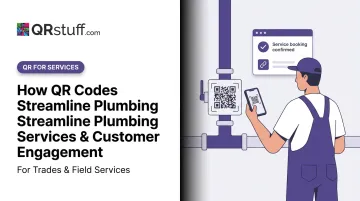
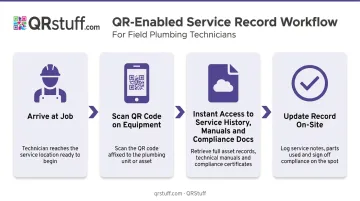
Picture a technician arriving at a return job on a combi boiler. Under the old workflow: call the office, wait on hold, hope someone can find the original paperwork. With a QR code sticker on the unit, they scan it and immediately have the installation date, prior service notes, parts used, and any compliance certificates — all on their phone.
It's the model A.O. Smith deployed at scale: QR codes on their water heaters link customers and technicians to warranty information, troubleshooting videos, and parts lookup — removing the need to track down paperwork that's often lost by the second service visit.
For a plumbing business, the same approach applies to any installed asset:
- Water heaters and boilers
- Pipe manifolds and isolation valves
- Water softeners and filtration systems
- Commercial pump equipment
Cloud-linked records mean every technician, regardless of whether they handled the original install, walks into a job with full context. It also makes compliance audits far less painful — inspectors can review organised, searchable digital records rather than rifling through a folder.
Instant Access to Manuals, Specs, and Safety Data
Organised records solve the compliance problem, but technicians need more than service history on the job — they need the right documents at the right moment. A QR code affixed to the unit at installation links directly to the manufacturer's PDF. The technician scans, the document loads, job done.
That same code can point to far more than a manual:
- Pipe layout diagrams for complex installations
- Safety data sheets for chemicals or materials
- Wiring schematics on hybrid heating systems
- Spec sheets for parts that may need matching on a return visit
The real advantage comes from using dynamic QR codes here. If a manufacturer releases an updated manual or revised safety sheet, you simply update the link destination — the physical label on the equipment stays exactly as it is. No reprinting, no outdated documents surfacing mid-job.
QRStuff's PDF data type handles this well: upload the document, generate a dynamic code, and swap the file out whenever an update arrives. The code on the boiler keeps working without anyone touching it.
Boosting Customer Engagement with QR Codes
Collecting Reviews and Building Local Reputation
Word-of-mouth still drives most plumbing leads — but increasingly, that word-of-mouth happens on Google. The problem is that asking customers to leave a review creates friction: they need to search for the business, find the review section, and navigate to the form. Most don't bother.
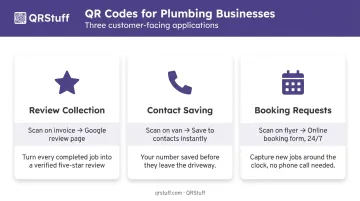
A QR code on a completed-job invoice eliminates all those steps. One scan takes the customer directly to the Google review page. The fewer steps between intention and action, the higher the completion rate.
Make it obvious what the code does. A short line beneath it is enough:
"Happy with today's job? Scan to leave us a quick review — takes about 30 seconds."
QRStuff offers a dedicated Google Review data type (not just a URL redirect) — you enter the business name, and the platform generates a code that routes directly to the review submission page. Place these codes on:
- Completed-job invoices
- Leave-behind door hangers
- The back of business cards
Digital Business Cards and Instant Contact Saving
A plumber's service vehicle parked on a residential street is passive advertising — but only if neighbours have a way to save the contact details when they notice it. A vCard QR code on the van solves this.
When someone scans it, their phone prompts them to save the business's name, phone number, email, and website directly to their contacts. No typing, no misspelling the number, no Googling a competitor ten minutes later because they couldn't remember the name.
QRStuff's vCard type supports a full range of contact fields:
- Business name and job title
- Mobile number and email
- Website and physical address
Generate it as a dynamic code and you can update the details if anything changes — without reprinting the vehicle wrap or ordering new business cards.
Simplifying Estimates and Service Requests
Not every potential customer calls during business hours. A QR code on a truck wrap, yard sign, or leave-behind flyer can link directly to an online booking form or quote request page — capturing leads 24/7 without the phone needing to ring.
This matters because 62% of business calls go unanswered. A self-serve booking option via QR code captures those leads, reduces admin time, and gives customers a faster response.
Equipment Tracking & Inventory Management with QR Codes
Tools and parts going missing across job sites is one of the most consistently frustrating operational problems in the trade. Construction workers spend an average of 38 hours per year searching for tools — time that directly reduces billable hours.
QR code labels on equipment create a simple accountability trail:
- Scan a tool out when leaving the warehouse
- Scan it in when returning from a job
- Log which job site it went to
This doesn't require expensive software. A basic mobile scanning setup with a cloud spreadsheet or job management app handles most small business needs. For plumbing businesses that scale up, QRStuff's dashboard supports project-based organisation — group codes by van, job site, or equipment type, and track scan history to see where assets are moving.
Parts Inventory
QR codes on parts bins — fittings, tape, valves, compression rings — let technicians log usage against specific jobs when they take stock. This feeds directly into job costing and reordering decisions. If three jobs in a fortnight all consumed the same fitting at an unexpectedly high rate, the data surfaces it.
Maintenance Scheduling
Equipment service records work the same way. A QR code on a pipe inspection camera or pressure testing unit links to its own service log — scan it, see when calibration is due, and schedule maintenance before the equipment fails mid-job.
Where to Place QR Codes in a Plumbing Business
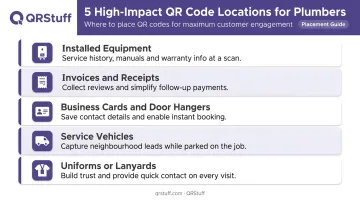
Placement determines whether a QR code gets scanned or ignored. These are the highest-impact locations for a plumbing business — and what each one should do:
| Location | Purpose |
|---|---|
| Installed equipment (boilers, heaters, manifolds) | Service history and manual access |
| Invoices and receipts | Review collection and payment links |
| Business cards and door hangers | Contact saving and repeat booking |
| Service vehicles | Neighbourhood lead capture |
| Company uniforms or lanyards | Trust-building and quick contact on site |
Two practical considerations before printing:
Durability matters. Codes on boilers, outdoor pipework, or plant rooms need waterproof, heat-resistant labels — not standard paper stickers. Test the code after application to confirm it scans correctly.
Label the code. An unexplained QR code almost always goes unscanned. A short text prompt beneath every code removes the hesitation — "Scan for service history" or "Scan to book a follow-up" gives people a reason to point their camera at it.
How to Set Up QR Codes for Your Plumbing Business
Choosing the Right Code Type
Start by identifying the use case before generating anything. The main question is whether the linked content will ever need updating:
- Static QR codes — free to generate, content is permanent. Fine for a URL that will never change.
- Dynamic QR codes — content is editable after printing, scan data is tracked. Better for almost every plumbing business use case.
For equipment labels, booking links, review pages, and document links, dynamic codes are the right choice. If a service record URL changes, a booking page moves, or a manual gets updated, the physical label stays put.
Using QRStuff for Plumbing Business Codes
QRStuff supports the full range of code types relevant to plumbing businesses: vCard, URL, PDF documents, Google Review, and booking form links. Dynamic codes on paid plans never expire as long as the subscription remains active — relevant for equipment labels that may stay on a boiler for a decade or more.
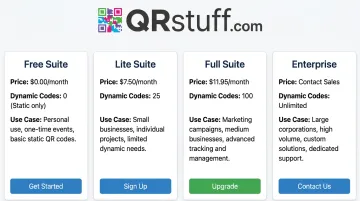
Plan options for a small plumbing business:
| Plan | Monthly Cost | Dynamic Codes | Best For |
|---|---|---|---|
| Free Suite | £0 | 10 (30-day expiry) | Testing only |
| Lite Suite | £8/month | 50 (no expiry) | 1–2 technicians, basic use |
| Full Suite | £20/month | 250 (no expiry) | Growing business, full use case coverage |
| Enterprise | £185/month | 1,000 | Multi-van fleet, bulk asset labelling |
The Full Suite also supports bulk generation of up to 500 codes per batch — practical if you need to label a large number of installed assets in one go.
Scan analytics (available on all paid plans for dynamic codes) track total scans, unique scans, device type, and geographic location. For a plumbing business, that data tells you:
- Whether customers are scanning the review code on invoices
- Whether the booking link on the van is generating leads
- Which equipment codes are being accessed regularly
Starting Small
Pick one or two use cases and test them for 30–60 days before expanding. A sensible starting point:
- Add a Google Review QR code to your next batch of invoices
- Put a vCard code on your vehicle
- Check scan analytics after one month to see what's working
Once scan data confirms those are working, add equipment labels, booking links, and inventory tracking codes progressively. The infrastructure is the same — it just scales as you add more codes.
Frequently Asked Questions
How do I scan a plumber's QR code?
Open your phone's camera app, point it at the code, and tap the notification that appears. Both iPhone and Android cameras can scan QR codes natively — no separate app needed. The link or contact card opens automatically.
What type of QR code is best for a plumbing business?
Dynamic QR codes are the better choice for most plumbing businesses. The linked content — service records, booking pages, manuals — can be updated without reprinting labels, and scan data can be tracked to measure performance. Static codes work for simple, permanent links but offer no flexibility or analytics.
Can QR codes replace paper service records for plumbers?
QR codes linked to cloud records largely cut reliance on paper — technicians scan to view and update records digitally. That said, keep backup digital copies and follow any local compliance requirements, particularly for gas safety certificates and related documentation.
How do QR codes help plumbers get more customer reviews?
A code on an invoice linking directly to the Google review page removes several steps from the process. The fewer actions required between intention and completion, the more customers follow through. Pair it with a short prompt explaining what the scan does and completion rates improve further.
Do QR codes on plumbing equipment expire?
Static codes never expire on their own. Dynamic codes depend on the platform subscription staying active. On paid QRStuff plans, dynamic codes remain active indefinitely as long as the subscription continues — important for equipment labels that may stay in place for ten years or more.
How much does it cost to add QR codes to a plumbing business?
Basic static code generation is free. For dynamic codes with analytics and editable content, QRStuff's Lite Suite starts at £4/month — enough for most small plumbing operations covering invoices, vehicle codes, and a handful of equipment labels. The time saved on admin and callbacks typically offsets the cost quickly.