yourbrand.com/menu and a 40-character auto-generated string is the difference between a user who trusts what they're scanning and one who doesn't.
EMARKETER estimates 102.5 million US smartphone users will scan QR codes in 2025, which means QR destinations now deserve the same brand governance as your email campaigns or paid ads. Yet many businesses still let auto-generated URLs represent their brand at the moment of scan.
This guide covers what a custom URL is, why it matters for QR campaigns, how to create one step by step, and the mistakes worth avoiding before you print anything.
Key Takeaways
- Custom URLs are human-readable, user-defined addresses — not system-generated character strings
- Branded URLs improve scan trust, brand recall, and shareability across print and digital formats
- They're especially valuable in QR campaigns, where users can't see the destination before scanning
- Creating one involves defining a clean slug, choosing a platform, and connecting it to your destination
- Dynamic QR codes let you update the destination behind a custom URL without reprinting, making them ideal for seasonal campaigns and packaging
What Is a Custom URL?
A custom URL is a manually configured web address — something like yourbrand.com/summer-sale — that replaces an auto-generated or complex default link.
The term covers a few related formats:
- Full custom domain URL: A page path on your own domain (e.g.,
brand.com/offers) - Vanity URL: A branded redirect to another destination, often used for campaigns or partnerships
- Branded short link: A shortened URL using a custom domain (e.g.,
go.brand.com/menu) via a link management platform
All three are intentionally written to be recognizable — not generated by a system for internal tracking or access control.
Custom URLs vs. Auto-Generated Links
The distinction matters, especially for QR codes. Auto-generated links — the kind your CMS, cloud storage, or file-sharing tool creates by default — use random alphanumeric strings. That randomness is intentional: it makes links harder to guess, which adds a layer of access control for private or sensitive content.
Custom URLs solve a different problem. They're built for public-facing content where discoverability, recognition, and trust matter more than obscurity. restaurant.com/menu tells the user exactly where they're headed. docs.storage.io/xK9m2pQr7w tells them nothing — and for a customer deciding whether to scan a code, that difference matters.
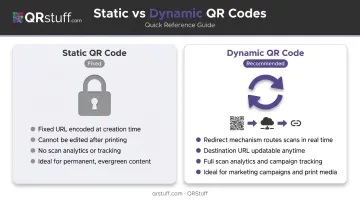
That readability gap becomes especially relevant when pairing custom URLs with QR codes. QRStuff supports both static and dynamic QR codes for URL-based content. Static codes have a fixed destination that can't be changed after creation. Dynamic codes use a redirect mechanism, so the destination can be updated at any time without regenerating or reprinting the code — making them the practical choice for campaigns that evolve over time.
Why Custom URLs Matter for QR Code Campaigns
The Trust Gap at the Moment of Scan
When someone scans a QR code, they're committing to a destination they can't preview. The FTC has specifically warned consumers to inspect QR destination URLs before opening them — looking for misspellings or switched characters that signal phishing attempts. A 2024 NDSS USEC study found that participants frequently opened QR links without checking the URL at all.
When a recognizable brand URL appears in the browser bar after scanning, it confirms the user landed in the right place. The URL itself becomes a trust signal.
The stakes rise when QR codes drive higher-commitment actions. The National Restaurant Association's 2024 Technology Landscape Report found 59% of full-service customers would use a QR code to access a menu — but only 48% would place an order and 46% would pay via QR. The drop-off tracks with perceived risk, and branded, expected URLs reduce that friction.
Brand Consistency Across Channels
Custom URLs that include your brand name or campaign keyword create continuity across every touchpoint: print ads, packaging, event signage, social media, and email. A URL like brand.com/spring seen on a poster, then confirmed in the browser bar after scanning, reinforces the same message twice.
This matters most in retail, hospitality, and event marketing, where the same QR code appears across multiple physical formats and needs to feel intentional rather than purely technical.
Analytics That Improve Over Time
Custom URLs tied to dynamic QR codes make campaign measurement possible. QRStuff's analytics dashboard provides real-time data including:
- Device type (iOS vs. Android, mobile vs. desktop)
- Geographic location (country and city level)
- Time and date of each scan
- Total vs. unique scans to differentiate repeat engagement from new audience reach
This data helps you understand which placements drive the most scans, when peak engagement occurs, and whether your QR codes are reaching the right geographic markets — without reprinting anything.
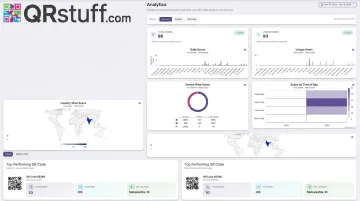
Full analytics access (including GPS coordinates, Google Analytics integration, and CSV export) is available on QRStuff's Full Suite and Enterprise plans.
Memorability and Shareability
brand.com/menu is easy to type if a scan fails. A 32-character auto-generated URL is not. For restaurant menus, event programs, or product packaging — where verbal sharing or manual entry is possible — a short, readable URL prevents dead ends.
Nielsen Norman Group recommends URLs be short, easy to type, and easy to remember, with lengths under 78 characters to avoid wrapping in email or print layouts.
How to Create a Custom URL: Step-by-Step
Follow these five steps to build a custom URL that's clean, on-brand, and ready to embed in a QR code or print campaign.
Step 1: Define Your URL Structure and Purpose
Decide what the URL should communicate. Good slugs reflect the brand, campaign, product, or action:
/menu— restaurant menus, hospitality/register— event sign-ups, webinars/offeror/spring-sale— seasonal promotions/vip— loyalty programs or exclusive access
Slug formatting rules:
- Lowercase only
- Hyphens between words (not underscores)
- No special characters or unnecessary subfolders
- Keep it under 20–30 characters where possible
Avoid internal jargon, campaign codes, or abbreviations that mean nothing to the person scanning.
Step 2: Choose a Platform or Domain Setup
Two approaches:
Your own domain with a redirect — configure
yourbrand.com/salethrough your CMS or hosting provider. Best if you want the URL on your own domain and have technical access to set up redirects.A QR code or link management platform — use a platform that supports custom URL slugs and handles the redirect infrastructure. Best when you need analytics, print-ready QR output, and the ability to update destinations without touching your website backend.
QRStuff's custom short URL domain feature (available on Full Suite and Enterprise plans) lets you configure branded short links directly within the platform, keeping URL management and QR code generation in one place.
Step 3: Configure the Slug and Destination
Once you've chosen your platform:
- Enter your custom slug (e.g.,
/menu2025) - Set the destination URL it should redirect to
- Save and verify the configuration
Before moving on, confirm:
- The redirect works on both desktop and mobile
- No duplicate slugs exist for different campaigns
- The destination page loads correctly and matches the URL's implied purpose
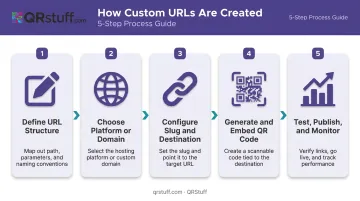
Step 4: Generate and Embed the QR Code
Take your custom URL and generate a dynamic QR code from it. QRStuff encodes the URL into a dynamic code using a redirect mechanism, so the visual QR pattern stays constant while the destination can be updated anytime from your account dashboard — without reprinting a single poster or package.
Dynamic QR codes with editable destinations are available on QRStuff's Lite Suite and above. The Free Suite does not include dynamic codes.
Step 5: Test, Publish, and Monitor
Pre-launch checklist:
- Scan from at least two devices (iOS and Android)
- Confirm the landing page loads and matches the campaign intent
- Verify analytics tracking is active in the dashboard
- Check that the URL displays correctly in the browser bar post-scan
Post-launch: Use QRStuff's real-time dashboard to track scan volume, device breakdown, geographic distribution, and peak engagement times. Filter data by daily, weekly, or custom date ranges and export as CSV, PDF, or Excel.
Best Practices for Custom URLs in QR Code Campaigns
Keep slugs under 30 characters. According to DENSO WAVE's technical documentation, QR codes range from 21×21 to 177×177 modules — longer URLs push codes into higher-density versions, which scan less reliably when printed small.
Short slugs like /sale, /menu2025, and /register keep your codes simple and scannable at any print size.
Use Consistent Naming Conventions
Organize QR codes by campaign type or time period:
/event-junevs./event-sept/product-launch-q3/retail-window-spring
This makes analytics filtering and campaign management far easier when running multiple simultaneous campaigns. QRStuff supports project folders and campaign tags for organising dynamic QR codes at scale — useful for marketing teams managing different clients or brand verticals.
Add Protection for Private Content
A descriptive URL like brand.com/vip-offer is more guessable than a random string. If the destination is access-controlled, don't rely on the slug alone — layer password protection on top. QRStuff's Full Suite includes password-protected QR codes for exactly this scenario.
Common Mistakes to Avoid
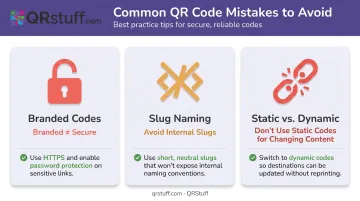
Three mistakes come up repeatedly when businesses roll out custom URLs — and each one is avoidable.
Mistaking branded URLs for secure URLs. A custom URL is built for recognition, not obscurity. Randomized auto-generated links are harder to guess, but even they don't constitute real access control. For sensitive content, layer in authentication, expiration tokens, or password protection — regardless of URL format.
Using slugs that only make sense internally. Codes like /CMP-007-V2 or /launch_promo undermine the core purpose of a custom URL. If a user sees the slug in the browser bar and can't immediately understand where they are, the URL isn't doing its job. Keep slugs descriptive, clean, and campaign-facing.
Treating custom URLs as permanent. Business pages change. Seasonal campaigns end. Product pages get restructured. If a custom URL is tied to a static QR code, that update breaks every printed piece carrying it.
Dynamic QR codes solve this directly — the URL on the label stays constant while the destination updates, keeping campaigns live and eliminating reprint costs.
Frequently Asked Questions
What is a custom URL?
A custom URL is a user-defined, human-readable web address configured to replace a system-generated link. It typically reflects a brand name, campaign, or product (e.g., brand.com/menu) and makes links easier to share, remember, and trust.
What does "URL-based" mean?
"URL-based" refers to any content or action accessed through a web address. In QR codes, a URL-based code encodes a web link that opens automatically when scanned — the most common QR code type for marketing campaigns.
What is the difference between a custom URL and a regular URL?
A regular URL is often auto-generated and contains random characters, typically for security or system purposes. A custom URL is manually defined to be descriptive and on-brand, prioritizing recognition and shareability over randomized strings.
Can I change the destination of a custom URL after a QR code is printed?
Yes. With a dynamic QR code, the destination can be updated at any time through your QR platform without reprinting the code. The visual pattern stays the same; only the redirect destination changes. QRStuff's Lite, Full, and Enterprise plans all support dynamic redirects.
How long should a custom URL be for use in a QR code?
Keep the full URL under 75 characters where possible, with the slug itself ideally under 20–30 characters. Shorter URLs generate lower-density QR codes that scan faster and remain readable at smaller print sizes.
Are custom URLs safe for all types of content?
Custom URLs work well for publicly accessible content. Because descriptive slugs are more guessable than randomized strings, sensitive or private content should use a randomized link or password protection rather than relying on a custom URL alone.