QR code menus started as a pandemic workaround. They've since become a genuine operational tool. The 59% of full-service customers who say they'd use a QR code to view a menu aren't doing so reluctantly — they expect it.
This article breaks down 12 specific ways QR code menus translate into measurable efficiency gains and stronger profitability. Not surface-level features — actual operational outcomes.
Key Takeaways
- QR code menus eliminate recurring print costs and enable instant menu updates across one or multiple locations
- Faster ordering and digital payment reduce table turn times and free staff for hospitality work
- Digital upsell prompts increase average check size without adding pressure on servers
- Scan analytics show operators exactly what guests are viewing, when they scan, and which menu items get the most attention
- Together, these gains build on each other — lower costs, faster turns, and higher checks that improve profitability with every service
What Is a QR Code Menu?
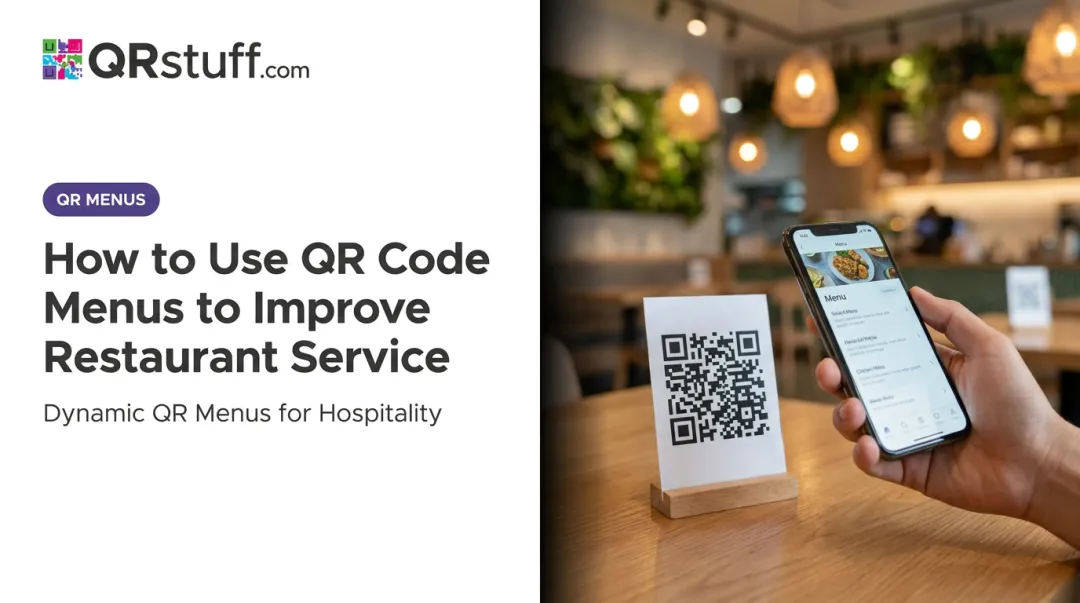
A QR code menu is a scannable code — placed on a table, tent card, or receipt — that opens a digital menu directly on a guest's smartphone. No app download required. On most modern iPhones and Android devices, the native camera handles it automatically.
Not all QR menus work the same way. Some are simply PDF links. Others, like those built on platforms such as QRStuff, connect to fully dynamic menu pages with real-time update capability, scheduling, and scan analytics.
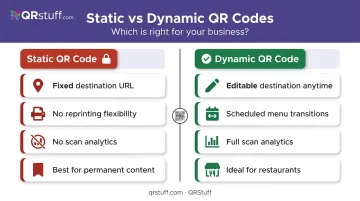
The core difference comes down to two code types:
- Static QR codes lock in one destination permanently — useful for fixed content that never changes
- Dynamic QR codes let you change where the code points at any time from a dashboard, with no reprinting required
For restaurants, that distinction has real operational weight. A dynamic setup means a price change, a seasonal special, or a sold-out item gets updated in seconds — not the next time you reprint table cards.
12 QR Code Menu Benefits for Restaurants
The 12 benefits below are organized across three outcome areas: Efficiency, Profitability, and Guest Experience. Each one ties directly to metrics restaurant operators track every shift.
Efficiency Benefits: Cost Control, Operations, and Accuracy
Benefit 1 — Reduce Printing Costs and Waste
Every price change, seasonal update, or 86'd item triggers the same cycle: design, print, distribute, dispose. Multiply that across daily specials, quarterly menu refreshes, and physical wear on laminated copies, and the printing budget compounds quickly.
QR code menus eliminate this entirely. When a menu changes, the operator updates the digital content — and every guest who scans that day sees the current version immediately. Nothing gets reprinted.
Benefit 2 — Simplify Multi-Menu Operations
Running breakfast, lunch, and dinner menus means someone has to coordinate the transitions — physically swapping menus or reminding staff to redirect guests. It's a friction point that's easy to underestimate until it goes wrong.
QRStuff's dynamic QR codes support scheduled URL changes, meaning a single table code can automatically display the breakfast menu in the morning, switch to lunch at midday, and transition to dinner service in the evening — all based on pre-configured schedules. No manual intervention required, and no risk of guests seeing yesterday's specials at 7pm.
Benefit 3 — Update Menus Instantly Across Locations
For multi-location operators, a price change used to mean coordinating reprints across every site. With dynamic QR codes, one dashboard update applies instantly to every deployed code — whether you have two locations or twenty.
QRStuff's platform makes that coordination manageable at scale:
- Project folders and centralized management keep all codes organized across locations
- Batch processing generates or updates hundreds of codes simultaneously
- Role-based permissions let location managers handle local updates without touching group-level settings
Benefit 4 — Improve Order Accuracy
When guests select and confirm their own orders on their own device, the verbal handoff between guest and server disappears. So does the most common source of order errors — the gap between what a guest says and what gets typed in.
Digital ordering routes confirmed selections directly to the kitchen. There's no interpretation required. The result: fewer remade dishes, fewer apology comps, and fewer guests who walk out unsatisfied and don't return.
Profitability Benefits: Revenue, Table Turns, and Labor
Benefit 5 — Speed Up Ordering and Reduce Wait Times
In table service, guests often wait several minutes before a server reaches them to take a drink order — let alone a food order. With a QR code menu, browsing starts the moment they sit down.
Guests scan, explore the menu at their own pace, and place orders when they're ready. During a busy Friday dinner, that shift in timing can change how many covers move through a section.
Benefit 6 — Turn Tables Faster
The checkout process is where idle table time accumulates fastest. Each step — the check, the card terminal, the receipt — adds minutes that compound across a full service.
According to Toast's 2022 data, servers in full-service restaurants save approximately 4 minutes per table during checkout when guests pay via QR. Across 40 covers on a Saturday night, that's nearly three extra table turns recaptured.
Benefit 7 — Increase Average Check Size Through Digital Upselling
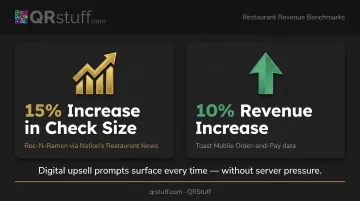
A well-placed digital upsell prompt — a wine pairing suggestion, a dessert add-on, a side upgrade — appears at exactly the right moment in the ordering flow. Unlike a rushed server who might skip the upsell entirely, the digital menu surfaces it every time, without pressure.
Roc-N-Ramen, as reported by Nation's Restaurant News, saw check sizes increase by 15% after implementing mobile ordering via QR codes. Toast's data similarly points to an average 10% revenue increase for restaurants using mobile order-and-pay workflows.
Benefit 8 — Optimize Labor Utilization
When QR menus handle the transactional work — presenting the menu, taking the order, initiating payment — servers are freed to do what actually builds loyalty: checking in, reading the table, and making guests feel looked after.
The NRA's data makes the staffing case clear:
- 27% of operators name recruiting and retaining staff as their top challenge
- 69% of operators say technology will augment — not replace — human labor
Reducing the transactional load per server doesn't shrink your team. It makes each person more effective where it counts.
Guest Experience and Strategic Benefits
Benefit 9 — Improve Guest Confidence and Comfort
Guests browsing on their own device move at their own pace. They can check allergen information, read item descriptions, and ask questions without feeling rushed. That sense of control matters — particularly for guests with dietary restrictions who often feel like a burden when asking servers to clarify ingredients mid-service.
QRStuff's menu pages support image-rich, mobile-optimized layouts with category sections, giving guests a browsing experience that feels intuitive rather than transactional.
Benefit 10 — Promote Limited-Time Offers and Move Inventory
Printed menus are static. If a shipment comes in short, or a supplier substitutes an ingredient, the menu still shows the original item. With a digital menu, operators can flag limited availability, feature a special, or quietly remove something that's 86'd — in real time, from any device.
That flexibility extends beyond availability flags. It's also useful for pushing high-margin items to more prominent positions during peak hours without any design or print lead time.
Benefit 11 — Unlock Real-Time Scan and Ordering Analytics
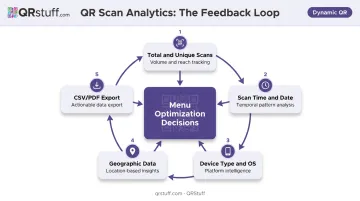
QRStuff's analytics dashboard turns scan data into an actionable feedback loop. It tracks:
- Total and unique scans — distinguishing new visitors from repeat engagement
- Scan time and date — identifying peak ordering windows by hour and day
- Device type and OS — informing mobile layout decisions
- Geographic data — down to city level, useful for multi-location operators
- CSV and PDF export — for integration with Google Analytics or other BI tools
Operators who review this data regularly can spot which items get viewed but not ordered, and when guests drop off in the ordering flow. Pairing those insights with menu positioning changes is how operators move from guessing to adjusting.
Benefit 12 — Boost Marketing, Loyalty, and Guest Engagement
A QR code scan doesn't have to end at the menu. Dynamic QR codes can redirect to loyalty program enrollment, promotional landing pages, or email capture forms — and that destination can change at any time without issuing a new code.
Common redirect strategies include:
- Loyalty sign-ups — capture enrollment at the table while intent is high
- Seasonal promotions — swap in holiday offers without touching the physical code
- Email or SMS capture — build a first-party list directly from dine-in traffic
- Feedback forms — route guests to a post-meal survey before they leave
A guest who scans a table code during a Tuesday lunch could be presented with a sign-up offer for the restaurant's loyalty program. Next month, that same code redirects to a holiday promotion. The physical code on the table never changes. The guest relationship keeps building.
What Happens When Restaurants Skip the QR Code Menu
Every price change triggers a reprint cycle. Every reprint cycle takes time, costs money, and introduces a lag between the decision and when guests see the updated menu. During that lag:
- Servers field questions about items that have changed
- Staff apologize for prices that don't match what's on the table
- Kitchen-unavailable dishes get ordered and have to be turned away
Without digital ordering support, servers remain the bottleneck for every ordering and payment interaction. That limits how many tables a section can handle and slows recovery during high-volume periods when every minute matters.
The expectation gap is widening, too. YouGov's 2023 survey of 11,680 U.S. adults found 45% had used a QR code menu in the prior year. The NRA puts full-service customer comfort at 59%. Restaurants without QR menus are no longer a neutral option — they're increasingly the outlier in a guest base that already treats digital ordering as standard.
How to Get the Most Value from a QR Code Menu
Three principles determine whether a QR code menu delivers real returns or just replaces one static format with another:
Build for mobile, not just digital. A PDF link works on a basic level, but it's not a menu experience. Use a fast-loading, scroll-friendly, image-rich page built for small screens. QRStuff supports branded landing pages with category sections for exactly this purpose.
Choose dynamic codes over static ones. Static codes lock in a destination permanently. Dynamic codes let you update the URL, run scheduled menu transitions, and track every scan — making them the practical choice for any restaurant that changes pricing, runs specials, or wants analytics. QRStuff's Full Suite supports up to 250 dynamic codes with unlimited scans.
Treat scan data as a feedback loop. Review which items are viewed most versus which are actually ordered, and use peak scan times to inform staffing. Operators who engage with this data regularly make faster, better-calibrated decisions than those relying on intuition.
Conclusion
QR code menus aren't a single-benefit swap. The value compounds: lower print costs free budget, faster ordering increases covers, digital upsells raise check averages, and analytics sharpen every menu and staffing decision that follows. The restaurants that see the strongest returns aren't just swapping a laminated menu for a URL. They're updating menus regularly, reviewing scan data, and connecting the QR code to their broader marketing and loyalty strategy. That's the difference between a convenience tool and an operational asset.
QRStuff's dynamic QR codes give restaurants the flexibility to update menu content instantly, track scan performance, and build that strategy without reprinting a single code.
Frequently Asked Questions
How much does it cost to make a QR code menu?
Generating a QR code is free or very low cost. The main expense is the platform used to host and manage your menu — QRStuff offers plans starting free, with paid tiers covering dynamic codes, analytics, and multi-location management. For most restaurants, printing cost savings offset platform fees quickly.
What are the benefits of a QR code menu?
The headline benefits include eliminated printing costs, instant menu updates across locations, faster table turns, improved order accuracy, and higher average check size through digital upselling prompts at the point of ordering.
Do QR code menus require customers to download an app?
No. QR menus open directly in Safari or Chrome when a guest points their camera at the code. Guests on iOS 11+ and Android 8.0+ can scan with their built-in camera app — no download or account required.
Can I update my QR code menu without reprinting the codes?
Yes — if you're using dynamic QR codes. The destination URL can be changed at any time from your dashboard, meaning the physical code on the table never needs to be replaced even when pricing, specials, or seasonal content changes.
Do QR code menus work with existing POS systems?
Many QR menu platforms integrate with common POS systems to sync orders directly. QRStuff links to your ordering system or POS via URL, and API access is available for custom integrations with your existing setup.
What if some guests don't have smartphones or prefer a physical menu?
A hybrid approach works well: use QR code menus as the default while keeping a small number of printed menus available on request. This ensures every guest feels accommodated without sacrificing the operational benefits of digital ordering for the majority of tables.