QR codes cut through that friction. A customer scans, lands on a mobile enrollment page, and joins your loyalty program in under a minute—no app, no staff interaction, no forms to fill out later at home.
This guide walks through every step of building a QR code-powered loyalty program: how to structure your rewards, which code type to use, where to place codes for maximum scans, and the mistakes that quietly kill programs before they gain traction.
Key Takeaways
- QR codes replace punch cards and app-only enrollment with a single scan from a table, receipt, or packaging
- Always use dynamic QR codes: they let you update offers and destination pages without reprinting
- Your enrollment page must load fast, look clean on mobile, and ask for minimal information
- Use separate QR codes for enrollment, redemption, and feedback — clean separation keeps your analytics accurate and attributable
- Placement, promotion, and relevant rewards determine whether your program sticks — get all three right
How to Build a Restaurant Loyalty Program With QR Codes
Step 1: Define Your Loyalty Program Structure
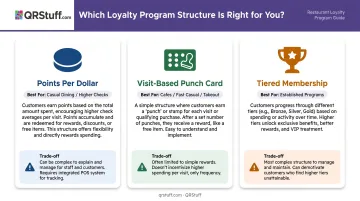
Before touching a QR code generator, nail down your reward model. Three structures work well in restaurant settings:
| Structure | Best For | Trade-off |
|---|---|---|
| Points per dollar spent | Casual dining, higher check sizes | Slower gratification; needs clear communication |
| Visit-based (digital punch card) | Cafes, fast casual, takeout | Simple to understand; limited personalization |
| Tiered membership | Established programs with repeat data | Complex to manage early on |
Square's 2024 restaurant dining report found that 73% of diners prioritize free food or products as their preferred reward, followed by daily discounts at 64%. Start tangible—a free side after 5 visits beats a vague "earn points toward future savings" message every time.
Keep sign-up data minimal. The same Square research found 70% of diners will share personal data if they believe it improves their experience. Name plus one contact method (email or phone) is enough for the first interaction. Adding a birthday field is optional but useful for occasion-based offers.
Step 2: Choose the Right QR Code Type for Each Touchpoint
The single most important technical decision: dynamic QR codes, not static ones.
Static codes permanently encode a URL into the image. Once printed, the destination is locked. Dynamic codes use a redirect URL, meaning the physical code stays the same but the destination can be changed instantly from your dashboard, with no reprinting required.
For an ongoing loyalty program, static codes create mounting problems. When your offer changes or a page URL breaks, you'd need to reprint every table tent, receipt insert, and window cling. Dynamic codes eliminate that entirely.
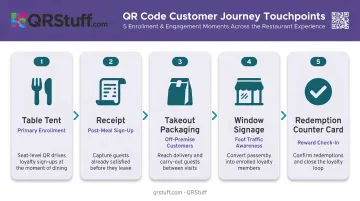
Map your touchpoints by purpose before generating any codes:
- Table tents → Primary enrollment point during the meal
- Receipts → Post-meal sign-up when satisfaction is highest
- Takeout packaging → Enrollment for off-premise customers
- Window signage → Awareness for passersby
- Redemption counter card → Separate code for reward check-in
Each touchpoint should have its own QR code. Mixing enrollment and redemption into one code muddles your scan data and makes it impossible to identify which placement is actually driving results.
Step 3: Create and Customize Your QR Codes
Use a generator that supports dynamic codes, scan analytics, and custom branding. QRStuff supports URL QR codes, coupon codes, Google Form links, and other types relevant to loyalty workflows, with visual customization that keeps codes on-brand rather than generic.
Customization options include:
- Upload your restaurant logo to the center of the code
- Set brand colors or apply a two-color gradient to the foreground
- Choose custom module shapes and eye patterns
- Add a center text label like "Scan to Join & Earn"
- Apply frames or templates for consistent visual presentation
Export format matters as much as design. For print materials, export table tent and receipt codes as PNG at 300 DPI minimum. For window signage and packaging, use SVG or EPS vector formats, which scale to any size without losing sharpness. QRStuff recommends a minimum code size of 2cm × 2cm for simple URLs, with 4cm × 4cm for reliable table scanning.
Before printing anything, test each code on both an iPhone and Android device using the native camera app. Verify the correct destination loads, check scan reliability at an arm's length distance, and test under your actual dining room lighting.
Generate separate codes for:
- Enrollment
- Reward redemption
- Customer feedback
This keeps analytics clean and lets you optimize each function independently through QRStuff's per-code scan tracking dashboard.
Step 4: Build a Mobile-Optimized Enrollment and Reward Page
The landing page is where enrollments are won or lost. Google's mobile speed research found 53% of mobile visits are abandoned when a page takes more than 3 seconds to load. A scan that leads to a slow or desktop-formatted page loses the customer before they even see the offer.
Your enrollment page must:
- Load in under 3 seconds on a standard mobile connection
- Display the reward offer prominently at the top (not buried below a form)
- Require only name plus email or phone number
- Include a clear disclosure about how you'll use their data
After sign-up, show the reward immediately: a confirmation screen with a discount code or digital coupon. Instant gratification closes the loop and gives customers a concrete reason to return. A "check your email for your reward" message kills conversions for a customer who's already heading for the door.
If your loyalty platform connects to a CRM or email tool, the QR code's destination URL can feed directly into automated follow-up sequences:
- A welcome email delivering the first reward
- A reminder after 14 days of inactivity
- A birthday offer tied to the optional field at sign-up
Step 5: Deploy QR Codes and Promote the Program Consistently
Placement matters more than most operators expect. The National Restaurant Association's 2024 technology report documented that First Watch placed QR codes on bills across roughly 125,000 weekly customers for payment and special-offer sign-up, saving over 1,000 combined customer and employee hours in a single week.
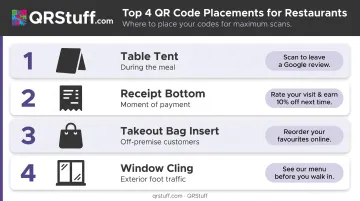
Highest-impact placements:
- Table tents at eye level during the meal, when attention is relaxed and satisfaction is building
- Receipt bottom with a bold CTA directly above the code ("Scan this for a free side on your next visit")
- Takeout bag inserts for customers who never sit down
- Window clings for foot traffic outside the restaurant
Staff involvement also moves the needle. One sentence from a server, like "Scan this to get a free side next time", measurably increases scan rates without requiring any formal training.
Because you're using dynamic codes, seasonal offer refreshes require zero reprinting. Update the destination page from your QRStuff dashboard and every printed code in the restaurant immediately redirects to the new offer.
What You Need Before Launching
Non-Negotiable Requirements
Two things must be in place before you print a single QR code:
- A dynamic QR code generator with analytics — QRStuff tracks real-time scans per code, including device type, time of day, location, and unique vs. repeat visitors. Paid plans keep codes active as long as your subscription runs, which matters when codes are printed on physical materials you can't easily swap out.
- A mobile-optimized sign-up page or form — this can connect to your email platform, loyalty software, or a lightweight web form. What matters most is load speed and a frictionless sign-up flow.
Equipment and Printing
Confirm print specifications before ordering materials:
- Table tents and receipt inserts: minimum 2cm × 2cm, 300 DPI PNG, high-contrast black on white
- Window signage and packaging: SVG or EPS vector format, sized to context
- Always maintain the quiet zone (white border) around the code—cropping it breaks scannability
Compliance and Data Readiness
Collecting customer emails or phone numbers triggers legal obligations. Before you go live, confirm you've covered these:
- US email (CAN-SPAM): Identify your business, include a physical address, and honor opt-out requests promptly
- US SMS (TCPA): Prior express written consent is required for marketing texts; the sign-up form must state who's texting and what they'll receive
- EU/UK visitors (GDPR): Consent must be freely given and specific; include a privacy notice and an easy opt-out route
Put disclosures on the enrollment page itself, not hidden in a footer. QRStuff is GDPR compliant at the platform level; compliance for customer data collected through linked forms is your responsibility to configure.
Key Factors That Determine Your Loyalty Program's Success
The technology is straightforward. These four variables separate programs that drive repeat business from ones that get ignored.
Dynamic vs. Static QR Codes
Dynamic codes let you refresh seasonal offers, fix broken links, or redirect to a new campaign without touching a single printed material. Restaurants that launch on static codes typically watch their programs go stale—the same offer sits unchanged for months, and customers stop scanning because nothing changes.
Reward Relevance and Immediacy
Generic discounts generate weak engagement. The NRA found 96% of restaurant loyalty participants see programs as an effective way to get more value—but that only holds when the reward feels worth the effort of signing up.
Specific, tangible rewards convert: "Free side after 5 visits" outperforms "Earn points toward future rewards." Tie offers to items customers already order or create time-limited specials for seasonal relevance.
QR Code Placement and Visibility
A code buried at the bottom of a cluttered receipt with no label is functionally invisible. Placing the code right after a good meal, paired with a clear action prompt, dramatically changes scan rates.
Use per-code analytics to compare placement performance, then put more signage where it counts:
- Table tents catch diners while they're still seated
- Receipts reach customers at the moment of payment
- Takeout bags extend your reach beyond the dining room
Scan Analytics and Ongoing Optimization
Without tracking, you can't distinguish between poor placement, an unappealing reward, a slow-loading page, or simple lack of awareness. QRStuff's analytics dashboard surfaces device type, time of day, location, and unique vs. repeat scans for each code.
Use that data to run controlled tests: swap one variable at a time — reward, CTA text, or code position. Measure the effect over two to three weeks, then keep what works. That's how a QR loyalty program improves over time rather than stagnating.
Common Mistakes When Building a QR Code Loyalty Program
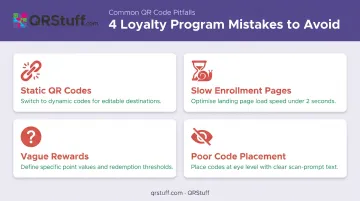
These four mistakes account for most loyalty program drop-offs before a customer even enrolls. Avoid them before you print a single code.
- Static QR codes break the experience every time an offer changes or a URL updates, forcing a full reprint of physical materials. Always use dynamic codes for loyalty programs.
- Slow or non-mobile enrollment pages lose customers before they submit. The sign-up page needs fast load time, large tap targets, and a form completable with one thumb.
- Vague rewards don't motivate action at the moment of scan. "Get a free coffee after 5 visits" works. "Join our rewards community" doesn't. The payoff must be specific and proportionate to a typical check size.
- Poor code placement kills scan rates. Codes smaller than 2cm, taped to reflective or curved surfaces, or tucked in low-light spots get ignored. Place codes at eye level on flat, matte surfaces and test scan reliability before printing at scale.
Frequently Asked Questions
What is the QR code for loyalty cards?
A QR code for a loyalty card replaces the physical card entirely. Customers scan to enroll, check their points balance, or redeem a reward—all directly in their phone's browser, no card required.
Do customers need to download an app to use a QR code loyalty program?
No app download is needed when the QR code links to a mobile-optimized web page. Customers sign up and access rewards in their phone's browser, which eliminates the friction of app downloads that typically discourages sign-ups.
What type of QR code should I use for a restaurant loyalty program?
Dynamic QR codes are the right choice. They allow the destination URL to be updated at any time without reprinting materials, and they provide real-time scan tracking so you can measure and optimize performance.
How do customers earn and redeem rewards through a QR code?
The typical flow: customer scans → lands on enrollment or check-in page → earns points or receives a digital coupon → returns and redeems by showing the confirmation screen or scanning a separate redemption code at the counter.
Can I update my loyalty program offers without reprinting QR codes?
Dynamic QR codes handle this automatically. The printed code stays identical, but the destination page and offer update instantly from your QRStuff dashboard.
How do I measure whether my QR code loyalty program is working?
Track scans, enrollment conversion rate, redemption rate, and repeat visit frequency. QRStuff's analytics cover scan volume, device type, time of day, and location per code. Add UTM parameters to capture post-scan conversions in Google Analytics.