QR codes fix each of these problems, and adoption is accelerating. ISPA's 2024 Consumer Snapshot found that 69% of active spa-goers view online booking availability favorably — a clear signal that clients want self-service options. With 91% of US adults now owning a smartphone, the infrastructure to make QR-based booking and check-in work is already in your clients' pockets.
This guide is for spa managers, front desk staff, solo practitioners, and multi-location wellness operators. It covers exactly what you need, how to configure each flow, where to place codes, and how to measure results — not just the theory.
Key Takeaways
- Use dynamic QR codes for booking pages — update the destination URL without reprinting signage
- Keep your booking code and check-in code separate — they serve different moments and different intents
- Booking codes go on storefronts, collateral, and digital channels; check-in codes go at the reception desk
- Pair each code with a clear CTA like "Scan to Book" or "Scan to Check In" — ambiguity kills scan rates
- Track scans by placement to see which touchpoints drive the most bookings
When QR Codes Actually Make Sense for Spas
QR codes aren't the right answer to every problem — but they solve specific, recurring operational headaches very well.
High-value use cases:
- Reducing inbound phone call volume for routine appointment scheduling
- Enabling 24/7 booking when the front desk is closed — nearly 50% of beauty and wellness customers book outside standard operating hours, according to a 2023 American Express industry report
- Streamlining arrival for multi-therapist operations where front desk staff manage several simultaneous check-ins
- Running seasonal promotions where a trackable code links to a limited-time offer page
Where spas misuse QR codes:
- Printing a static code on permanent signage — if the booking URL ever changes, every printed code silently breaks
- Using one generic code across all placements — you lose the ability to know which touchpoints are actually working
- Linking to a desktop-only booking page — if the destination isn't mobile-optimized, the entire check-in flow breaks down
Getting the use cases right is only half the equation. Before rolling out any QR code placement, run through these operational basics.
Operational constraints to check before deploying:
- Your booking system must have a stable, mobile-friendly URL
- Every physical code placement needs adequate lighting for reliable scanning
- Front desk staff need to know what happens after a client scans — so they can step in if a client hits a snag
What You Need Before Setting Up
No technical expertise is required. But someone on your team needs to own the process — creating codes, testing them, and updating links when your booking software changes.
Before you generate a single code, confirm you have:
| Requirement | Why It Matters |
|---|---|
| Mobile-optimized booking system URL | The destination clients land on after scanning — a desktop-only page creates a dead end |
| Dynamic QR code generator with custom branding | Dynamic codes let you update the destination without reprinting; branded codes build visual trust |
| Defined check-in confirmation method | Either a client-facing confirmation screen or a staff-side dashboard showing arrivals |
QRStuff supports URL-based dynamic QR codes without requiring any technical integration with your booking system. You paste in your booking page URL, configure the code, and deploy — it works with any booking platform you already use.
Plan selection depends on how much branding matters at the point of client contact. Custom colors, logos, and shape styling are available on the Full Suite plan (£15/month), not on the Lite Suite. A small single-location spa will typically find the Lite Suite sufficient on code volume — at £4/month it covers 50 dynamic codes with no expiration. Full Suite becomes worthwhile when consistent visual presentation across reception, locker rooms, and printed collateral is part of the client experience you're delivering.
How to Set Up and Use QR Codes for Spa Booking and Check-In
The QR code workflow for spas follows two distinct flows: pre-visit booking and day-of check-in. Skipping steps in either setup — like forgetting to test or leaving off a CTA — creates the exact confusion you're trying to eliminate.
Setting Up Your Booking QR Code
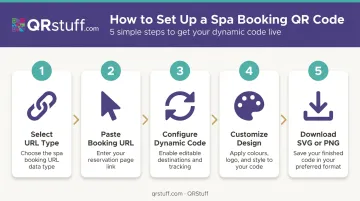
Follow this sequence in your QR code generator:
- Select URL as your QR code type — this is the data type for linking to a web page
- Paste your booking page URL — confirm it loads correctly on mobile before proceeding
- Configure as a dynamic code — this is non-negotiable for any printed material; static codes tied to a URL that later changes break silently in every piece of collateral where they appear. When you eventually switch booking platforms or update a subdomain, a static code points nowhere — and clients get no indication anything is wrong.
- Customize design (Full Suite and above) — add your spa's logo and brand colors; a branded code signals trust and increases scan confidence
- Download in SVG or high-res PNG — SVG is ideal for signage and printed menus because it scales without pixelation; PNG at 300 DPI minimum for smaller items like business cards
Setting Up Your Check-In QR Code
Check-in via QR code works two ways, and the right approach depends on your operation size:
- Fixed desk code (best for smaller spas): A single QR code displayed at reception opens a check-in form. Simple to manage, easy for walk-in clients.
- Unique per-booking codes (better for larger or multi-therapist operations): Each confirmation email contains a unique code that links to that client's specific appointment. When scanned, it confirms arrival and notifies the relevant therapist.
A successful check-in lands the client on a confirmation screen showing their appointment details, with staff notified automatically in the booking dashboard.
Operating the Flow on Appointment Day
When both codes are deployed correctly, the end-to-end journey looks like this:
- Client scans booking code → lands on mobile booking page → selects service, therapist, and time
- Booking system sends confirmation via email or SMS
- Client arrives, scans check-in code at reception or entrance
- Booking system marks them as arrived → therapist or front desk is notified
Watch for these active failures during use:
- Slow-loading booking pages on mobile — test on both iOS and Android before launch
- Check-in codes placed too low, too high, or in poor lighting — Nielsen Norman Group recommends assuming users need at least 15 seconds to notice a code and open their camera app, so placement must allow time and comfort to scan
- Login walls on check-in pages — remove account creation requirements from the arrival confirmation flow entirely
Where to Place Spa QR Codes
Placement determines whether clients actually use the codes. Booking codes and check-in codes need different placement logic because they serve different moments.
Booking QR Code Placements
| Location | Why It Works |
|---|---|
| Storefront window | Captures walk-by traffic who are curious but not ready to enter |
| Front desk counter | Lets clients finishing a session rebook immediately |
| Treatment menus and business cards | Extends booking opportunity beyond the physical visit |
| Email newsletters and social media | Reaches existing clients on their own time |
Promotional codes — a flyer for a first-visit discount, for example — should be separate, trackable dynamic codes so campaign performance stays distinct from your main booking data.
Check-In QR Code Placements
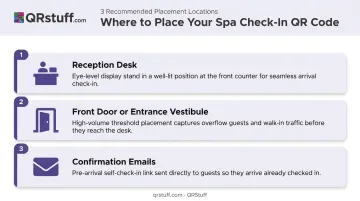
Place check-in codes in three locations:
- Reception desk — a fixed display stand or acrylic holder, eye-level and well-lit, positioned where clients naturally pause on arrival
- Front door or entrance vestibule — useful on high-volume days when the desk gets backed up
- Confirmation emails — lets clients scan and self-check-in from the car park before approaching the desk, which cuts front-desk congestion during peak hours
One placement rule worth following: don't put check-in codes and booking codes at the same physical location. Clients who aren't sure which to scan will either skip both or ask staff — defeating the purpose of self-service.
Best Practices for Effective Spa QR Codes
Always Include a Specific CTA
Every code needs a clear, action-oriented label placed directly beside or beneath it. "Scan to Book Your Treatment" and "Scan to Check In on Arrival" are unambiguous. A code with no label or a vague label like "Scan Here" gives clients no reason to act.
Nielsen Norman Group notes that QR codes have no inherent information scent — they communicate nothing on their own about what happens after scanning. The CTA carries that entire weight.
Use Analytics to Optimize Placement
QRStuff's real-time scan tracking breaks down performance by individual code, geographic location, device type (iOS vs. Android), and time of day. That data translates directly into placement decisions:
- Compare scan volume from your storefront code vs. your front desk code
- Identify peak booking times to inform when you run promotions
- Confirm whether clients are predominantly on iOS or Android, which informs mobile optimisation decisions
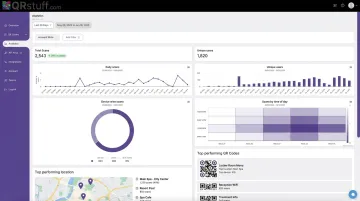
Review this data monthly. If your storefront code is generating almost no scans, the placement or CTA may need adjustment. If your confirmation email check-in code is getting heavy use, that's a signal to promote it more actively in your booking confirmation template.
Test Before You Deploy, Then Check Monthly
Before placing any code in a client-facing location:
- Test on at least one iOS and one Android device
- Confirm the destination loads quickly on a mobile connection
- Verify the code scans in the actual lighting conditions of the intended placement location
After deployment, do a monthly pass to confirm all destination URLs are still live — especially after any changes to your booking software or website. Most clients won't flag a broken code — they'll simply move on and not rebook.
This is where dynamic codes have a real advantage. With QRStuff, you update the destination URL directly in the dashboard — no reprinting required. When your booking platform changes its URL structure, the physical code keeps working without any changes on your end.
Conclusion
QR codes work in a spa context when they remove friction — not when they're added for novelty. Clients expect calm, seamless transitions from booking to check-in, and a well-placed, well-maintained code delivers exactly that. The discipline of correct setup, thoughtful placement, and consistent maintenance is what separates codes that consistently drive bookings from ones that frustrate guests and collect dust.
Treat your QR code system as an ongoing operational asset: review scan analytics monthly, update dynamic codes when destinations change, and expand placement as you learn which touchpoints are driving bookings. Start with one booking code and one check-in code. Get those right, then build from there.
Frequently Asked Questions
How do I get a QR code for spa booking?
Generate one through a QR code platform like QRStuff — select the URL code type, paste in your booking page link, choose dynamic (not static), and download the branded image for print or digital use. No technical skills or booking software integration required.
How do I scan a QR code with my phone?
Most modern smartphones can scan QR codes directly through the native camera app — QR scanning has been built into phone cameras since iOS 11 and Android 8. Open your camera, point it at the code, and tap the notification that appears. No third-party app required.
Are QR codes safe to use for spa bookings?
QR codes themselves are neutral — safety depends on the platform and destination. QRStuff is GDPR-compliant and does not store personally identifiable information from individual scans. Clients can verify the destination URL in the preview before tapping.
Can I update my spa's QR code without reprinting it?
Yes — dynamic QR codes let you change the destination URL at any time through your QRStuff dashboard without generating a new code. The printed code on your signage or business cards continues to work unchanged. This feature is available on all paid tiers starting with the Lite Suite.
Where should I place QR codes in my spa for check-in?
The front desk counter is the primary location — use an eye-level display stand with good lighting. The entrance area works as a secondary option for high-traffic days. Including the code in confirmation emails lets clients self-check-in before reaching reception.
What is the difference between a booking QR code and a check-in QR code?
A booking code is used before the visit to direct clients to your scheduling page. A check-in code is used on arrival to confirm the client has arrived and notify staff. They serve different moments in the client journey and should each have their own placement strategy and analytics tracking.