Introduction
Counterfeit goods aren't a niche problem. According to the OECD's 2025 report on global trade in fakes, trade in counterfeit and pirated goods reached $467 billion in 2021 — equal to 2.3% of global imports. Affected categories span clothing, pharmaceuticals, auto parts, food, and cosmetics. The WHO estimates at least 1 in 10 medicines in low- and middle-income countries are substandard or falsified.
Brands across retail, pharma, luxury goods, and food and beverage are turning to QR codes as a practical first line of defense — and for good reason. A well-implemented QR authentication system is consumer-friendly, scalable, and doesn't require specialized hardware.
The catch: QR codes are only as secure as the system behind them. A static code printed on every unit offers zero authentication value — a counterfeiter can photograph it and reproduce it in minutes. Done correctly, with serialized codes, a brand-controlled destination, and active monitoring, each code becomes a traceable, tamper-evident record.
This guide covers how to do it correctly.
Key Takeaways
- Use dynamic, serialized QR codes — one unique code per product unit, not one per SKU or batch
- Every code must link to a secure, brand-controlled destination that returns unit-specific data
- Scan analytics are a critical counterfeit detection layer, not an optional add-on
- Consumer scanning should require no app download
- Pair QR codes with tamper-evident placement to add a physical authentication signal
When Should You Use QR Codes for Product Authentication?
QR code authentication makes sense when your product carries real counterfeit risk — meaning it has recognized brand value, safety implications, or downstream warranty and licensing requirements where a fake unit causes genuine harm.
Situations Where It's the Right Tool
- Products with meaningful brand equity that counterfeiters profit from reproducing
- Items with safety implications: pharmaceuticals, food, auto parts, industrial components
- High-value goods where buyers — whether consumers or distributors — need provenance confirmation
- Warranty or licensing workflows where an authentic serial number matters at the service stage
Where QR Codes Are Commonly Misused
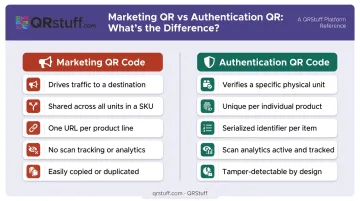
A single shared QR code printed identically on every unit of a product line is not an authentication system. It's a marketing link. A counterfeiter copies it once and applies it to every fake unit they produce — the scan resolves identically to the genuine product page, and counterfeit units pass as genuine.
The distinction matters:
- A marketing QR code drives traffic to a product page
- An authentication QR code verifies a specific physical unit
These serve different purposes and require different technical implementations — a point worth confirming before choosing your approach.
QR authentication works best in mid-to-large production runs where each unit can be assigned a unique serialized code and a backend database or redirect system exists to validate scans. For very small artisan runs, it's only viable if a lightweight product database is already in place — otherwise, the overhead outweighs the benefit. Once you've confirmed the fit, the next step is understanding how the underlying system actually works.
What You Need Before Setting Up QR Code Authentication
Before generating a single code, three prerequisites need to be in place.
1. A QR Platform That Supports Dynamic, Serialized Codes
Static codes offer no serialization — every unit gets an identical code, which counterfeiters can copy wholesale. You need a platform that generates dynamic QR codes with unique identifiers per unit and supports bulk or API-based generation at production volume. QRStuff's Enterprise tier, for instance, offers unlimited batch generation and API access for direct integration into manufacturing or inventory systems.
2. A Brand-Controlled Authentication Destination
Every code must resolve to a page you own. This means your domain, your branding, and your product database — not a generic landing page hosted by a third party. Counterfeiters clone destination pages; a recognizable brand domain is the consumer's clearest signal that the verification is legitimate.
3. A Physical Placement Plan
A QR code that can be peeled off and reapplied to a counterfeit unit is not an authentication control. Placement decisions — under a seal, on tamper-evident labels, or embedded during manufacturing — are part of the security architecture, not an afterthought.
How to Set Up QR Codes for Product Authentication
Authentication QR codes follow a specific sequence. Skipping serialization or pointing codes to an unsecured page makes the system easy to bypass.
Choose the Right QR Code Type
Dynamic, serialized QR codes are the only viable choice for authentication. Here's why each property matters:
- Dynamic: The destination URL can be updated without reprinting, which is critical for updating authentication content or responding to security incidents
- Serialized: Each code encodes a unique identifier tied to a specific unit record, meaning duplicate scans are detectable
- Traceable: Every scan generates a data event (time, location, device) that feeds into counterfeit detection
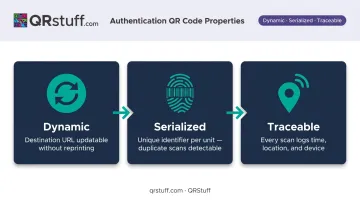
Static codes fail on all three counts. A counterfeiter who copies a static code gets an exact functional duplicate that produces identical scan results indefinitely.
Generate and Assign Unique Codes at Scale
Each product unit needs its own QR code generated from a central system and tied to a record in your product database. That record should include, at minimum: batch number, manufacturing date, origin, and authenticity status.
For high-volume production, manual generation isn't workable. QRStuff supports:
- Batch processing up to 500 codes per batch on Full Suite, with unlimited batches on Enterprise
- Offline bulk generation for runs exceeding 20,000 units
- API serialization at SKU, batch, and asset level, with direct ERP and MES integration via webhooks
For regulated industries, GS1 Digital Link adds another layer. QRStuff's GS1 Digital Link QR codes encode GTIN, batch, expiry, and serial data in a single scannable code, meeting both retail POS requirements and Sunrise 2027 compliance standards at once.
Configure the Authentication Destination
The destination page isn't just a landing page — it's the verification response. It should:
- Display unit-specific data: batch, origin, manufacturing date, authenticity status
- Use your brand's own domain (not a third-party redirect)
- Be visually consistent with your brand so consumers recognize it immediately
QRStuff supports custom short URL domains and white-label configurations, so the redirect path and landing page domain both stay within your brand's identity. This matters because consumers need to recognize a legitimate verification response when they see one, and counterfeiters can build convincing lookalike pages on unfamiliar domains.
Apply and Monitor
Physical application: Place codes where tampering leaves evidence. Options include:
- Under a security seal that must be broken to access the product
- On tamper-evident labels that show visible damage if removed
- Integrated into packaging during manufacturing, making clean removal impossible
Ongoing monitoring: Skipping post-deployment monitoring is how counterfeit operations go undetected for months. After launch, watch for:
- Duplicate scans on a single serialized code, which suggests it's been cloned onto fakes
- Geographic mismatches where a code registered in one region starts scanning from unrelated locations
- Volume spikes on a single unit code exceeding expected scan counts — a reliable early signal
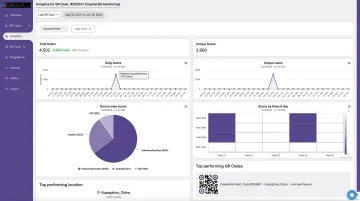
QRStuff's analytics dashboard tracks total scans, unique scans, geographic data at country and city level, device type, and timestamp — all per individual dynamic code. Brands can export scan data in CSV format for threshold monitoring in external tools, or build automated alerts via API webhooks when scan events exceed defined parameters.
Where QR Code Authentication Is Commonly Used
QR code authentication is now deployed across regulated industries and consumer markets alike — each with different objectives, compliance requirements, and scan expectations:
| Industry | How It's Used |
|---|---|
| Pharmaceuticals | Batch and expiry verification; US DSCSA and EU FMD mandate 2D serialization on medicine packs |
| Luxury goods & apparel | Consumer-facing authenticity confirmation; Stone Island has used QR/CLG authentication on 25M+ products via Certilogo |
| Food & beverage | Supply chain transparency, origin verification; Mondelez Italia piloted GS1 Digital Link QR codes linking batch and expiry data |
| Electronics | HP uses QR codes on security labels for ink and toner cartridge verification |
| Automotive parts | MAHLE Aftermarket uses QR security labels for pistons, valves, turbochargers; codes return green/yellow/red authenticity status |
| Consumer packaged goods | Warranty validation, regulatory compliance, and retailer verification workflows |
What separates these use cases isn't the QR code itself — it's what happens after the scan. Regulated industries like pharma tie scan events to serialization databases and compliance reporting. Consumer-facing sectors like luxury and CPG prioritize instant, friction-free confirmation that builds buyer trust at the point of purchase.
Best Practices for Effective QR Code Authentication
One code per unit, not per product line. Batch-level codes reduce counterfeit resistance significantly — a single copied code validates every fake unit in a run. Peer-reviewed research confirms that ordinary QR codes are vulnerable to illegal copying because they lack intrinsic anti-counterfeiting ability. Serialization at the unit level is the baseline requirement.
Own the verification domain. The authentication destination URL should be on your brand's domain — not a platform subdomain. Consumers can't evaluate a URL they don't recognize, and counterfeiters exploit exactly that gap. Platforms that support custom domains — like QRStuff — let you keep the full redirect path on a URL consumers already associate with your brand.
Treat scan analytics as a detection tool, not a reporting metric. A serialized code scanned 400 times across six countries is not an engagement success — it's a counterfeit signal. Build monitoring routines that flag codes exceeding expected scan thresholds. Per-code analytics that surface geographic, device, and unique-scan data — available in QRStuff's dashboard or via API export — give you what you need to run those routines.
MAHLE's automotive authentication system offers a useful precedent: it returns a yellow warning automatically when a code's maximum check count is exceeded.
Add a physical layer. QR codes alone don't stop physical tampering. Tamper-evident labels, sealed packaging, or on-pack placement that's destroyed upon opening each add a signal that a digital-only system can't provide. The combination — digital code plus physical tamper indicator — creates a meaningful barrier for counterfeiters.
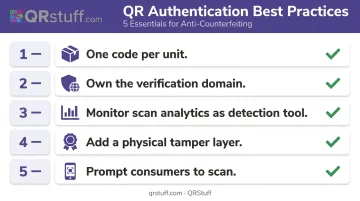
Tell consumers what to do. Most consumers won't scan proactively unless prompted. Include a short instruction on packaging: "Scan to verify authenticity at [yourbrand.com/verify]." This sets the expected behavior, tells consumers where a legitimate response comes from, and creates a basis for comparing what they see against a known standard. According to a 2024 GS1 US consumer survey, 79% of consumers are more likely to buy a product when it offers a scannable code that provides the information they want — but that intent only converts if the prompt is visible and clear.
Conclusion
QR code authentication works — but only when the implementation is built correctly. The three non-negotiables are dynamic serialized codes (one per unit), a brand-controlled verification destination, and active scan monitoring. Without all three, the system has gaps a counterfeiter can step right through.
Those gaps also appear after launch. A QR authentication system deployed and left unmonitored degrades over time — codes get copied, scan anomalies go undetected, and verification pages become outdated. Treat it as an ongoing operation. The brands that get real counterfeit deterrence are the ones monitoring scan data routinely, acting on anomalies quickly, and keeping their verification pages current.
The infrastructure to do this at scale doesn't need to be built from scratch. QRStuff's Enterprise tier includes everything a production-deployed authentication system requires:
- Serialized dynamic codes with GS1 Digital Link support
- Custom domain redirects for brand-controlled verification
- Per-unit scan analytics with geographic tracking
- Bulk batch generation and API integration
The platform runs on a 99.9% uptime SLA — reliability that matters when a consumer's trust in your product depends on that scan resolving instantly.
Frequently Asked Questions
How do I get a QR code for my product?
Product QR codes can be generated through a platform like QRStuff, which supports dynamic code creation, bulk batch generation, and API-based serialization. Choose a platform that lets you create unique codes per unit — not one shared code per SKU — and that provides scan analytics for post-deployment monitoring.
How do I scan a QR code for product authentication?
Use your smartphone's native camera app — no third-party app needed. Point it at the QR code and tap the notification that appears. A legitimate authentication system redirects you to the brand's own verification page displaying product-specific details like batch number and authenticity status.
What is the difference between a static and dynamic QR code for authentication?
Static QR codes encode a fixed URL that cannot be changed or tracked, meaning anyone who copies the code gets a fully functional duplicate. Dynamic QR codes use a redirect that can be updated, tracked per scan, and tied to a specific unit record when serialized — making them the only viable option for real authentication.
Can counterfeiters copy QR codes used for product authentication?
Basic non-serialized codes can be copied freely. Serialized dynamic codes are harder to exploit because scan analytics flag duplicate events and geographic anomalies. Any copy of a serialized code still registers in your monitoring system, logging the location and triggering threshold alerts when scan counts exceed what a single unit should generate.
Which industries use QR codes for product authentication?
Key industries include pharmaceuticals, luxury goods, food and beverage, electronics, automotive aftermarket parts, and consumer packaged goods. Any category where a counterfeit unit poses safety risks or damages brand value has a legitimate use case for QR authentication.
Do consumers need a special app to scan a product authentication QR code?
No. Both iOS and Android native camera apps support QR scanning without any additional download. This is intentional design: requiring an app sharply reduces scan completion rates, which undermines the entire system's effectiveness.