Introduction
Walk into most manufacturing facilities and you'll find the same problem: the machine is on the floor, but its service history is in a binder in the maintenance office. The inspection checklist is on a clipboard somewhere. Inventory counts live in a spreadsheet that was last updated Tuesday.
This fragmentation is expensive. Rockwell Automation's 2024 survey of 1,567 manufacturing decision-makers found that manufacturers effectively use only 44% of their collected data — meaning more than half of operational information sits unused while decisions get made on incomplete information.
QR codes close this gap. A single scan connects any physical asset — a machine, a pallet, a finished product — to live digital data. What follows is a practical breakdown of where QR codes deliver the most value on the factory floor, and how to deploy them without disrupting existing workflows.
Key Takeaways
- QR codes link physical assets to real-time digital data with a single scan — no manual data entry required
- Key benefits: reduced equipment downtime, faster quality checks, better traceability, streamlined inventory
- Dynamic QR codes let you update linked SOPs, manuals, and checklists without reprinting labels
- Use dynamic codes for evolving content and integrate with ERP/CMMS systems for maximum ROI
- Scan analytics reveal whether maintenance checks and safety reviews are actually happening on schedule
Key Benefits of Using QR Codes in Manufacturing
QR codes outperform traditional 1D barcodes in industrial settings for reasons that go well beyond storage capacity.
Standard UPC barcodes hold roughly 12 characters of data. QR codes can encode up to 7,089 numeric characters or 4,296 alphanumeric characters, according to DENSO WAVE — the company that invented QR codes for automotive manufacturing in 1994.
They also scan from any angle without precise laser alignment, and their Reed-Solomon error correction lets a partially damaged label still be read at up to 30% damage before the code fails.
The deeper advantage is that QR codes link to dynamic digital destinations — maintenance records, inspection forms, training videos, live inventory dashboards — rather than encoding a fixed string of numbers.
Improved Inventory and Asset Management
Manual inventory entry creates errors. A peer-reviewed Management Science study examining nearly 370,000 inventory records across 37 locations found 65% were inaccurate. In manufacturing, inaccurate stock data causes two expensive problems simultaneously: line stoppages from unexpected shortages and cash tied up in excess buffer stock.
QR codes on components, pallets, and storage locations eliminate manual entry at every touchpoint. Workers scan to log check-ins, check-outs, and location transfers rather than typing or writing. This enables:
- FIFO enforcement — scan sequences confirm first-in, first-out rotation without manual tracking
- Low-stock alerts — inventory systems trigger notifications when scan data shows quantities dropping below threshold
- Real-time visibility — production planners see current stock levels across locations without waiting for shift-end updates
Reduced Equipment Downtime Through Faster Maintenance
Unplanned downtime is one of manufacturing's costliest problems. Siemens' 2024 True Cost of Downtime report puts the annual cost for Fortune Global 500 companies at $1.4 trillion — roughly 11% of total revenues. In automotive specifically, one hour of downtime costs $2.3 million.
A QR code on each machine gives technicians instant mobile access to:
- Full service history and repair logs
- Upcoming maintenance schedules
- Digital SOPs and troubleshooting guides
- Parts lists and supplier contacts
The right information is at the machine the moment a technician needs it — no office terminal, no paper binder required.
Enhanced Quality Control and Compliance
QR codes can link each product or batch to its complete inspection checklist, test results, and certification documents. Quality auditors can pull up an entire paper trail with a single scan instead of manually locating records across multiple systems.
For regulated industries, the stakes go beyond convenience. Food Safety Magazine research tracking 2,439 recalls over a decade found the average incident costs $10 million in direct costs — and traceability failures are a leading trigger. QR codes help prevent that exposure by:
- Capturing batch-level data at every production stage
- Enabling targeted recalls limited to the specific lot with the issue
- Replacing scattered paper records with a scannable, auditable trail
Top Use Cases for QR Codes on the Factory Floor
Work-in-Progress (WIP) Tracking
QR codes on workstations and in-progress assemblies let workers scan to update status and location at each production stage in real time. Supervisors can see exactly where bottlenecks are forming without walking the floor or waiting for shift reports. Scheduling and logistics teams share the same production view, reducing miscommunication between shifts.
Equipment Maintenance Logs and Digital Manuals
The operational workflow is straightforward:
- Affix a durable QR code to each machine
- Code links to a live digital record: maintenance history, next service date, current operating manual, safety SOP
- Technician scans on arrival — full context is immediately available
- Completed work is logged digitally, not on paper
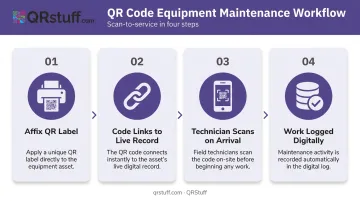
The critical enabler here is dynamic QR codes. When a procedure changes or a manual is updated, the new version is live immediately. Every code already affixed to equipment across the facility reflects the update automatically — no reprinting, no re-labeling, no version confusion.
Supply Chain and Receiving Verification
QR codes on incoming shipments allow receiving staff to pull up purchase orders and inspection checklists instantly upon delivery. Staff log condition and quantity directly into the inventory system at the dock, before materials enter production. Defective inputs get caught before they cause line problems downstream.
Employee Training and Safety Access
QR codes posted near equipment link workers to training videos, emergency procedures, and safety guidelines specific to that machine. New hires can self-serve onboarding at the point of use. Experienced workers have a consistent reference for infrequent procedures. Both reduce accident risk.
Product Traceability and Anti-Counterfeiting
Unique QR codes on finished products enable tracking from raw material origin through final distribution. When a quality issue surfaces, manufacturers can execute targeted recalls affecting only the specific batch rather than pulling entire product lines.
Real-world deployments show the scope of what's possible. Knorr, through a Scantrust-documented initiative, deployed serialized QR codes on seasoning packets in Vietnam to deliver farm-to-fork ingredient origin data — using traceability as a competitive differentiator in a price-pressured market. Pfizer has confirmed preventing over 302 million counterfeit doses from reaching patients since 2004 through serialization programs. Note that pharmaceutical packaging specifically requires 2D Data Matrix barcodes under FDA DSCSA requirements rather than QR codes.
Static vs. Dynamic QR Codes: What Manufacturing Operations Need
In manufacturing, the choice between static and dynamic QR codes has direct operational consequences — unlike most environments, factory floors change constantly: procedures update, machines get replaced, and compliance requirements shift.
| Static QR Codes | Dynamic QR Codes | |
|---|---|---|
| Data storage | Fixed — encoded permanently in the pattern | Redirect URL — destination can be updated anytime |
| Content updates | Requires reprinting the physical label | Update centrally; all printed codes reflect the change |
| Scan analytics | None | Full analytics: volume, timing, device, location |
| Best for | Permanent asset IDs, fixed serial numbers | SOPs, manuals, maintenance logs, training materials |
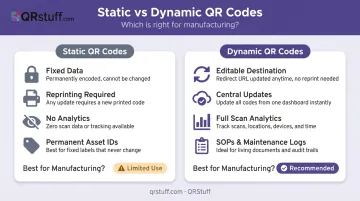
For any manufacturing use case where the linked content might evolve — and in a factory, almost everything evolves — dynamic codes are the right choice.
QRStuff's dynamic QR codes work through a short redirect URL embedded in the code pattern. When someone scans, that URL captures the scan event (with timestamp, device type, and location data) before routing to the current destination. Update the destination in the dashboard, and every code already on the floor points to the new content immediately — no reprinting required.
The scan analytics go beyond redirect flexibility — they surface operational patterns worth acting on. A troubleshooting guide scanned repeatedly signals a recurring machine problem worth investigating. A safety manual with zero scans over three months means either the label is inaccessible or staff haven't been trained to use it.
QRStuff's Enterprise plan includes unlimited dynamic codes, bulk generation, full API access for ERP/CMMS/MES integration, and SSO — built to handle the scale and complexity of multi-facility manufacturing operations. The platform maintains a 99.9% uptime SLA, with actual historical uptime of 99.968% since 2008, which matters when QR codes are embedded in operational workflows.
How to Implement QR Codes in Your Manufacturing Operations
Step 1 — Audit and Prioritize
Identify the 2–3 workflows causing the most delay or error. Common candidates:
- Equipment maintenance lookups (technicians leaving the floor to access records)
- Receiving verification (manual PO matching at the dock)
- WIP status updates (supervisors asking workers for verbal updates)
Start there. Proving value in one area builds the case for broader rollout.
Step 2 — Choose the Right Platform
For manufacturing, choose dynamic codes unless the data is genuinely permanent. Evaluate platforms on:
- Bulk/batch generation capability at scale
- API integration for ERP, CMMS, or MES connectivity
- Scan analytics dashboard
- Uptime guarantees
QRStuff supports batch generation of up to 500 codes per run online, with an offline service for jobs exceeding 20,000 codes. Its open REST API connects to ERP, CMMS, and MES systems for automated data synchronisation between the shop floor and back-office platforms.
Step 3 — Print and Place Strategically
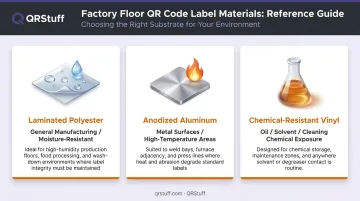
Paper labels will not survive a factory floor. Match label material to environment:
- Laminated polyester — general manufacturing use, moisture-resistant
- Anodized aluminum — metal surfaces, high-temperature areas
- Chemical-resistant vinyl — areas with oil, solvent, or cleaning chemical exposure
Placement rules: eye level, well-lit, outside safety guards or obstructions. A QR code that requires crouching or moving a panel to scan will not get scanned.
Step 4 — Integrate and Train
QR codes deliver limited value if they link to static PDFs sitting on a shared drive. The real payoff comes from connecting codes to live systems:
- CMMS for maintenance records and scheduling
- ERP for inventory levels and purchase orders
- Digital forms for quality inspection logging
Train workers on the scan-to-action workflow before rollout. A short hands-on session — scanning actual codes, completing a test form, confirming the data lands in the right system — takes 20 minutes and significantly increases first-week adoption.
Best Practices for QR Codes in Industrial Environments
Getting QR codes onto the floor is one challenge. Getting them to work reliably — and stay useful over time — requires a few deliberate choices upfront.
Label every code with intent. A bare QR code gives workers no reason to scan it. Add a short text line directly on the label — "Scan for Maintenance Log" or "Scan for Safety Checklist" — and you remove hesitation before it starts.
Treat scan analytics as an operational signal, not just a usage report. Review scan data in your regular operational cadence:
- High scan frequency on a troubleshooting guide → potential recurring equipment failure
- Zero scans on a safety manual → placement issue or a training gap
- Scan spikes at unusual hours → process anomaly worth investigating
Match code size to scan distance. A code scanned at arm's length needs to be physically larger than one on a desktop asset tag. The minimum recommended size for a QR code scanned from 20–30 cm is 2.5 cm × 2.5 cm; scale up proportionally for longer distances.
Restrict access to sensitive content. For maintenance logs containing proprietary repair data or SOPs covering competitive processes, QRStuff's password-protected codes limit access to authorized personnel — useful in facilities where contractors or visitors regularly move through the floor.
Frequently Asked Questions
How much does QR code implementation in manufacturing cost?
QRStuff offers tiered plans starting at $4/month for basic deployments, with the Enterprise plan at $185/month covering unlimited codes, bulk generation, and full API integration. The main additional cost is durable industrial label printing for factory floor conditions.
Who manufactures QR codes?
QR codes are generated by software platforms, not physical manufacturers. Any business creates them using a QR code generator; the resulting image is then printed on labels using standard or industrial printing equipment. Physical label production is separate from code generation.
What is the difference between static and dynamic QR codes in manufacturing?
Static codes encode fixed data permanently — suitable for asset serial numbers that never change. Dynamic codes store a redirect URL that can be updated at any time, making them the right choice for SOPs, manuals, and inspection checklists that are regularly revised.
Can QR codes integrate with ERP or CMMS systems?
Yes. QR codes link to specific screens, forms, or records within ERP and CMMS platforms via web-based URLs or API integrations. QRStuff's REST API supports direct connection to ERP, CMMS, and MES systems for automated data entry and real-time synchronization.
Are QR codes durable enough for factory floor use?
Standard paper labels are not suitable. QR codes printed on laminated polyester, anodized aluminum, or chemical-resistant vinyl withstand heat, moisture, oil, and abrasion typical of manufacturing environments. Match the label material to the specific exposure risks — chemical splash zones need different substrates than high-heat welding areas.
How do QR codes improve quality control in manufacturing?
Each product or batch is linked via QR code to its full inspection checklist, test results, and certification documents. Quality checks complete faster, defects are logged digitally at the point of inspection, and audit trails are maintained automatically — reducing both audit preparation time and compliance risk.