This isn't a technology problem — it's a workflow problem that most businesses have quietly accepted as normal. The fix exists, costs almost nothing to implement, and takes less than an hour to deploy.
WiFi QR codes are increasingly common, but most venues treat them as a cosmetic touch rather than an operational tool. This guide covers the concrete benefits — staff time, network security, and guest experience — along with what actually goes wrong when businesses keep doing it the old way.
Key Takeaways
- Guests scan a QR code and connect instantly — no password typing, no staff assistance
- One change addresses guest satisfaction, staff interruptions, and network security simultaneously
- Dynamic WiFi QR codes let you rotate passwords without reprinting any signage
- Works across hotels, restaurants, cafés, vacation rentals, and shared offices
- Skipping it means ongoing staff interruptions and friction that quietly erode the guest experience
What Is QR Code WiFi Access for Guests?
A WiFi QR code is a scannable image that stores your network name (SSID), password, and security type — when a guest scans it, their phone connects automatically, no manual entry required.
The code encodes all three elements — SSID, password, and security type — in a single scannable image. QRStuff's WiFi QR code generator supports WPA, WPA2, WEP, and open networks, and can be configured for hidden SSIDs that don't broadcast publicly. The guest never sees or types the password; the phone handles the handshake.
Where it's typically deployed:
- Table cards and menu inserts in restaurants and cafés
- Reception desks and in-room welcome materials at hotels
- Welcome packets and check-in confirmation emails for vacation rentals
- Entrance signage and registration desks at event venues
- Waiting areas in healthcare facilities and professional offices
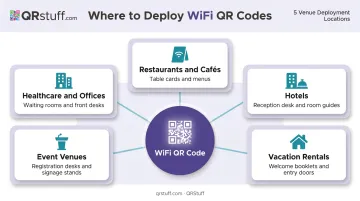
In practice, a single laminated card handles a question your staff answers dozens of times per shift — without any extra effort on their end.
Key Benefits of QR Code WiFi Access for Guests
Instant Guest Connectivity That Saves Staff Time
Every time a guest asks for the WiFi password, a staff member stops what they're doing. They locate the credential, read it out, wait while the guest types it, and often repeat the process when a typo fails the connection. In a busy hotel, restaurant, or conference venue, this happens constantly.
A QR code at the table, front desk, or welcome packet makes the entire interaction self-serve. Guests scan, connect, done — without involving anyone on your team.
The labor angle matters more than it might seem. McKinsey's 2023 tourism research found that digital automation can help tourism businesses manage a labor deficit of 10–15%. Offloading repetitive requests — including WiFi assistance — is exactly the kind of low-effort workflow change that contributes to that equation.
When this matters most:
- Hotel check-in rushes when front desk agents are already managing queues
- Full restaurant services where servers are juggling multiple tables
- Conference registration desks during peak arrival windows
KPIs affected: Staff interactions per shift, guest wait-to-connect time, front-of-house labor efficiency, and guest satisfaction scores — particularly in post-visit reviews that mention WiFi.
Improved Network Security Without the Security Tradeoffs
Posting your WiFi password on a chalkboard or front desk card solves the convenience problem while creating a security one. Anyone who walks past — whether they're a paying customer or not — can read it, photograph it, and share it indefinitely.
QR code WiFi access addresses this directly — the credential is encoded inside the QR image, so guests never handle the actual password string and can't easily share it beyond the intended access point.
Security best practices reinforce this approach. Two key recommendations from authoritative sources:
- CISA recommends a guest WiFi network separate from the main internal network, using multiple SSIDs or wireless isolation to prevent guest traffic from reaching organizational systems
- NIST's WLAN security guidelines echo this, recommending logically separated networks for external and internal use
Pairing a dedicated guest SSID with QR access gives you both layers: guests connect easily, and your operational network stays isolated.
Businesses that rotate passwords regularly get an added advantage: dynamic QR codes remove the biggest deterrent to doing so. With QRStuff's dynamic WiFi QR codes (available on Lite, Full Suite, and Enterprise plans), you update the credentials in the dashboard and the same printed code serves the new password on the next scan — no reprinting, no new signage.
KPIs affected: Unauthorized access incidents, password rotation frequency, IT support tickets related to WiFi, and compliance audit findings for regulated environments.
Note on compliance: Guest network segmentation supports better scoping for PCI DSS environments and stronger safeguards for organizations handling sensitive data. It does not by itself make a business HIPAA or PCI compliant — consult your compliance team for environment-specific guidance.
A Polished Guest Experience That Reinforces Brand Perception
WiFi is usually the first practical thing a guest asks for. How you handle it signals whether your venue is attentive or indifferent.
A well-designed, branded QR code on quality signage shows guests the experience has been thought through. The guest scans, connects in seconds, and starts forming an impression — one that tends to be more favorable than the alternative of hunting for a sticky note or waiting for staff to find the password.
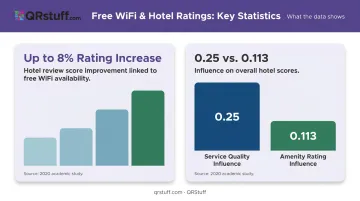
A 2020 academic study on hotel reviews found that free WiFi can raise a hotel's overall rating score by up to 8%. Cornell hospitality research across nearly 100,000 reviews found that service-quality ratings had a stronger association with overall hotel scores (0.25 per point) than amenity ratings (0.113 per point) — meaning the experience of getting online matters as much as simply having WiFi available.
The branding opportunity most venues miss: QRStuff's WiFi QR codes support full custom styling — logo overlays, custom colors, gradients, and branded frames — available from the Lite Suite tier upward. That code on your table card or welcome packet isn't just a utility. It's a brand touchpoint at the moment guests first engage with your space.
KPIs affected: Guest satisfaction scores, review volume and sentiment, average dwell time, and repeat visit rates.
What Happens When Guest WiFi Is Still Handled the Old Way
The costs of manual WiFi distribution don't show up on a single invoice — they build up across shifts, reviews, and security incidents.
Operationally:
- Staff interruptions compound across a full day; each WiFi request is small, but they stack
- Typed passwords fail regularly on mobile devices — Nielsen Norman Group notes that password masking on smaller screens increases entry errors because users can't see what they've typed
- Guests who fail to connect after two attempts may assume the network is down, not that they mistyped
Security:
- Static visible passwords accumulate unauthorized users over time — neighbors, passersby, former guests
- Passwords are rarely rotated when doing so requires manually updating every printed sign and chalkboard
- In regulated environments (healthcare waiting rooms, financial services lobbies), visible credentials create compliance exposure
Reputation:
- WiFi friction shows up in reviews more often than its actual severity warrants — a three-minute password struggle frequently becomes a one-star comment
- That "poor WiFi experience" label persists in search results, shaping booking decisions before a guest ever walks through the door
J.D. Power's hotel satisfaction research identified a 76-point satisfaction gap between guests charged for internet access and those who weren't — a gap recorded over a decade ago, before smartphones became the default device for connection. The friction dynamic it captured has only intensified: guests now expect seamless WiFi as a baseline, not a differentiator, and password barriers sit conspicuously below that bar.
How to Get the Most Value from QR Code WiFi Access
The benefits above only fully materialize with deliberate placement. A QR code buried in a welcome packet on page four reaches a fraction of the guests who needed it at the front door.
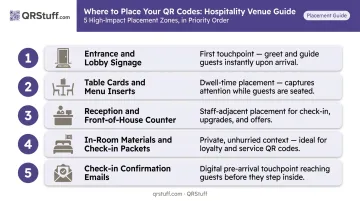
High-impact placement locations:
- Entrance and lobby signage (visible the moment guests arrive)
- Table cards and menu inserts (in front of seated guests)
- Reception desk and front-of-house counter
- In-room materials and check-in packets for hotels and vacation rentals
- Check-in confirmation emails (for guests who connect before they arrive)
If your business rotates passwords — or plans to — use dynamic codes. A static code breaks the moment credentials change. QRStuff's dynamic WiFi QR codes let you update the password in the dashboard without reprinting anything, so the same code on your walls and tables continues to work with new credentials.
QRStuff's dashboard tracks scan volume, time of day, device type (iOS vs. Android), and geographic data. If a placement location consistently underperforms, the data makes it visible — so you can relocate or redesign the signage before it keeps costing you connections.
Multi-location operators — hotel groups, restaurant chains — have additional options. QRStuff supports bulk WiFi QR code generation and project-based organization, letting different properties run from a single account with role-based permissions for team access.
Conclusion
QR code WiFi access is a small operational decision with a broad reach. It affects staff efficiency, network security, and the guest's first practical experience with your venue — all at once, all from a single printed code.
Venues that deploy this well have eliminated a recurring friction point entirely. Hotels, cafés, vacation rentals, and event spaces see measurable gains in staff workload, guest review sentiment, and the kind of frictionless check-in experience that keeps people coming back.
Implementation takes less than an hour with the right tool and placement strategy. If your venue is still reciting passwords at the front desk, that's the first thing worth fixing.
Frequently Asked Questions
What are the benefits of setting up a guest WiFi network?
A dedicated guest network keeps guest traffic separated from your operational systems, which is both a security and compliance best practice. It also reduces staff interruptions by letting guests connect independently and meets the connectivity baseline that guests in hospitality, food service, and retail now expect as standard.
Can the WiFi owner see what I search on guest mode?
The network owner can see traffic metadata (sites visited, data volume) through router logs regardless of guest mode. Guest mode isolates devices from each other but doesn't restrict what the router itself logs. Treat any shared or public WiFi as potentially observable and avoid entering sensitive credentials.
Do guests need a special app to scan a WiFi QR code?
No app is required. iPhones running iOS 11 or later and Android devices running Android 8.0 or later scan QR codes natively through the built-in camera app. The phone recognizes the WiFi credentials automatically and prompts the user to connect — no additional steps needed.
Can I update my WiFi password without reprinting the QR code?
Yes, with a dynamic WiFi QR code. When you update the password in the QRStuff dashboard, the same printed code serves the new credentials on the next scan. This feature is included on QRStuff's Lite, Full Suite, and Enterprise plans.
Is QR code WiFi access secure for businesses?
QR code WiFi access removes the credential string from guest handling entirely, which eliminates the risk of passwords being shared, photographed, or overheard. Combined with a dedicated guest network isolated from your operational systems — as recommended by CISA and NIST — it closes the most common vulnerabilities in typical business WiFi setups.
Where should I display a WiFi QR code for guests?
The highest-impact locations are entrance signage, table cards, reception desks, welcome packets, and check-in emails. The guiding principle: place the code where guests are standing or seated at the exact moment they first think to connect — not somewhere they might find it later.