Introduction
Most satisfied customers don't leave reviews. Not because they don't care—according to BrightLocal's 2024 research, 94% of consumers are open to writing reviews, yet only 69% actually wrote one in the past year. The gap comes down to timing and friction.
Email follow-ups arrive hours or days after the experience, when the memory has softened and the motivation to act has faded. By the time someone opens that request, they've moved on. The moment of peak satisfaction—when they'd have taken 30 seconds to share their experience—is long gone.
QR codes solve this by moving the ask to the physical moment itself. Instead of following up later, businesses meet customers where they already are: receipt in hand, phone nearby, experience still fresh.
This article breaks down how review collection QR codes work, why they outperform email follow-ups, and what separates high-converting placements from ones that get ignored.
Key Takeaways
- QR codes capture reviews at peak satisfaction—when motivation is highest and friction is lowest
- 74% of consumers only trust reviews written in the last 3 months, so keeping your review volume fresh directly affects whether new customers trust you
- Dynamic QR codes let businesses redirect scans to different platforms without reprinting physical materials
- Placement and call-to-action quality are the two variables that most directly drive review conversions
- Scan analytics make review collection measurable—so you can test, adjust, and improve over time
What Are QR Codes for Review Collection?
A review collection QR code is a scannable code placed on a physical or digital surface that takes customers directly to a review form—Google, Yelp, TripAdvisor, or another platform—without any URL typing, app downloads, or account navigation.
They appear on receipts, product packaging, table tents, invoices left at job completion, thank-you cards, and exit signage. Unlike email or SMS review requests, they operate at the physical touchpoint—no follow-up required.
QRStuff supports dedicated Google Review QR codes that open directly on the Google review submission screen when scanned. For TripAdvisor, Yelp, and other platforms, any review page URL can be encoded into a QR code and deployed across the same surfaces.
The real advantage is timing. A customer who scans a code at checkout is describing what just happened. A customer who receives an email two days later is reconstructing a memory — and that gap shows in the quality of the review.
Where QR review codes are typically placed:
- Receipts and printed invoices
- Product packaging and unboxing inserts
- Table cards and menus (restaurants, cafés)
- Thank-you cards in delivered orders
- Exit signage at service completion points
- Business cards and service vehicles
Key Advantages of Using QR Codes for Review Collection
Review volume, recency, and quality are all driven by how easy and timely the ask is. QR codes directly improve all three.
Advantage 1: Higher Review Submission Rates
The primary advantage is in-the-moment capture. Customers scan while satisfaction is high, without needing to remember a request or act on a follow-up email later.
Compare the two paths:
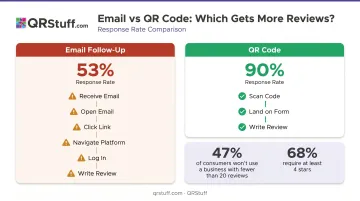
| Email Follow-Up | QR Code |
|---|---|
| Receive email (maybe) | See QR code at checkout |
| Open email | Scan with phone |
| Find and click link | Land directly on review form |
| Navigate to platform | Write review |
| Log in | Done |
| Write review |
A 2022 evaluation study published in PMC found QR-based methods achieved a 90% response rate versus 53% for traditional alternatives—a gap driven by reduced friction and in-context timing.
That conversion difference compounds quickly. According to BrightLocal, 47% of consumers won't use a business with fewer than 20 reviews, and 68% require at least 4 stars before considering it. Getting to those thresholds faster is a direct business outcome.
What this moves:
- Monthly review volume
- Average star rating
- Google Business Profile local search visibility
Where it matters most: High-footfall environments where email collection is impractical—restaurants, retail, clinics, trades, and events.
Advantage 2: Higher Review Quality and Recency
Fresh reviews aren't just better for SEO—they're what consumers actually trust. BrightLocal's research shows 74% of consumers only care about reviews written in the last 3 months. Reviews from a year ago, no matter how positive, are functionally invisible to most buyers.
QR codes placed at the point of service completion capture reviews before memory fades. A customer writing a review at the checkout counter describes specific details—the staff member who helped them, the exact product they liked, the moment that stood out. A customer writing from memory three days later writes "nice experience, would recommend."
Those specifics matter for two reasons:
- Detailed reviews convert better — specific mentions of staff, products, or moments are more persuasive than generic praise
- Real-time specificity enables faster service recovery and targeted staff coaching before the details are forgotten
KPIs this affects:
- Review specificity and sentiment quality
- Conversion rate influenced by reviews
- Speed of response to negative feedback
Where it matters most: Service industries where individual interactions vary—hospitality, healthcare, personal care, trade services.
Advantage 3: A Measurable, Optimizable Review System
A verbal ask at checkout generates no data. An email link in a footer generates no data. A QR code turns what was previously passive hope into a trackable system.
QRStuff's dynamic QR code analytics capture:
- Total and unique scans
- Scan time and date (down to the hour)
- Device type and operating system
- Location at country and city level
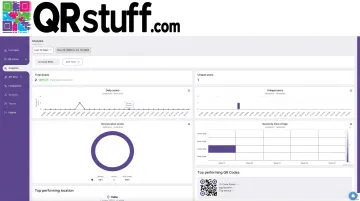
This means businesses can compare performance across placements. If the receipt QR code generates 3x more scans than the table tent, that's a resource allocation decision. If scan rates are high but reviews aren't increasing, the review form experience is the bottleneck, not the QR code.
Dynamic codes add another layer. With QRStuff, a dynamic code's destination URL can be updated at any time without reprinting the physical material. If Google needs more reviews this month, redirect the code there. Next month, shift it to Yelp. The printed code doesn't change—only the destination does.
Metrics to watch:
- Scan-to-review conversion rate
- Platform distribution of reviews
- Cost per review collected
This level of control is especially useful for multi-location businesses managing review consistency across branches, and for any operation that has tried passive review requests without understanding why they're not converting.
What Happens Without a Review Collection System
The default for most businesses is organic collection—waiting for customers to leave reviews on their own initiative. The problem: only the most highly motivated customers follow through, and motivation skews negative.
Without a system in place:
- Review volume stays low. Low count reduces visibility in local search. Google explicitly states that review count and score factor into local rankings.
- Reviews go stale. With 74% of consumers ignoring reviews older than three months, a business that collected reviews in a burst 12 months ago is effectively starting from zero again.
- Negative reviews carry more weight. When positive reviews aren't being collected systematically, a single negative review has an outsized effect on average star rating.
The deeper problem is that this situation is invisible. Businesses rarely track how many customers leave without reviewing, so the gap between "satisfied customers" and "customers who left a review" is never quantified. That gap doesn't close on its own — it closes when you make leaving a review easier than not leaving one.
Best Practices for Getting the Most from QR Code Review Collection
QR codes work best when three variables are optimised together: where they appear, what surrounds them, and how the results are used.
Strategic Placement at Peak Satisfaction Moments
Place QR codes at the natural end of the customer experience—when the transaction is complete, the phone is already out, and satisfaction is at its peak.
Highest-converting placements:
- On the printed receipt, at the bottom or back
- Inside product packaging or alongside unboxing inserts
- On invoices left at job completion (especially trades and service businesses)
- On table cards at checkout or point-of-sale
- On thank-you cards included with delivered orders
Placement at entry points (front door signage, pre-service waiting areas) underperforms—the experience hasn't happened yet, so there's nothing to review.
Clear, Contextual Call-to-Action
A QR code displayed alone gets ignored. Pair it with a short, specific message that explains what happens when someone scans and why it matters.
What works:
- "Share your experience—takes 30 seconds"
- "Your feedback helps us improve"
- "Happy with your visit? Let us know on Google"
What doesn't:
- "Scan here" (no reason to act)
- "Leave us a review" without context (no platform clarity, no time expectation)
The CTA sets expectations and gives customers a reason to act. Without it, the code is just a pattern on a piece of paper.
Design Quality and Scannability
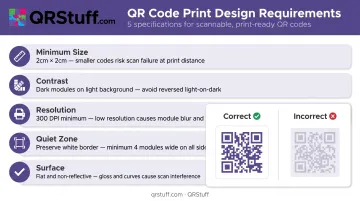
A poorly designed QR code fails before the review funnel even starts. QRStuff recommends:
- Minimum size: At least 2cm × 2cm for simple URL codes in print
- Contrast: Dark code on light background—avoid inverted colors, which many scanners struggle to read
- Resolution: Minimum 300 DPI for raster files; SVG/EPS for large-format print
- Quiet zone: Never crop the white border surrounding the code—this border is how scanners distinguish the code from surrounding content
- Place on flat, non-reflective surfaces; avoid folds or seams
Custom-branded QR codes—incorporating brand colors, logos, and shapes—improve perceived credibility and scan intent. QRStuff supports full brand customization, including colors, gradients, logo embeds, and custom shapes.
Always test scan performance under the actual lighting conditions of the placement before committing to a full print run.
Track Scans and Act on the Data
Once your codes are live, the setup work is done—but the optimization isn't. Set a monthly cadence to check which placements are generating scans and whether review volume is growing in step.
Two diagnostic scenarios:
- High scans, low reviews — The issue is in the review form experience: too many steps, not mobile-optimized, or landing on the wrong page
- Low scans — The issue is placement location, code visibility, or CTA clarity
QRStuff's analytics dashboard makes this easy to act on:
- Filter by individual code, date range, and location to pinpoint underperformers
- Use campaign tags to group and compare codes by branch, placement type, or time period
- On the Enterprise plan, organise codes by location with role-based access for branch managers
Conclusion
The value of QR codes for review collection isn't the technology—it's the timing. Meeting customers at the moment of satisfaction, rather than asking them to revisit it later, changes the math on review volume, quality, and recency simultaneously.
The three advantages—higher submission rates, better review quality, and a measurable system—compound over time when placement, messaging, and follow-through are treated as an ongoing practice rather than a one-time setup.
Businesses that build a consistent review collection system end up with something more durable than a high star rating. They get a steady stream of recent, specific reviews that improve local search rankings, reassure undecided buyers, and keep working long after the initial setup effort.
Frequently Asked Questions
What is the recommended method for using QR codes to collect reviews?
Place a well-designed QR code at the moment of service completion—on a receipt, invoice, or table card—paired with a short, specific CTA. This captures the review while the experience is fresh and the customer's phone is already in hand.
Where should I place a QR code to get the most reviews?
The highest-converting placements are receipts, product inserts, invoices left at job completion, table cards at checkout, and thank-you cards with delivered orders. Placement at the natural end of the customer experience consistently outperforms entry-point or general signage placement.
Are QR codes more effective than email for collecting reviews?
QR codes outperform email follow-ups because they remove multi-step friction and capture responses at peak satisfaction. Email requests require customers to act later, by which point motivation has dropped and details of the experience have faded.
How do I know if my review QR codes are working?
QRStuff's analytics dashboard shows scan volume by individual code, date range, device type, and location. If scans are high but reviews aren't increasing, the issue is the form experience. If scans are low, the placement or CTA needs adjustment.
Can I send customers to different review platforms using one QR code?
Yes. Dynamic QR codes can be updated to point to a new platform URL anytime without reprinting. QRStuff's Social Link feature goes further, creating a single landing page that lists all your review platforms—Google, Yelp, TripAdvisor, and others—from one scan.
Do customers actually scan QR codes for reviews, or do they ignore them?
Scan rates depend on placement timing and CTA clarity. Codes placed at the natural end of a transaction with a clear, human message consistently generate engagement. Research on QR-based feedback found a 90% response rate, with 95% of participants describing the process as easy.