These are fair questions. The U.S. State Department has made significant changes to its passport program in recent years, and many travelers are encountering this feature for the first time without any explanation of what it actually does.
This article covers exactly that: what the passport QR code is, what happens when you scan it, what information it does and does not contain, how it differs from the embedded e-passport chip, and where QR codes fit into travel documents more broadly.
Key Takeaways
- The passport QR code links to a State Department informational webpage and contains no personal data
- Every U.S. passport book carries the exact same QR code — meaning it identifies nothing unique about you
- The visible QR code is completely separate from the embedded e-passport chip, which does store biometric data
- Scanning your passport QR code has no effect on how border agents or airlines process your document
- QR codes on travel documents are increasingly common globally, from e-visas to boarding passes
What Is the QR Code on Your Passport?
The QR code appears on new U.S. passport books — either as a sticker on the back cover or printed directly inside, depending on when your passport was issued. According to the U.S. Mission Nigeria's official social media, the State Department initially added a QR code sticker to the back of passports in 2022, and more recent passport books have the code printed directly inside.
Passport cards do not carry the QR code — only passport books.
Context: The "Next Generation" Passport
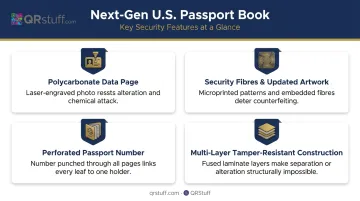
The QR code is one element of a broader modernization effort. The State Department's next generation U.S. passport book introduced several enhanced features:
- Polycarbonate data page with laser-engraved photo
- Security fibres and updated artwork throughout
- Passport number perforated through every page
- Multi-layer construction for durability and tamper resistance
The QR code sits alongside these features as a consumer-facing guidance tool, not a security mechanism. Many travelers assume it stores personal data or tracks their movements — it does neither.
What Does the Passport QR Code Actually Do?
Point your phone camera at it and tap the link — you'll land on the State Department's "After You Get Your New Passport" page at travel.state.gov/new.
That page includes practical guidance on:
- How long your passport is valid
- How and where to sign the document
- How to protect your passport from damage
- Checking visa requirements for upcoming travel
- Updating Trusted Traveler program information
- Staying informed while abroad
What It Does Not Do
The State Department is explicit: the QR code "does not change the way border officials, airlines, and others review your document." It plays no role in passport authentication at checkpoints. Border agents do not scan it. Airlines do not scan it. It is purely a consumer guidance tool.
How to Scan It
No third-party app needed:
- Open your native camera app (iOS or Android)
- Point it at the QR code
- Tap the notification link that appears
- The State Department page loads in your browser
The Logic Behind It
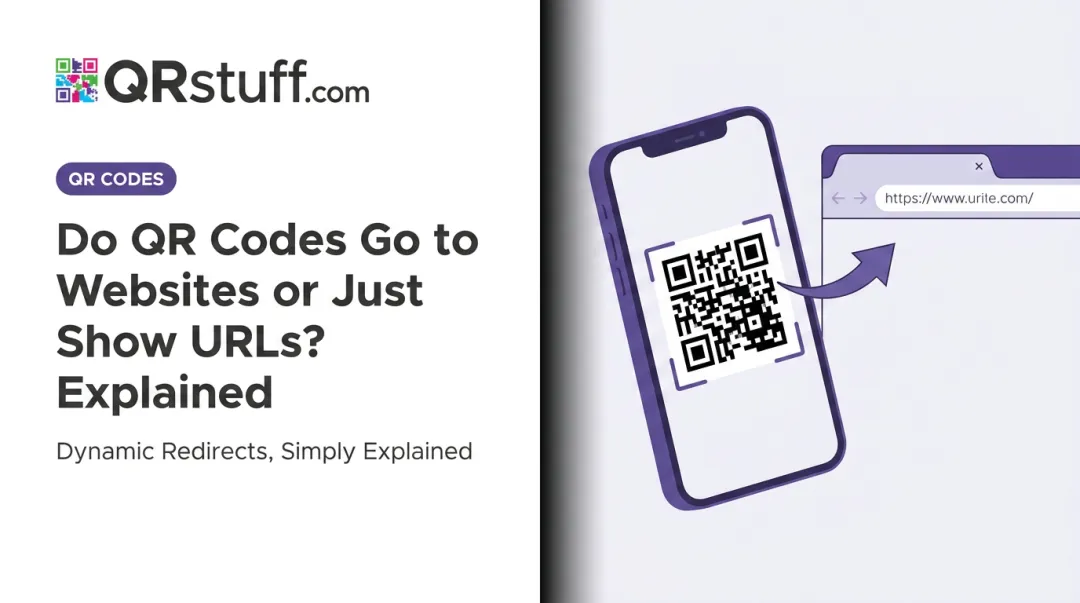
Rather than printing lengthy instructions inside every passport booklet, the State Department uses the QR code to point travelers to a webpage that can be updated over time — without reprinting millions of passports.
The same principle applies in business. When companies print QR codes on packaging, signage, or marketing materials, dynamic codes let them update the linked content at any time — no reprint required. Platforms like QRStuff are built around this model: organizations generate a code once and manage the destination from a dashboard, keeping printed materials current without physical changes.
Does the Passport QR Code Contain Your Personal Information?
No. The State Department states clearly that the passport QR code "does not have personally identifiable information."
What "Static" Actually Means Here
The code encodes a single, fixed URL — nothing else. It does not encode:
- Your name or date of birth
- Your passport number
- Biometric data of any kind
- Travel history or records
- Any detail specific to you as the holder
The Same Code on Every Passport
Every new U.S. passport book carries the exact same QR code. Scan one person's passport and another's — you get the same result. That alone confirms there's nothing personally identifying in the code.
This addresses the "government tracking" concern directly. The QR code cannot be used to monitor your location or access your records. It opens a public webpage — the same one anyone can visit by typing the URL into a browser.
That also means no identity theft risk. With no personal data encoded, someone scanning your passport's QR code gets nothing beyond a government travel information page.
The Passport QR Code vs. the E-Passport Chip
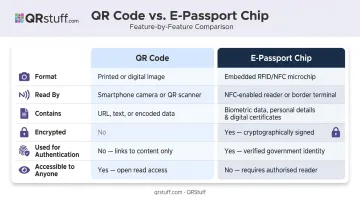
Most people assume the QR code on their passport sleeve is part of the security system. It isn't — that job belongs to the e-passport chip, which operates through a completely different mechanism.
The Passport QR Code
The QR code found on U.S. passport sleeves or renewal mailers is a printed optical code that links to a public government website — typically a tracking or informational page. Any smartphone camera can read it. It holds no personal data and plays no role in border control or identity verification.
The E-Passport Chip
Modern U.S. passports contain an embedded contactless chip — what's known as an e-passport. According to DHS, this chip holds the same information printed on your passport data page, including:
- Full name and date of birth
- Nationality and passport number
- A digital facial image (biometric identifier)
- Other biographic information
The chip is read by border control equipment using radio-frequency technology (NFC/RFID under ISO/IEC 14443), not smartphone cameras. Cryptographic signatures on the chip allow border systems to verify the data hasn't been tampered with.
Side-by-Side Comparison
| Feature | QR Code | E-Passport Chip |
|---|---|---|
| Format | Printed optical pattern | Embedded contactless IC |
| Read by | Smartphone camera | NFC/RFID reader |
| Contains | A single public URL | Biometric and biographic data |
| Encrypted | No | Yes |
| Used for authentication | No | Yes |
| Accessible to anyone | Yes | No (requires specialist reader) |
What Actually Does the Security Work
Three elements handle passport security and identity verification:
- E-passport chip — encrypted biometric data, read at border control
- Machine-Readable Zone (MRZ) — the two lines of text at the bottom of the photo page, scanned optically by border machines
- Laser-engraved biometric data page — tamper-resistant physical identity information
The QR code sits outside this security stack entirely. Its role is informational — pointing to a public URL — not protective.
QR Codes in Other Travel and Identity Documents
The U.S. passport is far from unique in incorporating QR codes. They appear across travel and identity documents worldwide.
Boarding Passes
IATA's Bar Coded Boarding Pass standard lists QR codes among the approved symbologies for paper and mobile boarding passes. Every time you pull up a boarding pass on your phone, you're likely presenting a QR code that encodes your flight details, seat assignment, and passenger data.
COVID-19 Health Certificates
During the pandemic, QR codes took on a more data-heavy role. The EU Digital COVID Certificate used a QR code containing a traveler's name, date of birth, vaccination or test status, and a unique certificate identifier. The CDC's vaccination certificate system offered a similar QR-based mechanism. Unlike the passport QR code, these did encode individual health data — and required specific verification apps to decode them securely.
Entry and Visa Systems
Several countries now use QR codes as part of their entry processes. The Dominican Republic's mandatory eTicket system generates a QR code upon form completion that airlines request before departure and customs verify on arrival. The UK's immigration ID check app uses a QR code to connect a mobile application to an online visa application.
Hotels and Hospitality
For hotels, QR codes have become a standard tool for contactless check-in, digital room service menus, concierge guides, and guest feedback. Marriott, one of the major brands using QRStuff's platform, reflects how broadly the hospitality industry has adopted QR-based guest experiences.
For operators managing codes across multiple properties, QRStuff provides:
- Bulk code generation at scale
- Real-time scan analytics across locations
- Dynamic URL editing so guest guides and local info pages update instantly without reprinting physical materials
Frequently Asked Questions
Does your passport have a QR code?
U.S. passport books issued in recent years include a QR code — either as a sticker on the back cover or printed inside the booklet. Passport cards do not carry the QR code. If you're unsure, check the back cover or interior pages of your passport book.
How do you get a QR code for your passport?
You don't apply for it separately. Any new or renewed U.S. passport book issued through the State Department's current process will include the QR code automatically.
What information is stored in a passport QR code?
The QR code on a U.S. passport stores only a URL pointing to a State Department informational webpage. It contains no personal data, biometric information, or passport details of any kind.
Is the passport QR code the same for everyone?
Yes. Every new U.S. passport book carries the identical QR code regardless of the holder. Because it links to a general government webpage rather than individual records, there's nothing personally identifying about it.
Can someone use the QR code on my passport to steal my identity?
No. Scanning the QR code opens a public State Department webpage — nothing else. Since the code contains no personal information, there is no identity theft risk associated with someone scanning it.