Introduction
Product labels have always communicated more than a product name. QR codes make that communication two-directional: a customer scans a label and instantly accesses video tutorials, detailed ingredient lists, loyalty programs, or sustainability reports.
The problem? Most QR code failures on printed labels aren't caused by bad code generation. They're caused by decisions made during design, file prep, and print specification that no one flagged until the labels were already printed.
According to GS1 US research, 79% of consumers say they're more likely to purchase products with a scannable QR code that provides the product information they want. That's a significant opportunity, and one that only pays off when the code scans reliably.
This guide covers every step: choosing the right QR code type, generating and customizing it properly, integrating it into your label design, and preparing a print-ready file. It also covers the four design parameters that most frequently determine whether a printed code scans successfully or not.
Key Takeaways
- Product label QR codes require two workflows: generating the code correctly and integrating it into the label design
- Dynamic QR codes are the right choice for almost all product labels; they can be updated after printing and provide real-time scan analytics
- Four variables determine scannability: size, colour contrast, error correction level, and quiet zone integrity
- Always test the printed code on multiple devices before approving a full label run
- Static codes are permanent: a broken link forces a reprint; dynamic codes let you update the destination instantly
What You Need Before Getting Started
Most QR code label problems trace back to skipped preparation. Before generating anything, confirm you have these in place.
Equipment and Account Requirements
- QR code generator account that supports dynamic codes and scan analytics — QRStuff's paid tiers cover 40+ data types (URL, PDF, vCard, WiFi, GS1 Digital Link, and more) with unlimited scans on the Full Suite plan
- Label design software — Adobe Illustrator, Canva, or similar
- Label printer capable of 300 DPI minimum — 600 DPI is preferred for codes smaller than 2.5 cm
Content and Destination Readiness
- The destination URL must be live and mobile-optimized before the code is generated — a code that lands on a broken or incomplete page will drive users away before they engage
- For high-volume product launches, confirm your plan supports the expected scan volume. QRStuff's Lite Suite caps at 200 scans per code per month — if your product ships to multiple retail locations, that ceiling will fill up fast. The Full Suite and Enterprise plans offer unlimited scans
- Confirm your dynamic code platform has a reliability track record — QRStuff has maintained 99.968% actual uptime since 2008, backed by a 99.9% uptime guarantee
How to Create Product Labels with QR Codes
Follow these four steps to go from destination URL to a print-ready label file.
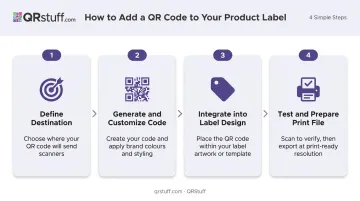
Step 1: Decide What Your QR Code Will Do
Define the destination before generating anything. Common options include:
- Product webpage or landing page
- How-to video or setup guide
- PDF manual or specification sheet
- Nutritional information or ingredient detail
- Loyalty program sign-up
- Customer review form
- Sustainability or sourcing report
The destination determines which QR code type to use. More importantly, it determines whether consumers will actually scan.
Pair the destination with a clear customer action — "Watch setup video," "Join rewards," "Read ingredients" — rather than a generic homepage. Generic destinations rarely drive engagement because they don't answer the consumer's immediate question.
Also ask: will this content need to change after labels are printed? Seasonal promotions, updated instructions, recalled product pages — any of these scenarios require a dynamic QR code from the start. Deciding to switch later means reprinting.
Step 2: Generate and Customize Your QR Code
Use a QR code generator that supports dynamic codes. QRStuff supports 40+ QR code types with full customization for branded product labels.
Dynamic codes are the default choice for product labels. They redirect through a short URL, so you can edit the destination any time without reprinting. They also track real-time scan data: location, device type, operating system, time of scan, and unique vs. repeat scans — giving you measurable data on label performance.
Customize the visual design:
- Adjust foreground and background colors to match your brand palette (QRStuff supports individual hex color inputs for foreground, background, finder patterns, and alignment patterns independently)
- Add a logo to the centre of the code
- Apply gradient effects if your brand requires it
One critical rule: test scannability after every major visual change. Color and logo modifications can reduce contrast and degrade scan reliability if not checked.
Download in the right format:
- SVG or EPS (vector) for print — these scale to any size without quality loss
- PNG at 300 DPI minimum for raster — 600 DPI for codes smaller than 2.5 cm
- Avoid JPEG for QR codes; compression artifacts can corrupt the module pattern
QRStuff automatically selects the optimal error correction level based on your data type and any customizations applied, balancing scan reliability with code density.
Step 3: Integrate the QR Code into Your Label Design
Placement directly determines whether the code scans in real-world conditions.
Where to place the code:
- Flat, high-visibility areas of the label
- Away from folds, seams, and label edges
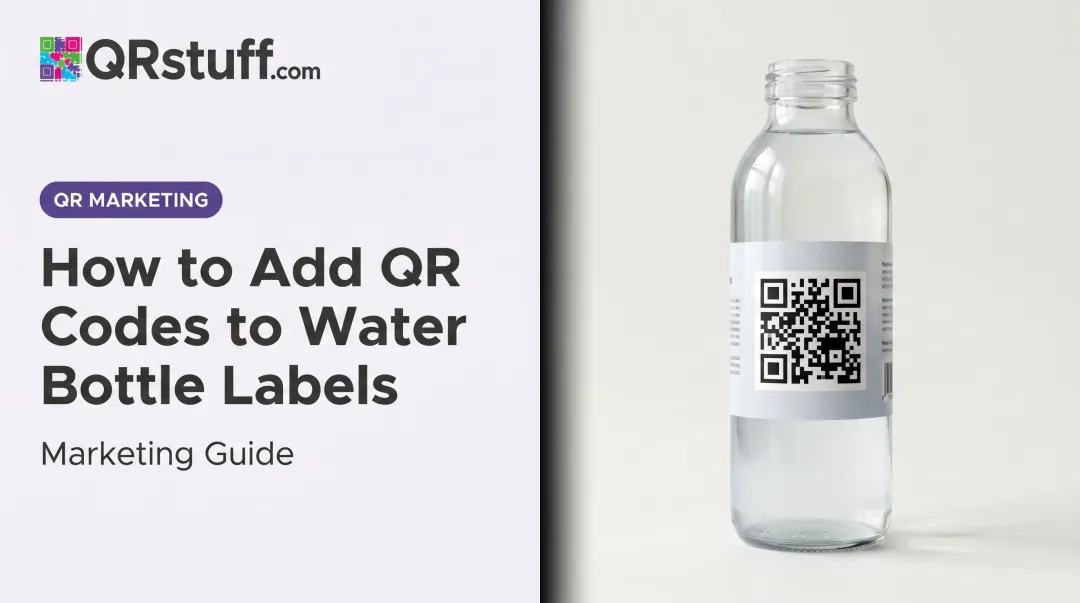
- Not on narrow cylindrical surfaces where the pattern will distort when the label wraps
Size and quiet zone:
- The code should be no smaller than approximately 2 × 2 cm under standard conditions — smaller codes require higher error correction and may still fail on older camera hardware
- GS1 specifies a quiet zone of at least 4 modules wide on all sides. At GS1's minimum X-dimension of 0.396 mm, that's roughly 1.6 mm of clear space per side
- That margin is easy to violate when placing a code near a label border — verify it explicitly in your design file before sending to print
Add a call-to-action. A code with no surrounding context gets ignored. "Scan for recipe ideas" or "Scan to reorder" gives consumers a reason to take out their phone. Treat the CTA as a mandatory label element.
Step 4: Test, Proof, and Prepare the File for Print
Testing is non-negotiable before committing to a print run.
- Test the code digitally using QRStuff's built-in preview, then download and display at actual intended print size
- Scan with at least three devices — mix of iOS and Android, using both native camera apps and dedicated scanner apps
- Test in varied lighting including low-light conditions, which are common at retail shelf level
- Verify the landing page loads in under 3 seconds on mobile — 53% of mobile users abandon pages that take longer than 3 seconds to load, per Google
- Supply the printer with the QR code as a separate vector file alongside the full label artwork
- Request a physical proof — not just a digital proof. Scan the proof before approving the full run
Key Design Parameters That Determine Scannability
Most QR codes that fail on printed labels fail because of one or more of these variables — not because the code itself was generated incorrectly.
Minimum Size
GS1 calculates QR code size from the number of modules multiplied by the X-dimension (the size of one module). For retail point-of-sale, GS1 UK specifies an X-dimension range of 0.396 mm to 0.990 mm. For a 29-module QR code with an 8-module quiet zone total, the minimum print size works out to approximately 14.7 mm — roughly 1.5 cm.
As a practical working minimum for product labels, 2 × 2 cm provides a reliable safety margin across varying lighting conditions and camera hardware. Smaller codes are possible but require rigorous testing.
Once size is confirmed, contrast is the next variable that determines whether a scanner can reliably read what you've printed.
Color Contrast
Dark modules on a light background is the standard for a reason. GS1 guidance identifies the root issue: many imaging systems use a 660 nm red light source, under which red, orange, and yellow backgrounds appear light to the sensor — making them nearly indistinguishable from the code's dark modules.
- Safe: Black or dark ink on white or light backgrounds
- Problematic: Warm-coloured backgrounds (red, orange, yellow)
- High risk: Metallic foil backgrounds — these require hands-on testing before committing to a print run, as specular reflection can disrupt scanning entirely
With contrast handled, the error correction level determines how much print degradation or logo coverage your code can tolerate before it stops scanning.
Error Correction Level
QR codes have four error correction levels:
| Level | Data Recovery | Best For |
|---|---|---|
| L | ~7% | Clean, plain codes, maximum data density |
| M | ~15% | Standard use cases without logo overlays |
| Q | ~25% | Moderate logo coverage or variable print conditions |
| H | ~30% | Logo in centre, poor print quality environments |
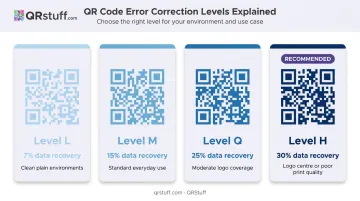
For most branded product labels — where a logo sits in the centre of the code — Level H is the appropriate choice. It makes the code visually denser but far more resilient to printing imperfections and logo interference.
The substrate you print on introduces one more layer of risk that error correction alone can't compensate for.
Surface and Label Material
The substrate affects scannability more than most designers expect:
- Matte finishes scan most reliably — matte-coated substrates produce stable, uniform module edges that scanners read cleanly
- Glossy coatings create specular reflection (glare) that interferes with the scanner's ability to read module contrast
- Metallic or reflective foils require explicit readability testing — published print-quality research flags thermal transfer with black foil as requiring explicit verification before a full print run
- Curved containers introduce code distortion — on curved packaging, reading distance, container diameter, and code size all interact to affect scannability — test each combination before finalising your label spec
Common Mistakes When Adding QR Codes to Product Labels
- Linking to a non-mobile-optimized destination. Every label scan happens on a mobile device. If the page isn't responsive, most consumers will abandon it immediately and won't scan again.
- Using a static code for content that may change. A broken link, updated promotion, or recalled product page on a static code means a full reprint. Dynamic codes let you update the destination instantly, with no reprinting required.
- Placing the code on curved or irregular surfaces without testing. Codes on narrow cylindrical containers or seamed packaging frequently fail at real-world scanning angles — always test on a physical proof of the actual container.
- Omitting a call-to-action. A code without context gets ignored. Consumers need to understand the benefit of scanning in one or two words before they'll act. Without it, most consumers won't bother.
When QR Codes Work Best on Product Labels
QR codes deliver the most label value when the product naturally has more information than the label can hold.
High-ROI use cases:
- Food and beverage: nutritional detail, recipes, allergen information, sourcing transparency. SmartLabel, which uses QR codes to deliver extended product information, appears on more than 100,000 products across 1,000+ brands, and SmartLabel research found that 84% of consumers say in-depth information beyond the physical label affects their loyalty to a manufacturer
- Health and wellness: usage instructions, dosage guidance, clinical references
- Consumer electronics: setup guides, manuals, warranty registration
- Apparel: care instructions, sustainability certifications, brand storytelling
These categories share a common thread: the scan has a clear payoff for the buyer. That logic extends to consumable products — supplements, coffee, cleaning products — where a QR code linking to a reorder flow or loyalty sign-up captures the repeat purchase moment while the product is actively in use. Few marketing channels reach a buyer at that level of intent.
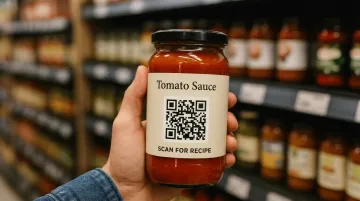
Where QR codes underperform:
- Labels with under 1.5 × 1.5 cm of available space
- Rough, heavily textured, or embossed surfaces
- When the destination content doesn't offer genuine utility to the buyer — the decision to add a QR code should always start with what the consumer gets from scanning, not what the brand wants to track
Frequently Asked Questions
Do I need a label if I have a QR code?
No — a QR code does not replace a product label. Regulatory requirements including ingredients, warnings, net weight, and manufacturer details must still appear in printed form. The QR code extends the label's information capacity; it doesn't substitute for it.
What precautions should I take when using QR codes on product labels?
Use dynamic codes so broken links can be fixed without reprinting. Test the printed code on multiple devices before approving a run. Verify the destination is mobile-optimised, loads quickly, and uses HTTPS. Confirm the quiet zone is intact in the final physical proof.
What size should a QR code be on a product label?
A minimum of approximately 2 × 2 cm works under standard conditions for most label formats. Smaller codes require higher error correction and must be tested rigorously — when in doubt, go larger.
Should I use a static or dynamic QR code for product labels?
Dynamic codes are the right choice for almost all product label use cases. They allow destination updates after printing and provide scan analytics — location, device, time, and unique vs. repeat scans. Reserve static codes only when content is genuinely permanent and tracking is not needed.
What file format should I send to my printer for the QR code?
Send SVG or EPS (vector format) — these scale to any print size without quality loss. If the printer requires raster, use PNG at 300 DPI minimum (600 DPI for codes smaller than 2.5 cm). Avoid JPEG.
Can I update my QR code's destination without reprinting my labels?
With a dynamic QR code, yes. Through the QRStuff dashboard, you can change the destination URL at any time — the printed code stays the same; only the redirect target changes. This makes dynamic codes the practical choice for seasonal promotions, evolving content, or anything that may shift after labels are in market.