Most restaurant owners know QR codes exist. Fewer understand how they reshape the entire dining experience — not just the menu, but every moment from when a guest sits down to when they walk out. This guide breaks down exactly how QR code ordering works, what it changes for customers, and what it means for the people running the restaurant.
Key Takeaways
- QR code ordering lets guests scan a table code with their phone camera to browse a digital menu, order, and pay — no app download needed.
- For customers, it removes forced wait points and hands them control over their own pace.
- For restaurants, it reduces order errors, speeds up checkout, and eliminates reprint costs when menus change.
- Dynamic QR codes let you update prices, specials, or availability in real time — no reprinting required.
What Is QR Code Ordering for Restaurants?
QR code ordering is a system where a scannable code at the table — on a tent card, table surface, or signage — links guests to a digital menu hosted online. No physical menus. No waiting for a server to kick off the ordering process.
It exists because traditional restaurant ordering has friction built into every stage: waiting to receive a menu, waiting to flag a server, waiting for the check. QR ordering collapses several of those wait windows into a guest-directed sequence.
What QR Ordering Is Not
A few things worth clarifying upfront:
- Modern iPhone and Android cameras scan QR codes natively — iOS 11 and Android 8.0 onwards handle it without downloading anything.
- It handles the mechanical parts of ordering so staff can focus on the human parts — not a replacement for hospitality.
- QR ordering works across dining segments — fine dining included — when implemented with the right experience design.
Static vs. Dynamic QR Codes
This distinction matters practically for restaurant operators:
| Type | How It Works | Best For |
|---|---|---|
| Static | URL is encoded directly into the code. Can't be changed after printing. | Permanent info that never changes |
| Dynamic | Uses a short redirect URL. Destination can be updated at any time without reprinting. | Restaurant menus, pricing, specials |
For any restaurant with a menu that changes — even seasonally — dynamic codes are the only sensible choice. Platforms like QRStuff generate dynamic QR codes that operators can update through a web dashboard. The printed code on the table stays valid — only the menu content behind it changes.
How QR Code Ordering Works: The Step-by-Step Customer Journey
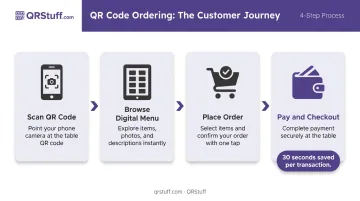
QR code ordering follows a defined sequence. Each stage builds on the last, and the whole thing runs off a smartphone camera.
Scanning the QR Code
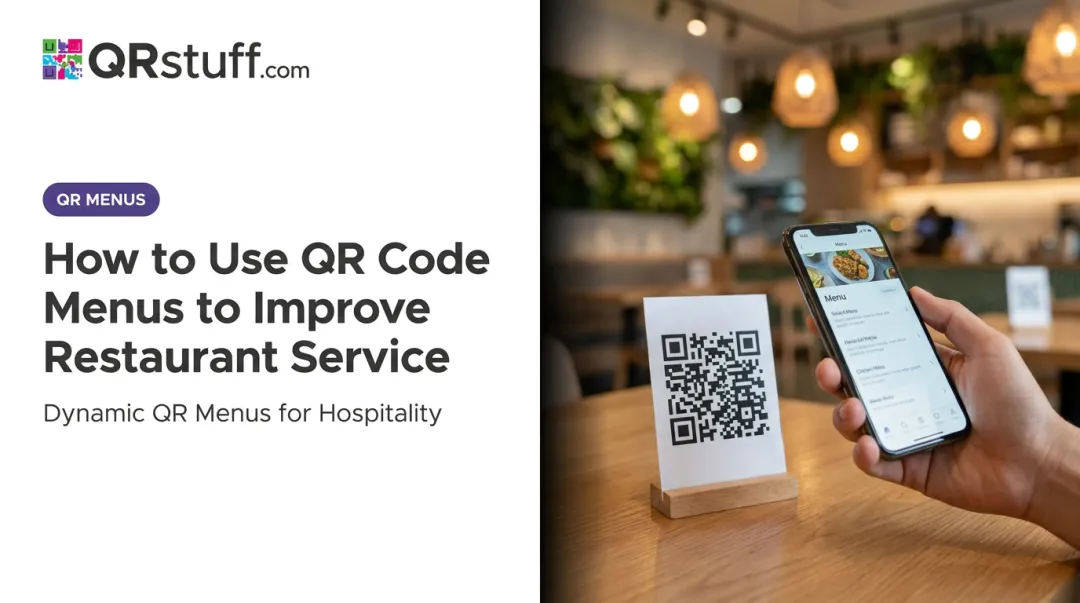
A guest sits down and scans the code on their table using their phone's native camera — no app required. The code instantly opens the restaurant's digital menu in a mobile browser.
Accessing the Digital Menu
What they land on should be an interactive, mobile-optimized menu with:
- Categories and search
- Photos and item descriptions
- Dietary labels (vegan, gluten-free, halal, allergen info)
- Real-time availability — items marked sold out don't appear
This is where dynamic QR codes deliver practical value. Because the code points to a live URL rather than a fixed destination, operators can update prices, add daily specials, or pull unavailable items instantly. The printed code on the table never needs to change.
Placing the Order
Guests select items, note preferences or modifications, and either submit directly to the kitchen via an integrated system or flag a server with their full selections ready. Direct-to-kitchen submission removes the verbal relay entirely: the kitchen receives exactly what the guest entered, no interpretation required.
Payment and Checkout
After eating, guests pay through the same QR-linked interface using digital wallets or cards, without waiting for a check to arrive. Consumer research via Nation's Restaurant News identifies checkout wait times as one of diners' top frustrations — and QR payment removes it completely. First Watch's QR payment rollout saved an estimated 30 seconds per transaction across 420 locations, totaling over 1,000 hours returned to customers and staff in a single week.
How QR Code Ordering Transforms the Customer Experience
The shift QR ordering creates isn't just operational — it changes how guests feel about the meal itself.
The Autonomy Shift
Traditional dining puts guests in a passive role: sit, wait, wait some more. QR ordering inverts that. Guests browse when they're ready, order when they're ready, and pay when they're ready. That sense of control cuts the frustration of waiting on someone else's schedule.
This matters because consumer willingness to wait for orders has dropped to just 6 minutes, down from 10 minutes pre-pandemic. Eliminating forced wait points at arrival and checkout removes two of the highest-friction moments in any dining visit.
Instant Menu Access as a First Impression
From the moment guests sit down, having a menu immediately available creates momentum. Guests who are browsing feel attended to — even during a Saturday dinner rush when every server is stretched. That matters more than most operators realize: the first few minutes set the tone for the entire meal.
Digital Menus and Upselling Without Pressure
Well-designed digital menus give guests everything they need to make confident choices:
- High-quality food photography that sets expectations accurately
- Chef recommendations and featured dishes surfaced at the top
- Pairing suggestions for drinks, sides, and add-ons
- Upgrade prompts guests can explore at their own pace
Guests discover upgrades on their own terms rather than responding to a server's verbal pitch. Research on online restaurant menus confirms that visual appeal and informativeness drive purchase intent through enjoyment and trust.
Guests who can see what they're ordering feel more confident — and more satisfied with their choices.
Allergen and Dietary Transparency
Digital menus can display allergen tags, dietary labels, and ingredient details by default — no interrogating servers, no hoping the kitchen got the message right. For guests managing food allergies or intolerances, that transparency is a real differentiator.
The Physical Menu Question
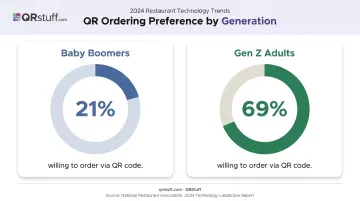
Not every guest will scan. According to the National Restaurant Association's 2024 Technology Landscape Report, 64% of full-service customers still prefer traditional employee service over technology-driven experiences.
That preference shifts significantly by generation: only 21% of Baby Boomers in full-service settings are willing to order via QR, compared to 69% of Gen Z adults.
QR ordering works best as an opt-in layer. Keep a small supply of physical menus available. No guest should feel excluded by a system designed to serve them.
Operational Benefits for Restaurant Staff and Owners
Beyond the guest experience, QR ordering changes how the restaurant itself runs.
Labor Reallocation, Not Reduction
When guests self-navigate menus and place their own orders, servers stop spending time on mechanical tasks — distributing menus, taking orders verbatim, processing checks — and redirect that time toward actual hospitality. Refills, table check-ins, resolving issues, making guests feel welcome. That's where staff make the experience memorable.
Order Accuracy at Every Handoff
Orders placed digitally by the guest are transmitted exactly as entered. The verbal relay — guest to server to kitchen — introduces errors at each handoff. Digital ordering removes those handoffs. Modifications, allergen notes, and substitutions go through in the guest's own words.
Menu Management Without Reprinting
Restaurants with seasonal menus, daily specials, or frequent price changes face ongoing printing costs and the operational headache of keeping physical menus current. Dynamic QR codes solve this completely. Update the linked menu URL or file, and every table code in the restaurant reflects the change immediately.
QRStuff's dynamic codes work this way by design: the printed code stays fixed while the destination updates through a web dashboard. For a restaurant pulling sold-out items mid-service or adjusting prices on the fly, that means no reprint, no confusion at the table.
Checkout Speed
Menu management and order flow both improve the experience — but checkout is where guests feel the most friction. The bill-delivery delay is one of the most consistently frustrating parts of dining out, and QR payment removes it entirely. The First Watch example — 125,000+ customers using QR checkout across their locations in a single week — shows this isn't a niche feature. Guests use it when it's available and easy.
Best Practices for Setting Up QR Code Ordering
Design for Mobile First
The digital menu must load fast and work on a small screen. Google's mobile speed data shows that when page load time goes from 1 second to 10 seconds, bounce probability increases by 123%. Sub-3-second load times are the practical target. Clean navigation, readable text, high-quality images — if the mobile experience is frustrating, it creates more friction than it removes.
Use Dynamic QR Codes and Keep the Destination Updated
Avoid static codes that link to PDFs you can't update without reprinting. Use a dynamic QR code generator — QRStuff's platform supports this across paid tiers starting at $4/month — so the underlying menu URL can be updated at any time. The same printed code remains valid on tables and signage indefinitely.
For restaurants just testing the concept, QRStuff's free tier offers limited dynamic codes, though the scan limits make it impractical for active service. The Full Suite ($15/month) is the practical option for single-location restaurants wanting full functionality:
- Unlimited scans with no restrictions
- Dynamic code editing after printing
- Logo embedding for branded codes
- Analytics to track scan activity
Train Staff to Bridge the Gap
Technology should feel invisible to guests. Staff need to:
- Know how to walk a guest through scanning if asked
- Troubleshoot common issues (camera permissions, browser problems)
- Offer physical menus without hesitation to anyone who prefers them
When the technology works seamlessly and staff are prepared to step in, the transition from print to digital feels natural rather than disruptive.
Conclusion
QR code ordering changes the dining experience at every stage — from the moment a guest sits down to when they pay and leave. It removes the friction points guests notice most: waiting to see a menu, waiting to order, waiting for the check. For operators, it's a flexible, low-maintenance tool for keeping menus current without constant reprinting.
For restaurant operators, the real question is how to implement QR ordering well. That means:
- Choosing dynamic codes so menu updates don't require reprinting
- Optimizing the mobile experience for fast, frustration-free ordering
- Training staff to guide guests rather than step back entirely
- Keeping physical menu alternatives available for guests who prefer them
Frequently Asked Questions
What are the benefits of a QR code ordering system for restaurants?
QR ordering speeds up table turns, reduces order errors, cuts printed menu costs, and lets staff focus on hospitality rather than order-taking. Guests control their own pace, and digital menus support upselling through photos and suggestions — no server pressure required.
Do customers need to download an app to use QR code ordering?
No app is needed. QR code menus open directly in the phone's mobile browser when scanned with the native camera — supported natively on iOS 11+ and Android 8.0+. Most guests can access the menu in two seconds without installing anything.
How do QR code menus handle menu changes or item availability?
Dynamic QR codes link to a live URL, so operators update the menu through a dashboard in real time. Price changes, sold-out items, and new specials update instantly across every table without generating a new code or reprinting any materials.
Can QR code ordering integrate with existing POS systems?
Many QR ordering platforms integrate directly with POS systems to sync orders, update inventory, and align sales reporting. QRStuff offers API access on its Enterprise tier for custom integrations with existing restaurant management systems.
What happens if a customer doesn't have a smartphone or prefers a physical menu?
QR ordering should always be an option, not a mandate. Keeping a small supply of physical menus available ensures every guest is accommodated — including guests who simply prefer a traditional menu.
Are QR code ordering systems expensive for restaurants to set up?
QR code generation is inexpensive to get started. QRStuff offers affordable paid plans, and the ongoing savings from eliminating printed menu reprints typically outweigh setup costs quickly — especially for restaurants that update pricing or specials frequently.