These aren't just design questions. Whether you use one QR code or many for the same URL has real implications for how well you can track campaign performance, test creative variations, and manage your QR library as campaigns scale.
This article breaks down what's actually happening when the same URL produces different-looking codes, and when each approach — single code vs. multiple codes — is the smarter strategic choice.
Key Takeaways
- Two QR codes can point to the same URL and look completely different — encoding choices and error correction levels vary, but both scan correctly.
- One QR code across all channels is simpler, but you'll have no idea which placements are actually driving scans.
- Separate codes per channel unlock per-placement analytics, A/B testing, and campaign segmentation.
- Dynamic QR codes offer the best of both: distinct codes per channel, editable destinations, and independent scan tracking.
- If you need to know where your scans are coming from, you need more than one code.
One URL, Different QR Codes: What's Actually Happening?
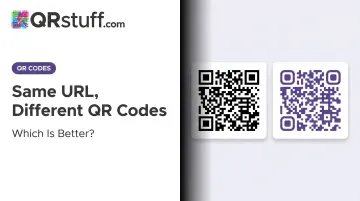
Generate the same URL twice using two different tools and you'll almost certainly get two visually distinct codes. That's by design, not a bug — the QR standard allows for significant encoding variation.
Why the Same URL Produces Different Patterns
According to DENSO WAVE, the original inventor of QR codes, symbol versions range from 21×21 modules (Version 1) to 177×177 modules (Version 40), with capacity varying by character type and error correction level. The ISO/IEC 18004:2024 standard also specifies that QR symbols are masked with one of eight predefined mask patterns to balance dark and light modules. Different tools apply different masks, so even the same encoder can produce visually distinct results.
Four variables drive these visual differences:
- Error correction level — Levels L, M, Q, and H restore roughly 7%, 15%, 25%, and 30% of damaged data respectively. Higher correction produces a denser, more complex pattern.
- QR version — Each version adds more modules to support additional data, creating a visually larger and more complex grid.
- Encoding mode — Most URLs use Byte mode; some character sets allow Alphanumeric mode, which changes the output structure.
- Mask pattern — The encoder selects from eight patterns to minimize visual imbalances, and different tools make different selections.
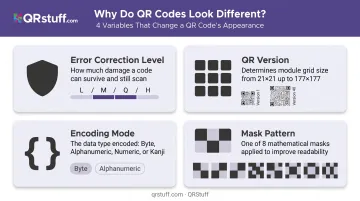
None of these choices make one code "wrong" — both decode to the same destination reliably.
The Real Question: Visual Variation vs. Strategic Intent
That technical variation is mostly invisible to end users. The more relevant question for marketers and businesses is a deliberate one: should you intentionally create multiple distinct codes for the same URL — and if so, why?
Single Code vs. Multiple Codes: The Strategic Choice
Using a Single QR Code Across All Channels
One code, created once, deployed everywhere. Flyers, packaging, email footers, social posts — all pointing to the same code image, all funneling scan data into one pool.
Core advantages:
- Zero management overhead — one file to track, one design to maintain
- Guaranteed visual consistency across every touchpoint
- No risk of deploying the wrong code version in the wrong placement
Core limitation: You can't see where scans are coming from. Did that product packaging outperform the in-store display? You'll never know. All you have is a total.
When it's the right choice:
- Single-channel campaigns where placement tracking isn't needed
- Simple, one-destination use cases (a restaurant linking every table tent to their menu)
- Audiences and actions are uniform across all touchpoints
- Operational simplicity matters more than granular data
Using Multiple QR Codes for the Same URL
Here, you deliberately create separate codes — each with its own identity or tracking ID — that all point to the same destination. The motivation is almost always analytics.
What separate codes unlock:
- One code per placement (print ad, packaging, email) shows exactly which channel drove results
- Two differently styled codes in the same location reveal which visual approach gets more scans — useful for A/B testing creative
- Append different UTM parameters per code for context-specific personalization, so your analytics platform distinguishes traffic even when the landing page is identical
- In multi-location retail or events, separate codes per site identify which environments perform best
Those analytics benefits only hold up if your platform tracks each code independently. With QRStuff's dynamic codes, each one generates its own scan dashboard — tracking total and unique scans, device type (iOS vs. Android), geolocation at country and city level, and time-of-day patterns. Campaign tagging lets you group and filter codes by initiative, so comparing performance across a multi-channel campaign doesn't require digging through individual reports.
When it's the right choice:
- Multi-channel or multi-location campaigns
- Events with multiple booths or sessions
- Product packaging at scale where per-SKU performance matters
- Any scenario where you need to prove which offline touchpoint drove online traffic
Single vs. Multiple: Making the Decision
Neither approach is universally better. The right choice depends on three factors.
Tracking & Analytics
Bitly's 2025 survey of 250+ marketers found 87% struggled to understand the post-scan customer journey and 85% had difficulty integrating QR data with other marketing metrics. That's the core problem a single-code approach leaves unsolved.
If channel-level attribution matters, multiple codes win. If aggregate scan totals are sufficient, one code is enough.
There are two practical ways to distinguish performance across multiple codes:
- Use a QR platform that assigns independent tracking per code (scan data stays separate by default)
- Append unique UTM parameters —
utm_source,utm_medium,utm_content— to the destination URL per code, so Google Analytics can distinguish traffic sources regardless of platform
Brand Consistency
A single code guarantees every placement looks identical. Multiple codes introduce the risk of version confusion — deploying the shelf-tag code in the email, or vice versa.
Structure prevents that confusion. QRStuff's folder and tagging system lets you organize codes by project, apply campaign tags for filtering, and manage team permissions — keeping even large-scale deployments navigable. Consistent naming conventions (e.g., campaign-name_channel_date) handle the rest.
Management Complexity & the Dynamic Code Advantage
One code is effortless. Multiple codes require organized labelling and a reliable platform to prevent mix-ups at scale.
Dynamic QR codes remove the biggest operational risk: being stuck with printed codes if the destination URL changes. With QRStuff's bulk update feature, you can export selected codes to a spreadsheet, edit the destination URLs across all of them at once, and re-upload — no reprinting, no redistributing. Each code retains its unique tracking identity through the update.
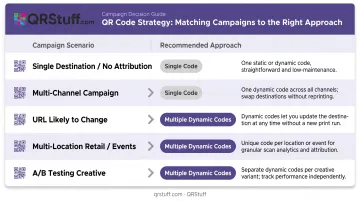
Quick decision guide:
| Scenario | Recommended Approach |
|---|---|
| One destination, one audience, no attribution needed | Single static or dynamic code |
| Multi-channel campaign with performance tracking | Multiple dynamic codes |
| URL likely to change after printing | Dynamic codes (single or multiple) |
| Multi-location retail or event marketing | Multiple dynamic codes, one per location |
| A/B testing QR creative or placement | Multiple dynamic codes |
Real-World Scenarios
Scenario A — Single Code Wins
A local restaurant adds one QR code to every table, linking to their digital menu. One destination, one consistent experience, zero management overhead. There's no meaningful channel to segment — every table is effectively the same.
Scenario B — Multiple Codes Win
A retail brand runs a campaign across in-store shelf tags, product packaging, and a print catalogue — all linking to the same product page. Using three separate dynamic QR codes, they discover shelf tags drive the majority of scans while the catalogue drives a fraction of that. That data directly informs the next print budget allocation.
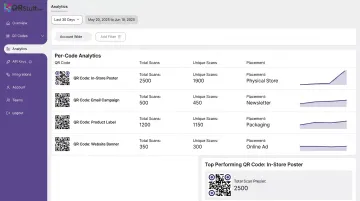
This mirrors what Branch documents in retail QR tracking: location-based performance analytics (unique codes per store or placement) reveal which environments drive the most engagement.
Scenario C — Dynamic Codes as the Bridge
An event company manages 15 booths at a trade show, each with a QR code linking to the same registration page. They generate 15 dynamic QR codes in a single batch through QRStuff's Full Suite bulk generation — one per booth — tracking which booth drove the most registrations. When the registration URL changes the following day, they update all 15 codes via bulk upload without reprinting a single sign.
Conclusion
The right choice comes down to what your campaign needs to prove — not just what it needs to do.
Start by asking: how many distinct contexts will this code appear in, and do I need to know which one is working? If the answer involves multiple channels, locations, or creative tests, multiple dynamic QR codes — with per-code analytics and updatable destinations — will give you cleaner, channel-specific data that a single shared code simply can't provide.
For most professional campaigns, the operational overhead of managing multiple codes is minimal when using a platform built for it. The per-code scan data you gain in return is what turns a campaign report from guesswork into evidence.
Frequently Asked Questions
Why are QR codes different for the same URL?
Different generators use different encoding algorithms, error correction levels (L through H), and mask patterns — all of which affect the visual matrix. The codes look different but decode to the same destination. Neither is incorrect.
Can I reuse the same QR code on different marketing materials?
Yes. A single QR code image can be placed across as many materials as needed — flyers, packaging, signage, email — and will scan correctly every time. The trade-off is that you won't be able to tell which placement generated which scans.
Should I use static or dynamic QR codes when creating multiple codes for the same URL?
Dynamic codes are the better option here. They let you update the destination URL without reprinting and provide independent scan analytics per code — two things static codes can't do once printed and distributed.
How do I track which QR code performs better if they all go to the same page?
Two approaches work: use a QR platform like QRStuff that tracks each code independently by default, or append unique UTM parameters (utm_source, utm_content) to the destination URL for each code so Google Analytics can distinguish the traffic sources.
Does having multiple QR codes for the same URL cause any technical problems?
No. Each code is independently valid, and multiple codes pointing to one URL creates no technical conflict. The only risks are organizational — using the wrong code in the wrong placement. Consistent naming conventions and a folder-based management system keep things straight.