Introduction
Running a restaurant in 2025 means operating on margins that leave almost no room for error. Labor costs hit 36.5% of sales for full-service restaurants in 2024, according to the National Restaurant Association — and the industry's traditional pre-tax profit margin sits around 5%.
QR codes are often dismissed as a pandemic workaround that overstayed its welcome. That framing misses what's actually happening. Restaurants actively using them today are reporting faster table turnover, fewer order errors, and measurable increases in average check size — because they address real operational bottlenecks that paper menus and manual order-taking never could.
This article covers the specific advantages QR codes deliver, the metrics they move, and how to implement them in ways that create lasting operational gains.
Key Takeaways
- QR codes touch ordering, payments, loyalty, feedback, and data — not just menus.
- According to Toast, mobile QR checkout saves servers 4 minutes per table versus traditional methods.
- Digital menus create a low-pressure environment where customers spend more time browsing and order more.
- Dynamic QR codes let restaurants update menus, pricing, and specials instantly — no reprinting required.
- Scan analytics surface peak demand periods, top-selling items, and device behavior — insights paper menus never captured.
What Are QR Codes in a Restaurant Context?
A QR code is a scannable matrix barcode that connects a customer's smartphone camera to any digital destination — a menu, an ordering platform, a payment portal, or a feedback form, with no app required on modern phones.
The range of applications goes well beyond menus:
- Table tents and signage — linking to digital menus, daily specials, or ordering platforms
- Receipts — directing customers to leave a Google review or complete a feedback form
- Windows and entrance signage — driving reservation links or loyalty sign-ups
- Loyalty and email capture — prompting customers to join a rewards programme before they leave
The QR code itself is just the access point. The operational value lives in what it connects to and the data it generates behind the scenes. A static code pointing to a PDF menu delivers far less value than a dynamic code tied to a live ordering system with scan analytics attached.
QRStuff's dynamic codes cover each of these use cases and let you update the destination at any time without reprinting — so if your seasonal menu changes mid-week or you swap review platforms, the physical code stays the same while the link behind it doesn't.
Key Advantages of QR Codes for Restaurants
The advantages below aren't abstract. They show up in specific metrics that restaurant operators already track: labor cost as a percentage of revenue, average check size, table turnover, and menu printing spend.
Advantage 1: Reduced Staff Workload and Faster Table Turnover
QR codes shift the most time-intensive routine tasks off servers and onto the customer's own device: presenting menus, taking orders, splitting checks, processing payments.
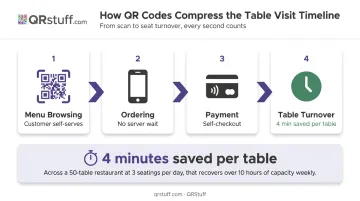
When customers can browse, order, and pay without waiting for a server at each stage, the visit timeline compresses. Servers aren't the bottleneck anymore, which means they can manage more tables simultaneously without service quality declining.
The numbers back this up. Toast reported that mobile QR checkout saves servers 4 minutes per table compared to traditional payment methods. Over a busy dinner service with dozens of table turns, that adds up to meaningful capacity recovery by removing the low-value tasks that consume server time, not by cutting headcount.
KPIs this affects:
- Table turnover rate
- Average transaction time
- Covers per server per shift
- Labor cost as a percentage of revenue
Where it matters most: High-volume operations (casual dining, food courts, quick-service) where speed of service directly drives daily revenue. A four-minute saving per table across 60 covers per night is four hours of server capacity recovered.
Square describes QR ordering as delivering high guest control, high order accuracy, and low staff involvement — a combination traditional service models struggle to deliver during peak hours.
Advantage 2: Higher Revenue Through Upselling and Larger Order Values
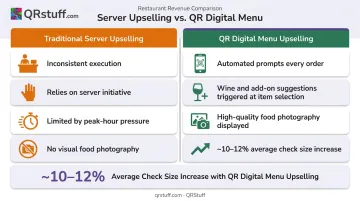
Customers browsing a digital menu on their own device feel less rushed and less judged than in a verbal interaction with a server. They're more likely to explore items they'd normally skip, add a second drink, or upgrade to a premium option.
That same browsing context is also where automated upsell prompts work best. A QR-based ordering system can suggest wine pairings, premium add-ons, or dessert options at the exact moment a customer selects a main — and it does this consistently, every order, without relying on server initiative.
Toast reports that restaurants using Mobile Order & Pay typically see around a 10% increase in revenue (vendor-reported). Separately, trade sources cite QR ordering increasing check averages by approximately 12% — though that figure comes from vendor and industry reports rather than independent research.
Visual presentation amplifies this effect. High-quality food photography, ingredient descriptions, and dietary tags on digital menus increase the likelihood of customers ordering items they'd otherwise overlook. DoorDash data shows merchants with header photos generate significantly more sales than those without. The same psychology applies to QR menus.
KPIs this affects:
- Average check size
- Items per order
- Upsell conversion rate
- Food and beverage revenue per cover
Restaurants with complex menus, strong seasonal specials, or inconsistent server-driven upselling benefit most here. Automated prompts don't have off days.
Advantage 3: Real-Time Customer Data and Smarter Menu Decisions
Every QR code scan generates data: when it happened, where, on what device, how often. When tied to an ordering system, that data tells you which items are most viewed, which are ordered at different times of day, and where demand peaks during the week.
This is where QR codes function as operational intelligence rather than just convenience.
Practical applications for scan analytics:
- Menu placement — move high-margin items to the positions customers engage with most
- Pricing decisions — identify popular items that may support a price test
- Inventory planning — predict demand by day and shift based on historical scan patterns
- Staffing — schedule based on peak scan activity rather than historical intuition alone
QRStuff's dynamic QR codes give restaurant operators a real-time analytics dashboard tracking total scans, unique scans, scan velocity by hour, geographic data, and device type.
The data exports as CSV for integration with other business tools. Daily, weekly, and custom date views make it straightforward to compare a seasonal menu launch against baseline performance.
Critically, 84% of restaurant-goers always or often look up a menu before visiting, according to TouchBistro's Diner Trends research. That means the digital menu isn't just a table tool — it's influencing decisions before customers walk in. A dynamic QR code ensures the menu they viewed online matches what's available when they arrive.
KPIs this affects:
- Menu item sell-through rate
- Cost of menu updates
- Inventory waste reduction
- Peak-hour revenue
- Customer return rate
The dynamic format matters here. With QRStuff's dynamic codes, a restaurant can update pricing, remove a sold-out item, or push a daily special across all table codes instantly. No reprinting, no delay, no version mismatch between what's on the table and what's available in the kitchen.
What Happens When Restaurants Ignore QR Codes
The case for QR codes becomes clearer when you map the operational costs of not using them.
Ongoing printing expenses. Physical menus need reprinting every time a price changes, an item is added, or a seasonal menu rolls out. Those costs accumulate faster than most operators realize.
Peak-hour bottlenecks. Without QR ordering or payment, servers carry the full load of order-taking and check management. During a busy service, that creates wait times that directly compress table turnover — and frustrate customers who've already decided what they want.
Inconsistent upselling. Without automated prompts, revenue from add-ons and upgrades depends entirely on which server is working, how well they're trained, and how busy they are. That inconsistency shows up in check averages.
No behavioral data. Restaurants without QR analytics are making menu, staffing, and inventory decisions on gut feel and historical sales data alone — while competitors using scan analytics are optimizing those exact decisions in real time.
Individually, each gap is manageable. Together, they quietly erode margins, slow service, and hand a measurable edge to competitors who've already made the switch.
How to Get the Most Value from QR Codes in Your Restaurant
A QR code is just the access point. The actual value comes from what it connects to — and whether anyone checks the data it generates.
Practical starting points:
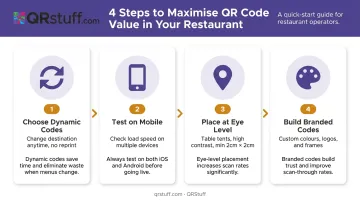
- Choose dynamic codes from the start. Static codes can't be updated without reprinting. QRStuff's dynamic format lets you change the destination, pricing, or linked promotion anytime from the dashboard — no reprint needed.
- Test the destination on mobile before launching. A QR code pointing to a slow-loading or desktop-formatted page loses the customer before the menu even loads. Check load time on multiple devices.
- Place codes at eye level in good lighting — table tents work; folded cards in dim corners don't. QRStuff recommends flat, non-reflective surfaces, high-contrast printing (dark code on light background), and a minimum size of 2cm × 2cm for reliable scanning.
- Build branded codes — QRStuff's paid tiers support custom colours, logos, shapes, and frames from the Lite Suite upward. A branded QR code on a table tent looks intentional, not bolted-on.
Connecting data to decisions:
Setup gets you started — analytics keep you improving. Build a monthly review habit around three questions:
- Which items have high scan engagement but low order rates? That gap signals a pricing, description, or presentation problem.
- What times of day drive the most scans? Use that to inform staffing and prep schedules.
- Are feedback QR codes (placed on receipts or at the exit) surfacing recurring complaints? Recurring themes need operational responses, not just acknowledgement.
For multi-location operators, QRStuff's Full Suite supports batch generation of 500 codes per run, with API access available for automated management across sites — useful for keeping menus consistent while allowing location-specific customisation.
Conclusion
QR codes in restaurants aren't about replacing the dining experience. They remove the friction that slows service, inflates costs, and leaves revenue uncollected.
The advantages — faster table turnover, higher average check size, and clearer data on what's actually selling — don't arrive all at once. They build as the system matures. Menus get refined based on what scan data reveals. The team stops guessing and starts acting on real numbers.
The restaurants getting the most from QR codes are the ones treating them as an ongoing operational tool. Set up well, connected to the right destinations, and reviewed consistently, they improve table throughput, lift check averages, and give operators the visibility to make smarter decisions — week after week.
Frequently Asked Questions
How do you use a QR code at a restaurant?
Restaurants place QR codes on table tents, receipts, or entrance signage. Customers scan with their smartphone camera — no app required on most modern phones — and the code opens a menu, ordering platform, payment portal, or feedback form depending on what the restaurant has configured.
Are QR code menus actually good for restaurants?
Yes — the operational benefits are real: faster service, lower printing costs, and higher average order values through automated upsell prompts. The difference between a good and frustrating experience comes down to quality: a mobile-optimized, fast-loading destination behind the code is non-negotiable.
How much can a restaurant save by switching to QR code menus?
Savings vary by menu change frequency. Lightspeed notes that digital menus eliminate ongoing printing and reprinting costs entirely — restaurants that update menus seasonally or monthly see the most meaningful savings. The more frequently pricing or items change, the faster the savings accumulate.
Do customers prefer QR codes or paper menus?
Preference splits significantly by age. Roughly 47% of consumers reported discomfort using QR codes in restaurants in a 2023 William Blair survey, with resistance higher among older demographics. Most restaurants benefit from offering both options — QR for speed and data, paper as a fallback for guests who prefer it.
What can restaurants track with QR code analytics?
Key metrics include total scans, unique scans, scan time and date, device type, and geographic location. QRStuff's dashboard shows scan velocity by hour and supports daily, weekly, and custom date views — and when tied to an ordering system, item-level view and order data becomes available too.
Can small restaurants benefit from QR codes, or are they mainly for large chains?
QR codes are particularly accessible for small restaurants. Setup costs are low, no app development is required, and the core benefits — staff efficiency, printing savings, faster payments — scale down just as effectively as they scale up. QRStuff's Lite Suite includes 50 dynamic codes with no expiration, making it a practical starting point for most independent restaurants.