Yet most marketing teams treat QR code deployment as an afterthought — generate a code, stick it on the flyer, hope for scans. The result is static codes pointing to broken URLs, no way to measure what worked, and print runs that can't be corrected after the fact.
This guide covers how to build a QR code marketing strategy that actually functions: from goal-setting and code selection, through deployment and testing, to real-time performance tracking and campaign close-out.
Key Takeaways
- QR codes bridge physical and digital, turning printed touchpoints like packaging, signage, and ads into mobile actions
- Define your campaign goal before generating any code; the destination and code type follow from the objective
- Always use dynamic QR codes for printed materials so destinations can be updated without reprinting
- Placement and a clear call-to-action matter more than visual design
- Track scans by device, location, and time; pair with UTM parameters for full-funnel attribution
When Should You Use QR Codes in Your Marketing Strategy?
QR codes belong where they remove friction — replacing a manual task like typing a URL, searching for a profile, or locating a form. The real question to ask isn't "where can we put a QR code?" but "where does a physical-to-digital handoff genuinely help the user?"
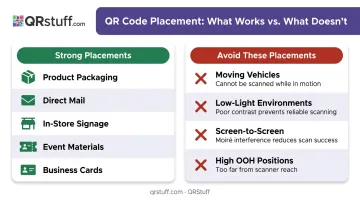
Strong use cases:
- Product packaging linking to usage guides, nutrition info, or loyalty sign-ups
- Direct mail pieces converting to campaign landing pages or discount forms
- In-store signage directing to product reviews or mobile checkout
- Event materials enabling contactless ticketing, schedules, or post-event surveys
- Business cards replacing manual contact entry with a vCard scan
Placements that consistently underperform:
| Placement | Why It Fails |
|---|---|
| Moving vehicles | Users can't stop and scan safely |
| Low-light environments | Camera focus fails without adequate contrast |
| Screen-to-screen scanning | Awkward and unnecessary if the user is already on a device |
| High OOH placements | OAAA advises against codes in the top third of creative when screens sit above eye level |
Exposure time matters too. OAAA research notes many out-of-home ads run for 15 seconds or less — and Nielsen Norman Group confirms users need at least 15 seconds to scan a code. If dwell time is that short, the code needs to be displayed for the full slot with nothing competing for attention.
Once you've identified the right placements, the next consideration is scale. QR codes work across any campaign size — from a single business card to a national packaging run. A small campaign works fine with a handful of dynamic codes and a basic dashboard; an enterprise rollout typically needs API-based bulk generation and multi-seat analytics access.
What You Need Before Launching a QR Code Campaign
Skipping preparation is the most reliable way to waste a print budget. Before generating any code, confirm you have all of the following in place.
Campaign prerequisites:
- A defined objective: Are you driving app downloads, capturing leads, sharing a menu, or promoting a discount? The objective determines the code type and destination. Vague goals produce codes that point to a homepage and convert no one.
- A mobile-optimized destination: The majority of QR scans happen on smartphones. Google/SOASTA research found that bounce probability rises 123% when mobile page load time increases from 1 second to 10 seconds. A slow or desktop-only landing page will lose nearly every user immediately after the scan.
- Dynamic code capability and analytics: Static codes are permanent — if the URL changes or contains an error, the print run is unusable. Dynamic codes let you update the destination at any time without reprinting, and built-in scan tracking tells you what's working.
QRStuff's paid tiers (starting at the Lite plan) cover both: dynamic codes with no expiration and real-time scan analytics out of the box.
Design and deployment minimums before going to print:
- Minimum code size of 2cm x 2cm for close-range print materials (scale up proportionally for posters and signage)
- A four-module quiet zone on all sides — never crop the white border
- High contrast between code and background; dark code on a light background is the standard approach
- A visible, benefit-driven call-to-action adjacent to the code
How to Use QR Codes in Your Marketing Strategy (Step-by-Step)
Effective QR code campaigns follow a deliberate sequence. Jumping ahead — generating a code before the destination exists, or skipping testing — creates problems that can't be fixed after print.
Setting Your Campaign Goal and Choosing the Right QR Code Type
The marketing objective must come before code generation. A code designed to grow a social media following should be configured differently from one collecting email leads or directing to a payment page.
QRStuff supports 40+ code types, including website URLs, vCard, WiFi, social media profiles, payment, event registration, Zoom links, Google Review prompts, and file downloads. Matching the code type to the campaign goal is a decision that belongs at the planning stage, not after a URL has already been encoded.
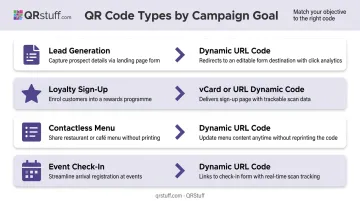
A few common mappings:
- Lead generation → URL code pointing to a form-based landing page with UTM parameters
- Loyalty sign-up → URL or social link page code on product packaging or in-store displays
- Contactless menu → URL code on table cards, updated in real time as items change
- Event check-in → Event or attendance code tied to a registration confirmation
Generating and Customizing Your QR Code
Once the goal and code type are confirmed:
- Build the full destination URL first — including UTM parameters (
utm_source,utm_medium,utm_campaign) — then encode it - Choose dynamic as the code type for any material that will be printed
- Apply visual styling — QRStuff supports color, gradient, logo embedding, module shapes, finder pattern styles, and frame options on paid plans
- Name and tag the code using campaign tags and project folders in the dashboard, so codes from different placements stay organized
One practical note: the customization preview updates in real time, so color and contrast issues are visible before finalising. Keep the foreground dark and the background light; avoid low-contrast combinations like dark blue on light blue.
Deploying QR Codes Across Marketing Materials
Before any print or digital deployment, test the code on at least two different devices and in the lighting conditions where it will actually appear. A code that scans cleanly from a desktop-printed draft may fail when printed at low resolution on a textured or reflective surface.
Pre-deployment checklist:
- Scans correctly on both iOS and Android native cameras
- Lands on the intended mobile-optimized destination
- Minimum size maintained (2cm x 2cm for close-range; scale up for distance)
- Quiet zone intact (the white border around the code) — no cropping
- CTA is adjacent and readable ("Scan to claim your offer," "Scan to view the menu")
- Placement environment allows users to hold and aim their phone comfortably
Export SVG or EPS formats for professional printing; PNG at minimum 300 DPI for standard office output. Vector formats prevent pixelation when scaling up for banners or signage.
Tracking Scan Performance in Real Time
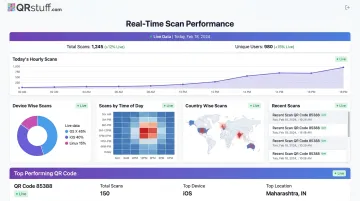
Once a campaign is live, the QRStuff analytics dashboard gives you continuous visibility into what's working:
- Total scans and unique scans — distinguishes reach from repeat engagement
- Device type breakdown — iOS vs. Android, mobile vs. desktop
- Geographic data — country and city level
- Time and date of scans — daily, weekly, and custom date range views
- CSV export — for integration with other BI tools
UTM parameters feed scan data directly into Google Analytics, showing what happens after the scan — pages visited, form completions, purchases. Build the UTM-tagged URL before encoding it (see Step 1 above).
Mid-campaign, treat the data as a feedback loop. A drop in scans from a specific city may indicate poor placement; an unexpected spike in desktop sessions likely means the code is being shared digitally rather than scanned physically.
Updating or Closing Out a Campaign
Dynamic QR codes redirect through a short URL stored in QRStuff's system, not a hardcoded destination. This means the destination can be changed through the dashboard at any time — the printed code remains identical and functional.
When a promotion ends or a URL changes, update the destination rather than letting users land on a dead page. This is particularly important for seasonal campaigns and limited-time offers printed on packaging or permanent signage.
At campaign close:
- Export scan data from the dashboard as CSV or PDF
- Review total scans, unique scans, geographic distribution, and device split against campaign KPIs
- Document placement performance to inform future decisions — which materials drove scans, which didn't, and what the scan-to-conversion rate looked like across channels
Where QR Codes Work Best Across Marketing Channels
Physical Marketing Environments
Each physical format has a different strength — here's where QR codes consistently pull their weight:
- Product packaging: GS1 Digital Link connects a product's physical identity to real-time digital content — usage guides, allergen info, loyalty registration, and promotional offers. NielsenIQ notes private label brands use packaging codes to surface reviews at the moment of consideration.
- Direct mail: USPS identifies QR codes as one of six methods to track direct mail performance. Scans route users to campaign-specific URLs where all web activity is fully attributable.
- Out-of-home advertising: OAAA/Morning Consult research found 76% of adults engaged with an OOH ad on a smartphone in 2023. Transit stops, lobbies, and waiting areas — where people are stationary — outperform moving traffic placements.
- In-store signage and shelf displays: Bridge physical browsing to digital action — product demos, review aggregations, mobile checkout, or loyalty sign-ups at the point of decision.
Digital and Event Contexts
- Trade show booths — codes replace brochures with instant access to pitch decks, case studies, or lead capture forms
- Live events — Eventbrite's check-in app supports contactless QR ticket scanning; codes also work for schedules, speaker bios, and post-event surveys
- Email campaigns — a QR code image in an email reduces the click path for mobile users who prefer scanning to tapping small links
Industry-Specific Examples
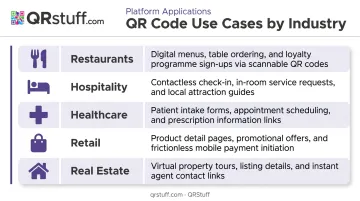
| Industry | Primary Use Case |
|---|---|
| Restaurants | Contactless menus, order placement, loyalty sign-ups |
| Hospitality | Room service menus, check-in forms, guest WiFi access |
| Healthcare | Appointment booking, medication info, patient check-ins |
| Retail | Loyalty programme registration, product reviews, mobile checkout |
| Real estate | Virtual tours linked from yard signs and open house flyers |
These use cases translate to measurable results. First Watch rolled out QR codes on bills across 420 restaurants; more than 125,000 customers used the feature in a single week, saving over 1,000 combined staff and customer hours, per the National Restaurant Association's 2024 report.
In real estate, a QRStuff user generated 14 property codes before a single open house weekend. Scan tracking showed exactly which listings were drawing attention — giving the agent something concrete to bring back to sellers.
Best Practices for QR Code Marketing That Gets Results
- Include a benefit-driven CTA like "Scan to claim 20% off" — users need to know what they're getting before they scan. A bare code with no context gets ignored.
- Assign a unique code to each channel — one for print ads, one for direct mail, one for Instagram. Without that separation, you can't attribute scans to specific placements and you're left guessing what worked.
- Match the landing page to your CTA. A mismatch between what the code promises and what the page delivers is one of the most common reasons conversion rates drop — the page should load fast and present a single clear action.
- Test in real conditions by scanning the final proof under the actual lighting and distance where it will appear. Textured surfaces, glossy finishes, and low ambient light all affect scannability.
- Monitor mid-campaign, not just at the close. QRStuff's real-time dashboard shows scan trends by device, geography, and time segment — a placement that's underperforming after week one is worth adjusting while the campaign is still running.
Frequently Asked Questions
Are QR codes effective in marketing?
Yes, when tied to a clear goal and a mobile-optimized destination. eMarketer projected 99.5 million U.S. smartphone users would scan a QR code in 2025 — adoption is broad across age groups, with usage highest among 18–44 year olds but significant across all demographics.
Do QR codes used in marketing need to be updated?
Static QR codes cannot be changed after creation — the destination is permanently encoded. Dynamic QR codes allow marketers to update the destination URL at any time through a dashboard without reprinting, which makes them the standard choice for any printed marketing material.
What is replacing QR codes?
Nothing has replaced QR codes at scale. NFC tags and augmented reality markers are sometimes cited as alternatives, but both iPhone and Android cameras scan QR codes natively without an app — a level of universal compatibility no competing technology has matched.
What size should a QR code be on marketing materials?
At minimum, 2cm x 2cm for close-range print materials like business cards or table cards. For every 10cm of additional scanning distance, add 1cm to each dimension. Always test scannability on the final printed output before full deployment.
How do I track QR code performance in a marketing campaign?
Dynamic QR codes provide built-in analytics covering total scans, unique scans, device type, location, and time-of-day data. Appending UTM parameters to the destination URL also routes scan data into Google Analytics for full-funnel attribution from scan to conversion.
What should a QR code link to in a marketing campaign?
Always a mobile-optimized page directly relevant to the QR code's call-to-action — a landing page, product page, booking form, or discount redemption page. Linking to a homepage or a non-mobile-optimised page is the most common reason scan-to-conversion rates underperform.