That delay matters more than most agents realise. Research from Harvard Business Review found that firms contacting a lead within one hour were nearly 7x more likely to qualify it than firms waiting just one hour longer. By the time you've transcribed a paper sheet the morning after an open house, many buyers have already moved on.
This guide walks through exactly how to replace paper sign-ins with QR codes — how to set them up, where to place them, and how to turn scans into closed deals.
Key Takeaways
- QR sign-ins capture cleaner lead data than paper and cut manual transcription entirely
- Link a short form (name, phone, email, buying timeline) to a dynamic QR code reusable across events
- Deploy codes at the entrance, on flyers, and throughout the property for multiple capture points
- Segment leads by scan data and form responses, then follow up within 24 hours
- Dynamic codes update the destination form without reprinting — one code works across every open house
Why QR Codes Outperform Paper Sign-In Sheets
Switching from paper sign-in sheets to QR codes comes down to two practical advantages: better data quality and faster follow-up.
The Handwriting Problem Is Real
A 2022 peer-reviewed study of 405 records found handwritten notes had 8.3% illegibility compared to zero for electronic records, with electronic documentation outperforming handwritten on 17 of 18 quality criteria. That study covered healthcare documentation, but the mechanism is identical: people write quickly, skip fields, and produce contact details that can't be acted on.
When a visitor fills out a form on their own phone, they're entering their own number. There's no transcription step, no guessing, no delayed follow-up while you decipher someone's handwriting.
The Speed-to-Lead Gap
Paper sheets don't just create bad data — they create slow data. After an open house, most agents spend time re-entering contact information before any outreach can begin. That delay is costly.
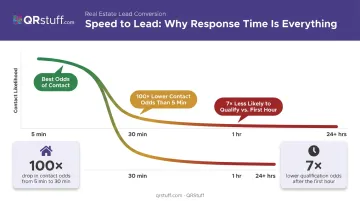
The MIT Lead Response Management Study found that the odds of contacting a lead drop 100x when response time moves from 5 minutes to 30 minutes. QR-based sign-ins feed directly into a digital workflow, so follow-up can start the same day — or the same hour.
Engagement Data You Can Actually Use
Faster follow-up also becomes more targeted when you have richer data to work with. With a dynamic QR code platform like QRStuff, every scan is timestamped and tracked by device type, location, and time — giving you signals a paper list never could. That includes:
- How many unique visitors scanned vs. total scans
- Which in-room codes attracted the most attention
- What time of day engagement peaked
A visitor who scanned the entrance code and two in-room feature cards is telling you something a paper signature never could.
How to Set Up a QR Code for Your Open House
Skip any step here — especially testing — and you risk broken links on the day of the event. Follow the sequence.
What You'll Need Before You Start
Three things are required before generating anything:
- A digital sign-in form — Google Forms, Typeform, or a property-specific landing page built directly in QRStuff's Full Suite or Enterprise tier
- A dynamic QR code account — so you can update the destination URL without reprinting; QRStuff's Lite Suite gives you 50 dynamic codes with no expiration, enough for agents managing multiple listings at once
- A print and display plan — minimum code size, display format (tabletop acrylic stand, foam board), and placement locations decided in advance
Static codes are permanently locked to one URL. Dynamic codes can be updated any number of times through the QRStuff dashboard, so the same printed code works across multiple properties — eliminating reprinting costs for agents running several open houses per month.
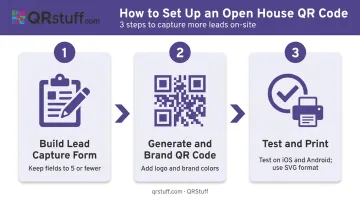
Step 1 – Build Your Lead Capture Form
Keep the form short. Baymard's 2024 research found that 18% of users abandon forms because they feel too long or complex — and open house visitors are standing in a doorway deciding whether it's worth their time.
Required fields:
- Full name
- Phone number
- Email address
- Buying timeline (dropdown: within 90 days / 3-6 months / 6+ months / just browsing)
- Are you currently working with an agent? (Yes/No)
Optional qualifying fields (mark them optional, not required):
- Pre-approval status
- Target price range
Every required field you add reduces completion rates. Gather the minimum needed for follow-up; qualify further in the conversation.
Step 2 – Generate and Brand Your QR Code
In QRStuff, paste your form URL into the dynamic QR code generator. Then brand it.
Customization options available on paid tiers include:
- Upload your brokerage logo (centered automatically; covers up to 30% of the code surface safely)
- Apply custom foreground and background colours matched to your brand palette
- Modify module shapes, eye shapes, and eyeball shapes for a distinct visual style
A branded code signals that the destination is legitimate — which matters, given that the FBI and FTC have both warned consumers about malicious QR codes. Making your code visually identifiable as yours, and ensuring it links to an HTTPS-secured page, reduces visitor hesitation before submitting contact information.
Step 3 – Test Before the Event, Then Print
Test from both iOS and Android devices before printing anything. Verify:
- Form loads correctly on mobile data (not just WiFi)
- All fields are visible without excessive scrolling
- Submission confirmation appears after completing the form
Print specifications:
- Minimum size: 2cm x 2cm for simple URLs (QRStuff's recommendation); larger for high-traffic placements
- Use SVG or EPS vector formats for signage to avoid pixelation at any scale
- Dark code on light background; never crop the white border (Quiet Zone) around the code
- Display in a tabletop acrylic stand at the entrance, on the back of flyers, and on in-room feature cards
Where to Place QR Codes at an Open House
Placement determines how many visitors you actually capture. Three locations cover the full visit lifecycle.
Entrance Sign-In Station
This is your primary capture point. Position the QR code at eye level with a clear, specific CTA — not "scan me," but "Scan to sign in and receive the full property report." Reinforce it with a quick line when you greet visitors: "Feel free to sign in here — just a quick scan and you're done."
Keep a tablet open with the form as a backup for visitors with older devices. Pew Research reports that 91% of U.S. adults owned a smartphone in 2025, but that 9% gap is worth covering at a high-stakes event.
In-Room Feature Cards
Place secondary QR codes in key rooms — kitchen, primary bedroom, living area — linking to room-specific details such as:
- Included appliances and recent renovations
- HOA rules and monthly fees
- Energy upgrades and utility estimates
This captures visitors who skipped the entrance sign-in and creates useful data about buyer interest. A visitor who scanned the kitchen card three times is signaling something — follow up on it directly.
Printed Takeaway Materials
Include the QR code on flyers and feature sheets. Buyers who take materials home and scan later are often further along in their decision-making — they've left the property, thought it over, and come back for more information. That's a strong cue to reach out before they move on to the next listing.
How to Convert Open House Scans Into Closed Deals
Capturing contact data is step one — converting it takes a repeatable process built around speed, segmentation, and follow-through.
Follow Up Within 24 Hours
Response time is the biggest variable in open house lead conversion. Use the collected email or phone number to send a personalized message that references the specific property, includes a link to additional photos or the full listing, and asks one direct qualifying question about their timeline.
The more specific the outreach, the more likely you get a reply.
Segment Leads by Form Responses
Sort your collected leads into three buckets based on their form answers:
| Bucket | Criteria | Follow-Up Cadence |
|---|---|---|
| Hot | Ready within 90 days, no agent | Same-day call or text |
| Warm | 3-6 month timeline | Weekly check-in + listing alerts |
| Cold | 6+ months, neighbours, browsing | Monthly market update drip |
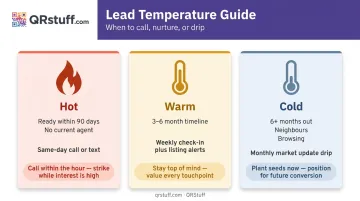
Each bucket needs a different approach. Treating all three the same wastes time on the cold ones and loses the hot ones to slower agents.
Use Scan Analytics to Prioritise Outreach
Not every lead who submitted a form is equally serious. Use QRStuff's scan data to read intent signals:
- Multiple in-room scans → high engagement, prioritise
- Entrance scan only → lower intent, standard follow-up
- Late scan from flyer → warmer than average, they came back
QRStuff's analytics dashboard tracks total and unique scans, device type, geographic location, and scan timing in real time — giving you a practical prioritisation tool that costs nothing extra to use.
Import Contacts Into a CRM Immediately
Move leads from your form spreadsheet into your CRM within hours of the open house ending. Google Forms and Typeform both connect to popular CRMs via automation tools like Zapier, eliminating manual data entry. NAR's 2025 Technology Survey found 23% of agents cited CRM as their top quality lead source — it only works if the data gets in there.
Nurture Warm and Cold Leads With a Drip Sequence
Many open house leads convert weeks or months later. A simple three-touch sequence keeps you present without being intrusive:
- Week 2: Local market update email with recent comparable sales
- Week 5: New listing alert matching their stated criteria
- Week 10: Personal check-in — one question, no pitch
NAR's 2025 data shows 75% of buyers interview only one agent before committing. That makes the first useful follow-up the most important contact you'll send.
Best Practices to Maximise Scans and Lead Quality
Best Practices to Maximize Scans and Lead Quality
A few tactical decisions separate agents who collect 3 contacts per open house from those who collect 15.
- Use a specific CTA every time — "Scan to sign in and receive the full property report" outperforms "scan here" or "scan me" by giving visitors a reason to act
- Offer a tangible incentive — a neighborhood guide, recent comparable sales report, or local market snapshot gives visitors a clear reason to share accurate contact details. A 2021 PLOS One meta-analysis of 54 studies confirmed incentives rank among the strongest drivers of personal information disclosure (Hedges' g = 0.42)
- Add a verbal prompt — greet every visitor with a brief, natural invitation to scan: "Feel free to sign in — just a quick scan, takes about 20 seconds"
- Reuse dynamic codes across events — generate one master code per placement type (entrance, flyer, room card) and update the destination URL in QRStuff's dashboard for each new property; no reprinting required, branding stays consistent, and cost per event drops
Frequently Asked Questions
Why should we be careful in using QR codes?
QR codes carry the same risks as any link — the FBI and FTC have both warned that malicious actors can replace legitimate codes with ones that redirect to harmful sites. For agents, this means always using branded, HTTPS-linked codes and checking that no stickers have been placed over printed codes before the event begins.
Can I use the same QR code for multiple open houses?
Yes, with a dynamic QR code. Simply update the destination URL in your QRStuff dashboard to point to the new property's form before each event — the printed code stays the same. Static codes cannot be updated and require a new code for each use.
What information should I collect on my open house sign-in form?
The core fields are full name, phone number, email address, and buying timeline. Optional fields like pre-approval status or price range help with lead scoring but should never be marked required — mandatory fields reduce completion rates.
Do visitors need a special app to scan a QR code at an open house?
No. Both iPhone and Android devices scan QR codes natively through the built-in camera app. Keep a tablet open with the form loaded as a backup for the small percentage of visitors with older devices.
How do I follow up with leads collected through a QR code sign-in?
Send a personalized message within 24 hours referencing the specific property, then import all contacts into your CRM immediately after the event. Segment follow-up based on each buyer's stated timeline and their scan behavior during the visit.
How do I get more open house visitors to actually scan my QR code?
Combine three things consistently: a verbal greeting that invites visitors to scan, a printed CTA that specifies what they'll receive, and a visible incentive like a free neighborhood report.