QR codes close that gap. A scan takes two seconds; the buyer gets photos, pricing, a virtual tour, and your contact info — all without typing a URL.
But a poorly configured QR code can actively hurt your marketing. Static codes on yard signs become dead links after price changes. Codes printed too small go unscanned. Landing pages that aren't mobile-optimized send buyers straight to your competitor's listing. This guide covers exactly what to prepare, how to create the code correctly, and the mistakes worth avoiding before you print a single flyer.
Key Takeaways
- Use dynamic QR codes so you can update the destination without reprinting when prices, open house times, or listing status change.
- Every QR code must link to a mobile-optimized page — buyers scan from phones, and a slow or desktop-formatted page kills engagement immediately.
- Match code type to goal: URL for listings, vCard for contact saving, Video for virtual tours, PDF for documents, and Location for directions.
- Design minimums: 1-inch size for flyers, several inches for yard signs, high-contrast colors, and a CTA frame like "Scan for Full Property Details."
- Test on multiple devices (iOS and Android) before committing to any print run.
How to Create QR Codes for Real Estate Listings
Step 1: Choose the Right QR Code Type for Your Listing Goal
QR code type determines what happens at the moment of scan. Picking the wrong one means buyers don't get what they need — and you lose the lead.
The five most useful types for real estate:
| QR Code Type | Best Used For | What Happens on Scan |
|---|---|---|
| URL | Property listing pages, landing pages | Opens mobile browser to the destination URL |
| vCard | Agent business cards | Saves contact details directly to the phone |
| Video | Virtual tour walkthroughs | Plays property video |
| Brochures, disclosure documents | Opens or downloads the document | |
| Location | Directions to the property | Opens Google Maps with the address |
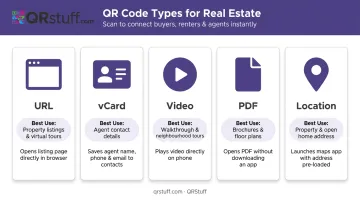
For a property listing specifically, a URL or landing page code is the most versatile option — it can hold everything: photos, pricing, tour, and contact. Reserve vCard codes for business cards, and video codes for open house signage where a walkthrough is the primary draw.
QRStuff supports all five types, along with 40+ others, so agents aren't limited to basic URL codes when the listing goal calls for something different.
Step 2: Set Up Your Destination Content Before Generating the Code
The QR code is only as good as what it links to. Before generating anything, confirm:
- The listing URL is live and loads correctly
- The page is mobile-optimized — no horizontal scrolling, no pinch-to-zoom required
- Key property details are visible above the fold: price, photos, square footage, and a CTA to schedule a viewing
- Agent contact details are current, with a click-to-call phone number
- Any lead capture forms are functional and not broken
One decision to make at this stage: static or dynamic code?
- Static codes permanently encode the destination. Any change to the URL means reprinting all materials.
- Dynamic codes store a redirect URL that you control. Change the destination any time — even after the yard sign is planted.
For real estate, dynamic is the default choice. Listing prices get cut — NAR reports around 18% of existing-home listings had a price discount as of late 2025. Open house times change. Properties go under contract. A static code pointing to outdated information is an active marketing failure.
Step 3: Configure, Customize, and Brand Your QR Code
With your destination content ready, move to configuration and design.
Configuration settings to complete:
- Assign a recognizable name to identify the code (e.g., "123 Maple St – Yard Sign")
- Enable dynamic mode so the destination stays editable
- Activate scan tracking and analytics
Design choices that directly affect scan rates:
- Add your agency logo to the centre of the code (it can safely cover up to 30% of the surface without affecting readability)
- Use your brand color hex codes for the foreground, with a light background — dark pattern on light background scans reliably across all devices
- Add a frame with CTA text: "Scan for Property Details" or "Scan for Photos & Pricing"
- Never invert colors (light pattern on dark background) — many older scanners fail on this
QRStuff's platform lets agents customize module shapes, eye shapes, foreground/background colors via hex codes, gradient effects, and logo placement, all viewable in real time before download.
Step 4: Download in the Correct Format, Test Thoroughly, and Deploy
File format by use case:
- SVG or EPS — vector formats, required for yard signs, window displays, and any large-format print. Scale to any size without pixelation.
- High-resolution PNG — suitable for digital use, email signatures, and standard flyer printing
- Avoid JPG for print — compression artifacts degrade scannability
On QRStuff, vector formats (SVG, EPS) and high-resolution raster files are available on all paid plans (Lite Suite and above). Free tier users only get low-resolution PNG, which isn't suitable for print materials.
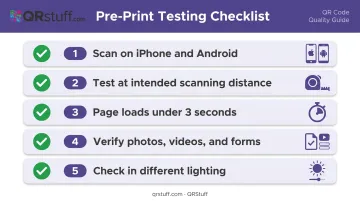
Testing checklist before any print run:
- Scan from an iPhone and an Android device
- Test at the actual intended scanning distance (see size guidelines below)
- Confirm the destination page loads in under 3 seconds on mobile
- Verify all photos, videos, and contact forms function correctly
- Check in different lighting conditions — bright outdoor light can cause glare issues
Where real estate QR codes perform best:
- Yard and for-sale signs
- Printed listing flyers and postcards
- Open house materials — sign-in sheets, room-by-room info cards
- Business cards
- Email signature blocks
What to Prepare Before Creating Your Real Estate QR Codes
Rushing into code generation without the right assets in place leads to wasted print runs. Get these ready first.
Content and Destination Readiness
Before opening any QR code generator:
- Listing URL is live and tested on mobile
- All property photos and videos are uploaded and loading correctly
- Agent contact info is current
- Lead capture form (if used) is functional
- Decision made: static or dynamic (dynamic for anything that may change)
Design Assets and Branding
- Agency logo in high-resolution PNG with transparent background
- Brand colour hex codes
- Approved CTA copy for the frame text
- Confirm output format requirements with your printer — vector for large-format, minimum pixel dimensions for small print
Platform and Account Setup
Free tools typically produce static codes with no tracking. For real estate, you need dynamic codes and analytics to measure which materials — yard sign, postcard, or flyer — are actually driving buyer interest.
QRStuff offers two paid tiers suited to real estate use:
- Lite Suite (£4/month) — 50 dynamic QR codes, no expiration, scan analytics, and vector format downloads; covers most solo agents running 10–15 active listings at a time
- Full Suite (£15/month) — 250 dynamic codes and more comprehensive analytics, suited to agents managing larger or multi-property listing volumes
Key Parameters That Affect Real Estate QR Code Performance
Two codes for the same listing can produce very different scan outcomes. These variables are all within your control.
Static vs. Dynamic Code Choice
Static codes permanently encode the destination — once printed, the URL can't be changed. Dynamic codes use a redirect URL you manage from a dashboard — update the destination any time without reprinting.
For real estate, dynamic codes are the better choice:
- Listing prices, open house schedules, and property status all change during a typical listing cycle
- A static code pointing to a sold listing or expired page actively misleads buyers
- Dynamic codes provide scan analytics — total scans, device type, geographic location, and time of day — that static codes cannot offer
QR Code Size and Quiet Zone
Size determines whether a scanner can actually read the code at the distance buyers encounter it.
The rule: code width should be 1/10th of the intended scanning distance. For a buyer scanning from 10 feet away, the code needs to be at least 1 foot wide. For flyers and postcards viewed at arm's length, the minimum is 1 inch (2.5 cm).
The quiet zone — the white margin surrounding the code — must be at least 4 modules wide on all sides. Cutting into this margin causes consistent scan failures.
Color Contrast and Design Integrity
Low-contrast colour choices are one of the most common reasons QR codes fail to scan despite looking visually fine.
- Always use a dark foreground on a light background
- Avoid soft-on-soft combinations like light grey on cream or gold on white
- When adding a logo, keep it in the centre quiet zone and test rigorously
- Test the finished code with at least two different scanning apps before committing to a print run
Destination Page Mobile Experience
Google's research shows that 53% of mobile site visits are abandoned when a page takes longer than 3 seconds to load. Every second over that threshold loses buyers.
The destination page should:
- Load in under 3 seconds on a mobile connection
- Display listing photos without horizontal scrolling
- Show a visible CTA button above the fold
- Include a click-to-call button for the agent's phone number
Common Mistakes Realtors Make When Creating Listing QR Codes
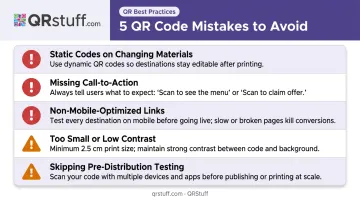
Here are five mistakes that consistently undermine QR code performance — and how to avoid each one.
Printing static codes on materials that change. When a listing price drops, an open house is rescheduled, or the property goes under contract, every yard sign and mailer pointing to that static code becomes a liability. Dynamic codes let you update the destination without reprinting a single sheet.
Leaving out a call-to-action. A bare QR code gives buyers no reason to scan. A simple frame reading "Scan for Photos & Pricing" removes uncertainty and directly increases scan rates. Don't assume buyers know what they'll get — tell them.
Linking to non-mobile-optimized pages. Agents often point codes directly to their brokerage's MLS listing page, which is built for desktop. A buyer who lands on a page requiring pinch-and-zoom is likely to leave. Use a dedicated mobile landing page for each listing instead.
Printing too small or with poor contrast. A 0.5-inch code on a yard sign that buyers view from 10+ feet away will not scan reliably. Neither will a soft gold pattern on a cream background, regardless of how on-brand it looks. Minimum 1-inch print size and high-contrast colors are non-negotiable.
Skipping the pre-distribution test. Scan the code yourself — on both an iPhone and an Android — at the intended viewing distance, in natural light. Confirm the landing page loads fully and all content renders correctly. Catching a broken link before 500 postcards go out costs nothing; finding out after is expensive.
Frequently Asked Questions
What precautions should I take when using QR codes for property listings?
Use dynamic QR codes so the destination can be updated without reprinting, and always link to a secure (HTTPS) mobile-optimised page. Test every code before distributing materials, and use a platform like QRStuff that handles scan analytics with GDPR-compliant data practices.
What type of QR code is best for real estate listings — static or dynamic?
Dynamic QR codes are the better choice. Listing prices, availability, and details shift constantly — dynamic codes keep your materials current without reprinting. Unlike static codes, they also capture scan analytics so you can measure which listings get the most buyer attention.
What should a QR code for a real estate listing link to?
A dedicated mobile landing page with property photos, pricing, key details, a virtual tour, and a clear CTA to schedule a viewing. Avoid linking to generic brokerage homepages or desktop-formatted MLS pages.
How big should a QR code be on a for-sale sign or printed flyer?
Apply the 10:1 rule: code width should be 1/10th of the scanning distance. Yard signs need a code several inches wide to accommodate drive-by scanning. For flyers and postcards, the minimum is 1 inch (2.5 cm). Always maintain a 4-module quiet zone on all sides.
Can I use the same QR code for multiple listings?
Static codes are permanently tied to one destination, while dynamic codes can be redirected to different listings. Still, creating one dynamic code per listing is better practice — it keeps analytics separate and gives you accurate performance data per property.
How can I track how many people scanned my real estate QR code?
Scan tracking is available through dynamic QR code platforms. QRStuff's analytics dashboard tracks total and unique scans, device type (iOS vs. Android), city-level location, and time of scan. That data tells you exactly which marketing materials are driving the most buyer interest.