at Trade Shows: A Complete Guide](https://file-host.link/website/qrstuff-qjtbbl/assets/blog-images/943ed25f-d685-40f7-b1f3-cc45f2d5a6c6/1780334418526112_0cd4b62cd5c64551b8f2cbb62a15aa00/360.webp)
Digital business cards don't just replace paper — they give you a complete contact exchange workflow: share your details instantly, capture leads in real time, and track which interactions actually converted after the event ends.
This guide covers exactly how to use digital business cards at trade shows, from preparation before you arrive to follow-up after the last day.
Key Takeaways
- Prepare and test your digital card before you step onto the show floor — never debug it in front of a prospect
- Use QR code scans for booth visitors, Apple/Google Wallet passes for quick saves, or a direct URL for remote follow-ups
- Two-way contact capture lets prospects submit their details directly — no manual entry on your end
- Update card content between shows without reprinting any signage
- Export collected contacts to your CRM within 24–48 hours of the event
When to Use Digital Business Cards at a Trade Show
Digital cards work best in high-volume, time-pressured conversations — booth meetings, networking floors, and speaker sessions where pulling up a QR code is faster than fumbling through pockets.
They're misused in these situations:
- Spraying and praying — sharing with every passerby without an actual conversation reduces your follow-up list to noise
- Testing at the show — using an untested card for the first time on the floor guarantees something breaks mid-conversation
- Using stale content — a card that still references your previous company, old title, or last event's offer creates a poor first impression
The operational case for digital cards gets stronger as team size grows. If you're staffing multiple booths or sending reps to back-to-back sessions across a multi-day event, physical cards create a real logistics problem.
Inconsistent information, varying detail levels across team members, and the near-certainty that someone runs out by day two — these aren't edge cases. They're the norm.
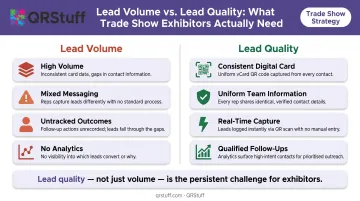
CEIR research identifies lead quality — not just volume — as the persistent challenge for exhibitors. A consistent digital card across your entire team directly addresses that: every rep shares the same accurate information, every time.
What You Need Before the Show
Get these three things confirmed before you arrive:
1. A complete digital business card Include name, title, phone, email, website, relevant social links, and a short professional summary. An incomplete card signals carelessness at exactly the moment you can't afford it: a first impression.
2. A dynamic QR code linked to your card This is your primary display tool for booth signage and your badge. Unlike static codes, a dynamic QR code lets you update your card's destination after printing — so if your offer, title, or team changes mid-show, your signage stays accurate without reprinting. QRStuff's vCard QR code type supports this, and dynamic codes also track scan data in real time across the event.
3. A tested sharing method on your device Confirm your QR code scans correctly, your wallet pass loads, and your share link opens before you arrive. Trade show floors have crowded Wi-Fi and no patience for troubleshooting. The recipient only needs their own connection to scan your code — but your card's content still needs to load correctly when they get there.
How to Use Digital Business Cards at a Trade Show
Effective use follows four phases: preparation, active sharing, real-time monitoring, and post-show follow-up. Skipping any phase reduces what you get out of the event.
Setup and Preparation
Tailor the card to this specific show before you arrive:
- Update your title if it's changed since the last event
- Add event-specific links: a product demo, a landing page for a show offer, or a booking link
- Confirm your profile photo is current
A card that references the show's context — a product relevant to that audience, a booking link for post-show calls — performs better than a generic profile.
Position your QR code for visibility:
- Print and mount it at eye level on your booth stand
- Embed it in your presentation slides
- Add it to your email signature in the week before the event
Anyone who approaches your booth should be able to scan it without asking. Don't reserve it for people you've directly spoken to.
QRStuff supports SVG and EPS exports for booth signage and pull-up banners — vector formats that scale to any size without pixelation, which matters when your QR code needs to be scannable from a distance.
Initiating the Exchange
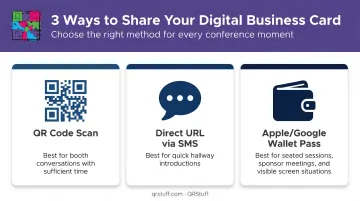
Three methods work in different situations:
| Method | Best For |
|---|---|
| QR code scan | Booth conversations with enough time |
| Direct URL via SMS or messaging app | Quick hallway introductions |
| Apple/Google Wallet pass | Seated sessions, sponsor meetings, anywhere screens are visible |
A confirmed exchange means the contact has saved your details, submitted their information via your card's contact form, or confirmed receipt of your link. "I'll look you up later" is not a confirmed exchange.
Operating During Conversations
Don't open with the card. Build the conversation first, then share the card as a closing step that preserves the connection you've just made.
When you enable a contact form on your digital card, recipients can submit their own details back to you at the moment of exchange. It's the equivalent of swapping cards rather than just handing one over.
The lead quality difference matters: a contact who actively submits their information has shown intent. They're a warmer follow-up prospect than someone who passively received your card in a stack.
QRStuff's digital business card platform includes two-way contact sharing built in, so the exchange happens within a single QR code scan. That also means every captured contact flows into one place, ready to review before the day ends.
Monitoring During the Show
Check scan counts and contact submissions at the end of each day. You're looking for two things:
- Which sessions, booth locations, or conversations generated the most engagement — useful for adjusting where you focus time on day two
- Declining scan volume: if numbers drop, check whether your QR display is still visible, your share link is working, or your team is consistently offering the card. This is an operational issue, not an audience issue.
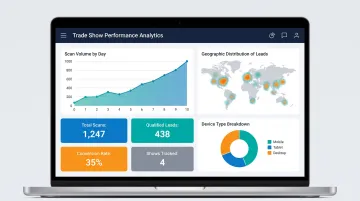
QRStuff's analytics dashboard updates in real time, so you can check daily scan velocity, device types, and geographic data without waiting for a post-event report.
Completing the Exchange Post-Show
Export collected contacts to your CRM or email platform within 24–48 hours of the event. Context fades fast: the conversation that felt memorable on Thursday is harder to recall specifically by the following Monday.
Harvard Business Review research found that companies contacting leads within one hour were nearly seven times more likely to qualify them than those who waited even one hour longer. The data covers online leads, not trade show contacts specifically, but the pattern holds: faster follow-up converts better.
A well-timed follow-up — referencing the specific conversation, not a generic outreach template — is what turns a scan into a qualified lead.
Best Practices for Getting the Most Out of Your Digital Card
Use dynamic QR codes for all booth displays. If your offer, team, or product changes after the show, your printed signage continues pointing to current information. QRStuff's dynamic codes include built-in scan analytics — scan volume by day, geographic location, device type, and unique versus repeat views — so you can compare performance across events and make informed decisions about where to exhibit next.
Customize the card for each show. A tech trade show audience has different expectations than a healthcare expo. Adjust the linked content, featured product, and call to action to match the audience you're meeting.
Train your team before the event. Every staff member should be able to pull up their card in under ten seconds, explain what it contains, and walk someone through a two-way contact exchange. When one person shares confidently while another fumbles through their phone, it creates an uneven impression that's easy to avoid.
QRStuff's team accounts keep everyone aligned with:
- Role-based access so each member manages their own card
- Consistent company branding applied across all individual cards
- Personalized contact details without diverging from your brand identity
Be intentional about who you share with. A follow-up list of 200 cold contacts is harder to work than 50 warm ones. Prioritize exchanges that follow an actual conversation.
Review analytics after each event. Scan data across multiple shows tells you which events generate the strongest return — useful context when deciding where to allocate next year's exhibition budget. CEIR data shows that 68% of exhibitors rank lead generation among their top three objectives, yet most don't have a systematic way to measure engagement quality by event. Scan analytics fill that gap.
Conclusion
Using digital business cards at trade shows effectively comes down to discipline, not technology. Prepare the card correctly before the show. Share it at the right moment in a conversation — not as an opener, but as a closer. Enable two-way capture so the exchange is mutual. Follow up on collected contacts before the context of those conversations disappears.
The workflow breaks down into four repeatable steps:
- Prepare your card with a complete profile, QR code, and updated contact details before the show
- Share at the close of a meaningful conversation, not at the start
- Capture contacts mutually so both sides leave with actionable information
- Follow up within 48 hours while the conversation is still fresh
Treat each trade show as a test of the system. Track what works, update your card between events, and the process compounds over time.
Frequently Asked Questions
Can I use a digital business card at a trade show if the venue has poor Wi-Fi or no connectivity?
Sharing via QR code only requires the recipient to have their own mobile connection — the exhibitor displaying the code doesn't need to be online. Two-way contact capture and analytics sync do require connectivity, so submissions may queue and sync once a connection is restored.
How do I display my digital business card QR code at my trade show booth?
Print it at eye level on booth signage, pull-up banners, or table displays, and embed it in presentation slides. The goal is for it to be visible to anyone approaching your booth, not just contacts you've directly engaged.
What information should I include on a digital business card for a trade show?
Include name, job title, company, phone, email, website, and relevant social links. For trade shows specifically, add an event-specific link — a product demo, landing page, or booking form — that reflects why you're at that event.
How do I follow up with contacts I collected through my digital business card after a trade show?
Export contacts from your card dashboard to your CRM within 24–48 hours. Personalize follow-up messages with specifics from the conversation, and use scan analytics to prioritize the most engaged leads first.
Are digital business cards better than paper business cards for trade shows?
For trade show use specifically, digital cards offer advantages paper cannot: unlimited distribution, real-time updates, lead capture, and post-event analytics. Paper cards can run out, carry outdated information, and provide no data on who actually engaged with them.
Can my entire team use digital business cards at the same trade show?
Yes. QRStuff's team accounts give each member their own card under consistent company branding, so everyone captures leads independently while presenting a uniform look across the booth.