The catch? According to The Knot's 2026 Real Weddings Study, 90% of couples now create a wedding website, and 49% include QR codes on their stationery — up from just 20% in 2022. That growth means guests increasingly expect them. But a poorly generated or printed code can send someone to a broken link, or fail to scan entirely, right when first impressions count most.
This guide covers the exact steps to create one, when to choose dynamic over static codes, how to design and size it for print, and the mistakes worth avoiding before your invitations go to press.
Key Takeaways
- Finalize your wedding website URL before generating any QR code
- Dynamic QR codes let you update the destination URL after printing; static codes lock the link permanently
- Download as SVG or PNG at 300 DPI minimum; avoid JPEGs for print
- Print at a minimum of 1 inch (2.5 cm) square with a clear quiet-zone border
- Test on both iOS and Android devices before approving any print run
How to Create a QR Code for Your Wedding Website
Step 1: Finalize and Copy Your Wedding Website URL
Before you open any QR generator, your website needs to be live and complete. Generating a code that points to a draft, empty page, or platform placeholder creates a poor first impression — and with a static code, you'd need to reprint everything to fix it.
Once the site is ready:
- Open your wedding website in a browser
- Copy the full URL from the address bar, including
https:// - Test the link by pasting it into a private/incognito browser window to confirm it loads correctly
Don't shorten the URL manually before this step — the QR generator handles encoding automatically.
Step 2: Choose a QR Code Generator
Not all generators are equal for print use. You need one that:
- Supports a dedicated URL/Website QR code type
- Exports SVG or high-resolution PNG files (300 DPI minimum)
- Offers dynamic code options if you need flexibility post-print
QRStuff has a dedicated URL data type specifically built for this purpose — users paste their link, and the platform handles both static and dynamic code generation. Free accounts support static URL codes with unlimited scans and no expiration. Dynamic codes, which let you edit the destination URL and track scan analytics, are available on paid plans.
For a wedding, free tools handle the basics. The decision to upgrade comes down to one question: is your URL definitely final before printing?
Step 3: Generate, Customize, and Download
Once you've selected the URL type and pasted your wedding website link, configure the design before downloading.
Customization options to consider:
- Adjust foreground and background colors to match your wedding palette (navy on cream, black on ivory, forest green on white all work well)
- Upload a monogram or small logo for the center of the code — QRStuff places it automatically at a size that preserves scan reliability
- Choose module and eye shapes to complement your stationery's aesthetic
- Keep dots at least 70% darker than the background — light grey on white is a common failure point that only shows up on the finished print
Once the design is set, format matters as much as the file itself.
Download format:
- SVG or EPS — best for professional printing; scales to any size without quality loss
- PNG at 300 DPI — suitable for digital proofing and standard print runs
- Avoid JPEG — compression artifacts blur fine detail and cause scan failures
Step 4: Test Before Sending to Print
Testing is where most print failures get caught — skip it, and you may not discover the problem until after the invitations are mailed.
- Scan the downloaded digital file using an iPhone and an Android device
- Print a home test copy at the intended final size
- Scan the printed version from roughly 6–10 inches away (normal phone-to-paper distance)
- Confirm the code routes to the correct page, not a platform homepage or error
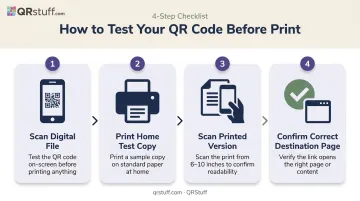
Shipley Creative recommends testing across different operating systems and requesting a printer proof before committing to a full print run. A code that scans cleanly on screen can still fail in print due to ink bleed, low resolution, or textured paper stock.
Where to Use Your Wedding Website QR Code
One QR code pointing to your full wedding website can serve every purpose — there's no need for separate codes for RSVPs, directions, and registry if your website already houses all of it.
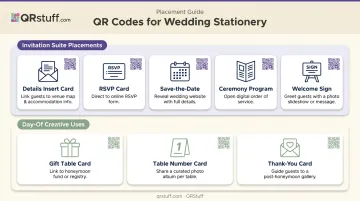
Most effective placements across the invitation suite:
| Stationery Piece | Best Placement | Primary Use |
|---|---|---|
| Details insert card | Front or back | Full wedding website |
| RSVP card | Front | Online RSVP form |
| Save-the-date | Back | Early venue research |
| Ceremony program | Back | Photo-sharing or digital order of service |
| Welcome sign | Center | Guest arrival information |
Day-of creative uses:
- Gift table card linking to a honeymoon fund
- Table number cards linking to a shared guest photo album
- Thank-you cards linking to a post-honeymoon gallery
With a dynamic code, updating the destination URL once automatically redirects every printed piece to the right place — no reprinting required.
Static vs. Dynamic QR Codes: Which Is Right for Your Wedding?
The choice between static and dynamic shapes everything that follows — so it's worth understanding the difference before you generate anything.
How They Differ
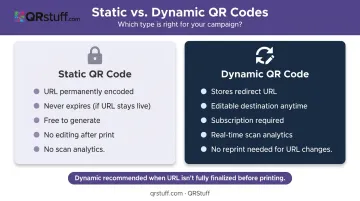
A static QR code permanently encodes the destination URL into the pattern itself. Change the URL by even one character, and the code breaks — everything needs reprinting.
A dynamic QR code stores a short redirect URL instead. The printed pattern never changes, but you can update the destination in your account dashboard at any time.
Why Dynamic Codes Make More Sense for Weddings
Wedding planning rarely follows a straight line. Couples switch website platforms, add custom domains, or update RSVP functionality after invitation production has already started.
The Knot reports that a full wedding stationery suite averages $510, and invitation reprints are rarely cheap. A dynamic QR code — which costs a fraction of that — is cheap insurance against a URL change forcing a reprint.
Beyond flexibility, dynamic codes also unlock real-time scan analytics — useful for large guest lists where you need to know whether people have actually visited the site before chasing RSVPs. QRStuff's dashboard tracks:
- Total scans and unique visitors
- Device types (iOS vs. Android)
- Geographic location data
- Time-of-scan breakdowns
URL edits are available at any time post-print, with no documented limit on updates. Analytics populate in real time. Dynamic features start from the Lite Suite tier.
One Important Caveat on Expiration
- Static codes never expire as long as the destination URL stays active — no subscription required
- Dynamic codes remain active while your subscription is maintained; QRStuff's paid plans explicitly guarantee no expiration during an active subscription
For programmes and signage scanned months after the wedding, both types work fine — provided the destination page is still live.
Tips for Designing and Printing Your Wedding QR Code
Size
Print the QR code at a minimum of 1 inch (2.5 cm) square. QRStuff's own guidance sets the minimum at 2cm × 2cm for simple URLs; VistaPrint recommends 1 inch as the practical rule for invitation-scale materials.
Smaller is technically possible, but scan reliability drops — especially on textured or colored paper stocks.
Quiet Zone
Every QR code requires a clear border (called the quiet zone) of at least 4 modules wide on all sides, per DENSO Wave's specification. Never crop into this border or allow design elements to overlap it. The quiet zone is what tells a camera where the code starts and ends.
Colour and Contrast
What works:
- Navy on cream
- Black on white
- Forest green on ivory
What fails:
- Light grey on white
- Any inverted light-on-dark design (technically supported by the QR standard, but unreliable across all smartphone cameras)
- Low-contrast colour combinations where foreground and background are similar in brightness
File Format for the Printer
Always supply your stationer or print vendor with an SVG or EPS vector file. These scale to any size without pixelation. If using PNG, confirm it's exported at 300 DPI — Microcom recommends 300 DPI for detailed designs like QR codes to ensure fine detail reproduces cleanly.
Follow these guidelines and your QR code will scan reliably whether it's printed on a matte invitation, an acrylic sign, or a foil-stamped envelope.
Common Mistakes to Avoid
Three mistakes account for most QR code failures on wedding stationery:
- Generate only when your site is live. Guests who scan early and land on a blank page or platform homepage are unlikely to try again. Wait until the site is fully built before finalizing the code.
- Use a dynamic code if your URL isn't finalized. Many couples switch platforms, add a custom domain, or adjust their URL during production. A static code breaks permanently if any of this happens after printing — a dynamic code lets you update the destination without reprinting.
- Always test a physical proof before the full print run. On-screen scanning is not a reliable proxy for real-world print performance. Ink bleed, textured stocks, and resolution differences between screen and print create failure modes that only appear on paper. Test at final size before approving.
Frequently Asked Questions
Can I make a QR code for my wedding website?
Yes — any QR generator that supports URL input can create one in minutes. Paste your wedding website link, select the URL/website code type, generate, and add it to your stationery or signage. QRStuff's dedicated URL type handles both static and dynamic versions.
How much does it cost to get a QR code?
Basic static QR codes are free from most generators. Dynamic codes (which allow URL editing and scan tracking after printing) require a paid plan. QRStuff offers affordable paid plans covering dynamic codes with no expiration and scan analytics — check the QRStuff pricing page for current rates.
Do QR codes for wedding websites expire?
Static QR codes don't expire as long as the destination URL stays active. Dynamic QR codes remain active throughout an active paid subscription — QRStuff's paid plans explicitly guarantee no expiration while the subscription continues.
What size should a QR code be on a wedding invitation?
A minimum of 1 inch (2.5 cm) square is the practical standard for invitation-scale print. Always preserve the quiet-zone border around all edges — crowding the code with design elements often causes scan failure.
Can I update my QR code after the invitations are already printed?
Only with a dynamic QR code. The printed pattern stays unchanged, but you update the destination URL in your account dashboard with no reprint needed. Static codes are permanently tied to the original URL and cannot be changed.
What should I link my wedding QR code to?
Your full wedding website is the best destination. A single well-built site can house the RSVP form, registry links, venue directions, accommodation recommendations, and the day-of schedule — everything guests need in one place.